


A facilities manager usually starts looking for a shared desk after the current setup has already failed. Two employees are working shoulder to shoulder on mismatched surfaces. One keeps turning to speak, the other keeps getting interrupted. Power cords cross the floor. Storage lives in three separate pieces. The room technically works, but nobody would call it efficient.
That’s where a 2 person L shaped desk starts to make sense. It isn’t just a larger table or two desks pushed together. In the right room, it creates defined work zones, supports collaboration without constant interference, and makes better use of a corner that would otherwise remain awkward.
The problem is that most buyers stop at finishes and price. The harder part is deciding whether the layout fits the room, whether the users need separation or constant interaction, and how the workstation will handle power, storage, and future changes. A shared workstation succeeds or fails on implementation.
For teams planning a reconfiguration, expansion, or replacement cycle, Cubicle By Design is part of the broader office furniture conversation because the project rarely ends with a desktop alone. It usually connects to partitions, circulation, cabling, and adjacent workstations.
The Smarter Way to Share a Workspace
The most common request sounds simple. Two people need to work closely together, but they can’t keep losing desk space, focus, or storage. In practice, that request has several moving parts. The users may collaborate all day, or they may just need quick access to each other while protecting concentration for the rest of the time.
A 2 person L shaped desk works when both users need a primary work surface and a secondary surface for reference materials, peripherals, or active files. That second wing is what changes the workflow. One side handles the screen-based work. The return handles overflow, shared materials, or a task that shouldn’t compete with the main monitor zone.
I’ve seen offices make the wrong call by trying to solve a two-person problem with two small straight desks placed side by side. It looks compact on paper, but the result is usually cable clutter, cramped movement, and no clear boundary between users. The L-shape fixes that only if the room and the workflow support it.
Practical rule: A shared workstation should reduce friction, not just consolidate furniture.
A stronger approach is to start with the work itself. Ask whether the pair needs constant verbal exchange, occasional consultation, or mostly independent focus. Then look at the room. A neglected corner, a perimeter office, or a project pod often supports an L-shaped arrangement better than a narrow center aisle.
If you’re evaluating shared desk options in that context, desks for two is the category to review after the workflow questions are settled, not before.
Understanding 2 Person L Shaped Desk Configurations
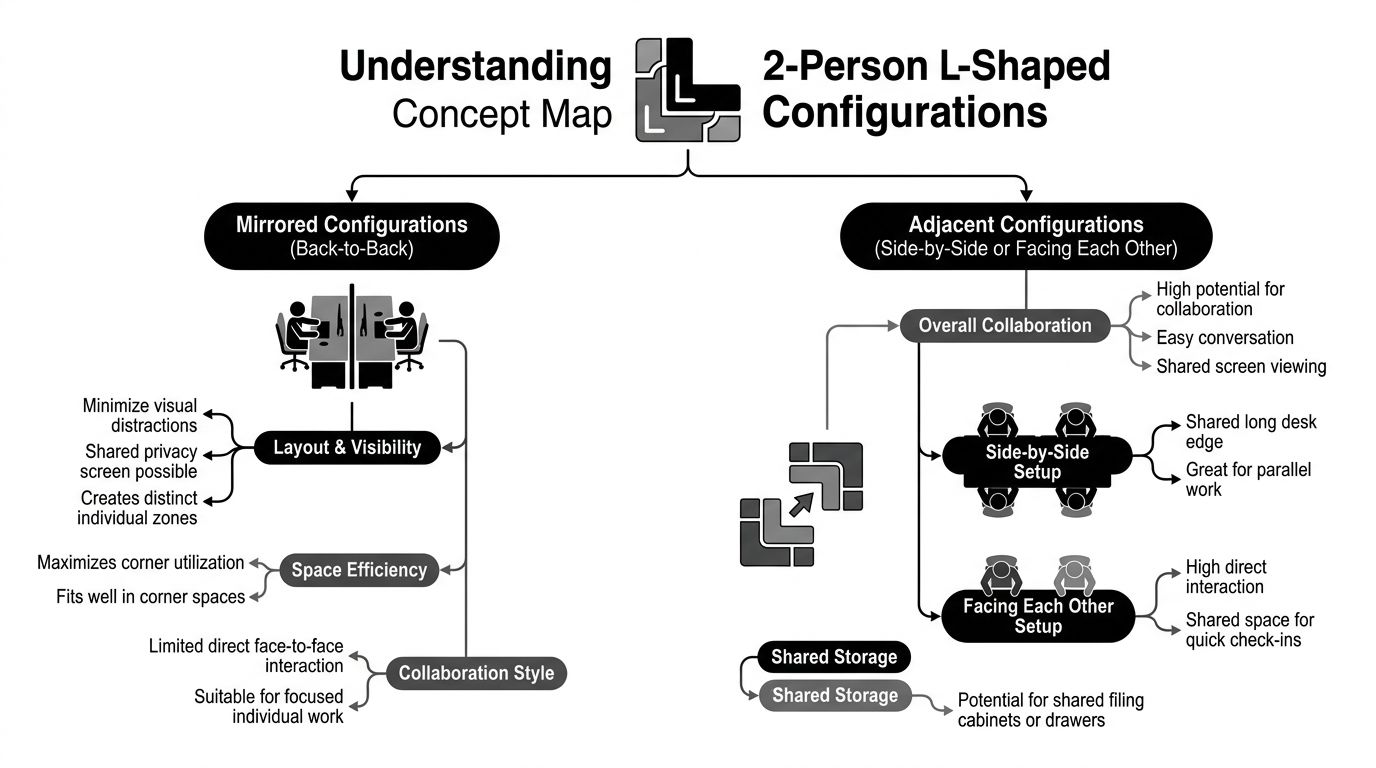
A 2 person L shaped desk usually falls into one of two planning models. Mirrored layouts give each user a more independent zone. Adjacent layouts put collaboration first.
Mirrored layouts
In a mirrored arrangement, the two L-shapes oppose one another or interlock so each person has a distinct wing. This works well for accounting pairs, operations staff, coordinators, or anyone who needs quick access to a teammate without sharing the same immediate reach zone.
The benefit is separation without isolation. Each employee gets an obvious “ownership” area, which lowers the constant micro-conflicts over paper stacks, monitor placement, and desk accessories.
Adjacent layouts
An adjacent plan places the users side by side, often sharing one edge of the footprint more directly. This suits paired designers, managers and assistants, schedulers, or anyone handling a fast back-and-forth workflow.
The advantage is conversational ease. The drawback is that visual and acoustic distraction rises quickly if both users spend long stretches on heads-down work.
A lot of buyers assume the L-shape is automatically the space-saving answer. It isn’t. Guidance on neglected corner planning notes that even a compact L-desk still requires planning for door swings, outlets, and roughly 3 feet of clearance behind the chair for movement, which can erase the footprint advantage in small rooms. That same guidance also makes the more useful point: the shape is most efficient when the corner is underused and when each user needs a defined work zone, while two smaller desks or benching may fit better when aisle width and access matter more than surface area (Bestier on corner desk space planning).
The shape helps only when the room geometry and the users’ tasks line up.
A modular environment changes the calculation too. If the desk has to live inside a larger workstation plan, modular office desk systems usually give you more control over how that shared station relates to adjacent teams, storage runs, and circulation paths.
Planning Your Layout Dimensions and Ergonomics
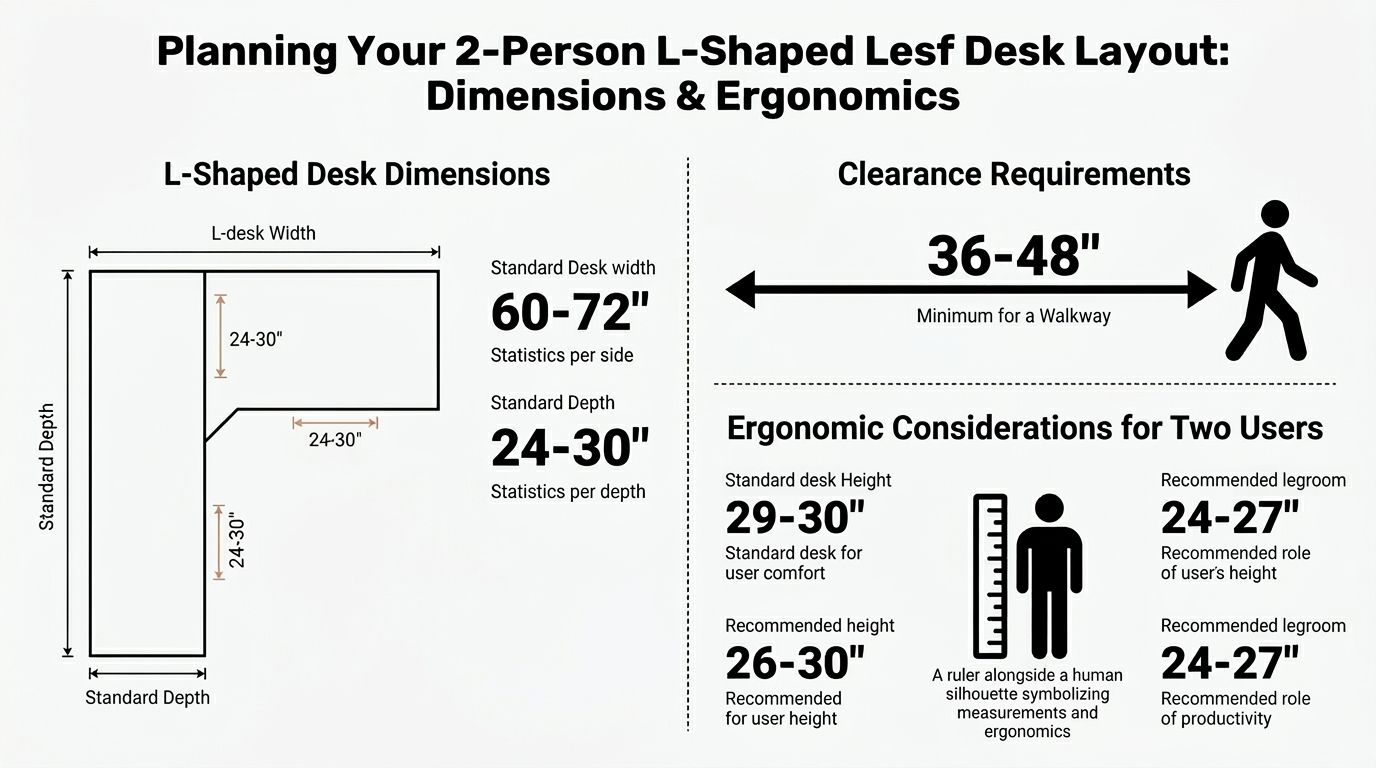
The tape measure comes out before the finish samples. A 2 person L shaped desk has to fit the room, support the screens, and leave enough movement space that the workstation still feels usable after chairs, users, and storage are added.
To ground the planning, start with the visual layout requirements.
What to measure first
Modern guidance for L-shaped desks notes that a 48- to 52-inch width can fit two 24-inch monitors in a compact corner setup, while a 24 to 30 inch minimum depth supports healthier viewing distance for larger screens. The same guidance recommends a 20 to 40 inch focal distance for screens and at least 36 inches behind the chair to keep walkways unobstructed. It also cites a 20% to 30% productivity gain for multi-monitor users, especially in cross-referencing and data-heavy work (Bestier dual-monitor L-desk guidance).
Those numbers matter because facilities teams often under-measure depth and overestimate aisle tolerance. The workstation might fit on the floor plan and still fail once monitor arms, task chairs, and daily movement are introduced.
A quick walkthrough of ergonomic thinking helps before final specification.
A practical planning sequence
Use this order on site:
- Room envelope first: Measure wall lengths, door swings, window mullions, outlets, and any baseboard heat or columns.
- Chair path second: Confirm there’s enough space behind the users for normal pull-back and passage without creating a choke point.
- Screen depth third: Don’t let the return become a shallow landing zone that forces monitors too close to the eyes.
- Storage last: Pedestals, cabinets, and shelves should support the workstation, not block legroom or circulation.
Here’s a simple planning view:
| Planning item | What to confirm |
|---|---|
| Monitor zone | Enough width for each user’s screen setup |
| Desktop depth | Enough distance for comfortable viewing |
| Chair movement | Clear pull-back and aisle function |
| Shared edge | No overlap in primary reach areas |
The ergonomic side shouldn’t be left to the installer. If the desk is specified without considering viewing distance, chair sweep, and user handedness, the office inherits the problem for years. That’s why workplace planning and furniture planning need to meet early. Workplace ergonomics guidance is useful when facilities, HR, and operations need a common framework for that discussion.
Customizing for Privacy Power and Storage
An off-the-shelf shared desk usually looks acceptable in a product photo and underperforms in a real office. The failures are predictable. There’s no privacy treatment, power is an afterthought, and storage ends up scattered around the room because the desk wasn’t specified as part of a full workstation.
Privacy that fits the task
Not every two-person station needs tall panels. Some only need a visual divider that controls peripheral distraction. Others need seated privacy with openness above. Frosted glass, modesty screens, and fabric-mounted dividers all solve different problems.
Glass tends to work well in environments where daylight, sightlines, and a cleaner aesthetic matter. Fabric or tackable screens make more sense when teams pin active material or need a softer acoustic effect. For lighter separation at the desk itself, privacy screens for desks are often more practical than building a full enclosure around a pair.
Good privacy planning reduces interruption without making the station feel punitive.
Power and cable control
A shared L-shape without integrated power becomes a cable project by day three. Desktop modules, grommet-fed wiring, under-surface trays, and managed raceways keep chargers and monitor leads from crossing the users’ knees or the floor.
This is also where customization matters most. One team may need monitor arms, docking stations, and task lighting. Another may need almost no exposed accessories but heavier data access below. The workstation should reflect the equipment load, not the showroom sample.
Storage that belongs to the workstation
Ergonomic guidance for L-shaped desks points to a 29 to 30 inch seated work height and a 24 to 30 inch desktop depth, and it notes that a deeper surface helps reduce monitor crowding while requiring at least 24 inches of unobstructed chair sweep space behind the desk. That same guidance also says a compact L-desk can provide about 30% more usable surface area than a rectangular desk with the same footprint length (Eureka Ergonomic on L-shaped desk sizing).
That extra usable area only pays off if storage is integrated intelligently. A mobile pedestal under the wrong wing can compromise leg clearance. A shelf run without cable planning can block access to outlets. A hutch can solve paper clutter or create a visual wall, depending on the role.
When teams need to model those decisions before ordering, the Cubicle By Design designer tool is one way to configure dimensions, finishes, privacy elements, and electrical options within a broader workstation plan.
Space Planning Examples for Modern Offices
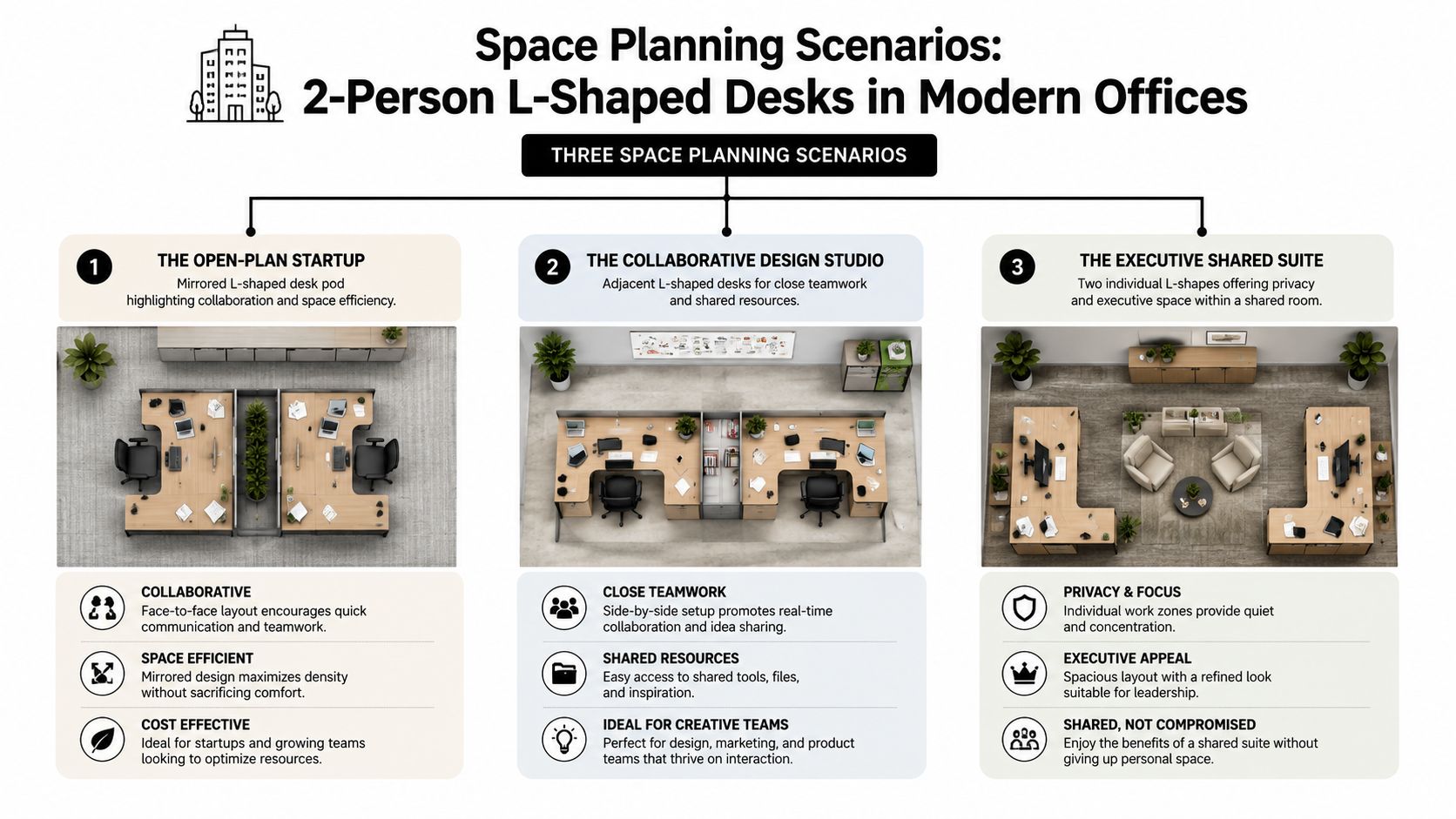
The same desk shape behaves very differently depending on the office type. A startup pod, an executive suite, and a service floor don’t ask the workstation to do the same job.
Open-plan startup pod
A small development team often needs close collaboration without dropping into constant interruption from the larger room. In that setting, a mirrored two-person L-shaped station can create a compact “neighborhood” for paired work while still giving each person a separate primary zone.
A common commercial configuration is built around a 144-inch by 72-inch footprint with a 30/74-inch height specification. That same product setup includes a 2-drawer personal storage cabinet and an open bookcase, which shows how the workstation can combine work surface and storage in one module rather than forcing separate pieces around it (Madison Liquidators two-person L-shaped desk configuration).
In practical terms, that kind of module helps the startup avoid adding freestanding storage that clutters circulation around the pod.
Executive shared suite
In a private office, the adjacent version usually makes more sense. An executive and assistant can share a room while keeping one return dedicated to coordination materials, incoming work, or reference items. The key is that the desk supports a shared workflow without making the assistant’s area feel temporary.
This is one of the few settings where the L-shape can look more deliberate than benching. The desk doesn’t read as overflow furniture. It reads as part of the room’s function.
Support floor or call center hybrid
Some support teams want more personal organization than a straight row provides but don’t need enclosed stations everywhere. A two-person L approach can break up long rows and create tighter team pairings, especially where agents handle reference material, dual screens, or rotating supervisory support.
For higher-density operations, call center cubicles remain the more structured option when acoustics, uniformity, and repeatable deployment drive the project. But a paired L-station can be useful in selected zones where agents need more desktop variety.
When stakeholders struggle to visualize these layouts from plan drawings alone, it helps to improve office design with virtual tours so decision-makers can see aisle relationships, sightlines, and furniture scale before orders are finalized.
Choosing Materials and Managing Installation
Material decisions are easy to postpone and expensive to correct later. A two-person desk gets touched, rolled into, leaned on, and re-cabled constantly. The finish has to survive that use pattern.
Material choices that hold up
Commercial-grade laminates usually make the most sense for active shared workstations. They’re easier to standardize across departments, simpler to maintain, and less stressful in high-contact areas. Veneer can be appropriate in executive rooms or client-facing spaces, but it should be chosen because the room calls for it, not because the sample looks richer.
The same logic applies to edges, hardware, and grommet placement. Shared stations need durable details more than decorative ones.
Installation is part of the specification
For a 2-person L-shaped desk, a practical engineering baseline is to allocate at least 78 inches of linear length for concurrent use, while many commercial models are built closer to 144 inches by 72 inches to preserve elbow clearance, monitor spacing, and storage without forcing users into overlapping reach zones. The long axis matters because it determines whether each user keeps a separate primary work zone, and the larger format is better suited to dual-task use with monitors and storage included (Madison Liquidators engineering baseline for 2-person L-shaped desks).
That’s why professional installation matters. Larger shared units don’t just arrive and drop into place. They require delivery path checks, room prep, field verification, and coordination with power access. If the building has tight elevators, narrow corridors, or phased occupancy, those details can change the product choice or the install sequence.
A practical install checklist looks like this:
- Access review: Confirm loading dock rules, elevator reservations, corridor turns, and final room access.
- Power coordination: Decide where desktop power, floor feeds, or wall access will land before assembly starts.
- Cable planning: Route cords through trays and raceways during assembly, not after users move in.
- Punch review: Check alignments, panel fit, drawer operation, and outlet access before sign-off.
For teams that want a single handoff from planning to setup, office furniture installation services are usually worth bringing in early rather than after the order is already locked.
Comparing Alternatives and Finalizing Your Choice
A 2 person L shaped desk isn’t always the right call. Sometimes benching is cleaner. Sometimes two separate desks solve the room better.
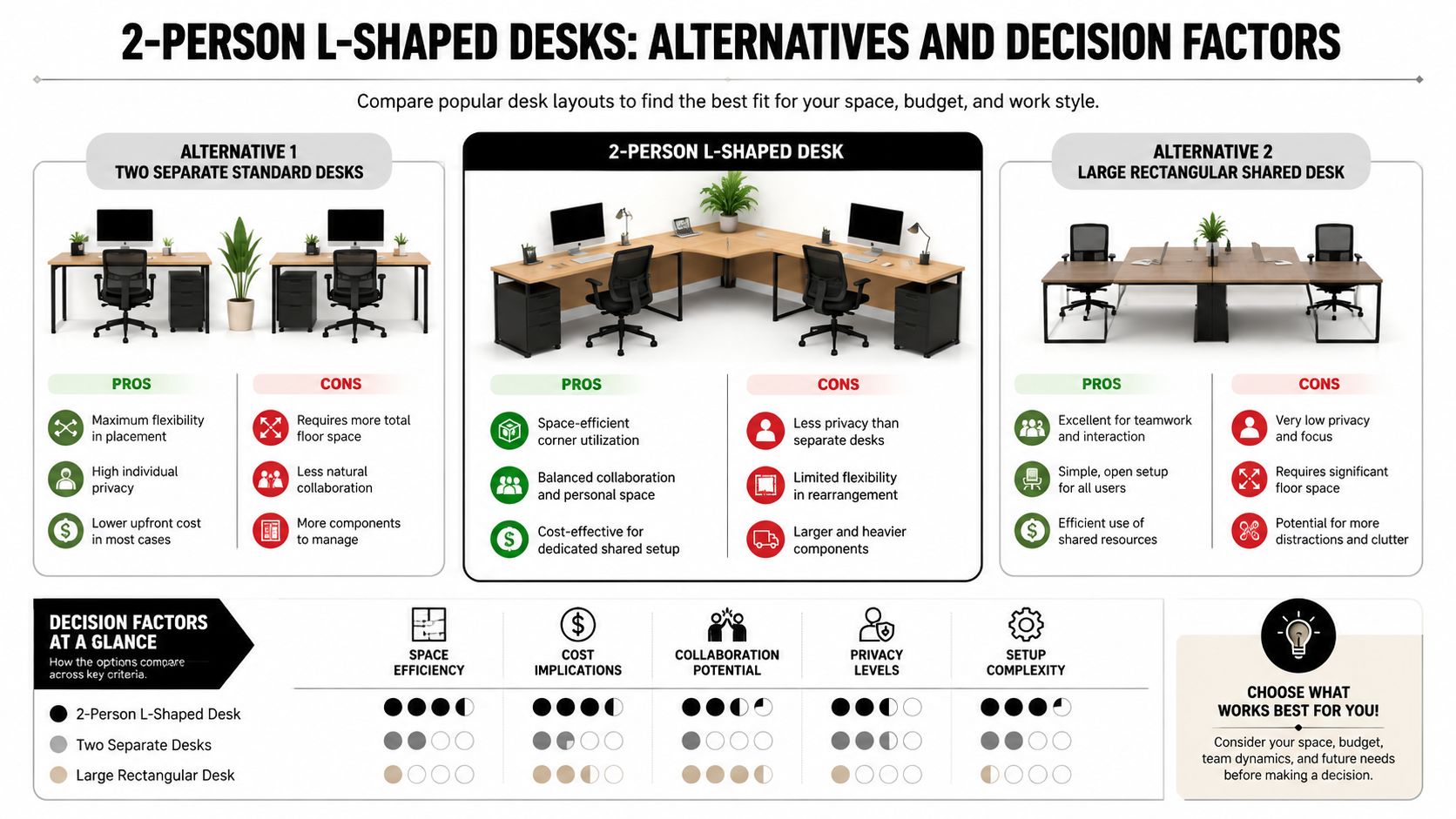
Side-by-side trade-offs
| Option | Works well when | Usually struggles when |
|---|---|---|
| 2-person L-shaped desk | Two users need distinct zones plus frequent coordination | Room width and circulation are tight |
| Two separate rectangular desks | Flexibility and independent placement matter most | Shared storage and cable management are messy |
| Benching system | Density, uniformity, and scalability drive the project | Users need more individualized task zones |
The L-shape tends to win when each user needs a primary and secondary surface. Separate desks win when the room may be rearranged often. Benching wins when the organization values repeatability across larger departments.
Choose the workstation that fits the room and the task, not the one that looks most efficient in isolation.
Buyer’s checklist
Before approving the order, confirm these points:
- Workflow fit: Are the users collaborative, independent, or mixed?
- Room fit: Does the corner support the footprint and circulation?
- Equipment fit: Will monitors, docks, and accessories live comfortably on the specified surfaces?
- Privacy fit: Do the users need visual separation, acoustic support, or none at all?
- Growth fit: Can the station connect to adjacent workstations later?
If the answer points away from the L-shape, broader workstation cubicle options may fit the project better than forcing one desk type into every department.
Frequently Asked Questions
What does a commercial-grade 2 person L shaped desk usually cost
Pricing varies widely based on size, laminate versus veneer, storage package, privacy elements, and electrical integration. The useful budgeting approach is to price the full workstation, not just the surfaces. Include pedestals, screens, cable management, delivery, and installation in the same comparison.
How long does it take from order to installation
Lead time depends on whether you’re ordering stock furniture or a configured workstation. Finish selections, electrical options, space planning revisions, and site conditions can all affect the timeline. The safest process is to confirm field dimensions and scope before release so the project doesn’t lose time to preventable changes.
Can a 2 person L shaped desk be reconfigured later
Some can. Some can’t without compromising the original layout. Reconfigurability depends on how modular the product line is, whether privacy elements are add-on components, and whether power was designed to move with the station. If future change is likely, that should be part of the initial specification, not a later wish.
When should we choose something else
Choose another path when the room is narrow, circulation is already difficult, or the pair doesn’t need the second work surface that makes the L-shape worthwhile. In those cases, straight desks, benching, or a more enclosed workstation may perform better.
Who should be involved in the decision
Facilities should lead, but they shouldn’t decide alone. The users, IT, and anyone responsible for power access or occupancy planning should review the layout before order approval. Most workstation mistakes happen when one team chooses furniture without input from the people who have to support it.
For organizations planning beyond a single desk purchase, custom office cubicles are often the better starting point because they allow the workstation decision to connect with the larger office plan.
If you’re evaluating a 2 person L shaped desk as part of a move, expansion, or workstation refresh, Cubicle By Design is a practical place to start comparing layouts, privacy options, and modular configurations within a broader office plan.