



12 Nov Office Cubicle Design Ideas to Boost Productivity
Office Cubicle Design Ideas to Boost Productivity
The best office cubicle design ideas are about so much more than just plopping down desks. They’re about striking that perfect balance between privacy, teamwork, and style to create a place where people can actually get things done and feel good doing it.
Modern designs have thankfully moved past the sea of gray, fabric-covered boxes. We’re now seeing smart layouts that use elements like glass panels, walls of varying heights, and clever storage to boost both employee well-being and their ability to focus. The real secret is matching the design to how your team actually works.
Moving Beyond the Box with Modern Cubicle Design
Let’s be honest, the word “cubicle” can bring up some dreary, uninspired images. But today’s workspace is all about being dynamic and flexible, and the modern cubicle is right at the center of that shift. A well-designed office isn’t just about filling floor space; it’s about choreographing workflow and creating an environment where your team can thrive.
Strategic office cubicle design ideas can take a simple workspace and turn it into a productivity powerhouse. Making intentional choices in layout, materials, and even small personal touches can solve some of the most common office headaches, from constant distractions to not having enough room.
The Evolution of the Modern Workspace
The whole idea of a dedicated office space has a surprisingly long history. You can trace the roots of the office cubicle back to big changes that started with the Industrial Revolution. Way back in 1726, the first dedicated office building was built in London just to handle the Royal Navy’s massive amount of paperwork. This was one of the first times people really had to think about organizing workspaces.
This history really highlights the tug-of-war between fostering teamwork and giving people the quiet space they need to focus—a challenge we’re still solving today. It helps you appreciate the benefits of a modern office cubicle, which are designed with the flexibility to solve these age-old problems.
The goal is no longer just to fit as many people as possible into a single room. Instead, it’s about creating distinct zones that support different types of work, from deep concentration to spontaneous brainstorming.
Visualizing Your New Office Space
Before you get lost in the details of specific layouts or finishes, it’s incredibly helpful to see what’s possible. Using a digital tool can bring your office cubicle design ideas to life, letting you play around with different setups without moving a single piece of furniture.
Here is a 3D rendering from the Cubicle By Design configurator tool showing modern office cubicle design ideas.
Seeing your space like this makes it so much easier to plan for things like foot traffic, natural light, and where to put different teams. It ensures your final design isn’t just nice to look at, but is genuinely functional.
Choosing A Layout That Actually Works
The foundation of a productive office isn’t the coffee machine—it’s the layout. Just lining up desks in rows is a tired approach that can kill the natural flow of work before it even starts. Instead, the best office cubicle design ideas are built around how your teams actually work, what their goals are, and how they need to interact.
Think of your office floor plan as a small city map. You need main roads for foot traffic, quiet neighborhoods for focused tasks, and public squares for collaboration. Picking the right cubicle layout is like drawing that map—it dictates how people move, connect, and get things done.
Understanding Core Layout Concepts
Before you get lost in specific configurations, it helps to understand the “why” behind them. Some layouts are all about space efficiency, letting you fit more workstations into a tight footprint. Others are designed to spark interaction, creating shared spaces and easy lines of sight between team members.
The secret is matching the layout to your team’s main function. A high-energy sales team that thrives on constant communication has completely different needs than a team of software developers who require long stretches of quiet focus.
This simple decision tree can help you figure out which path makes the most sense for your primary office goals, whether that’s deep focus or dynamic collaboration.

Use this as your starting point. Clarifying whether individual productivity or group synergy is your top priority will make every other decision much easier.
Comparing Popular Cubicle Configurations
Once you know your main goal, you can start exploring specific layouts. Each one offers a different mix of privacy, collaboration, and spatial efficiency. Let’s break down some of the most effective options.
The pinwheel layout (also known as a quad or 4-pack) is fantastic for small, tight-knit teams. It clusters four workstations together, creating a natural team pod where people can collaborate frequently while still having their own defined space.
For those long, narrow office spaces, the spine layout is an incredibly efficient choice. A central “spine” wall houses all the power and data cables, with workstations branching off on either side. This design keeps walkways clear and gives the whole office a clean, organized look.
To help you weigh the pros and cons, here’s a quick comparison of common layouts:
Comparison of Common Office Cubicle Layouts
| Layout Style | Space Efficiency | Collaboration Level | Best For |
|---|---|---|---|
| Pinwheel (Quad) | High | High | Small, collaborative teams that need to communicate often. |
| Spine-Based | Very High | Medium | Long, narrow spaces; maximizing workstation count. |
| Rows (Linear) | High | Low | Call centers or roles requiring individual focus with high density. |
| Team Pods | Medium | Very High | Project-based teams; creating distinct “neighborhoods.” |
This table gives you a starting point for matching a layout style to your specific operational needs, balancing how many people you need to seat with how you need them to work together.
When you’re planning, always consider the “desire lines” of your office—the natural paths people take to get to the printer, meeting rooms, or the break room. A great layout works with this flow, not against it, preventing annoying bottlenecks and disruptions.
Finding The Right Fit For Your Team
Beyond team function, your company culture plays a huge part. A business with a flat hierarchy and a super-open communication style might love lower panel heights and more shared spaces. On the other hand, a company handling sensitive client information will need layouts with higher panels to ensure privacy.
Keep these factors in mind when making your choice:
- Communication Needs: How often do your team members really need to talk to each other? Are we talking quick check-ins or deep, project-based discussions?
- Space Constraints: What’s the actual shape and size of your floor plan? Some layouts, like the spine, are made for specific room dimensions.
- Future Growth: Do you expect to add more workstations down the road? Make sure you choose a modular system that can easily expand or be reconfigured.
The best way to find a solution that works today and can adapt for tomorrow is to explore a variety of office cubicle design ideas. For a closer look at different arrangements, check out these popular cubicle configurations to see detailed examples.
Ultimately, the best layout is one that feels natural and actively supports the work your team needs to do, turning your office floor into a real strategic asset.
Designing for Focus with Privacy and Acoustics
If a good layout is the skeleton of a productive office, then privacy and acoustics are the muscles that make it all work. Let’s be honest: unwanted noise and constant visual distractions are two of the biggest productivity killers out there. The right cubicle design is your first and best line of defense.
Think of each cubicle as a personal focus zone. The goal isn’t to stick everyone in a box, but to give people control over their immediate environment. That control is a huge deal—study after study shows that constant interruptions tank performance and crank up stress levels.
By nailing just a few key elements, you can create a workspace that lets people do deep work when they need to, without feeling disconnected from the rest of the team.
The Critical Role of Panel Height
One of the simplest yet most powerful tools you have for controlling the office soundscape is the height of your cubicle panels. It’s a straightforward lever you can pull to strike the perfect balance between focus and collaboration.
Taller panels, typically 65 inches or higher, are your go-to for creating true quiet zones. They do a fantastic job of absorbing and blocking ambient sound, which is a lifesaver for roles that demand intense concentration—think programmers, writers, or your accounting team. This height also offers serious visual privacy, cutting down on the distraction of people walking by.
On the flip side, lower panels—usually in the 42 to 53-inch range—foster a more open, interactive vibe. They keep sightlines clear and make it easy for colleagues to chat, which is exactly what you want for collaborative teams in sales or marketing. The trick is to match the panel height to the team’s function. Often, a mix of heights across the office floor creates the most dynamic and effective environment.
Leveraging Sound-Absorbing Materials
Panel height is just one part of the equation; the materials you choose play a massive role in managing acoustics. Standard, hard-surfaced panels can actually bounce sound around, turning a noisy office into an echo chamber. The fix is to use materials designed to absorb sound waves, not reflect them.
The science of office acoustics isn’t just about blocking noise; it’s about absorbing it. Think of the difference between shouting in an empty gym versus a carpeted room. The soft surfaces tame the echo, creating a calmer environment.
Acoustic fabrics are a brilliant choice here. These textiles are specifically engineered to trap sound, effectively muffling phone calls, chatter, and keyboard clicks.
- Acoustic Fabric Panels: This is the gold standard for sound absorption. They come in a huge variety of colors, so you can easily match them to your office aesthetic.
- Frosted Glass or Acrylic: These offer a great middle ground. They block sound and provide visual privacy but still let natural light pass through, keeping the space from feeling boxed in.
- Tackable Surfaces: Many fabric panels are also tackable, giving your team a built-in bulletin board without sacrificing any acoustic benefits.
Enhancing Visual Privacy and Well-Being
Acoustic privacy is only half the battle. Visual privacy is just as important for helping people stay in the zone. Constant movement in someone’s peripheral vision can be every bit as distracting as a loud conversation.
Strategic visual barriers can make all the difference. Frosted or patterned glass toppers are an excellent way to obscure direct sightlines without making the space feel dark and cramped.
Another simple but powerful strategy? Add some greenery. A few well-placed plants can act as natural, calming visual screens. Research has even shown that plants in the workspace can reduce stress by 37% and boost creativity. It’s these thoughtful details that are a part of what makes a well-designed cubicle so effective. When you combine smart acoustic materials with practical visual barriers, you create a workspace where your team can truly thrive.
Maximizing Space with Smart Storage Solutions
A cluttered desk is more than just an eyesore—it’s a direct hit to focus and efficiency. When an employee’s physical space is a mess, their mental space usually isn’t far behind. That’s why getting the storage right is one of the most impactful things you can do with your office cubicle design. It’s all about creating a system where everything has a designated spot, keeping work surfaces clear so minds can stay on task.
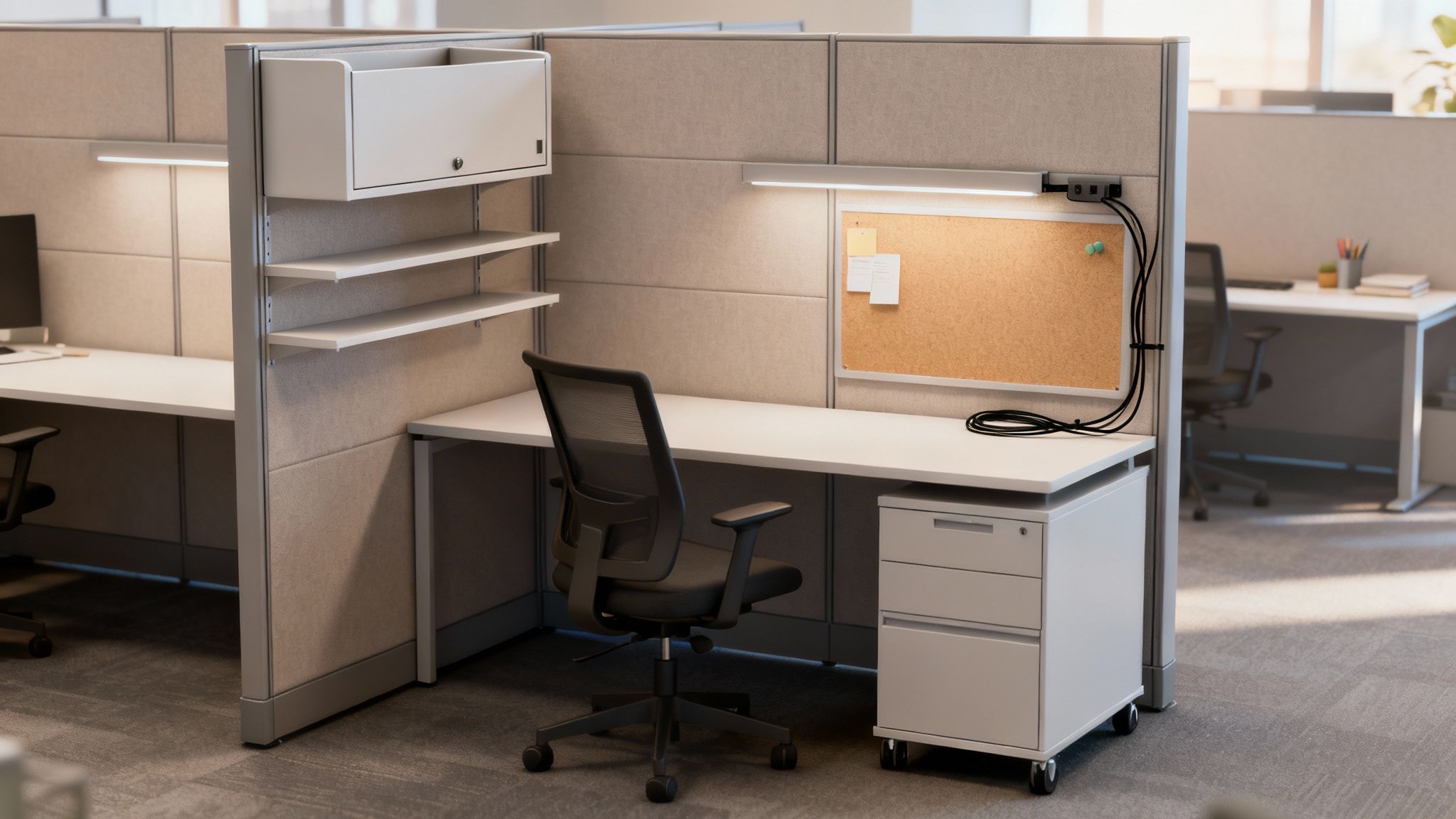
It’s time to move past the clunky, standalone filing cabinet. Modern cubicles integrate storage directly into the workstation, creating a seamless and ergonomic command center. This approach not only frees up valuable floor space but also keeps essential tools and documents right where they’re needed, cutting down on disruptions and keeping the workflow smooth.
Matching Cubicle Size to Employee Roles
Before you can think about storage, you have to nail down the right cubicle footprint. A one-size-fits-all strategy just doesn’t cut it. The dimensions of a workstation should directly reflect what the employee actually does, giving them the room they need without wasting a single square foot of your office.
Common sizes like 6’x6′ or 6’x8′ are a great starting point for most roles, offering plenty of surface area for monitors and active paperwork. For managers or staff who need extra space for meetings or spreading out documents, larger 8’x8′ or even 8’x12′ configurations make a lot more sense.
Think of a cubicle’s footprint as its foundation. A solid foundation supports the structure built upon it. Similarly, the right size cubicle supports the workflow and storage needs of the employee, preventing clutter before it even starts.
Matching the size to the role is a strategic move. A call center agent might be perfectly happy in a compact 5’x5′ space, while a graphic designer probably needs a larger L-shaped desk for multiple screens and drawing tablets. This kind of thoughtful planning is at the core of any good office design.
Thinking Vertically with Integrated Storage
Once you have the footprint set, the real magic begins when you start looking up. The space above and below the desk is prime real estate that often goes completely unused. By building storage upwards, you keep the main work surface clear for the day-to-day tasks.
This is where integrated storage solutions really prove their worth. They’re designed to be a natural part of the cubicle itself, making the whole unit feel cohesive and highly functional.
Here are a few of the most effective vertical options:
- Overhead Bins and Cabinets: These are a lifesaver for stashing binders, reference books, and personal belongings. Enclosed bins keep everything looking neat and protect contents from dust.
- Open Shelving: Perfect for items that need to be grabbed frequently. Open shelves keep things visible and within arm’s reach, and they’re also great for adding a personal touch with plants or photos.
- Integrated Tackboards: Why waste wall space? Fabric-covered panels can double as a giant bulletin board, letting employees pin up notes and reminders without cluttering their desks.
These vertical solutions can turn a simple desk into a fully organized workstation.
Flexible and Mobile Storage Solutions
While built-in storage provides a solid framework, modern work is anything but static. You need flexible options that can adapt to changing projects and teams. That’s where mobile storage comes in.
Mobile pedestals, often called “mobile peds,” are essentially small filing cabinets on wheels. They can be tucked neatly under the desk to save space or pulled out to serve as an extra surface when needed. This lets employees reconfigure their space on the fly to fit whatever their day throws at them.
Good organization is a cornerstone of efficiency, and understanding how good file management impacts your office can really drive home the need for these smart systems.
At the end of the day, the goal is to create an environment where staying organized is effortless. By carefully choosing the right cubicle size and mixing in both vertical and mobile storage, you give your team the tools they need to stay focused and productive. It’s a thoughtful approach that turns a simple cubicle into a powerful business asset.
Integrating Power and Technology Seamlessly
In today’s world, a cubicle without easy access to power and data is really just a fancy box. Getting the tech backbone of your office right isn’t just a job for the IT department; it’s a critical piece of your office cubicle design puzzle. A smart plan from the start ensures your team can plug in and get to work without a second thought, keeping productivity humming and cable messes at bay.
Think of power and data distribution as your office’s circulatory system. Just like veins and arteries carry essentials throughout the body, your cabling delivers the power and information your team needs to thrive. A tangled, messy system creates frustrating bottlenecks, but a clean, well-integrated one keeps everything flowing smoothly.
Powering Up Your Workstations
The first big decision you’ll make is how to get power and data to each desk. You’ve basically got two main options: using the channels built into the cubicle panels or relying on existing outlets in the floor or walls. Each has its own pros and cons, depending on your space, budget, and how flexible you need to be.
Integrated raceways are channels built right into the base of the cubicle panels. This is hands-down the cleanest and most efficient way to go. It hides all the wires and puts outlets right where employees need them. This approach also keeps your floors clear of tripping hazards and makes it much easier to change your layout down the road.
Using existing floor outlets (sometimes called “floor cores”) can be a more wallet-friendly choice, especially if your building is already wired for them. The downside? This can lead to a jungle of visible wires and really lock you into a specific layout, since every workstation has to be tethered to a nearby power source. For a deep dive into the nitty-gritty of wiring, our guide on cubicle electrical setup has some great practical advice.
“A future-proofed office is one that anticipates technological shifts. Planning for more power and data capacity than you currently need prevents costly retrofits down the road and ensures your workspace can adapt as technology evolves.”
Designing for a Tech-Ready Future
When you’re mapping out your power infrastructure, it’s so important to think beyond what you need right now. The number of devices each employee uses—laptops, extra monitors, phones, tablets—is only going up. A design that just barely meets today’s needs will feel outdated in a couple of years.
Here are a few ways to make sure your office is ready for what’s next:
- Install extra capacity: Go for systems that offer more circuits and data ports than you think you need. That small extra cost upfront is a bargain compared to tearing things apart to add more capacity later.
- Prioritize modularity: Pick cubicle systems that make it simple to add or move power connections. This gives you the freedom to adapt as your teams grow and change.
- Incorporate USB ports: Built-in USB-A and USB-C ports are becoming a must-have. They offer a super convenient way for people to charge their personal devices without hogging a valuable outlet.
This kind of forward-thinking is actually baked into the history of the cubicle itself. When Robert Propst of Herman Miller invented the cubicle in 1968 (originally called the “Action Office”), his vision was incredibly ambitious. He imagined an active, flexible workspace with different levels for sitting and standing, and walls set at 120-degree angles to break up the monotony. This idea completely changed how big companies organized their offices, letting them reconfigure layouts quickly and cheaply compared to building traditional private offices. Adaptability has always been at the core of great cubicle design.
Bringing Your Office Design Vision to Life
You’ve explored the layouts, thought about acoustics, and mapped out storage. Now it’s time for the fun part: moving from ideas on paper to a tangible reality. This is where your specific office cubicle design concepts start to take physical shape, turning your vision into a concrete plan you can see, tweak, and perfect before making any big decisions.
Being able to visualize the final result is probably the most critical step in this whole process. Instead of just guessing how different finishes or layouts might feel in the room, modern tools let you experiment with every single element. This takes all the guesswork out of the equation, making sure the finished space aligns perfectly with what you had in mind.
Experiment with the Cubicle Configurator
The best way to get a feel for your options is to get hands-on. The Cubicle By Design configurator tool is essentially your digital sandbox, a place where you can build and customize your ideal workspace from the ground up. You can play around with different dimensions, panel heights, fabrics, and storage options—all in real time.
Think of it like test-driving a car before you buy it. You can mock up a pinwheel layout for your marketing team, then quickly switch to a spine configuration for the developers, instantly seeing how each choice affects the flow and feel of the space. It’s a powerful way to make informed decisions tailored to your team’s unique day-to-day work.
Partnering with Design Experts
While our configurator is a fantastic starting point, bringing in a professional team can elevate your project to a whole new level. An experienced space planner can look at your floor plan and spot opportunities—and potential headaches—that you might have missed. Their job is to translate your ideas into a precise, functional layout that just works.
This kind of partnership brings a few key advantages to the table:
- Professional Space Planning: Experts know how to optimize your floor plan for traffic flow, ADA compliance, and pure efficiency, making sure every last square foot is pulling its weight.
- 3D Renderings: This is where it gets really exciting. You get to see a photorealistic preview of your new office before a single box is delivered. These renderings are invaluable for visualizing the final look and getting buy-in from your team and leadership.
- Seamless Installation: A professional crew handles all the logistics, from delivery to the final turn of the screw, ensuring a smooth transition with minimal disruption to your business.
Working with an expert team is about more than just buying furniture; it’s about investing in a strategic workspace solution. They help you navigate budget constraints and tricky logistics to deliver a final product that meets your exact specifications.
Get Your Free Quote Today
Whether you’re ready to jump into the configurator or you’d prefer expert guidance right from the start, the next step is easy. Bringing your vision to life starts with a clear plan and the right partner to help you execute it.
Ready to create a workplace that actually boosts productivity and reflects your company culture? Request a free, no-obligation quote from our team at Cubicle By Design. We’ll help you refine your office cubicle design ideas and map out a plan that fits your budget and your timeline.
A Few Common Questions About Cubicle Design
Jumping into the world of office cubicles can bring up a lot of questions. As you start to narrow down your choices, it helps to have some clear, straight-to-the-point answers. Let’s tackle some of the things we get asked about most often, so you can move forward with your project confidently.
Getting these final details right is what separates a decent office layout from a truly great one. It’s the difference-maker that ensures your investment pays off in productivity and happier employees for years to come.
What Is the Most Popular Cubicle Size?
While the “perfect” size really depends on what a person does all day, the 6’x8′ cubicle has become a go-to choice for a reason. It’s incredibly versatile and hits that sweet spot between giving someone enough personal space and not eating up your entire floor plan.
That footprint is generous enough for a computer, a second monitor, and whatever paperwork is on their desk, all without making them feel boxed in. It’s a solid, functional standard that just works for a huge range of roles, from admin staff to project managers.
How Can I Improve Acoustics Without a Redesign?
You don’t always have to tear everything down to get a handle on office noise. A few smart additions can make a huge difference. One of the most effective tricks is to add sound-absorbing panels or fabric-covered partitions to the cubicles you already have.
Beyond that, you can try a few other simple but surprisingly effective tactics:
- Add soft surfaces: Think area rugs, curtains, or even some fabric wall art. Anything soft will help soak up that ambient chatter.
- Get strategic with furniture: A tall bookshelf or a bank of filing cabinets can be a surprisingly good sound barrier between a quiet zone and a high-traffic area.
- Bring in some plants: It might sound strange, but plants are great for acoustics. A study from the University of Technology, Sydney, found that adding greenery can slash tension and anxiety by 37%. As a bonus, their leaves help break up and diffuse sound waves.
Are Glass Panels a Good Idea for Cubicles?
Absolutely. Using glass or frosted panels is a fantastic modern design choice. They really give you the best of both worlds: you get the necessary sound separation and a bit of visual privacy, but you keep that open, airy feeling in the office.
Glass panels let natural light pour through the entire workspace, which can boost employee mood and even lift productivity by up to 6%. It creates a feeling of transparency and connection without sacrificing the quiet focus people need.
This approach is the perfect antidote to the dreaded “cubicle farm” vibe. It helps you build an environment that’s visually appealing and strikes that crucial balance between community and concentration.
Ready to turn these ideas into a reality for your office? The expert team at Cubicle By Design can help you with everything from professional space planning to seamless installation. Explore your options and get a free quote today.