



You’re probably dealing with one of two situations right now. Either the office looks dated and needs a refresh, or the headcount changed and the furniture plan no longer fits how people now work.
That’s where the grey wooden desk keeps showing up. It feels current without being flashy, neutral without looking bland, and it works across private offices, open-plan stations, and hybrid touchdown areas. The problem is that most search results and most retail product pages talk about style first and performance second.
That approach breaks down fast in a real office. Facilities teams don’t buy desks one at a time for a spare bedroom. They buy for repeated daily use, cable-heavy setups, cleaning routines, phased installations, and layouts that may need to change again next year.
Why the Grey Wooden Desk Defines the Modern Office
A facilities manager usually sees the pattern before anyone else does. One team wants benching for density, another needs a few enclosed workstations for focused work, leadership wants private offices to feel updated, and nobody wants the floor to look like it was furnished in three separate years. A grey wooden desk keeps getting specified because it solves that coordination problem without forcing every space into the same visual formula.
The color is only part of the reason. In commercial settings, grey woodgrain works because it holds together across open-plan stations, private offices, touchdown areas, and shared support spaces. It pairs cleanly with black metal legs, white storage, glazed panels, acoustic screens, and the muted finishes now common in reconfigured offices. For teams tracking broader workplace design trends, that adaptability matters because finish selection now affects planning flexibility, not just appearance.
Neutral doesn’t mean generic
Grey is a specification decision. It reduces visual noise across large installations and makes phased additions easier to match later, especially when the desk line includes coordinated returns, pedestals, overheads, and meeting surfaces.
That matters in real procurement.
A desk that looks good in a retail listing can still fail the commercial test if the manufacturer cannot hold finish consistency across multiple orders, support standard dimensions, or provide matching components after an expansion. Facilities teams also need to know whether the desk is built and tested for business use. ANSI/BIFMA compliance, warranty terms, replacement availability, and finish repeatability carry more weight than a lifestyle photo.
What commercial buyers actually need
A grey wooden desk defines the modern office because it fits how offices are specified now. Buyers are rarely choosing a single desk. They are choosing a repeatable product line that has to work inside a larger furniture system.
That changes the evaluation criteria:
- Consistent finish across initial orders and future add-ons
- Commercial-grade testing such as ANSI/BIFMA for daily workplace use
- Compatibility with returns, pedestals, screens, and storage
- Support for cable routing, monitor arms, and shared power access
- Clean integration with modular systems, including lines such as Series 7
- A clear path for service parts and replacement surfaces
I advise clients to judge a desk by total cost of ownership, not by purchase price alone. If a lower-cost option chips at the edges, lacks matching components, or has to be replaced when a department reconfigures, the savings disappear fast. A well-specified grey wood desk earns its place by lasting through daily use, supporting system furniture planning, and staying relevant when the floor plan changes.
Decoding Materials What Grey Wood Means for Offices
A facilities manager usually sees the problem after move-in. The grey desks looked consistent in the sample set, then six months of monitor arm clamps, cleaning chemicals, and bag impact start showing on the front edges. At that point, the question is no longer whether the finish looks good. It is whether the material spec matched commercial use.
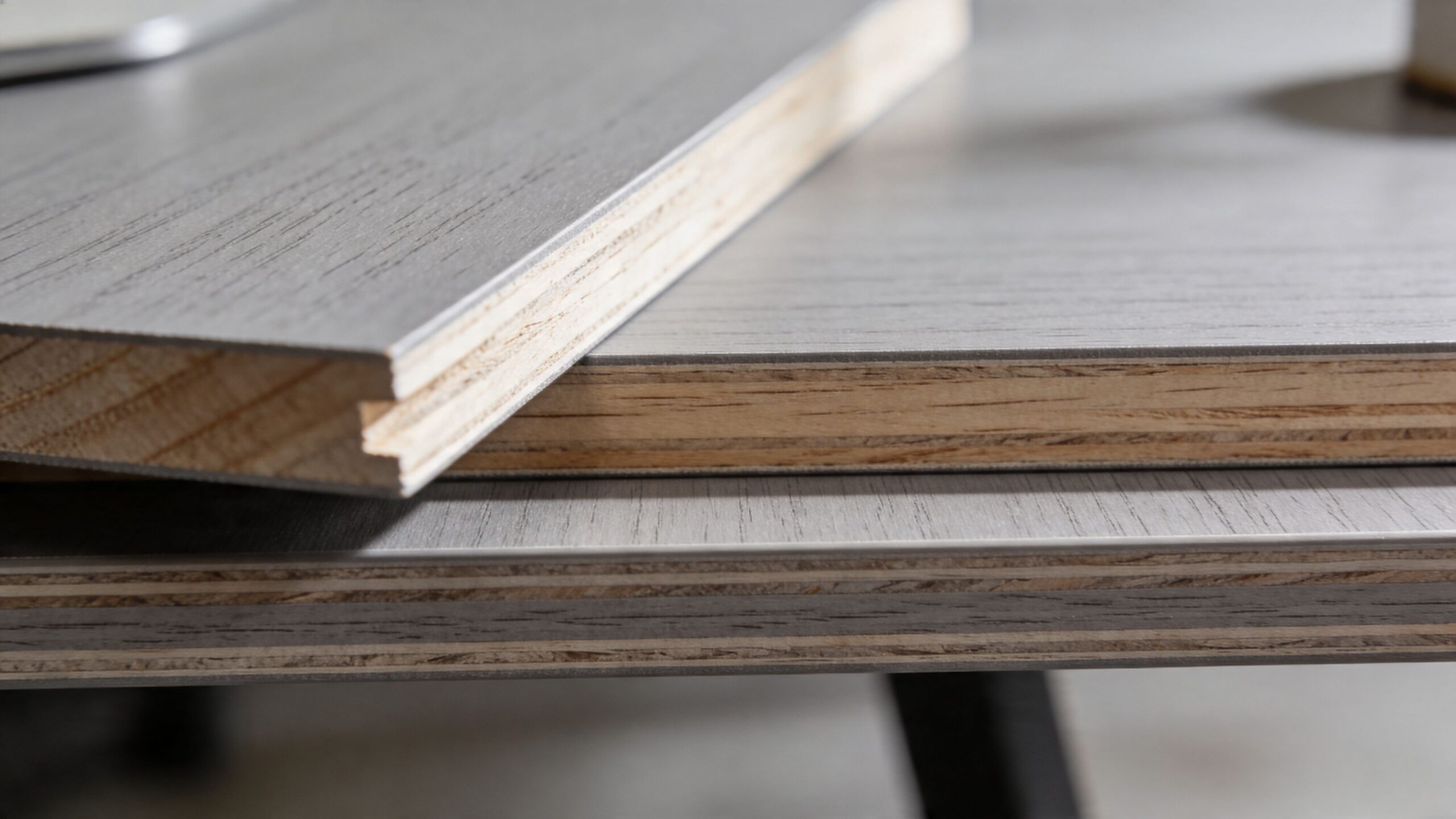
A commercial grey wooden desk is usually built from an engineered core with a furniture-grade surface, not solid wood. For office applications, that is often the right choice because it gives better finish consistency, more predictable sizing, and easier integration with standard components across a full floorplate.
What the grey finish usually is
In commercial casegoods and benching lines, the grey wood appearance often comes from thermally fused laminate, or TFL, applied over particleboard or MDF. The grain pattern is decorative. The performance depends on the substrate, edge treatment, and whether the manufacturer builds and tests the desk to recognized commercial standards such as ANSI/BIFMA.
That distinction matters on large projects. A desk surface has to hold up to daily keyboard abrasion, repeated wipe-downs, docking stations, cable grommets, and the clamp pressure from dual-monitor arms. If the finish chips at the edge or swells from routine cleaning, replacement costs rise fast and finish-matching future orders gets harder.
How TFL compares with veneer and solid wood
Grey wood can be specified in several material categories, and each one carries trade-offs that matter in offices.
| Material | Best use in offices | Main trade-off |
|---|---|---|
| TFL | Open-plan workstations, departmental rollouts, standard desking | Lower-end versions can show weak edge performance if the build quality is poor |
| High-pressure laminate or veneer over engineered core | Private offices, reception, higher-touch spaces | Higher initial cost and more finish variation between runs |
| Solid wood | Signature tables or limited-use executive applications | Weight, movement, and lack of modular compatibility |
For general workstation use, I usually steer buyers toward TFL or other laminate-based commercial surfaces. Veneer still has a place, especially in executive settings, but it requires tighter maintenance controls and is harder to standardize across expansions. Solid wood brings visual weight and material variation that often work against modular planning.
What to verify on the spec sheet
Finish name alone is not enough. The desk should be reviewed as a construction package.
Check these points first:
- Surface construction: Confirm whether the top is TFL, HPL, veneer, or another commercial finish
- Substrate: Particleboard, MDF, and plywood perform differently for fastener holding, weight, and long-term stability
- Edge detail: PVC or similarly impact-resistant edges usually outperform thin decorative treatments in shared offices
- Load guidance: The manufacturer should state whether the top supports common office equipment and monitor arm use
- Testing and warranty: ANSI/BIFMA alignment and clear commercial warranty terms are stronger indicators than marketing language
- System fit: Verify compatibility with pedestals, returns, screens, and height-adjustable bases, including adjustable workstations
For a quick example of how commercial storage and support components are presented, review a double pedestal desk specification. Use that as a format benchmark, not as proof of performance. Actual material and testing details should come from the manufacturer’s own data sheet or published product standards.
Grey wood describes the finish direction. Commercial value comes from the substrate, the edge, the test standard, and whether the desk can stay in service through reconfiguration, expansion, and daily abuse.
Optimizing Desk Size and Ergonomics for Productivity
A facilities team can save floor area on paper and still create a poor workstation. The problem usually shows up after move-in. Monitors sit too close, keyboards drift into the user’s lap zone, and staff start improvising with side tables or pedestal tops.
Desk sizing should be set by task, equipment, and adjustment range. A grey wooden desk that looks right in a finish sample can still underperform if the worksurface is too shallow or the width does not support the user’s actual setup.
Depth sets the workstation geometry
For computer-based work, depth is the first dimension I check. OSHA’s computer workstation guidance recommends placing the monitor at a comfortable viewing distance, generally about an arm’s length away, with the screen positioned to support a neutral head and neck posture. That requirement drives desk depth more than aesthetics or floor plan symmetry.
A 24-inch deep top can work in touchdown areas, reception support stations, and light laptop use. It gets tight once the user has a dock, monitor arm, keyboard, paperwork, or a large display.
A 30-inch depth is usually the safer commercial specification for assigned workstations. It gives enough room to place monitors correctly, keep primary tools within reach, and avoid pushing equipment into the front edge of the desk.
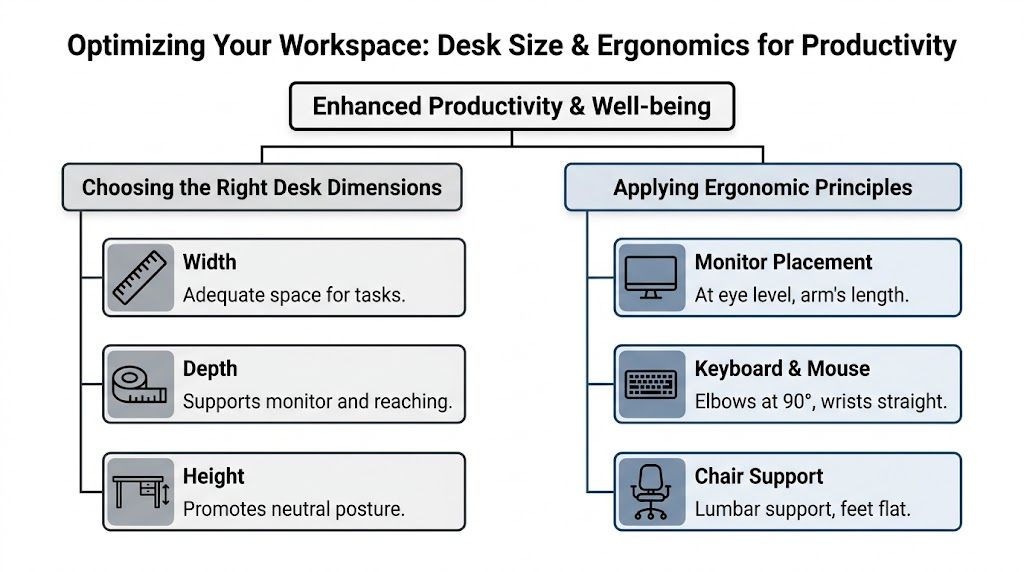
Depth also affects what you can attach to the desk. If users need monitor arms, privacy screens, keyboard trays, or rail-mounted accessories, confirm the remaining usable depth after clamps and edge details are accounted for. This matters in panel systems and benching applications where every inch gets claimed quickly.
Width should follow the work pattern
Width decisions often get made too late, after the space plan is already fixed. That is backwards. The desk should support the role first, then the plan should absorb the desk menu.
A practical range looks like this:
- 48 inches for compact stations, temporary seating, and users working mainly on a laptop with limited reference material
- 60 inches for general office use and standard single or dual-monitor setups
- 72 inches for analysts, managers, coordinators, and any role that uses active paperwork, larger displays, or short in-person meetings at the desk
Standardizing every station at one width can simplify ordering, but it can also raise total cost of ownership if users start requesting field modifications, returns, or add-on surfaces. In large deployments, two or three approved sizes usually give a better balance of planning efficiency and real usability.
Ergonomics needs adjustment range, not just the right footprint
A properly sized fixed-height desk still has limits. Shared seating, hoteling areas, and departments with a wide range of user heights often perform better with adjustable workstations, especially when the desk has to serve different people across shifts or days.
For fixed-height applications, review knee clearance, seated elbow height, and monitor placement before approving the typical. For height-adjustable applications, review the travel range, lifting capacity, anti-collision function, and whether the grey wood top is rated for the base and accessory load. A desk that carries dual monitors, arms, and power hardware needs a different specification than a basic writing surface.
Commercial buyers should also verify that the desk meets applicable ANSI/BIFMA performance standards for strength and durability. Ergonomics is not only about posture. It also depends on the desk staying stable under normal use, especially when users lean on the edge, clamp on accessories, or raise and lower the surface repeatedly.
Finish affects visual comfort, but function comes first
Grey wood can be a smart specification for open offices because it tends to show less contrast than very dark laminates and less glare than bright white surfaces under common overhead lighting. The finish can help the workstation feel calmer and easier to work at, but it should not be treated as a substitute for correct monitor placement, task lighting, or screen control.
In procurement reviews, I treat finish as the final layer. The first questions are whether the user can sit well, see the screen comfortably, and keep primary tools in the right reach zone.
A practical sizing matrix
| User type | Better fit | Watch for |
|---|---|---|
| Hot desk user | 24 to 30 inch depth, moderate width, simple accessory package | Too many personal devices competing for limited surface area |
| Call center staff | Consistent 24 or 30 inch depth across rows, width based on monitor count | Tight shoulder room and monitor arms colliding with panel elements |
| Dual-monitor analyst | 30 inch depth, 60 to 72 inch width, monitor arm compatibility | Screens pushed forward because the desk is not deep enough |
| Private office user | Larger primary surface or L-shape based on meeting and paper-handling needs | Overspecifying desk size and reducing circulation |
For teams refining seated posture, screen position, and workstation setup standards, this guide to maximize the ergonomics of office is a useful planning reference.
Integrating Power and Cable Management Seamlessly
A clean desk installation starts before the desk is ordered. Power planning that happens after delivery usually turns into exposed cords, added drilling, and compromises no one likes.
Cable management should match the role, the equipment load, and the way the station connects to the building. A receptionist, a call center rep, and a software developer won’t use the desk in the same way. Their power plan shouldn’t be identical.
Start with device count
Count what needs power and data at each station. Don’t stop with the obvious screen and laptop.
For many users, the list also includes:
- Docking hardware
- Task lighting
- Phone charging
- Speakers or headsets
- Desktop CPU or thin client
- Secondary monitor or monitor arm accessories
That inventory determines whether a simple grommet pass-through is enough or whether you need below-surface trays and panel-fed power.
Match the cable path to the desk type
Different desk applications need different routing methods.
A fixed desk in a cubicle often works best with hidden horizontal management below the worksurface and a clean vertical drop into the panel or leg path. A freestanding desk may need a more deliberate route so cords don’t hang into the user’s knee space.
Here’s a simple planning framework:
- Map the source. Identify where power enters the station.
- Define the path. Keep cords off the floor and out of leg space.
- Protect movement. If the station has motion or frequent reconfiguration, leave enough slack and control points.
- Plan service access. IT and facilities staff should be able to add or replace devices without dismantling the desk.
Don’t let accessories create clutter
Desktop power modules can be useful, but only when they reduce friction instead of adding bulk. They should support how people plug in during the day. If the module sits in the wrong spot, users will still run chargers across the top.
Field note: The cleanest workstations are usually the ones where power was planned with the panel system, storage, and monitor layout at the same time.
For under-surface distribution, an under desk power strip can help centralize charging and reduce visible cable sprawl when specified early.
Fitting Grey Desks into Modular Cubicle Systems
A facilities team usually sees the problem during installation, not in the showroom. The grey worksurface looked right on its own, then arrived on site with the wrong panel brackets, uneven storage alignment, and no clear route for panel-fed power. At that point, the finish is the least important part of the decision.

Grey wooden desks perform well in modular environments because they stay visually consistent across benching, panel systems, private offices, and touchdown stations. That consistency matters in phased projects. If you add 40 stations this year and 20 more next year, a neutral grey finish is easier to match across lots, storage pieces, and overhead elements than trend-driven laminates.
Specification carries the project. A commercial desk has to fit the panel system, accept the correct support method, and hold up under reconfiguration. For facilities managers, I recommend checking BIFMA-level performance expectations early, then confirming how each top mounts into the cubicle frame, whether left and right returns are standard, and how pedestal storage shares support without throwing off leg clearance. Those details determine whether the installation feels integrated or improvised.
Fit the desk to the system, not just the floorplan
A modular station only works when the desk dimensions respect the panel build. Panel thickness, post location, shared supports, and worksurface depth all affect fit. A 24-inch deep top may help circulation in a dense footprint, but it can limit monitor placement and reduce usable task space. A 30-inch deep top gives better equipment support, though it may force changes to aisle widths or storage placement.
Common workstation components to verify include:
| Integration point | What to confirm |
|---|---|
| Panel connection | Bracket type, mounting height, and field adjustability |
| Worksurface shape | Straight, corner, return, or L-shape options within the same finish line |
| Storage alignment | Pedestal height, support sharing, door swing, and knee-space clearance |
| Power compatibility | Whether the desk works with panel-fed electrical and accessible service points |
| Reconfiguration | Whether tops and supports can be reused if departments shift later |
That last point affects total cost of ownership more than many buyers expect. A desk that can move from a 6×6 station into a smaller reconfigured footprint without custom cutting or replacement parts usually costs less over its service life, even if the initial unit price is higher.
Plan around the modular platform
Grey wood is often specified across an entire furniture program, not one desk at a time. That is why it pairs well with modular office desk systems built for repeatable layouts, shared components, and future adds. In systems such as Series 7, that modular logic matters. Standardized spans, return options, and shared storage supports make it easier to keep finish consistency while changing station types by department.
Open-plan stations benefit because grey tones reduce visual noise across long runs of workstations. Enclosed manager stations benefit for a different reason. The same finish can carry into credenzas, meeting-height surfaces, and storage without forcing a separate specification package.
Good commercial specification keeps the worksurface, panel system, storage, and power path aligned before the first station is delivered.
The best installations usually look simple. They are not simple behind the scenes. They are measured correctly, coordinated with the panel manufacturer, and specified so replacement parts, additional tops, and future reconfigurations stay manageable for facilities and IT.
Styling the Workplace with Grey Wooden Desks
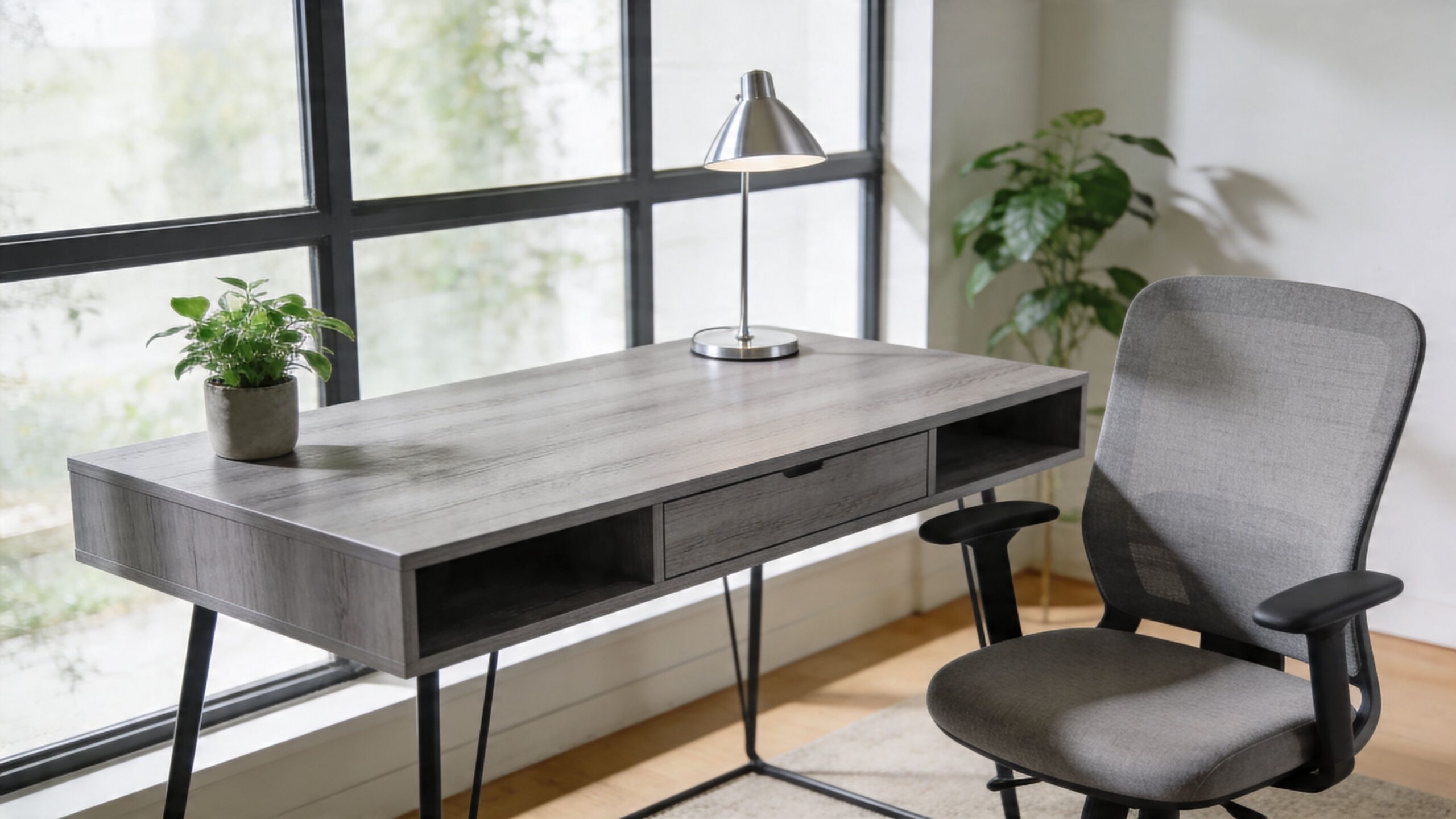
A grey wooden desk gives you a strong base, but the room around it determines whether the office feels sharp, welcoming, or flat. The finish can lean cool and architectural or warm and grounded depending on what you place around it.
Clean and focused
In a minimalist workplace, grey wood pairs well with white panels, black hardware, and glass. The effect is crisp without being clinical.
This works especially well in offices that want openness but still need a sense of order. The grey top softens the contrast between bright surfaces and dark framing.
Warm and human
Some offices worry that grey will feel too cool. That usually happens when every other finish in the room is also cool.
Add natural plants, warmer lighting, textured acoustic materials, or wood details in seating and shelving. The desk then reads as balanced rather than sterile.
A practical styling move is to treat the desk as the anchor and let smaller materials introduce warmth. That keeps the space controlled without becoming monotone.
Creative without visual chaos
In more energetic workplaces, grey wood gives accent colors room to work. Upholstered chairs, acoustic panels, and branded accessories can carry stronger color because the desk isn’t competing with them.
That’s useful in collaborative environments where a little visual energy helps, but the furniture still needs to look professional in meetings and client walk-throughs.
Here’s a quick visual guide:
- For a refined look: Pair grey wood with glass, white, charcoal, and restrained metal accents.
- For a softer office: Use warm lighting, greenery, and tactile fabrics.
- For a branded environment: Let the desk stay neutral and bring company color in through movable elements.
This video offers a helpful visual reference for how modern desk-centered workplaces come together in practice.
The most effective office palettes don’t ask the desk to do all the visual work. They let the desk stabilize the room while other elements shape the mood.
Budgeting Procurement and Long Term Maintenance
A facilities team usually feels desk costs twice. The first hit shows up on the purchase order. The second shows up over the next five to ten years in service calls, scratched tops, mismatched replacement parts, and workstations that no longer fit the power plan.
That is why grey wooden desks should be budgeted as a system decision, not a finish decision. For commercial projects, the useful comparison is total cost of ownership. Start with acquisition cost, then add installation, cable and power coordination, day-two adjustments, cleaning requirements, replacement availability, and the likelihood that the desk can stay in service through a reconfiguration.
Consumer-grade pricing often distorts the bid review. A desk can look competitive until the project team adds commercial requirements such as BIFMA compliance, consistent finish availability across phases, panel-mounted power coordination, and warranty support that still matters after occupancy. In practice, those items decide whether the original savings hold up.
Why maintenance belongs in the budget discussion
Grey wood is not one material. It can mean thermally fused laminate, high-pressure laminate, veneer over core stock, or solid wood accents. Each option carries a different cost profile.
In active offices, laminate usually wins the maintenance argument. It resists abrasion better, cleans with standard facility products, and avoids the touch-up cycle that can follow veneer chips or edge damage. Veneer still has a place in executive areas or low-abuse spaces, but facilities managers should price it with realistic service expectations, not showroom assumptions.
The specification also needs to cover what happens after year one. Can you still order the same grey finish if one station is damaged? Are replacement tops available without replacing the whole base? Can the desk be refit when monitor arms, screens, or under-surface power are added later? Those are budget questions.
What to compare before you request final quotes
Two grey desks can look nearly identical in a rendering and perform very differently on site. A disciplined spec sheet keeps vendors quoting the same standard.
| Feature | Specification | Your Requirement |
|---|---|---|
| Surface material | TFL, laminate, veneer, or solid wood | |
| Performance standard | BIFMA compliance and commercial duty rating | |
| Finish color | Grey wood tone and consistency across product line | |
| Edge detail | Impact-resistant edge treatment | |
| Desk size | Required width, depth, and height | |
| Load support | Suitable for monitors and accessories | |
| Cable management | Grommets, trays, modesty routing, power access | |
| Storage integration | Mobile pedestal, fixed pedestal, return support | |
| Panel compatibility | Mounting and fit within modular systems such as Series 7 | |
| Warranty | Coverage for surface and structural issues | |
| Maintenance needs | Cleaning tolerance and touch-up expectations | |
| Sustainability | Low-VOC and material sourcing requirements | |
| Installation plan | Lead time, phasing, and field coordination |
Add one more line item during review. Ask each vendor to identify which parts are field-replaceable. That answer usually tells you how painful future maintenance will be.
Smart buyers phase the rollout
Large procurements rarely land in one shipment. They move by floor, department, or lease milestone, and the desk program has to survive those gaps.
Keep the grey finish repeatable across production runs. Standardize a short list of widths and depths. Confirm that power components, brackets, and support legs are still available if phase two starts six months later. If the desks need to tie into a modular platform, quote the desks, panels, storage, and electrics as one package so the installer is not solving fit problems in the field.
If you’re comparing layout options before procurement, a visual planning tool like the Custom Cubicle Designer can help teams align dimensions, privacy levels, and electrical choices before the first purchase order is issued.
The right question to ask vendors
Ask vendors to price ownership, not just purchase. Request the installed cost, the replacement lead time for tops and components, the cleaning guidance, the warranty process, and the expected compatibility with future add-ons or system changes.
That conversation quickly separates office furniture suppliers from commercial workspace partners. The right grey wooden desk should still be working after churn, re-stacks, and technology changes, with a maintenance profile your facilities team can live with.
Design Your Ideal Workspace Today
A facilities team usually sees a desk program’s true test after installation day. A floor opens, users plug in monitors and docking stations, a few teams relocate within the first quarter, and the furniture either absorbs that change cleanly or starts generating tickets. A grey wooden desk is a good specification only if it holds up under that pressure.
For commercial projects, the decision should stay tied to performance. Specify desks that meet recognized commercial standards such as BIFMA expectations, support your actual power and data layout, and fit the modular system you plan to maintain over several years. Grey is the finish choice. The procurement decision is really about service life, replaceability, and how much disruption the furniture will create after move-in.
That is the difference between buying desks and specifying a workstation platform.
Use a short decision filter before you release the order:
- Commercial-grade construction with documented testing and warranty terms
- Dimensions that support monitor arms, keyboard placement, and daily task work
- Power, data, and cable routing that installers can configure cleanly
- Compatibility with existing or planned modular systems, including Series 7 applications
- Finish consistency and field-serviceable components for future adds and changes
- A total cost profile that includes installation, maintenance, and replacement planning
Cheap desks can look acceptable in a showroom. They become expensive when tops chip, laminates drift between batches, grommet locations do not match the electrical plan, or replacement parts are unavailable during a re-stack.
If you are ready to move from product comparisons to an office standard your team can manage, Cubicle By Design can help you review modular desks, workstation cubicles, and full office layouts matched to your team, budget, and installation schedule. You can also review broader solutions on the homepage before building a custom plan.