


You’re probably not shopping for an executive desk because you want a bigger slab of furniture. You’re doing it because an office is changing. A leader moved into a new space. A private office needs to feel current instead of dated. A hybrid team needs rooms that support heads-down work, quick meetings, video calls, and better traffic flow.
That’s why modern executive desks deserve a more practical lens. The desk still carries visual weight, but it also affects posture, cable planning, room circulation, guest seating, and how well the executive area connects to the rest of the workplace. In a flexible office, a desk that looks impressive but fights the layout is usually the wrong choice.
The Modern Executive Desk Beyond the Corner Office
The old image of an executive desk is easy to picture. Thick wood, oversized footprint, and enough mass to dominate the room. That model still appears in some offices, but it doesn’t fit how many companies work now.
The category itself has become much broader. The global executive desk market was valued at $6.2 billion in 2024 and is projected to reach $9.7 billion by 2033, with 5.1% CAGR growth over that period, while North America holds about 35% of global share, according to Market Intelo’s executive desk market report. That matters because it shows executive desks are no longer a narrow prestige purchase. They’re part of a larger commercial planning conversation tied to hybrid work, renovations, and ongoing workplace investment.
A well-chosen desk now has to do three jobs at once. It has to support the person using it every day. It has to represent the company well when clients, candidates, or staff walk in. It also has to fit the office system around it instead of acting like a separate object dropped into the plan.
What decision-makers usually get wrong
Many buyers still evaluate executive desks in isolation. They compare finish samples, drawer layouts, and photos of dramatic corner offices, then make a selection before they’ve solved circulation, privacy, power access, or sightlines.
That’s backwards.
Practical rule: Pick the office layout first, then the desk that fits it. A desk shouldn’t dictate the room if the room has to support meetings, movement, and changing team needs.
If the executive office sits near open workstations, reception, or meeting rooms, the desk becomes part of the office’s visual language. A clean-lined desk can reinforce a modern workplace more effectively than a bulky “statement piece” that clashes with glass fronts, benching, or lower panel systems.
For teams comparing office solutions, it helps to look at the whole workplace catalog, not just one private-office product. Cubicle By Design presents desks, partitions, and modular systems in that broader context, which is how most successful office projects are planned.
What works better now
The strongest executive offices today usually share a few traits:
- Balanced scale: The desk feels substantial, but it doesn’t overpower the room.
- Useful surface area: There’s enough room for monitors, documents, and short meetings without wasting floor space.
- Consistent design language: The private office relates to adjacent workstations, partitions, and meeting areas.
- Adaptability: The desk can support changing tech, different users, and office refreshes later on.
That shift is what defines modern executive desks more than any single style trend.
Decoding Styles Materials and Finishes
Style matters, but not in the way showroom photography suggests. The right style isn’t the one that looks expensive in a vacuum. It’s the one that matches the company’s culture, works with the architecture, and still looks right next to surrounding workstations or partitions.
Styles that fit different workplaces
A minimalist executive desk usually works best in offices that prioritize clarity and visual calm. Think clean planes, restrained hardware, and fewer visual interruptions. This style pairs well with glass-front offices and lower-profile workstation systems because it doesn’t compete for attention.
An industrial desk often mixes metal, darker finishes, and sharper lines. It can work in creative firms, tech environments, or renovated industrial spaces, but it can also turn cold if every other element in the office is hard-surfaced.
Scandinavian-inspired desks lean lighter in tone and feel more approachable. They suit companies that want a professional office without the heaviness of a traditional executive suite. These desks tend to integrate well with brighter offices and collaborative zones.
Mid-century modern styles can bring warmth and character, especially when the office needs personality. The risk is going too residential if the rest of the workplace uses contemporary systems furniture.
The safest style choice is usually the one that can sit beside a glass wall, a workstation cluster, and a meeting table without looking imported from another project.
Material trade-offs that affect daily use
The material decision is where appearance and operations meet. Buyers often focus on look first, but maintenance, repairability, and compatibility with the office plan usually matter more over time.
| Material | Average Cost | Durability | Aesthetic & Feel |
|---|---|---|---|
| Solid wood | Higher | Strong, but can show wear and movement over time | Warm, substantial, traditional to contemporary depending on finish |
| Wood veneer | Mid to higher | Good with proper care, easier to specify for premium looks | Refined wood appearance without the weight or cost of solid wood |
| High-pressure laminate | Lower to mid | Very practical for daily commercial use | Clean, consistent finish, less tactile character than real wood |
| Metal | Mid | Durable, structural, and low maintenance | Crisp, technical, often used as a frame or accent |
| Glass | Mid to higher | Visually light but shows fingerprints and requires more upkeep | Open, airy, contemporary |
Solid wood can look excellent, but it often introduces more visual weight than a modern office needs. Veneer is a common middle ground when you want wood character with better control over finish and consistency. High-pressure laminate tends to win on practicality in busy offices, especially when durability and replacement planning matter more than prestige.
If you’re evaluating how design teams now use digital tools to visualize finish combinations and product concepts, this guide to AI for furniture creators is useful background. It’s a helpful reminder that material selection is increasingly tied to faster concept development, not just showroom sampling.
Finishes that age well
The finish often decides whether a desk still looks good after daily use.
- Matte wood tones: Usually hide fingerprints and minor surface noise better than glossy finishes.
- Deep dark stains: They can look sharp, but they often make dust, smudges, and cable clutter more obvious.
- White and very light laminates: Bright and current, though they can look flat if the room already has a lot of pale surfaces.
- Tempered glass elements: Best used intentionally, especially when the office already uses transparent materials and lighter visual mass. Tempered glass desks can work, but they need stronger discipline around cable management and upkeep.
In practice, the safest material choice for many modern executive desks is the one that supports the office’s design language and facilities team’s maintenance reality at the same time.
Sizing and Office Layout Considerations
A desk can be well made and still fail because it’s the wrong size for the room. That happens more often than buyers expect. They see a desk in a showroom or rendering, approve it, then discover the office feels cramped once guest seating, storage, and door swing enter the picture.
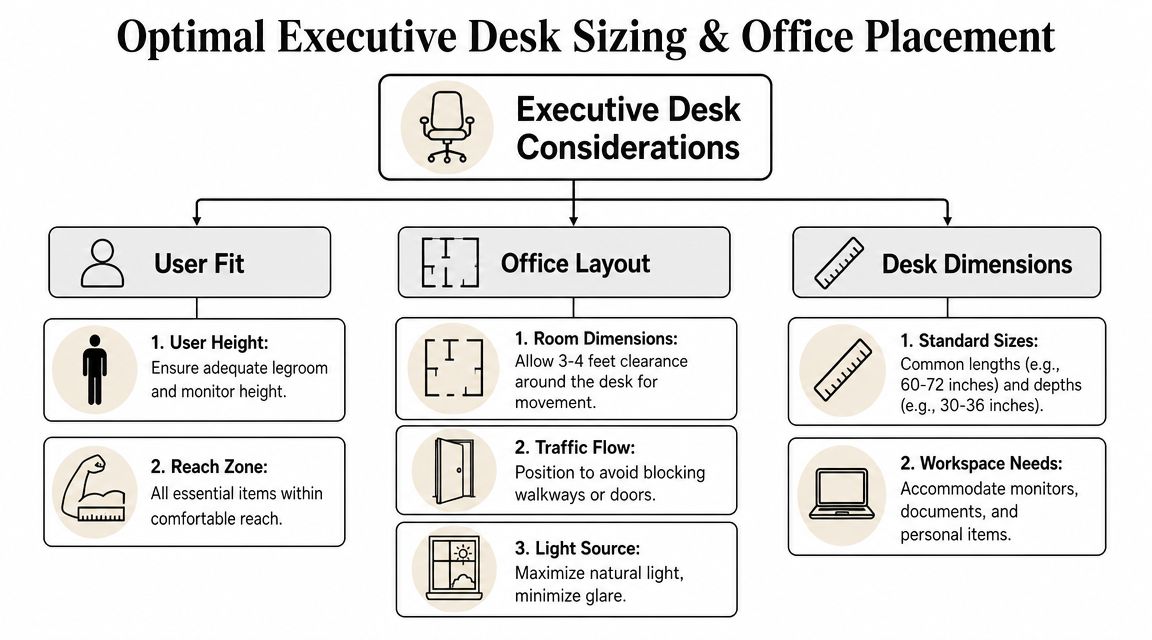
A technically sound baseline for modern executive desks is 60 to 72 inches wide and 30 to 36 inches deep, with a working height around 28 to 30 inches. That sizing supports dual-monitor setups and helps maintain a viewing distance of about 20 to 30 inches from the eyes, according to Eureka Ergonomic’s executive desk dimensions guide.
Start with the room, not the desk
Before comparing models, map the office footprint and the way people move through it. The desk needs a landing zone around it, not just a footprint on paper.
A solid planning process should account for:
- Entry path: The person entering the room shouldn’t have to sidestep the desk or chair.
- Guest position: Visitors need seats that don’t block drawers, legs, or door movement.
- Window placement: Natural light is valuable, but glare on screens quickly turns into a daily frustration.
- Background view: In many executive offices, camera framing matters almost as much as in-room appearance.
For teams refining that process, this office space planning guide is a useful companion resource. It helps frame the desk as one element inside a larger spatial system.
Which shapes solve which problems
A rectangular desk is often the most efficient choice. It gives you a clear working edge, fits a wide range of offices, and is easiest to position in relation to doors and glazing.
An L-shaped desk works when the executive splits work between screen-based tasks and paper review, or needs a side surface for quick meetings and active files. It also helps when the office can’t accommodate a separate credenza.
A U-shaped layout creates a command-center feel and plenty of storage, but it can overwhelm a smaller office fast. It works best when the room was designed for that footprint from the start.
A desk should leave the room feeling more usable, not more furnished.
Practical fit checks
Before final approval, review these points:
- Monitor depth: Confirm the desk depth supports screens without pushing the user too close.
- Chair travel: Make sure the executive chair can move back and rotate freely.
- Sightlines: Check what the user sees while seated, and what visitors see when entering.
- Coordination: If the office is part of a larger reconfiguration, office space planning and design should happen before furniture is finalized.
Good sizing looks obvious after installation. That’s usually because someone took the time to test the layout before ordering.
Ergonomics Power and Cabling
The most expensive desk in the room can still be uncomfortable by lunchtime. That’s the gap in a lot of executive desk buying. People spend energy on finish, edge detail, and storage, then treat ergonomics as a chair issue.
It isn’t.
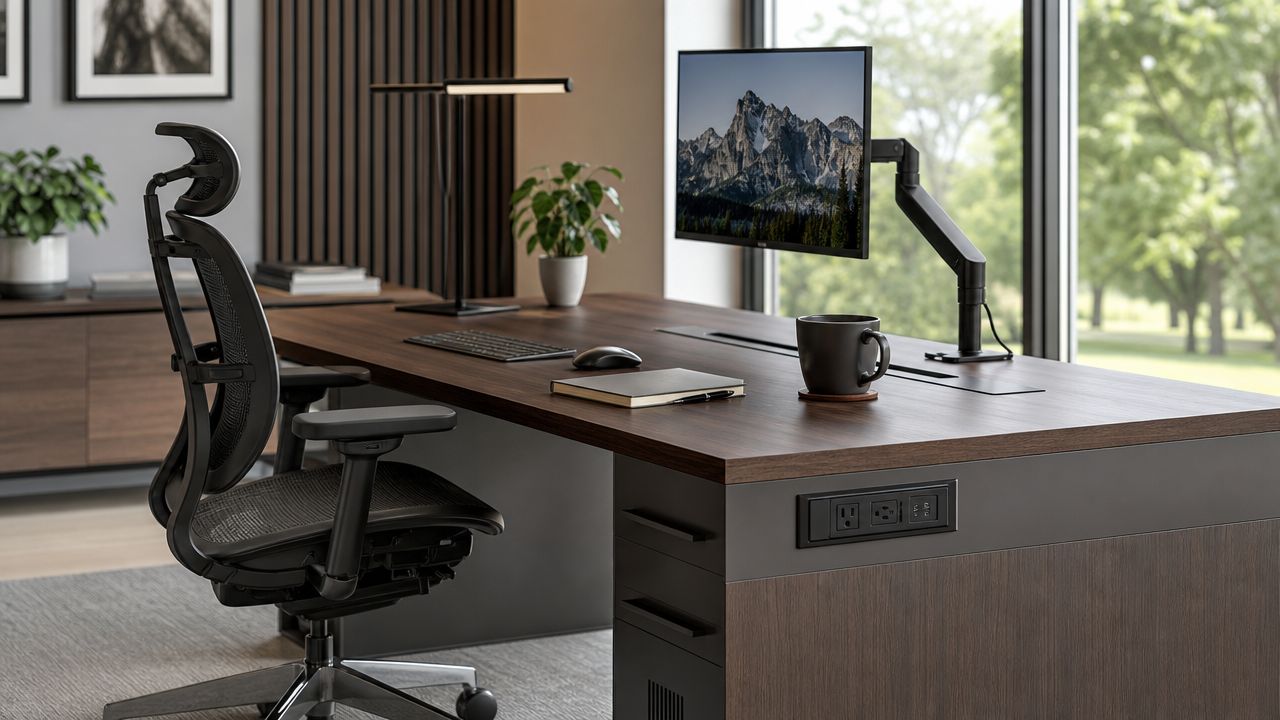
A standard 29 to 30 inch desk height isn’t ideal for everyone, and OSHA-aligned guidance emphasizes neutral posture, correct monitor placement, and adequate clearance. That’s why adjustable-height options matter more than many product pages admit, as discussed in ArcGrove’s review of executive desk ergonomics.
Why fixed-height desks often disappoint
Fixed-height executive desks can work well for some users, especially when the chair, monitor arm, and keyboard setup are carefully matched. But in real offices, people vary in height, footwear, posture habits, and equipment needs. Add long workdays, and small fit problems become ongoing strain.
Three issues show up repeatedly:
- Keyboard position too high: Shoulders rise, wrists bend, and typing gets tense.
- Monitor placement too low or too close: The neck leans forward all day.
- Storage blocks knee space: The user shifts posture just to stay comfortable.
If the office is assigned to one person with a carefully tuned setup, fixed height may be acceptable. If the executive office is part of a flexible environment, adjustable height is usually the safer specification.
For buyers considering that route, an adjustable-height executive desk makes more sense than trying to solve a poor desk fit with accessories alone.
Power should be accessible, not theatrical
A clean desk surface matters. Hidden power can be useful. But there’s a difference between tidy integration and gimmicky integration.
What tends to work:
- Grommets in sensible locations: Good for monitor, lamp, and charging cable routing.
- Accessible cable trays: Better than sealed compartments that only installers can reach.
- Replaceable power modules: Easier to service when ports change or fail.
- Separation of power and data paths: Simpler troubleshooting and cleaner routing.
What often disappoints:
- Built-in ports at awkward locations: They look impressive in a spec sheet, then interfere with actual device placement.
- Over-integrated wireless chargers: Nice in theory, limited in usefulness if device sizes or charging standards change.
- Decorative modesty panels with no access path: Great in photos, frustrating during installation and upgrades.
Buy the desk for its structure first. Treat power accessories as systems that should be easy to replace.
A good visual walkthrough can help teams think through cable routing and workstation setup details before purchase:
What a clean setup actually requires
A clean executive office usually comes from coordination, not from one magical desk feature. Someone has to decide where floor power arrives, how monitors mount, where excess cable length lives, and what devices need regular access.
That means the desk spec should answer practical questions:
| Question | Why it matters |
|---|---|
| Where do monitors mount | Some tops and backs handle arms better than others |
| How does power reach the desk | Floor core, wall outlet, or base feed changes the setup |
| What needs to stay on the surface | Dock, phone, task light, and paper workflow all compete for space |
| Who services the office later | Facilities staff need access without dismantling the desk |
When modern executive desks support posture and technology together, the room stays cleaner, the user stays more comfortable, and future changes become less disruptive.
Integrating Desks with Modular Office Systems
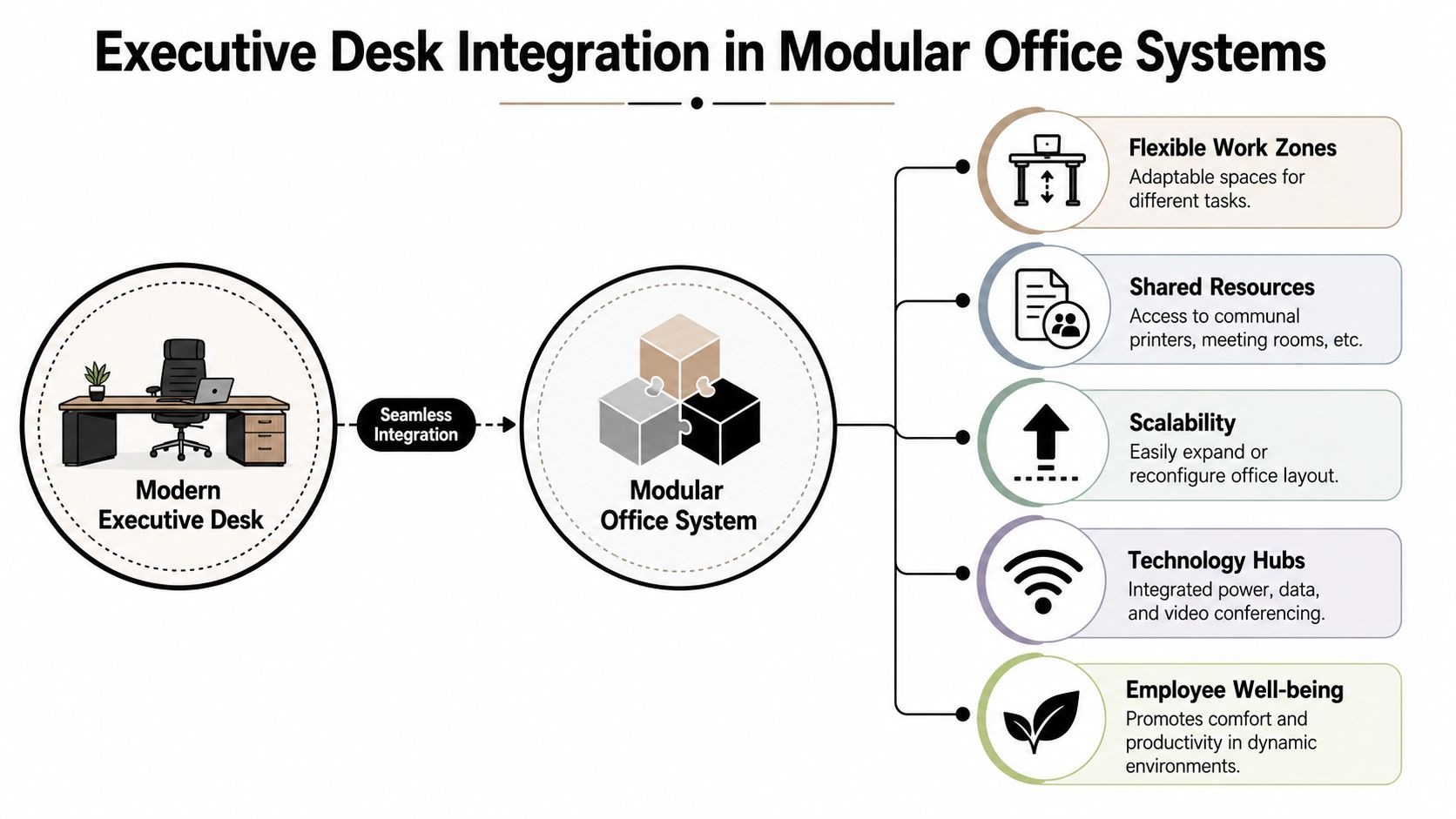
An executive desk should no longer be treated as a self-contained symbol of status. In a flexible office, it works best as one node in a larger system that includes circulation paths, privacy layers, team workstations, shared resources, and visual consistency across the floor.
That matters even more because office utilization has changed. Roughly 40% of dedicated desk space can sit unused on a given day, and hot-desking can reduce operating costs by 30% while cutting space requirements by 15% to 25%, according to the ONES overview of hot desk statistics. Those numbers explain why executive spaces are being planned with flexibility in mind rather than as oversized, fixed-footprint exceptions.
The desk should echo the office system
When the executive office uses one language and the rest of the workplace uses another, the whole floor feels disjointed. That’s common when a traditional desk gets inserted into a newer modular office.
A better approach is to coordinate:
- Panel heights and desk scale: A private office shouldn’t feel monumentally heavier than nearby team spaces.
- Finish palette: The executive desk can be richer, but it should still relate to surrounding surfaces.
- Transparency levels: If the office uses glass fronts, the desk should look intentional from every angle.
- Storage logic: Executive storage should complement, not duplicate, shared storage and team support areas.
Where private office and open plan meet
Glass-front offices are a strong example. A modern executive desk with clean lines and disciplined cable management can sit comfortably behind glass office partitions because the desk is visible much more often than it would be behind drywall. Every exposed backside, cable path, and side return matters more.
The same logic applies when an executive or team lead office sits adjacent to custom office cubicles or denser banks of workstation cubicles. The desk should anchor leadership presence without breaking the visual rhythm of the department.
The best executive office often feels connected to the workplace, even when it offers privacy.
Practical integration patterns
A few layouts work especially well in reconfigurable offices:
Glass-front private office with a rectangular desk
This is often the cleanest option. The desk faces the entry or sits perpendicular to glazing, with a side cabinet or credenza handling secondary storage. It preserves openness and keeps the room legible from outside.
Team-lead office near workstation clusters
A smaller executive desk can bridge the gap between private office and operational floor. This works well when a leader moves frequently between focused work, one-on-ones, and quick team support.
Administrative or operations hub beside specialized seating zones
In fast-paced environments, executive desks may need to relate to adjacent departmental systems such as call center cubicles, where supervision, visibility, and acoustic balance all shape the layout.
For organizations planning around long-term adaptability, modular office desk systems are often easier to integrate than standalone furniture pieces chosen one room at a time. That’s where a publisher like Cubicle By Design can fit into a project, since it offers desks, partitions, and modular planning tools within the same office-furniture workflow.
Budgeting Procurement and Installation
Most desk budgets get distorted by one mistake. Buyers compare sticker prices before they define what the desk has to do. That usually leads to overspending on appearance or underspending on function.
The more reliable approach is to budget by use case.
Budget by performance level
An entry-level executive desk usually makes sense when appearance matters more than intensive daily customization. Think clean laminate or simpler veneer looks, basic storage, and conventional cable pass-throughs. This tier can work well for private offices that need polish without heavy integrated technology.
A mid-range desk is where many offices land. You’ll usually see better fit and finish, more thoughtful storage, stronger cable management, and more flexibility in configuration. For many projects, this is the point where the desk feels executive without becoming hard to maintain.
A premium desk should justify itself with material quality, serviceability, and long-term fit within the office plan. Paying more only for visual drama rarely holds up in procurement review.
Watch the hidden cost in technology
Tech integration deserves more scrutiny than most buyers give it. Offices increasingly want power-ready workstations, but the most heavily integrated desks can age badly if components can’t be replaced. As noted in Italy Design’s discussion of adaptable executive desks, buyers often miss the hidden costs of integrated electronics, and the better long-term choice may be a desk with simple, replaceable power components because electronics can become obsolete faster than the desk itself.
That changes how I’d evaluate “value.”
A desk with modest built-in features and accessible service paths is often the smarter buy than one loaded with proprietary charging modules and difficult-to-reach wiring.
Procurement questions worth asking early
Before issuing approval, get clear answers on these points:
- What arrives assembled and what doesn’t: Large executive desks often have more installation complexity than expected.
- How field changes are handled: Room dimensions, outlet positions, and wall conditions aren’t always perfect.
- What the warranty covers: Structural warranty and electrical accessory coverage may not be the same.
- Whether finish samples match adjacent systems: This matters when the executive office connects to modular workstations or glass fronts.
If your team is reviewing options across multiple categories, an office furniture buying guide can help keep procurement aligned around performance, not just appearance.
Installation is part of the purchase
Executive desks often fail at the last stage. Not because the desk was wrong, but because the installation ignored the realities of the room. Power lands in the wrong place. The desk blocks the ideal chair path. Monitor arms collide with glazing or millwork. Drawer access is tighter than expected.
Professional installation reduces those risks because the team can coordinate:
- Final placement with door swing and guest seating
- Power and cable routing before equipment lands
- Monitor positioning and ergonomic setup
- Fit with adjacent partitions, credenzas, and workstation systems
If you’re planning a larger workplace update, the smarter move is to visualize the executive office as part of the whole layout before ordering. The Cubicle Designer can help teams configure dimensions, privacy levels, finishes, storage, and electrical options in a broader office plan rather than treating the executive desk as a one-off purchase.
If you’re selecting modern executive desks as part of a larger office refresh, Cubicle By Design is one place to evaluate desks, modular workstations, glass walls, and space-planning support in the same project workflow. That’s useful when the objective isn’t just buying one desk. It’s creating an office that works together.