


You’re probably juggling several questions at once. How many people need seats now. How many might need them next year. How do you keep the office comfortable and productive without overspending or locking yourself into a layout you’ll regret?
That tension is where most workstation projects get stuck. People often think they’re buying a few desks with panels, but they’re really making decisions about workflow, noise, flexibility, electrical access, storage, and how the office will feel every day.
The good news is that a modern office cubicle workstation isn’t the old stereotype most people picture. Done well, it gives you a practical middle ground between expensive fixed construction and a wide-open floor that leaves everyone distracted.
If this is your first major workstation purchase, the process can feel more technical than expected. That’s normal. The most successful projects usually come from asking the right questions early, especially around layout, panel height, role-specific needs, and infrastructure.
Office Cubicle Workstation Your Guide to a Better Workplace
Introduction
An office manager rarely gets the luxury of making one simple furniture decision at a time. More often, you're balancing headcount, lease constraints, employee comfort, IT needs, and a budget that has to survive internal review. The workstation decision sits right in the middle of all of it.
The phrase office cubicle workstation still carries some baggage. Many people hear it and think of dense rows of high walls and dated finishes. But the modern version is far more adaptable. It can support focused work, team interaction, hybrid schedules, and future reconfiguration without requiring permanent construction.
What makes this purchase tricky is that every choice affects another one. A smaller footprint may lower immediate cost, but it can create crowding if users need extra screens or paper storage. Lower panels can improve sightlines, but they may also increase distraction. Built-in power can simplify daily use, but only if it's planned early enough to align with your floor and cabling conditions.
Practical rule: Don't treat workstation selection as a furniture-only decision. Treat it as a space-planning and operations decision.
A good buying process starts with function. What does each team do all day. How much privacy do they need. What tools live at the desk. How often do they collaborate in person. Once those answers are clear, the workstation format gets much easier to define.
You'll see that the strongest layouts don't come from copying another office. They come from matching workstation size, panel height, storage, and power access to real work patterns. That's how you avoid expensive compromises later.
Beyond the Box What Is a Modern Office Workstation?
A buyer usually starts with a simple question: are we purchasing desks, or are we planning how people will work for the next five to ten years?
A modern office cubicle workstation is a planning system built from repeatable parts. Panels define boundaries. Work surfaces handle focused tasks and quick conversations. Storage keeps daily tools close without swallowing floor space. Power and data connections make the station usable on day one instead of forcing cables to snake across aisles later. If you browse a collection of workstation cubicles, the difference from one setup to another comes from how those parts are combined, not from one standalone piece of furniture.
That distinction matters because many first-time buyers still picture the old stereotype: tall walls, fixed layouts, and a one-size-fits-all grid. Current systems are far more adjustable. They can support a call-heavy team, an accounting group with active files, a manager who needs occasional privacy, or a hybrid department that may reassign seats over time.
The system mindset
A workstation works like a kit of parts with rules. Once you understand the parts, the buying process gets easier.
A typical system includes:
- Panels to shape privacy, traffic flow, and in many cases cable routing
- Work surfaces for monitors, laptops, paper handling, and short guest interactions
- Storage such as mobile pedestals, overhead bins, shelving, or lateral files
- Accessories including tackboards, monitor arms, task lights, and cable cutouts
The practical benefit is flexibility. The same furniture line can create compact stations for administrative roles, L-shaped setups for monitor-heavy users, or shared benching for teams that work in bursts of collaboration and heads-down focus. That is why a workstation should be evaluated like an operating system for the office, not just a desk package.

What makes a workstation "modern"
Modern does not just mean lower panels or newer finishes. It means the workstation solves several business questions at once.
First, it should fit the work itself. A designer using dual screens, a docking station, and reference samples needs a different setup than a staff member who mainly answers email and takes occasional calls.
Second, it should fit the building. Floor outlets, wall power locations, data drops, and aisle clearances shape what is realistic. Buyers often discover too late that the furniture they liked on a website assumes a power path their office does not have.
Third, it should fit the budget over time. A lower upfront price can become expensive if the system is hard to reconfigure, cannot accept added storage, or forces an electrician to revisit the same area each time a team changes.
That is why visual inspiration matters, but only after the functional framework is clear. A gallery of modern office cubicle design ideas can help you compare open, semi-private, and more enclosed concepts once you know what the station needs to support.
A good workstation creates enough privacy for the task, enough access to power and data for the tools, and enough flexibility to justify the investment.
Maintenance belongs in this conversation too. Glass panels, shared touchdown surfaces, fabric tiles, and cable openings all affect cleaning time and long-term appearance. In a larger refresh, guidance from providers of award-winning office cleaning in Toronto can be useful when you are weighing finish choices, cleaning access, and how easily the new layout can be maintained after installation.
Planning Your Footprint Sizing and Layout Strategy
Most layout mistakes happen before anyone talks about color or style. They start with footprint assumptions. A workstation that looks fine on a screen can feel cramped once you add a chair, dual monitors, personal storage, and everyday circulation around it.
A common engineering baseline for an office cubicle workstation is 6 ft x 6 ft to 8 ft x 8 ft, and a 6 ft x 6 ft station provides 36 square feet, often used as a default for administrative roles, while larger footprints such as 6 ft x 8 ft are better suited to monitor-heavy or document-heavy work, according to this cubicle workstation sizing reference.
How to match size to the job
Think about footprint selection as a role-based decision.
- 6 ft x 6 ft works well when the employee mainly needs a computer, a task chair, and limited paper storage.
- 6 ft x 8 ft makes more sense when the desk supports multiple monitors, active files, or occasional guest interaction.
- 8 ft x 8 ft is usually easier to justify when the user needs larger surface area, more storage, or a more office-like setting within an open plan.
The key is not to standardize too early. Many buyers try to put every employee into the same footprint because it feels simpler. In practice, that can waste space in one department and underserve another.

What the floor plan has to solve
A workable layout does more than fit stations onto a floor plate. It also has to respect movement, sightlines, and awkward building conditions. Before you lock in a workstation count, review:
Columns and structural interruptions
These often break up the clean grid you expected. A smart plan uses them as separators between departments or anchors for shared storage.Windows and daylight
Lower-profile stations typically preserve natural light better. Taller runs near the perimeter can make the office feel darker than the square footage suggests.HVAC and lighting grids
If heads land directly under diffusers or lights are misaligned with desk rows, people notice fast. Small shifts in station spacing can fix that.Egress and circulation
Main paths should feel obvious and unobstructed, especially near exits, meeting rooms, and shared equipment.
If you're still sketching options, a guide to standard cubicle dimensions can give you a practical starting point for comparing common footprints before moving into a full test fit.
Planning note: Count the equipment first, then choose the station size. Buyers often reverse that order and end up squeezing the work into the furniture instead of fitting the furniture to the work.
Balancing Privacy and Collaboration with Panel Choices
Panel height is one of the most visible decisions in any workstation project, but it isn't only about appearance. It affects how much people see, hear, and interrupt each other. That's why panel choice often shapes the daily experience of the office more than the desk surface itself.
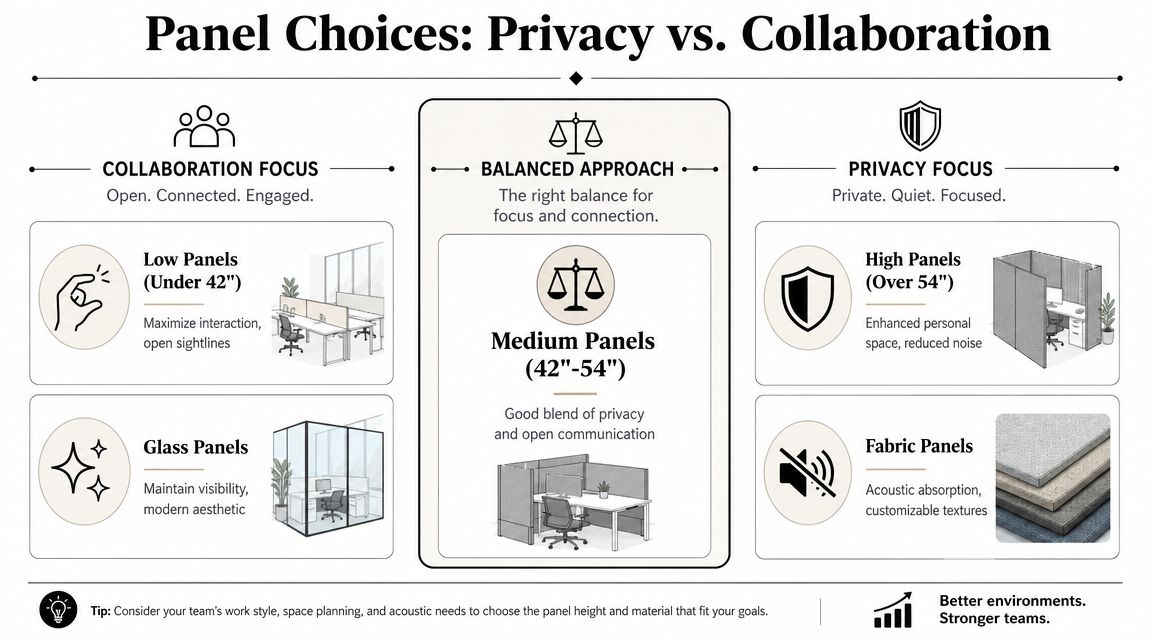
The strongest rule here is simple. Height should be tied to the role. Highly collaborative work may fit 39-inch partitions or lower, while focused work may need much taller walls, according to this role-based cubicle height reference.
A quick height comparison
| Panel Height | Level of Privacy | Ideal For |
|---|---|---|
| Low panels | Low visual privacy, easy interaction | Team-based work, open communication, shared departments |
| Mid-height panels | Moderate seated privacy | General office use, mixed focus and collaboration |
| High panels | High visual separation, stronger enclosure | Focused work, sensitive tasks, phone-heavy roles |
That sounds straightforward, but buyers often get tripped up by one question. "If low panels support collaboration, shouldn't we use them everywhere?" Usually, no. Collaboration isn't the same as constant exposure. People still need moments of concentration, visual control, and relief from movement in their peripheral vision.
Material changes the result
Height is only half the story. Material changes how a panel behaves.
Fabric panels tend to be the practical choice when sound absorption matters. They soften the space visually and can help reduce the harshness that comes from many voices and hard surfaces in one area.
Glass elements keep sightlines open and can make the office feel less boxed in. They're often a smart fit when you want a cleaner visual language or need to preserve light flow. If your goal is openness without giving up all separation, glass office partitions are worth comparing against traditional panel systems.
For teams that spend much of the day on phones, enclosure usually matters more. In those settings, call center cubicles often make more sense than low-profile stations because they better support repetitive, voice-heavy work.
The mixed-height approach usually wins
Many offices don't need one universal answer. They need zones.
- Sales or service teams may do better with lower or mid-height stations that support quick communication.
- Finance, HR, or detail-heavy admin roles often benefit from more screening.
- Manager stations may need a little extra enclosure or guest-facing surface area rather than a larger desk.
A practical way to fine-tune this is by using desk divider panels where full-height enclosure would be too much but some separation would still help.
Privacy and collaboration aren't opposites. They're settings you adjust based on what people need to do at the desk.
Integrating Power Data and Choosing Finishes
A workstation can look clean in a rendering and still fail on day one if people can't plug in what they need. Power and data planning is where many first-time buyers realize that workstation selection is closer to infrastructure planning than simple furniture shopping.
Modern cubicle workstations often function as power-and-data distribution assemblies. Some systems use a slim 2-inch panel with an 8-wire, 4-circuit powerway, which supports higher cable density and reduces visible cords, according to this product configuration example from Juniper Office. The takeaway isn't that every office needs that exact setup. It's that panels can carry serious utility functions.
What to decide before you order
Start with user behavior, not with the catalog.
- Device count per seat matters. A laptop-only user has very different needs from someone with multiple monitors, desk phone equipment, chargers, and accessories.
- Outlet location matters too. Base access may be enough in some layouts, while desktop access is more convenient in others.
- Reconfiguration plans should influence your wiring strategy. If departments move often, embedded distribution can save headaches later.
This is also where outside coordination becomes important. Your furniture plan, electrician, and low-voltage team need to align before installation day. If you're managing a project that also involves external connectivity work, a specialist in London & Essex structured cabling can be a useful reference point for thinking through how data runs interact with workstation layouts.
Field advice: If users will rely on extension cords and floor-level power strips after move-in, the plan wasn't finished. It was deferred.
A related element is the vertical route to power. In open areas without nearby walls, an office cubicle power pole may solve utility access more neatly than trying to improvise after the stations are in place.
Finishes and storage affect daily function
Once utility planning is settled, finishes become easier to evaluate sensibly. You're no longer asking only, "What looks good?" You're asking what will hold up, stay clean, and support the kind of work happening at each station.
Common choices usually revolve around:
- Laminate work surfaces for durability and easy wipe-down
- Fabric panel upholstery where tackability or softer acoustics matter
- Painted metal trim to define the visual character of the system
- Pedestals, shelves, and overheads based on how much storage needs to live at the desk
Customization starts to matter. A team handling active files may need more enclosed storage. A hybrid group may do better with lighter storage and cleaner surfaces. For layouts that need those adjustments, custom office cubicles make more sense than forcing every department into one preset package.
Budgeting for Cubicles and Calculating ROI
A first-time buyer often starts with a number that sounds simple. What does one cubicle cost? In practice, that question works like asking what a car costs without deciding whether you need a compact sedan or a work truck. The useful budget question is narrower and more practical: what does each employee need to work well, how much floor area can the office support, and what level of infrastructure should be built in now rather than patched in later?
That shift matters because workstation budgets are really three decisions happening at once. You are buying furniture, assigning square footage, and choosing how much future change the system can absorb. If you price only the furniture line, you can end up underestimating the total project or buying stations that become expensive to adapt six months later.
A clear budgeting framework usually includes four parts:
Footprint cost
The size and quantity of stations, plus the circulation space needed around them.Specification cost
Panel height, worksurface size, storage, finish level, and any glass or accessory upgrades.Infrastructure cost
Power, data coordination, field conditions, and any building limitations that affect labor.Change cost
How easily the stations can be reconfigured, added to, or reused if the team changes.
The fourth item is where many buyers get tripped up.
A lower initial price can be real, but it is not always lower total cost. A basic benching setup may save money on day one. If the team later needs more acoustic control, storage, or departmental separation, the retrofit can erase those savings quickly. A modular cubicle system costs more upfront in some cases, but it often gives facilities teams a better chance to rearrange the office without starting over.
Industry reporting still points to ongoing demand for partitioned work areas. Grand View Research tracks the broader office furniture market and notes sustained demand tied to hybrid work, reconfiguration, and space efficiency in commercial offices: Grand View Research office furniture market analysis. That does not prove every office should use cubicles. It does support the broader business case that companies continue to invest in adaptable workstation systems rather than treating them as outdated leftovers.
For ROI, the simplest approach is often the strongest. Measure the purchase against the problems it solves.
- Space use improves when more people can work comfortably in the same footprint without squeezing aisles or overloading shared rooms.
- Work gets easier when employees have the right amount of surface area, storage, and visual separation for their tasks.
- Future churn costs drop when adds, moves, and reconfigurations can happen within the existing system.
- Service life increases when the product is installed correctly and supported with matching components over time.
Installation deserves a place in the budget conversation because mistakes there are expensive. Misaligned panels, incomplete electrical connections, and damaged finishes create rework, downtime, and frustration that never show up in the original furniture quote. That is one reason many buyers include professional office furniture installation services as part of the ROI calculation rather than treating installation as a minor add-on.
Used cubicles can make sense for short timelines or tighter budgets. New systems often make budgeting easier when finish consistency, integrated power, warranty coverage, and future add-ons matter more than the lowest entry price. The right choice depends on how long you expect the layout to last, how often the team may change, and how much risk you want to carry after move-in.
Cubicle By Design often helps clients compare these trade-offs in one decision framework instead of splitting them into separate conversations about furniture, IT, and facilities. That approach usually leads to a budget that is easier to defend because it reflects how the office will function, not just what the line items cost on paper.
Bringing Your Vision to Life with Design and Installation
Most projects become manageable once you turn abstract decisions into a visible layout. That means moving from "we think we need mid-height stations" to an actual plan showing footprints, aisles, storage, power paths, and departmental zones.
One useful starting point is a visual configuration tool. The Cubicle By Design custom cubicle designer lets buyers explore dimensions, privacy levels, finishes, storage, and electrical options in a more concrete way than a spreadsheet ever will. For teams that are still sorting out what they need, that kind of tool helps narrow the conversation quickly.

What a smooth project usually includes
A good rollout isn't only about choosing the furniture. It also depends on who is coordinating the details.
Space planning should confirm that the chosen footprints fit the room, circulation, and building conditions.
Project management keeps decisions from slipping between departments like facilities, IT, and leadership.
Delivery and staging matter when the site has access restrictions, occupied areas, or phased occupancy dates.
Installation matters because even a well-specified system can underperform if panels, power, and alignment are handled poorly on site.
If you're evaluating implementation support, office furniture installation services are worth reviewing early instead of treating installation as an afterthought.
A practical way to move from idea to order
The easiest projects tend to follow a simple sequence:
- List the roles that need stations and note what each person keeps at the desk.
- Assign preliminary footprints based on equipment and task type.
- Choose privacy levels by team, not across the whole office.
- Mark utility needs so power and data decisions happen before procurement.
- Review finishes and storage only after the functional plan is stable.
- Finalize installation logistics with realistic delivery and move-in timing.
Here's a short walkthrough that helps visualize how those decisions come together in a real system:
The most important thing is that you don't need to solve every detail alone. A workstation project gets much easier once someone translates your headcount, floor plate, and work patterns into a coordinated furniture plan. That can happen through a designer, dealer, architect, or facilities consultant. What matters is that the process connects layout, product specification, and installation instead of treating them as separate problems.
For broader planning context, the Cubicle By Design homepage shows the categories and system types commonly used in modular office projects, which can help buyers compare cubicles, glass partitions, and related workstation solutions in one place.
If you're ready to turn rough ideas into an actual office plan, Cubicle By Design offers a practical path from concept to installation, including configurable workstation options, layout support, and tools that help you match privacy, footprint, and utility needs to the way your team works.