What Is The Average Cubicle Size? A Guide To Office Planning | Cubicle By Design

If you ask someone to picture an office cubicle, they're probably thinking of a 6'x6' space. It's the classic, the industry standard that gives you 36 square feet of personal workspace. This size really hit the sweet spot for balancing an employee's needs with the practical realities of an office floor plan. At Cubicle By Design, we've seen this dimension serve as the foundation for countless efficient office layouts.

What The Standard Cubicle Size Means Today

You can think of the 6'x6' cubicle as the reliable sedan of the office world. It's functional, gets the job done, and works for a huge range of professional roles. But just knowing the average isn't enough anymore.

A modern office needs a more thoughtful approach than just defaulting to the standard. Different jobs demand different tools, different amounts of space, and different levels of privacy. The right size is always more important than the average one.

The 6'x6' footprint still reigns supreme, comfortably accommodating about 80% of general administrative roles. Panel heights usually land somewhere between 53 to 65 inches, striking a great balance between private, focused work and easy collaboration. To give you a real-world idea, a 10,000-square-foot office can typically fit around 225 of these workstations once you account for aisles and common areas.

Common Cubicle Sizes At A Glance

To help you get a feel for the different options, here's a quick rundown of the most common cubicle footprints and what they're typically used for.

Cubicle Size (W x D) Total Square Feet Primary Use Case
5' x 5' 25 sq ft High-Density, Call Center, Task Work
6' x 6' 36 sq ft Standard Professional, Admin Staff
6' x 8' 48 sq ft Professional with More Equipment
8' x 8' 64 sq ft Management, Focused Work, Meetings

Getting a handle on these basic sizes is the first step toward creating a workspace that actually helps your team do their best work. For a more detailed breakdown, you can dive into our complete guide on standard cubicle dimensions.

Matching Cubicle Dimensions To Job Functions

Picking the right cubicle isn't just about filling up your floor space; it’s about creating an environment that actually helps people do their best work. A one-size-fits-all approach is a recipe for frustration and lost productivity, since different roles have wildly different needs for space, privacy, and collaboration. The real secret is matching the cubicle footprint directly to the job function.

Think of it like choosing the right tool. You wouldn't use a sledgehammer for a delicate repair, and you definitely wouldn't give a tiny desk to a designer who needs to spread out massive blueprints. When the dimensions fit the daily tasks, you're giving your team the resources they need to knock it out of the park.

This breakdown shows how the standard 6×6 cubicle hits that crucial balance between personal workspace and overall efficiency.
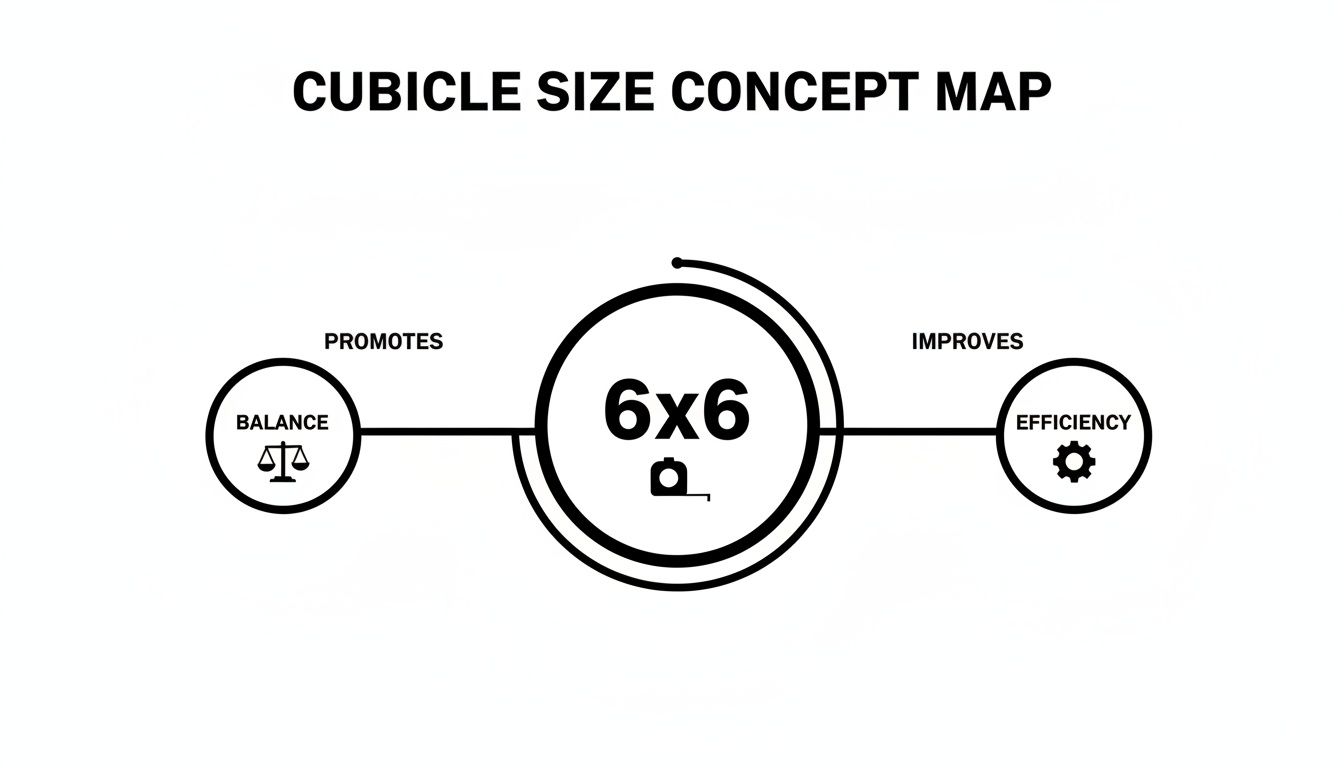
A 6x6 cubicle concept map illustrating the balance between personal space, storage, and efficiency.

As you can see, this common size provides a solid middle ground, making it a dependable starting point for a lot of office layouts.

Small Footprints For High-Volume Roles

For high-density environments like call centers or data entry teams, efficiency is everything. The goal is to maximize your headcount in a given space while still giving each person a functional spot to work. This is where smaller cubicles really shine.

A 5'x5' workstation, giving you 25 square feet, is the go-to solution here. This compact size provides just enough room for a computer, a phone, and minimal paperwork. It’s perfect for task-oriented roles that don't require much storage or elbow room, allowing you to boost your team size without leasing more real estate.

The Professional Sweet Spot

The 6'x6' and 6'x8' cubicles are the undisputed workhorses of the modern office. These sizes hit that sweet spot for most professional and administrative staff, offering a healthy balance of personal space and floor plan efficiency. A 6'x6' cubicle provides 36 square feet, which is plenty of room for a dual monitor setup, a decent chair, and personal storage.

When a role demands a bit more—maybe extra equipment or surface area for laying out documents—the 6'x8' is an excellent upgrade. Its 48 square feet can easily accommodate an L-shaped desk, creating separate zones for computer work and other tasks. There's a reason you see these versatile sizes in so many corporate offices.

Spacious Workstations For Management And Focus

Managers, executives, and anyone whose role requires deep concentration or frequent private meetings need more than just a desk. They need a functional office within the office, and that's where larger dimensions come into play. An 8'x8' cubicle or bigger essentially transforms a standard workstation into a semi-private office.

With 64 square feet or more, you suddenly have enough room for a large desk, guest chairs for one-on-one meetings, and beefed-up storage like filing cabinets or bookcases. Our private office cubicles are a perfect example of this.

These larger footprints are almost always paired with higher panels—65 inches or more—to provide the acoustic and visual privacy needed for confidential discussions and heads-down, focused work.

It's interesting to see how this fits into the bigger picture. Globally, the average office space per employee ranges from 75 to 175 square feet, with cubicle sizes generally shrinking over the decades. In North America, the gold standard is around 150-175 sq ft per person. A typical 36-48 sq ft cubicle fits nicely into that, leaving plenty of room for collaborative zones and walkways. You can learn more about how typical office cubicle sizes fit into these broader design trends.

Planning Your Office Layout Beyond The Cubicle

Choosing the perfect cubicle size is a huge first step, but how you arrange them on the floor is what truly separates a functional workspace from a frustrating maze. Think of your office floor plan as a small city. The cubicles are the buildings, but you absolutely need well-planned roads (aisles) and essential utilities (power and data) to make it a place people can actually work.

This is where effective space planning comes in. It’s all about creating a natural flow for people walking around, making sure everyone can get to printers and break rooms, and keeping the whole place accessible. Without that foresight, even the best-designed cubicles will just lead to a cluttered, unproductive mess.

Mastering Aisle Width And Accessibility

One of the most common—and costly—mistakes we see is underestimating aisle space. Trying to cram in one too many workstations might look good on paper, but in reality, it just creates traffic jams and major accessibility problems. Following ADA guidelines isn't just about checking a legal box; it's a best practice for creating a comfortable office for everyone.

To keep things moving and stay compliant, your main walkways should be a bare minimum of 36 inches wide. For those high-traffic "main streets" that see people coming and going all day, you really want to expand that to 44-48 inches.

And don't forget about chair "swing space"! Someone pushing back from their desk can instantly block an aisle. Building in a little extra buffer prevents those constant "excuse me's" and accidental collisions.

Integrating Power And Data Seamlessly

In any modern office, reliable access to power and data is completely non-negotiable. The trick is to plan for these utilities before a single cubicle panel is installed. Trust us, retrofitting electrical and network drops later is a massive headache that costs way more in time and money than just doing it right from the start.

Think through these key elements while you're still in the planning phase:

  • Outlet Placement: How many plugs does each person really need? Count up monitors, computers, phone chargers, and desk lamps. Most modern cubicles have slick integrated power poles that hide the wiring right inside the panels.
  • Data Ports: Is your team plugging into wired Ethernet, or are you all-in on Wi-Fi? Plan where your data ports will go right alongside the electrical outlets for a clean, organized setup.
  • Future Growth: Always plan for more capacity than you need today. It's so much easier to add a few extra data drops now than it is to tear things apart to expand your network later.

When you're mapping out the big picture, knowing how to work with floorplans and commercial spaces is fundamental to getting the design right. A truly great layout considers how every single element—not just the average cubicle size—works together. For a deeper dive into creating a layout that works, check out our expert advice on office space planning and design.

How To Choose The Right Cubicle Size For Your Team

It’s one thing to know the average cubicle size, but it’s another thing entirely to find the right size for your people. That's where a truly productive office is born. The best choice has less to do with industry standards and everything to do with the real-world demands your team faces every single day.

To get this right, you have to go beyond just the measurements and really think about daily workflow. Start by asking detailed questions about how your team actually gets their work done. This is the foundational step that ensures you’re investing in a solution that helps them, not hinders them.

The goal is to create a workspace that feels custom-fit to the tasks performed within it. When the environment aligns with the work, employees are empowered to perform at their best, leading to better focus and higher quality output.

This isn’t just about buying furniture; it's a strategic decision that digs into your team's specific needs.

A Practical Checklist For Choosing The Right Size

Use this checklist to break down what each role or department requires. Answering these questions will give you a crystal-clear picture of what your team truly needs to thrive, ensuring you pick a footprint that actually enhances how they work.

  • What are their primary daily tasks? Is the job all about deep, focused work like coding or writing? Or is it more about collaboration and constant communication? This first question helps you figure out the right balance of privacy and desk space.
  • What equipment is essential? Make a real list of everything that needs to live on or around the desk. Think about the number of monitors, docking stations, physical phones, or any specialized hardware. A dual-monitor setup alone usually demands a wider workstation to keep things from feeling cramped.
  • How much storage do they need? Do your people need quick access to physical files, bulky binders, or product samples? You'll want to plan for built-in storage like pedestals or overhead bins to keep their work surfaces clear and organized.
  • Is collaboration or privacy the priority? For teams that need to talk constantly, lower panels might be the way to go. But for roles that handle sensitive information or require intense concentration, you'll want taller panels and a more spacious layout.
  • How will hybrid work impact your needs? If employees are only in the office a few days a week, you might lean toward a more flexible, hoteling-style setup. This approach can save a ton of space while still giving everyone a fully-equipped station when they need it.

Thinking through these points gets you out of a generic conversation about average sizes and into a specific plan tailored to your organization. It's a deliberate approach that makes sure your investment directly supports your team's success. For more on this, you can read our guide on whether cubicles are right for your office to gain some extra perspective.

Visualizing Your Space With Sample Floor Plans

Theory and checklists are great, but sometimes you just have to see it to believe it. To make all these concepts click, let's walk through three completely different floor plans for a hypothetical 2,000 sq ft office. Seeing how the average cubicle size plays out in a real-world scenario can really spark some ideas for your own space.

Pay attention to the trade-offs each example makes between headcount, individual space, and the overall feel of the office. Each layout tells a different story about a company’s priorities—whether it’s maximizing every square foot or building a more open, collaborative culture.
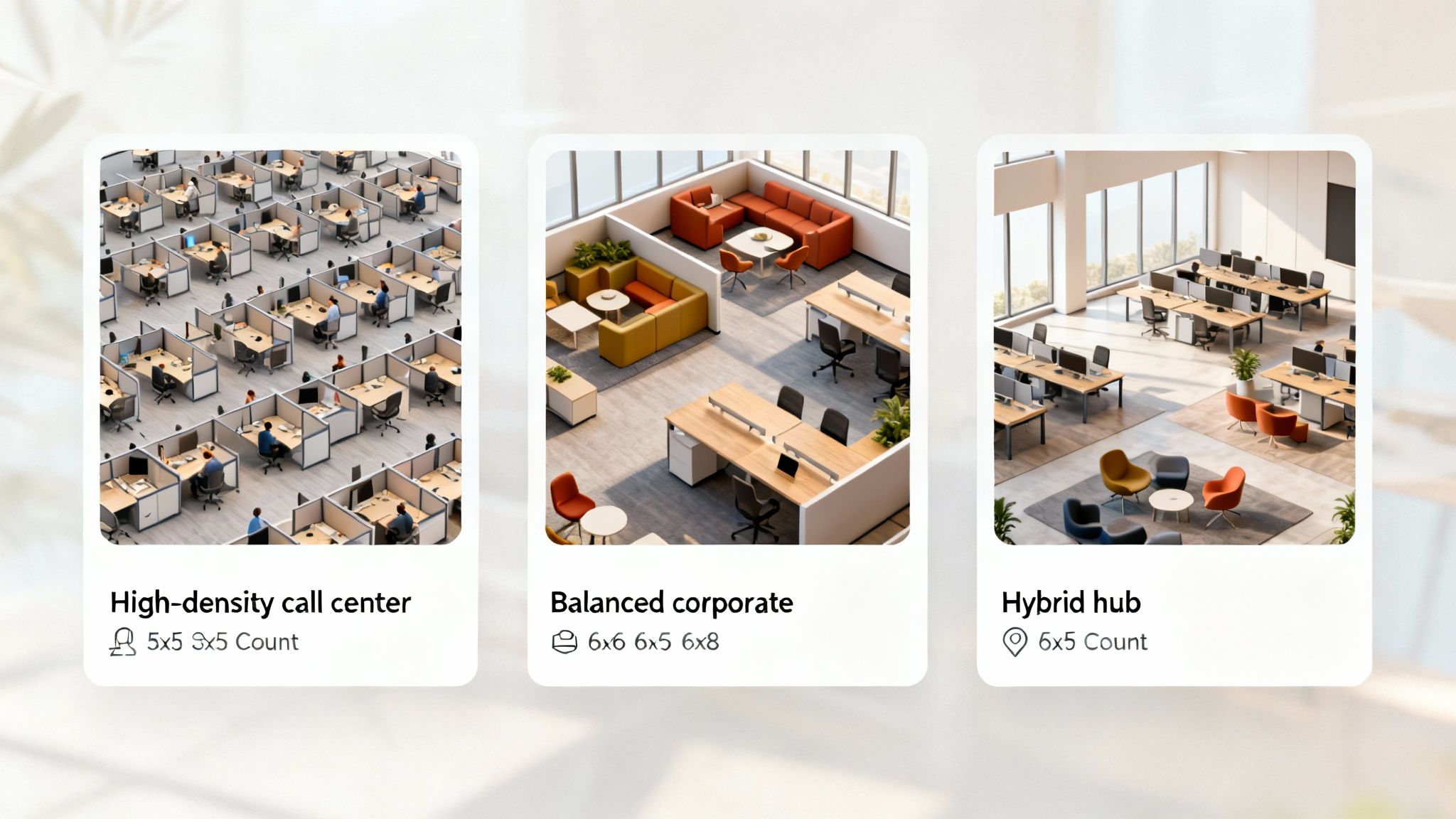
Three different office layouts comparing a high-density call center, a balanced corporate space, and a flexible hybrid hub.

Layout 1: The High-Density Call Center

Picture a fast-paced sales floor or a busy support center. Here, the number one goal is fitting as many people as possible without it feeling chaotic. This layout leans heavily on compact 5'x5' workstation cubicles to get the job done.

  • Capacity: You can comfortably fit approximately 30-35 employees in this setup.
  • Atmosphere: It’s all about high energy. The environment is buzzing, and information flows fast.
  • Best For: Phone-heavy, task-based roles that don't require a ton of desk real estate.

Layout 2: The Balanced Corporate Office

This is the classic, tried-and-true approach. It’s a smart blend of different cubicle sizes to serve a variety of roles within the company. It might feature standard 6'x6' cubicles for most of the team, slightly larger 6'x8' stations for supervisors, and a few 8'x8' private office cubicles for managers who need more privacy.

  • Capacity: This balanced plan works well for around 20-25 employees.
  • Atmosphere: The vibe is structured and professional. There are clear departmental zones and a functional, easy-to-understand flow.
  • Best For: Traditional company structures with diverse roles that demand different levels of space and privacy.

Layout 3: The Modern Hybrid Hub

This layout is all about flexibility and reflects the huge shift in how we work today. It has fewer dedicated workstations—maybe a handful of spacious 6'x8' stations for deep focus—but adds in open collaborative zones, touchdown spots for visiting staff, and small meeting pods.

  • Capacity: This model is designed for a smaller on-site headcount, typically 12-18 employees at any given time.
  • Atmosphere: It feels open, dynamic, and collaborative. It encourages people to move around, interact, and work together.
  • Best For: Companies embracing a hybrid model where the office is mainly a hub for team projects, meetings, and building connections.

This trend toward adaptable, multi-purpose spaces is also taking over the coworking world. Data from shared workspaces shows the average North American facility provides about 97 sq ft per person, mixing dedicated desks with flexible hot-desking options to meet changing demands.

Hopefully, seeing these layouts gives you a solid starting point. When you’re ready to start playing with your own ideas, you can transform your office with our interactive cubicle designer and bring that vision to life.

Common Questions About Cubicle Sizes And Planning

Even the best-laid plans run into a few last-minute questions. When you're designing an office layout, getting clear answers to those lingering details can make the final steps feel a whole lot smoother. We’ve put together a few of the most frequent questions we hear about cubicle sizes and how they fit into the bigger picture.

Think of this as your final check-in before you commit to a design. By sorting out these common points now, you can move forward feeling confident that you’ve covered all your bases for a truly great workspace.

What Is The Most Common Cubicle Size In Modern Offices?

The classic, go-to size for a standard cubicle is 6'x6', giving you a solid 36 square feet of personal workspace. It’s been a popular choice for decades for a good reason—it just works. This footprint strikes a great balance, easily fitting a desk, an ergonomic chair, and a bit of storage without making an employee feel boxed in.

Office design trends come and go, but the 6'x6' cubicle remains a cost-effective and efficient staple. It’s a workhorse for a huge range of professional and administrative roles. In fact, many of our modular cubicles are ordered in this very configuration because of its proven ability to balance employee comfort with smart floor plan usage.

How Do I Account For Walkways And Common Areas In My Layout?

This is a big one. It's easy to get caught up in the number of workstations and forget to leave room for people to actually move around. Planning for circulation and shared areas is a critical step that, if missed, can lead to a cramped, frustrating office.

As a rule of thumb, major walkways need to be at least 44-48 inches wide. This isn't just for comfort; it ensures you meet ADA guidelines and allows two people to pass without doing a sideways shuffle. For the smaller aisles between rows of workstation cubicles, you’ll want a minimum of 36 inches.

Here’s a helpful trick: once you’ve calculated the total square footage for all your cubicles, tack on an extra 25-35%. That buffer will cover your hallways, break rooms, printer stations, and other shared spaces.

Are Smaller Cubicles Becoming More Popular With Hybrid Work?

The shift to hybrid work has had an interesting, and somewhat divided, impact on cubicle sizes. On one hand, yes, some companies are leaning into smaller, unassigned "hoteling" stations. Think compact 5'x5' setups that support a team that’s in and out of the office. It’s a practical way to maximize space when you don't have a full house every day.

On the other hand, many businesses are going in the completely opposite direction. They see the office as a destination for focused, collaborative work and want to make the on-site experience a major draw. For them, upgrading to spacious 6'x8' or even 8'x8' private office cubicles makes coming to the office more comfortable and productive. The right move really boils down to your company's culture and what you want your physical workspace to achieve.

What Cubicle Panel Height Is Best For Privacy?

Panel height is your primary tool for controlling both visual distractions and the ambient noise level in the office. The right height is all about the kind of work your team is doing.

Here’s a quick breakdown of the most common choices:

  • Low Panels (around 42 inches): These are perfect if you want to cultivate an open, collaborative vibe. They allow for easy conversation and sightlines across the room but offer almost no privacy.
  • Mid-Height Panels (53-54 inches): This is the sweet spot and our most popular option. It provides "seated privacy" for focused work but still lets managers see across the office when they stand up.
  • High Panels (65 inches or taller): When a role requires deep concentration or involves confidential information, tall panels are the way to go. They create serious visual and acoustic separation, giving you a private office feel within a flexible system.

Getting these details right can make or break an office design. You can play around with all these options and more using our interactive Cubicle Designer tool.


At Cubicle By Design, our goal is to help you build a better workplace with furniture that truly fits your team. From the first sketch to the final installation, we’re here to provide the expertise and products to bring your vision to life.

Ready to start designing your ideal office? Visit us online today!
Read More

Standard Cubicle Size: A Practical Guide | Cubicle By Design

If you ask what the standard cubicle size is, most people in the industry will tell you it’s 6’x6’. And they’re not wrong. That dimension has become the go-to baseline for office planning, offering a solid sweet spot between personal space and efficient use of the floor plan.

Defining the Modern Workspace Footprint

But thinking of 6'x6' as a rigid rule is a mistake. It’s really just a starting point—a flexible foundation you build on based on what your team actually does all day. The right size for your office is a direct reflection of your company’s culture, your employees’ roles, and the kind of work they need to get done.

This whole idea of a "standard" is always shifting, too. Decades ago, the average office worker might have had close to 100 square feet. Over time, thanks to smaller tech and a focus on cost-efficiency, that number has shrunk. The 36-square-foot 6'x6' footprint is what we’ve landed on today, but it’s part of a much longer story in office design.

Common Cubicle Dimensions

To get a better feel for your options, let’s look at the most common sizes you’ll encounter. It’s pretty clear that what a general staff member needs is completely different from a manager who needs extra room for small meetings or has more files to wrangle.

  • 6'x6' (36 sq ft): This is the workhorse of the modern office. It’s ideal for most task-focused employees, giving them plenty of room for a computer, some paperwork, and a few personal items without hogging real estate.
  • 6'x8' (48 sq ft): A nice step up, this size is perfect for team leads or anyone who just needs a bit more elbow room. That extra two feet of space is often used for an L-shaped desk or a small filing cabinet, making it a favorite for supervisors.
  • 8'x8' (64 sq ft): Now we're getting into semi-private office territory. This larger footprint is great for managers, engineers, or designers who might spread out blueprints or frequently have a colleague pull up a chair to collaborate.

This concept map really helps visualize how these standard sizes line up with different roles in a company.

As you can see, the definition of "standard" just expands as responsibility and space requirements grow, moving from focused individual work up to managerial duties.

To help you get a quick handle on these options, here's a simple breakdown of the most common dimensions and where they fit best.

Common Cubicle Sizes and Their Applications

Cubicle Size (ft) Square Footage Primary Use Case Common Panel Height Range
5'x5' 25 sq ft Call centers, data entry, telemarketing 42" – 53"
6'x6' 36 sq ft Standard employee, administrative, customer service 53" – 65"
6'x8' 48 sq ft Supervisors, team leads, technical staff 53" – 65"
8'x8' 64 sq ft Mid-level managers, accountants, engineers 65" and up
8'x12' 96 sq ft Executive management, shared workstations 65" and up

This table gives you a great starting point for matching a specific job function with the right amount of real estate.

Visualizing Your Options

Trying to picture these sizes in your own space can be tough. Sometimes, the best way to figure out what works is to see it in action. Browsing through a gallery of office cubicles images can spark ideas and help you see how different layouts look and feel in a real environment.

The goal is to match the cubicle footprint to the job function. An undersized workstation can hinder productivity, while an oversized one wastes valuable real estate and budget.

Here at Cubicle By Design, we have solutions for all these standard sizes and everything in between. Whether you need compact workstation cubicles or spacious private office cubicles, we have you covered. Understanding the basics is the first step, and you might find our guide on cubicle configurations and their applications helpful. Even better, you can play around with different sizes and layouts yourself with our hands-on cubicle designer tool to find the perfect setup for your office.

Why Your Cubicle Dimensions Need a Purpose

Picking a standard cubicle size isn't just about grabbing numbers off a chart; it’s about assigning a specific mission to each workspace.

Think of it like setting up a professional kitchen. A pastry chef needs wide, sprawling counters for rolling dough, while a line cook thrives in a compact, efficient station where every single tool is within arm's reach. Each space is purpose-built for the task at hand.

That same logic is exactly how you should approach your office. A cubicle isn't just a box—it's a tool designed to help an employee do their best work. When you match the dimensions to the job, you stop furnishing an office and start engineering a high-performance environment. It's an investment in productivity, not just furniture.

Matching Size to Job Function

The day-to-day reality of your employees' tasks should be the number one driver behind your size decisions. A one-size-fits-all strategy almost never works because different roles have wildly different needs for space, equipment, and focus.

A high-density call center, for instance, might opt for compact 5'x5' workstation cubicles. This size minimizes the footprint for each person, letting you fit more staff into one area while still providing just enough room for a headset, monitor, and keyboard. The name of the game is efficiency.

On the flip side, an engineering or design team needs room to spread out and think. A much more spacious 8'x8' layout makes sense here. It can easily handle multiple large monitors and physical blueprints, and it gives a colleague enough space to pull up a chair and collaborate without everyone feeling jammed together.

Privacy and Seniority Considerations

Beyond job tasks, the need for privacy plays a huge role. Anyone handling sensitive information, like your HR or finance teams, often needs a larger footprint combined with higher panels to guarantee confidentiality.

Seniority is another factor to weigh. Giving managers and team leads a slightly larger cubicle, like a 6'x8', accomplishes two things:

  • Practicality: It gives them the extra desk space they need for planning, holding small team huddles, or storing more files.
  • Hierarchy: It offers a subtle, unspoken signal of their leadership role in the company, which can be a valuable part of office culture.

The most effective office layouts are the ones where every square foot has a job. When you align cubicle dimensions with roles and collaboration styles, you build a workspace that actively helps your team hit their goals instead of getting in their way.

This thoughtful approach to space planning is what makes or breaks an office design. If you're curious about the nitty-gritty details that create a truly functional workspace, you might want to read our insights on what makes a well-designed cubicle.

Fostering Collaboration and Focus

Finally, your choice of cubicle dimensions directly impacts the balance between teamwork and individual focus. Open, collaborative cultures might use smaller footprints clustered together to make interaction feel natural and easy. Teams that need deep, uninterrupted concentration, however, will do better in larger, more isolated workstations.

Think about how your teams actually work.

  • Do they need to constantly talk and bounce ideas off each other? Smaller, grouped stations could be perfect.
  • Do they need quiet time to crack complex problems? Larger, more enclosed private office cubicles would be a much better fit.

Ultimately, thinking strategically about the purpose behind each cubicle size is what separates a great office from a mediocre one. It turns a logistical headache into a genuine opportunity to boost both morale and productivity.

How Panel Height Shapes Your Office Environment

When people talk about the standard cubicle size, they usually focus on the footprint—the length and width. But it's the panel height, the vertical dimension, that truly defines how an office feels and functions. This single factor quietly dictates everything from privacy and noise control to your company’s entire culture.

Think of it like designing a house. Do you want an open-concept living room where everyone interacts, or a home with traditional, separate rooms for quiet and focus? Neither is better than the other; the right choice just depends on the lifestyle you want to support. In the office, it's about the work style.

Office design has swung back and forth on this for decades. The towering, maze-like cubicles of the past have mostly given way to more open setups, all reflecting shifts in how we work together.

Low Panels for Open Collaboration

The shortest panels you'll find, typically around 39 to 42 inches high, are built for buzz. They sit just below eye level for someone who is seated, creating an environment that feels open, airy, and ready for teamwork.

These are perfect for departments that run on spontaneous conversation. Imagine a sales floor or a creative agency where bouncing ideas around is a constant. The low walls remove any real barrier, making it effortless to ask a quick question, share a screen, or just stay connected to the team's energy.

  • Best For: Sales teams, creative departments, and any role requiring constant interaction.
  • Key Benefit: Promotes a strong sense of community and makes the office feel larger and brighter.
  • Consideration: Offers minimal acoustic or visual privacy, which can lead to distractions.

Mid-Height Panels for Balanced Focus

This is the sweet spot. Mid-height panels, usually around 53 inches, are the most popular choice for a reason. They're tall enough to rise just above the eye level of a seated employee, giving them a clear sense of personal space and visual privacy.

This "seated privacy" is fantastic for focused, individual work, shielding people from the distraction of colleagues walking by. At the same time, all you have to do is stand up to see across the office, ask a neighbor a question, or feel like part of the group. It’s the best of both worlds—balancing the need for concentration with the desire for connection.

For many businesses, the 53-inch panel strikes the ideal compromise. It supports heads-down productivity while preventing employees from feeling completely isolated from their colleagues, making it a versatile choice for a wide range of administrative and technical roles.

Tall Panels for Maximum Privacy

When a job demands deep concentration, confidentiality, or serious noise control, tall panels are the only way to go. Ranging from 65 inches and up, these walls create a genuine semi-private office.

They are essential for roles in HR, finance, or legal departments where sensitive information is a daily reality. The high walls provide excellent visual privacy and, when built with acoustic materials, can dramatically cut down on office chatter. This setup is all about minimizing distractions so employees can tackle complex tasks without interruption. If you're looking to create quiet zones, our guide to improving office cubicle privacy has some great tips.

Ultimately, the right panel height for your standard cubicle size comes down to the work happening inside it. At Cubicle By Design, we offer a full range of panel heights across all our cubicle systems so you can find the perfect match. Whether you need collaborative workstation cubicles or focused private office cubicles, our cubicle designer tool lets you customize every detail to build a workplace that truly works.

Planning Your Office Layout for People and Workflow

Once you’ve locked in the right standard cubicle size for your teams, the next big step is arranging them. You're not just fitting desks into a room; you're building an ecosystem. A thoughtful layout can be the difference between a place that feels disjointed and one that buzzes with productive energy.

Think of it like planning a city grid. You need wide avenues for the main traffic and smaller side streets that connect different neighborhoods. In your office, this translates to clear walkways and logical groupings that actually support how your teams work together.

Common Cubicle Configurations

There are a few proven ways to arrange workstations, and the best one really comes down to your company’s workflow and culture.

  • Linear Rows: This is the most straightforward setup, with cubicles lined up back-to-back. It's incredibly efficient for departments like accounting or data entry, where individual focus is the name of the game and work moves sequentially down the line.
  • Clusters or Pods: Grouping four to six cubicles into a pod creates a natural neighborhood for a project team. This is perfect for encouraging collaboration, as team members can easily chat without broadcasting their conversations to the entire office.
  • Spine-Based Layouts: Here, a central "spine" houses all the power and data cabling, with workstations branching off it. This approach makes tech management a breeze and keeps the whole space looking clean and organized.

These are great starting points. For more design inspiration, you can also check out some transformative office study room ideas to see how others are creating productive workspaces.

The Non-Negotiables of Office Flow

Beyond just arranging the furniture, a few critical factors ensure your office is safe, comfortable, and compliant. Getting these wrong can lead to frustrated employees and even expensive code violations.

First up: walkway width. Your main traffic arteries—the paths leading to exits, break rooms, and conference rooms—need to be at least 44 inches wide. This gives two people enough room to pass comfortably and meets most accessibility standards. For the smaller aisles between cubicle rows, 36 inches is the minimum.

A well-planned office layout prioritizes easy movement. If people feel like they’re navigating an obstacle course just to get to their desk, it creates a low-grade, constant friction that chips away at morale and productivity.

You also have to think about building codes, especially when it comes to fire safety. Your layout can't block sprinkler systems or emergency exits. It’s always a smart move to check local regulations before you start moving anything.

To stay on track, a simple checklist can make all the difference.

Office Layout Planning Checklist

Here's a quick rundown to ensure your layout is functional, compliant, and optimized for how your team actually works.

Planning Step Key Consideration Best Practice Tip
1. Map Your Workflow How do teams and individuals interact throughout the day? Group collaborative teams in pods and place departments with sequential workflows in linear rows.
2. Measure Your Space What are the exact dimensions, including columns and doorways? Create a scaled floor plan before ordering furniture. Account for every pillar and outlet.
3. Define Walkways How will people move through the office? Designate main traffic paths (44" min) and secondary aisles (36" min) for clear, safe passage.
4. Check Local Codes Does the layout meet fire safety and ADA requirements? Consult local building codes to ensure all exits, sprinklers, and accessible routes are unobstructed.
5. Plan for Power & Data Where are the existing outlets and data ports located? Use a spine-based layout or power poles to avoid trip hazards from extension cords. Ensure every desk has access.
6. Get Feedback What do the people who will use the space actually need? Involve department heads or team leads in the planning process to avoid overlooking practical needs.

Following these steps will help you create a space that not only looks good on paper but works great in reality.

Power and Data Planning

In a world run by tech, planning for power and data is just as crucial as planning for people. Before you finalize anything, map out where your outlets and data ports are. A spine-based layout is a massive help here, but you still have to make sure every employee can plug in without a jungle of extension cords creating trip hazards.

This is where getting some expert guidance can save you a world of headaches. A professional space planner can help you create a layout that not only looks fantastic but functions flawlessly, taking care of every detail from walkway widths to power distribution. You can get a head start by exploring a detailed office space planning guide to get a handle on all the key factors.

Essential ADA and Building Code Considerations

Beyond just picking a layout that looks good, your office plan absolutely must be safe, accessible, and up to code. This isn't just about sidestepping some hefty fines or having to tear everything out and start over. It's about creating a workplace where every single employee can move around and work safely and comfortably.

You can't treat regulations like the Americans with Disabilities Act (ADA) and local fire codes as an afterthought. They are the non-negotiable foundation of any smart office plan. Navigating these rules might seem daunting, but it all comes down to a few core ideas of safety and access. Thinking about this stuff from the very beginning will save you a world of headaches later on.

Decoding ADA Requirements

The Americans with Disabilities Act (ADA) is there to make sure workspaces are accessible to everyone, including team members who use wheelchairs or have other mobility challenges. When you're planning your cubicle layout, this directly impacts your standard cubicle size and the pathways weaving through the office.

The biggest rule here is the accessible route. You need clear, unobstructed paths at least 36 inches wide that connect workstations to all the common areas—think entrances, restrooms, and the break room.

Your layout also needs to have enough room for people to actually maneuver. This often means designing certain workstations with a larger footprint to allow for a 60-inch diameter turning space for a wheelchair. Desk surfaces have to be at an accessible height, too, usually between 28 to 34 inches from the floor, with plenty of knee clearance underneath.

Compliance is proactive, not reactive. Building an accessible office from the ground up creates a genuinely welcoming culture and avoids the significant expense and disruption of a forced redesign down the road.

Meeting Fire and Safety Codes

Fire safety is the other critical piece of the puzzle that shapes your cubicle arrangement. Local building codes are written to ensure one simple thing: that everyone can get out of the building quickly and safely in an emergency.

A key focus is maintaining clear egress paths. Your cubicles cannot block any designated fire exits, and your main hallways must meet minimum width requirements—often 44 inches or more—to handle a crowd moving in a hurry.

Here's a detail people often miss: the relationship between your cubicle panels and the ceiling-mounted sprinkler system. Panel heights and their placement can't get in the way of the sprinklers' spray patterns. In most cases, you must have at least an 18-inch clearance between the top of the panels and the sprinkler heads. Getting this wrong is a serious safety violation.

  • Egress Paths: Keep all designated exit routes completely clear and wide enough for rapid evacuation.
  • Sprinkler Clearance: Ensure at least 18 inches of vertical space between cubicle panels and sprinkler heads.
  • Emergency Lighting: Don’t let tall cubicles block emergency lights or exit signs.

Proper planning makes sure your office isn't just a productive space, but a fundamentally safe one for every person in it. For layouts that demand this level of detail, like creating compliant private office cubicles, getting professional guidance is a smart move. The team at Cubicle By Design has the expertise to help you create a space that meets all necessary codes, ensuring your design is both functional and secure.

Choosing the Right Cubicle Solution for Your Business

Once you have a handle on cubicle sizes, heights, and potential layouts, you can start putting it all together for your own space. Picking the right standard cubicle size is really about matching the furniture to the job function. A smart investment here actively helps your team do their best work, and different types of businesses need completely different setups.

Think about a bustling call center. It’s all about efficiency and focus. In that scenario, compact workstation cubicles with good acoustic panels are the way to go. They knock down the noise and distractions while letting you fit more people into the floor plan, creating an environment that’s built from the ground up for high-volume, individual work.

Tailoring Solutions for Different Business Needs

A growing startup, on the other hand, is playing a totally different game. Their biggest challenge is often just keeping up with growth. For them, a scalable, modular system is a perfect match. These setups can be easily rearranged or added to as new people come on board, giving them the flexibility they need without having to rip everything out and start over every year.

An established corporate headquarters usually needs a bit of everything. The goal is to create spaces for teamwork while also providing the privacy that executives and focused workers need. This might look like open-plan clusters for project teams, paired with taller, more spacious private office cubicles for senior leadership. By the early 21st century, it was common for around 60-70% of office work to happen in modular workstations, showing just how popular this blended approach became. You can learn more about the history of the modern office on thenewatlantis.com.

The best office design is a direct reflection of the business it serves. By visualizing how different teams work, you can select cubicle solutions that address specific needs for collaboration, focus, density, and scalability.

Finding Your Perfect Fit with Cubicle By Design

These examples show that there’s no single “right” answer for every office. The perfect setup is completely tied to your company’s culture and how your teams operate. Whether you need a sea of high-density stations or a few quiet executive suites, the key is having options. You might even be surprised to find that custom-fit cubicles are more affordable than you think.

At Cubicle By Design, our product lines were built to meet these different needs. From our all-purpose general cubicles to more specialized workstations, we have the building blocks for any business. Our online cubicle designer tool makes it easy to play around with different sizes and layouts until you find the perfect fit for your vision and budget, making sure your office is truly built for success.

Your Cubicle Sizing Questions, Answered

Jumping into office furniture planning always brings up a few specific questions. To help you nail down the details, we've pulled together answers to the most common things people ask about cubicle sizes and layout planning.

What’s the Go-To Cubicle Size for a Typical Office Role?

The classic, most common cubicle size you'll see is 6'x6'. It gives you a solid 36 square feet of workspace and really hits the sweet spot between having enough personal room and being efficient with your floor plan. It’s pretty much perfect for most administrative and general office roles. That said, the 6'x8' is also a popular choice for folks who need a bit more desk surface or storage space.

How Much Room Do We Need for Walkways?

Think about how people move through the office. For those main arteries where there's two-way traffic, you'll want to aim for a minimum width of 44 inches. This keeps things from feeling cramped and helps with ADA compliance. For the smaller aisles that run between individual rows of cubes, 36 inches is usually enough. It’s always smart to double-check this against your local building and fire codes, just in case they have their own specific rules.

A great office layout isn't just about the desks—it's about the space in between. Getting the aisle width right is crucial for safety, accessibility, and a smooth flow of traffic, all of which are key for a happy, productive team.

Is It Okay to Mix Different Cubicle Sizes in the Same Office?

Absolutely. In fact, mixing sizes is often a really smart way to build a more dynamic and functional space. You could use standard 6'x6' workstation cubicles for most of your team, give managers a little more breathing room with 6'x8' or 8'x8' setups, and even use smaller pods for touchdown spots or high-density teams like a call center.

The trick is to stick with a cohesive system from one manufacturer. This ensures that even with different footprints, the whole office has a unified, professional look.

How Do I Pick the Right Panel Height for My Team?

Panel height really comes down to how your team works. Here's a simple way to think about it:

  • Low Panels (around 42 inches): These are fantastic for super-collaborative teams. They keep the lines of communication wide open and create a buzzing, energetic atmosphere.
  • Mid-Height Panels (53-55 inches): This is the most popular option for a reason. It gives people privacy to focus when they're sitting down but still makes it easy to chat with a neighbor by just standing up.
  • Tall Panels (65 inches and up): If your team handles sensitive information or needs to block out noise, this is the way to go. Think HR, finance, or legal departments where confidentiality is key.

Getting the right blend of size and height is what turns a good workspace into a great one.


Ready to design an office that truly works for your team? At Cubicle By Design, we specialize in creating flexible, modern workspaces that fit your vision and your budget. Get started with our interactive cubicle designer tool and build your ideal office today.

Read More

Modular Office Furniture for Small Spaces Guide

Trying to fit a functional office into a tight space can feel like an impossible game of Tetris. But there's a secret weapon: modular office furniture. It's the key to creating a productive, adaptable workspace without the bulk of traditional, heavy-handed desks. It’s all about using flexible, reconfigurable pieces to make every single square inch count.

Why Modular Furniture Is the Smart Choice for Small Spaces

If you're staring at a cramped room and wondering how you'll ever make it productive, you're not alone. The old way of thinking—shoving heavy, fixed desks into corners and hoping for the best—just doesn't cut it anymore. Today's workplace, whether it’s a corporate satellite office or a home setup, demands agility. This is where modular office furniture really shines.

Forget bulky, immovable desks. Think of flexible, interconnected systems you can reconfigure on the fly as your needs evolve. This adaptability is the game-changer that sets modular solutions apart from the rest.

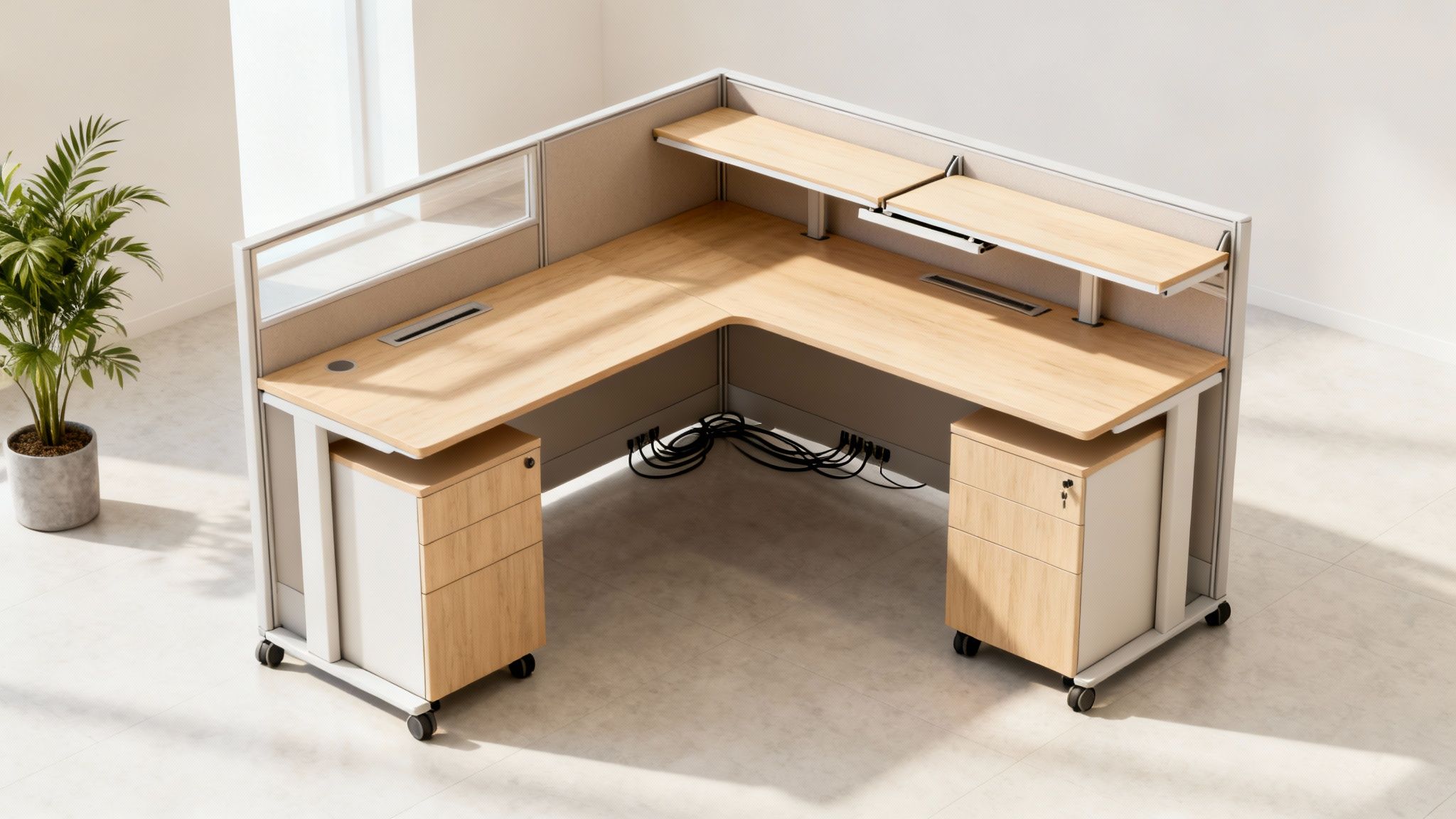
A bright, modern L-shaped office cubicle with light wood desk and mobile cabinets, a key piece of modular office furniture for small spaces.

Unpacking the Core Benefits

The move toward hybrid and remote work has only accelerated this trend. We see companies downsizing their physical footprints and individuals needing to get more out of their home offices every day. It’s no longer just about fitting in a desk; it’s about creating a multi-functional environment that can support different kinds of work.

The core benefits of going modular are pretty clear:

  • Scalability: You can start with a single workstation and easily add more as your team grows. You’re not locked into a fixed layout, which saves a ton of money and headaches down the road.
  • Cost-Efficiency: Instead of gutting the entire office and buying new furniture sets, you can just add or swap out individual components. That long-term value is a huge advantage over traditional pieces.
  • Smart Design: These systems are engineered for efficiency. They often build storage, privacy panels, and power solutions right into the workstation, which kills clutter and frees up precious floor space.

The most successful workspaces aren’t necessarily the largest, but the most intentional. The goal is to use every square foot to support collaboration, culture, and flexibility.

This shift in strategy is backed by the numbers. The global office furniture market, which includes these flexible solutions, was valued at USD 59.7 billion in 2025 and is projected to skyrocket to USD 134.8 billion by 2035. This growth is being driven almost entirely by the demand for adaptable systems that fit how we work now.

Real-World Scenarios

Picture a small startup that needs to rearrange its layout overnight to bring in a new project team. With a modular setup, they can reconfigure their workstation cubicles in a few hours, not days. Or think about a home office that needs to be a quiet focus zone by day, a professional video call background in the afternoon, and a family study area by night. Components like modular office walls can create that crucial sense of separation and order without any permanent construction.

At Cubicle By Design, we see these scenarios play out every single day. Our job is to provide solutions that solve these real-world problems. By embracing modularity, you're not just buying furniture—you're investing in a system that grows and changes right alongside you.

Mastering Your Small Space Measurement and Layout

Before you even think about picking out modular office furniture for small spaces, we need to talk about the single most important step: getting to know your room. An accurate plan is the bedrock of a functional workspace. It’s what separates a confident design project from a chaotic mess of furniture that just doesn't fit.

Guesswork is your enemy here. It leads to cramped layouts and costly returns. So, let’s grab a tape measure and do this right.

The Devil Is in the Details: Measuring Like a Pro

Start with the basics: measure the room’s length and width to get your total square footage. But don't stop there. In a compact office, every inch counts, and it’s the little things that will trip you up.

A common mistake is just measuring from wall to wall. You have to account for every single obstacle and quirk of the room. Get specific and document the precise location and size of:

  • Doors: Measure the door itself, but don't forget the swing path. A standard door that swings inward can gobble up nearly nine square feet of what you thought was usable floor space.
  • Windows: Note their width, how high they are from the floor, and the depth of the sill. This will dictate where you can place taller items like filing cabinets or cubicles with higher walls.
  • Power Outlets & Data Ports: Mark every single one on your sketch. There's nothing worse than designing the perfect layout only to realize your desks are a jungle of extension cords away from the nearest outlet.
  • Structural Elements: Columns, radiators, awkward jutting corners—these things aren’t moving. Measure them and plan around them from the start.

The goal isn’t just seeing if furniture will fit. It’s about figuring out how people will actually move and work in the space. A great design isn't measured in square feet, but in how it feels to use it every day.

Once you have these numbers, sketch out a simple floor plan. You can use graph paper or a free online tool—it doesn’t have to be fancy. This visual map becomes your single source of truth and prevents expensive mistakes down the line. If you want to dive deeper into creating a truly effective workspace, our guide on comprehensive office space planning and design is packed with expert strategies.

Zoning: Your Secret Weapon for Small Spaces

With your floor plan in hand, it's time to think like a designer. Don't see one small room; see several distinct, functional zones. "Zoning" is just a simple way of dedicating specific areas to different activities, and it brings a sense of order to even the tightest floor plan.

Even in a tiny office, you can carve out clear zones for:

  1. Focus Work: These are the spots for heads-down, concentrated tasks. Ideally, you’ll place these away from the main walkway, maybe near a window for some natural light.
  2. Collaboration: It doesn't need to be a full conference room. A small shared table or a cluster of two workstations can create a natural spot for quick team sync-ups without derailing everyone else.
  3. Storage: Group all your storage into one consolidated area. This is where you can make vertical space your superpower. Think tall, narrow shelving or overhead bins built right into your cubicles.

This strategy stops the entire room from feeling like a jumbled, chaotic free-for-all. It creates clear pathways and helps different work styles coexist peacefully.

Choosing the Right Layout for Your Small Office Shape

The actual shape of your room plays a huge role in what layout will work best. A long, skinny room needs a totally different approach than a square one.

To help you visualize what might work, here’s a quick comparison of a few common modular layouts and the room shapes they’re best suited for.

Layout Template Best For (Room Shape) Pros Cons
Perimeter Layout Square or Rectangular Maximizes open central space, which makes the room feel much larger and more open. Can feel a bit formal and isn't always the best for encouraging spontaneous collaboration.
Linear "Galley" Long and Narrow Creates a very clear, efficient walkway and makes the most of the room's length. Can feel cramped if the aisle becomes too narrow; furniture placement is less flexible.
Cluster or "Pod" Square or Wide Fantastic for small teams. It fosters easy communication and a strong sense of teamwork. Can eat up central floor space and might feel crowded if not planned with enough breathing room.
L-Shape Corner Any Shape A brilliant way to make use of corner space that often gets completely wasted. Can create a "dead zone" in the deep corner if you don't plan for accessible storage.

Each option has its trade-offs, but seeing them laid out like this can spark ideas you might not have considered for your specific footprint.

By nailing your measurements and thinking strategically about zones and layouts, you’re building a solid foundation. This is the prep work that ensures your investment in modular office furniture for small spaces pays off, creating a workspace that doesn't just work, but helps your team do their best work.

Okay, you've got your floor plan dialed in. Now for the fun part: picking the actual furniture that brings your small office to life.

This isn't just about grabbing a few desks and chairs. It's about being clever and choosing multi-functional pieces that work harder for you. When you get the right modular office furniture for small spaces, you'll be amazed at how a tight room can suddenly feel organized, efficient, and even spacious.

Think of it like this: every piece of furniture is a tool. A simple hammer does one thing. A multi-tool does a dozen. We're hunting for the multi-tools of the office world.

Private Focus vs. Collaborative Workstations

First thing's first—what kind of work actually happens in this space? Answering this one question will point you to the right core components. Do people need to bury their heads in deep, uninterrupted work, or is the team constantly bouncing ideas off each other?

  • Private Office Cubicles: These are built for concentration. With higher walls and a more defined personal bubble, private office cubicles are the go-to for roles that demand quiet. They create a mental barrier against distractions, which is gold in a busy, compact office.

  • Workstation Cubicles: On the flip side, workstation cubicles usually have lower panels and feel more open. They're designed to encourage chatter and are perfect for teams that need to communicate on the fly. This setup helps keep a small space from feeling cramped or stuffy.

This simple process flow breaks down the planning into three core stages, helping you see the path from an empty room to a finished workspace.

A three-step process flow showing measure, zone, and optimize with icons for planning a modular office.

As you can see, choosing the right components is that final "optimize" step that makes all your careful measuring and zoning pay off.

The Power of Multi-Functional Heroes

In a small office, every single piece of furniture has to earn its keep. Single-use items are a luxury you just can't afford. The trick is to find components that pack multiple functions into one streamlined footprint.

Mobile pedestals are a classic example. These rolling file cabinets tuck right under a desk, giving you secure storage without eating up more floor space. But they can also be pulled out to serve as a temporary extra surface or shifted around to make room for a new team member. Easy.

Smart design isn’t measured in square footage, but in experience. By choosing multi-functional components, you’re designing for efficiency and a better daily workflow, not just filling a room.

The industry numbers back this up. The North American modular furniture market was a USD 30.3 billion business in 2023 and is expected to grow to USD 43.6 billion by 2032. Why? Because businesses everywhere are demanding these kinds of space-efficient designs.

Materials and Ergonomics Matter

Don't forget that how furniture looks is just as important as how big it is. Dark, heavy materials can make a small room feel like a cave. You want to create an illusion of space, and that means choosing lighter finishes.

Keep these material options in mind:

  • Light-Colored Laminates: Think white, light gray, or natural wood tones. They reflect light and make the whole space feel brighter and bigger.
  • Glass Panels: Using frosted or clear glass for cubicle dividers keeps sightlines open while still giving people a bit of acoustic and psychological separation.
  • Slim Profiles: Always go for desks and panels with thin, clean lines. Bulky, thick furniture will just swallow up your space.

Finally, and this is a big one, never sacrifice ergonomics to save a few inches. A compact setup still has to support your team's health and well-being. Look for adjustable-height desks, chairs with solid lumbar support, and monitor arms that get screens off the desk surface while promoting good posture.

We've put together a helpful guide on finding good desks for small spaces that nails this balance between ergonomics and efficiency. When you're ready to start playing with ideas, our interactive Cubicle Designer tool lets you experiment with every component to see what works best for you.

Solving Noise and Privacy in a Compact Workspace

Let's be honest: one of the biggest challenges in a small office is dealing with the constant buzz of activity. When everyone’s elbow-to-elbow, a single phone call can easily break the concentration of the entire room. This is where modular office furniture for small spaces really shines, going beyond just saving space to become a crucial tool for productivity.

It’s not just about the furniture itself, but how you put it to work. Certain modular pieces, like high-walled cubicles or panels wrapped in sound-absorbing fabric, are absolute game-changers for office acoustics. These components act as physical barriers, blocking sightlines and, more importantly, disrupting the path of sound waves to create much-needed pockets of quiet.

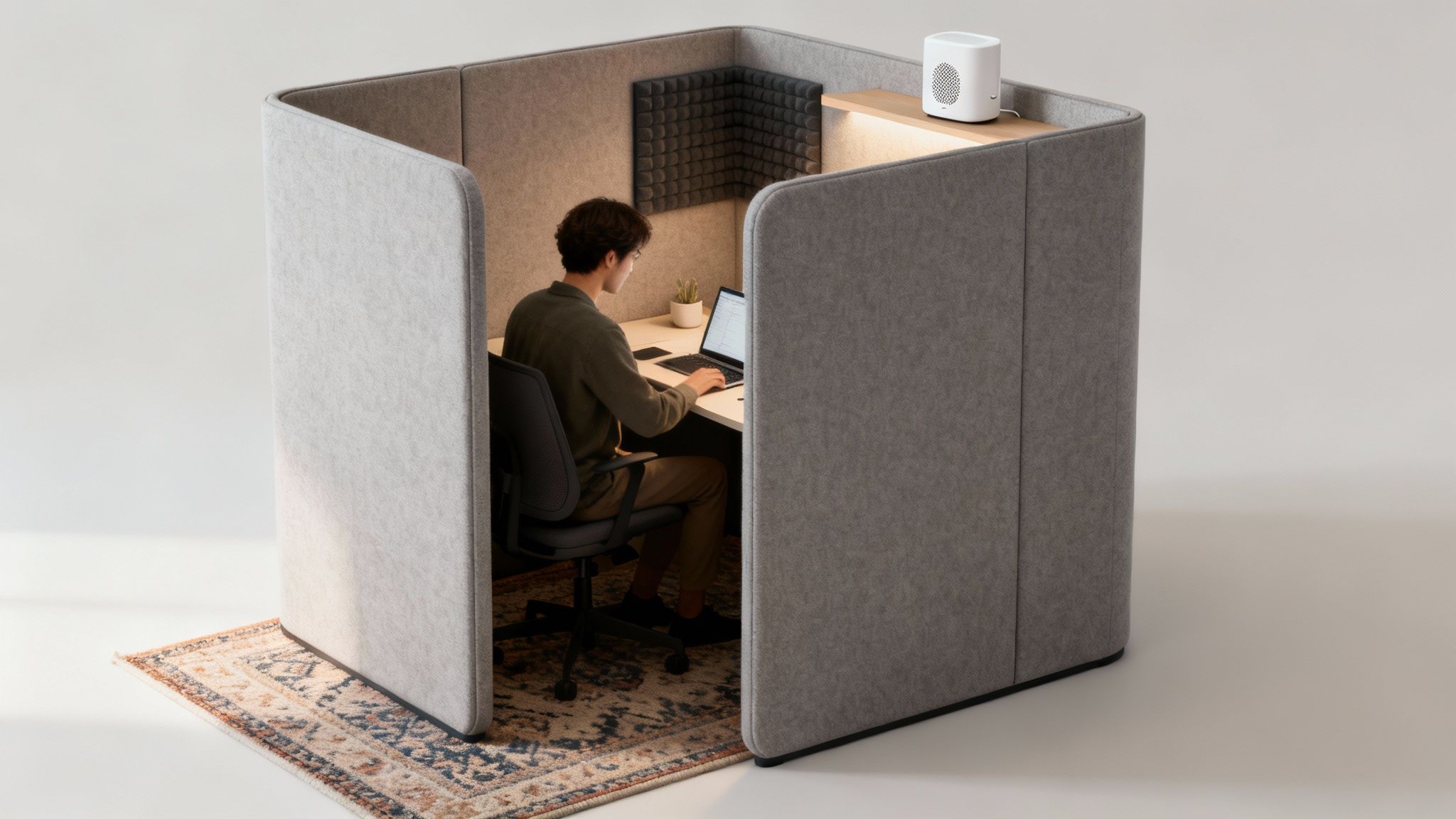
A man in a modular office pod, demonstrating a private furniture solution for small spaces.

This kind of intentional separation fosters a sense of psychological privacy, letting employees focus without feeling like they’re constantly being watched or overheard. The real goal is to build an environment where deep, focused work can happen, even when a teammate is just a few feet away.

Using Modular Components for Acoustic Control

The true beauty of modular systems is how you can configure them to tackle your specific acoustic issues. You get to mix and match components to create a custom-fit solution for your office's unique noise profile—a targeted approach you just can't get with traditional furniture.

Think about incorporating these strategies:

  • High Panels for Focus Zones: For areas meant for heads-down work, use cubicle panels that are at least 65 inches high. That height is incredibly effective at blocking most line-of-sight distractions and significantly muffling conversational noise from nearby workstations.
  • Fabric-Covered Panels: Always opt for panels covered in acoustic-grade fabric when you can. Hard surfaces like laminate or glass bounce sound around the room, but these soft materials absorb it, which helps lower the overall ambient noise level.
  • Staggered Layouts: Try to avoid lining up desks in long, straight rows. A staggered or offset layout naturally breaks up the direct path sound travels, stopping noise from ricocheting from one end of the office to the other.

The most productive small offices aren't the quietest ones—they're the ones that give people control over their sensory environment. Smart furniture choices provide that control without sacrificing a collaborative atmosphere.

This is a core principle we build into our designs at Cubicle By Design. We know a great layout balances the need for both collaboration and quiet focus, which is why our systems offer such a wide range of panel heights and materials.

A Holistic Approach to a Quieter Office

While your furniture is your first line of defense, creating a truly focused workspace requires a multi-layered plan. You can boost the acoustic performance of your modular setup with a few simple environmental tweaks that work together to soak up and mask distracting sounds.

Think beyond the cubicle walls and try these complementary tactics:

  1. Soften the Surfaces: Hard floors and bare walls are basically echo chambers. Adding soft materials like area rugs, curtains, or even fabric-covered art can absorb a surprising amount of ambient noise.
  2. Add Acoustic Wall Panels: If your room has a serious echo problem, dedicated acoustic panels mounted on the walls can make a world of difference. They come in all sorts of styles and colors, so they can double as a design element.
  3. Introduce White Noise: A simple white noise machine or a sound masking system creates a gentle, unobtrusive background hum. This raises the ambient noise floor just enough to make human speech less intelligible and, therefore, far less distracting.

By combining smart modular furniture choices with these simple environmental adjustments, you create a complete acoustic solution. You can transform your compact office from a place of constant interruption into a genuine haven for productivity. Getting this balance right is everything, and you can learn more about creating that separation by exploring the fundamentals of office cubicle privacy.

Bringing Your Vision to Life with a Custom Cubicle Designer

You've done the hard work of measuring, sketching layouts, and figuring out which components you need. Now it's time to bridge the gap between that vision in your head and a concrete, visual plan. This is where a lot of people get stuck, trying to imagine how all the pieces will fit together in the real world.

Thankfully, you don't have to guess anymore. Modern design tools let you move your ideas from a napkin sketch to a dynamic, interactive model. You can build your exact room digitally, play with different configurations, and see the results instantly. It’s all about confirming your layout works before a single box shows up at your door.

Translating Your Plan into a 3D Model

The first move is to take your precise room measurements and create a digital canvas. A powerful, free tool like the Cubicle By Design Custom Cubicle Designer makes this surprisingly simple. You just plug in your wall dimensions, mark where the doors and windows are, and—voilà—you have a digital twin of your office.

Once the room is built, the real fun starts. You can begin dragging and dropping different modular components right into your layout. This is a hands-on way to test all your theories. Will that L-shaped desk really fit best in the corner? Are those panels high enough to give people the privacy they need? You get immediate, visual answers to these critical questions.

This screenshot from the Custom Cubicle Designer shows the tool's intuitive drag-and-drop interface, where you can select and place various cubicle components.

This visual approach lets you experiment with different arrangements and see exactly how each piece impacts the flow and feel of your office.

A Practical Walkthrough: A Tiny 10×12 Foot Office

Let’s put this into practice. Imagine you’ve got a tiny 10×12 foot room (that’s just 120 sq. ft.) and you need to fit three people in there comfortably. Sounds like a nightmare with traditional desks, but it’s a perfect puzzle for a modular system.

Here's how we'd tackle it with the designer tool:

  1. Define the Room: First, we'd build the 10×12 foot digital room, making sure to add the door swing and any windows. This immediately shows us the true usable footprint we’re working with.
  2. Select Core Components: To save space, we’d probably go for a back-to-back or clustered "pod" layout instead of lining desks up against the walls. We could grab three compact workstations and start arranging them.
  3. Add Panels and Storage: Next, we'd drop in low divider panels between the stations. This gives everyone their own defined space without making the room feel like a closet. For storage, we'd use mobile pedestals that tuck under each desk and add some integrated overhead shelving to take advantage of vertical space.
  4. Integrate Power: Finally, we can map out where electrical hookups are needed. This ensures everyone has clean, accessible power without tripping over a jungle of extension cords.

What felt like a daunting challenge becomes a manageable, step-by-step project. You're not just hoping it works; you're building a proven solution piece by piece. To see more about how it works, you can transform your office with our interactive cubicle designer.

Customizing Finishes and Generating a Realistic Rendering

A great layout isn’t just about function—it's also about how the space feels. Once the configuration is locked in, you can start playing with finishes. The ability to toggle between light wood tones, crisp whites, or modern grays helps you see how your choices will impact the room's brightness and perceived size. You can even swap out fabric colors for the panels.

A 3D rendering does more than show you what fits. It gives you the confidence that you've made the right choices for your space, your team, and your budget before committing to a purchase.

The rise of modular furniture is directly tied to this kind of smart planning. These systems can reduce the need for excessive office space by up to 30%—a huge win for any small business.

After you've finalized everything, the tool generates a realistic rendering. This isn't just a flat floor plan; it’s a 3D image that shows you what your new office will actually look like. This final visualization is the perfect tool for getting buy-in from your team and moving forward with total confidence.

Still Have Questions About Modular Furniture?

Even the best-laid plans can leave you with a few lingering questions. When you're making an investment in modular office furniture for small spaces, it's smart to iron out the practical details. Let's tackle some of the most common questions we hear from business owners just like you.

How Hard Is It to Put This Stuff Together?

This is probably the number one question we get, and for good reason. The good news is that one of the biggest draws of modular furniture is its straightforward assembly. Most systems are designed with simple, intuitive connectors that don't require a whole workshop of specialized tools. Putting together a single workstation on your own is usually no big deal.

However, when you're talking about a full office installation with multiple cubicles, we really do recommend bringing in the pros. This makes sure every panel is perfectly stable, every connection is rock-solid, and all the electrical components are wired correctly and safely—a service we're proud to offer at Cubicle By Design.

The real magic, though, happens later. When your team grows or your workflow shifts, reconfiguring your layout is a world away from the hassle of traditional furniture. Instead of starting over, you just adapt what you already have. It's a far more flexible and cost-effective approach for a growing business.

Will I Actually Have Enough Storage?

Absolutely. In fact, this is where modular systems truly shine. They're engineered to think vertically and integrate storage in clever ways that get rid of those bulky, space-hogging filing cabinets of the past.

Instead of separate pieces, you get components that build storage right into the workstation.

  • Overhead Storage Bins: These are perfect for using the empty air above the desk, keeping things accessible but out of your immediate workspace.
  • Integrated Shelving: Some divider panels can be fitted with shelves, turning a simple wall into a functional spot for binders, books, or displays.
  • Mobile File Pedestals: These are the unsung heroes of the small office. They slide right under the desk and can be rolled out when needed, giving you secure storage without taking up a permanent chunk of your floor plan.

By building storage into the furniture, you end up with a more organized space that feels open and uncluttered. You can see some of these smart solutions in our collection of workstation cubicles.

Good design in a small office isn't measured in square footage, but in experience. The right modular furniture creates a workspace that feels intuitive, organized, and supportive of daily tasks.

This approach makes every square foot work harder for you, keeping things orderly and productive.

What’s the Real Long-Term Value Here?

While the initial price tag for modular and traditional furniture can look similar, the long-term value is in a completely different league. It all comes down to one word: adaptability. A traditional desk is just a desk. It's never going to be anything else.

A modular system, on the other hand, is a flexible asset that evolves with you. When you hire more people, launch a new team, or need more collaborative zones, you just add, subtract, or rearrange your existing pieces. You’re not stuck throwing out perfectly good furniture and starting from scratch.

This built-in scalability saves a ton of money over the life of your office. Instead of facing a huge capital expense every few years for a total overhaul, you make small, smart adjustments as you go. It's a forward-thinking approach that helps you plan for the future, whether you need private office cubicles or more open stations.


Ready to design a smarter, more flexible workspace? At Cubicle By Design, we specialize in creating modular office solutions that make every square foot count. Explore our full range of cubicles or bring your vision to life with our free Custom Cubicle Designer today.

Read More
Personalized Workspaces

Creating Personalized Workspaces with Custom Cubicles

Dynamic workplace, office space design has a significant impact on productivity and employee satisfaction. The modern workforce can no longer thrive in restrictive, one-size-fits-all workplaces. Instead, employees seek balance—a mix of privacy, cooperation, and personalization. That’s where customized office cubicles come in.

Custom cubicles are more than just workstations; they’re personalised hubs that reflect the company culture while meeting individual requirements. They assist firms in optimizing space, increasing productivity, and creating a positive work atmosphere. 

Why Personalization Matters in the Workplace?

Personalization is no longer a luxury, but rather an expectation. Employees spend about a third of their time at their desks; therefore, the work environment has a significant impact on their overall performance and well-being.

  • Enhanced Productivity: A workstation designed to an individual’s preferences lowers distractions and boosts productivity.
  • Employee Satisfaction: A customized setting gives employees a sense of ownership and comfort, making them feel appreciated.
  • Talent Retention: The modern workforce, particularly Millennials and Generation Z, rewards businesses that create flexible, employee-focused settings.

When employees believe their workspace is created with them in mind, they are more likely to remain engaged and loyal to the organization.

The Evolution of Cubicles: From Standard to Customized

Cubicles first appeared in the 1960s as part of the “Action Office” concept.  They were designed to provide workers with seclusion while allowing for communication.  Cubicles, on the other hand, earned a negative reputation over time as gray, homogeneous boxes devoid of personality.

Today, this perception has shifted considerably.  Modern bespoke cubicles are created with aesthetics, ergonomics, and utility in mind.  They are flexible to meet the demands of the firm and can be tailored to individual personnel.  Cubicles are no longer dull, with so many materials, colors, layouts, and accessories to choose from; they’re strategic tools for professional success.

Benefits of Custom Cubicles

  1. Maximizing Office Space.

Custom cubicles enable firms to maximize their available square space.  They can be customized to meet unique space layouts, enhance natural light, and generate flow across the office.

  1. Balancing Privacy and Collaboration.

Employees require both focused time and opportunity for teamwork.  Companies can achieve a combination of open-plan communication and individual concentration by using configurable dividers and layouts.

  1. Improved Aesthetics

Gone are the days of drab grey panels.  Custom cubicles can be made with bright colors, sophisticated finishes, or even branded with the company’s logo.  A visually pleasing workstation improves morale and fosters a greater sense of belonging.

  1. Improved Ergonomics.

Modern cubicles often feature ergonomic elements, including adjustable desk heights and cable management systems.

  1. Scalability & Flexibility

Businesses grow and develop, as should their workspaces. Modular cubicle systems are easily reconfigurable when teams grow, migrate, or restructure.

Key Features of Personalized Workspaces

When designing custom cubicles, companies should focus on these personalization features:

  • Adjustable Desks: Height-adjustable desks support both sitting and standing work styles.
  • Storage Solutions: Personal drawers, lockers, and shelving keep the workspace organized and clutter-free.
  • Technology Integration: Built-in charging stations, monitor mounts, and cable management streamline workflows.
  • Acoustic Panels: Soundproofing elements reduce distractions and maintain focus.
  • Lighting Options: Task lighting or natural light integration ensures comfort during long hours.
  • Aesthetic Customization: Employees can choose from various color schemes, wall art, or plants to personalize their cubicle.

How Personalized Cubicles Improve Company Culture?

Company culture is shaped by employees’ daily experiences in the workplace, not just regulations and events. Custom cubicles can play an important role in this.

  • Promoting Equality: Providing customized options to all employees shows fairness and inclusivity.
  • Encouraging Creativity: Personalized settings encourage individuals to bring their true selves to work, which fosters creativity.
  • Reinforcing Branding: Cubicles that include company colors and ideals enhance the sense of community.
  • Supporting Wellbeing: Ergonomic and tailored designs minimize stress and boost mental health.

Designing Custom Cubicles: Best Practices

Creating a completely personalized office needs a smart approach. Here are a few excellent guidelines to follow:

  1. Evaluate Employee Needs.

Conduct surveys or focus groups to learn what employees appreciate most in their workstation, such as extra storage, adjustable chairs, or silent zones.

  1. Incorporate Flexibility

Not all employees work in the same way. Create adaptable cubicles that allow employees to change layouts, modify desk heights, and personalize accessories.

  1. Use Sustainable Materials.

Eco-friendly materials not only promote sustainability, but they also produce healthier interior environments.

  1. Focus on Lighting and Acoustics

Good illumination decreases eye strain, and acoustic solutions boost focus. Integrating these into cubicle design improves comfort.

  1. Prioritize Technology Integration.

With remote and hybrid work becoming more common, cubicles should include built-in charging, screens, and soundproofing elements to allow virtual meetings.

Real-World Applications of Custom Cubicles

Many businesses are adopting customizable cubicles to address specific needs:

  • Tech Companies are creating flexible areas for collaborative coding sessions and individual problem solutions.
  • Law Firms: Creating discrete, soundproof booths for confidentiality while retaining a professional appearance.
  • Healthcare Offices: Create ergonomic, sanitary, and well-organized cubicles for administrative workers.
  • Creative Agencies: Designing vivid, open cubicles to promote brainstorming and inspiration.

ROI of Investing in Personalized Workspaces

Custom cubicles have a direct impact on corporate success in addition to their aesthetic value.

  • Reduced Turnover: Employees are more inclined to stick with a company that values their comfort and individuality.
  • Higher Productivity: Workspaces that are comfortable and distraction-free promote focus and efficiency.
  • Improved Recruitment: Modern, customizable workspaces entice top talent in competitive industries.
  • Space Efficiency: Well-designed cubicles decrease wasted space and lower long-term office costs.

Future of Personalized Workspaces

The future of work is hybrid and employee-centric. Custom cubicles will evolve as firms adapt to new work styles. Expect to see

  • Smart Cubicles: IoT-enabled gadgets that automatically alter lighting, temperature, and ergonomics.
  • Wellness Features: Air purifiers, plants, and circadian lighting to promote health and well-being.
  • Hyper-customization: Employees use digital planning tools to create their own cubicle arrangements.

These trends will ensure that individualized cubicles remain an important component of workplace architecture.

Conclusion 

Creating personalized workspaces with custom cubicles is more than a design trend—it’s a strategic investment in people and productivity. By offering flexibility, comfort, and individuality, companies foster environments where employees thrive.

In the modern workplace, success isn’t just about what gets done, but how it gets done. With custom cubicles, businesses can ensure that every employee feels empowered, valued, and equipped to do their best work.


Read More