

A familiar facilities problem shows up right after a standing desk rollout. The desks arrive, the team likes the flexibility, and then complaints start. People are either standing too long or dropping their old task chairs under raised work surfaces and leaning forward to reach keyboards.
That mismatch turns a smart furniture investment into a daily ergonomics issue. A standard office chair may have worked at a fixed-height desk, but it often falls short once work surfaces move higher and users start alternating between sitting and standing.
The best drafting chair solves that gap, but only if you buy it as part of the workstation, not as a standalone seat. That matters even more when you're planning around office furniture and layout support, high counters, shared touchdown stations, or reconfigured departments.
Best Drafting Chair
Why Your Standing Desks Need a Different Kind of Chair
A sit-stand desk rollout often exposes a purchasing gap fast. The desks are specified correctly, installation goes smoothly, and then users try to do focused seated work with chairs that were built for fixed-height stations. Shoulders rise, wrists angle up, and people either perch for short bursts or stop changing positions as often as they should.
That problem shows up in real office use, especially in departments with shared benches, higher work surfaces, or stations that sit alongside custom office cubicles and glass office partitions. The desk may fit the layout plan, but the chair still has to match the working height, sightlines, and clearance around the station.
A drafting chair solves a specific workstation problem. It supports seated work at a raised surface, so employees can shift out of standing without lowering the desk every time they need relief or a longer concentration block.
The difference matters in procurement. If facilities teams buy adjustable desks first and treat seating as a later accessory, they usually create three predictable issues:
- Users sit too low for the work surface: That drives forward reach and upper-back strain.
- The desk stops getting adjusted: Staff leave it in one position because changing everything feels inconvenient.
- The workstation loses flexibility: Employees stand when they would rather sit, or sit poorly because that is the only available option.
I see this most often after partial office upgrades. A company invests in height-adjustable desks for one zone, keeps legacy task seating, and assumes the mismatch is minor. It is not minor if the employee spends hours a day at that station.
A standing workstation works as a system. Desk range, chair height, foot support, monitor placement, and traffic flow all have to fit together.
If you are comparing use cases beyond general office work, this outside guide on choosing a drafting chair for your art table gives a helpful example of how seat height and work-surface height need to align. For broader workstation planning, Cubicle By Design also offers sit-stand desk planning resources that help facilities teams coordinate desks, seating, and layout decisions before they finalize a standard.
Understanding the Drafting Chair Difference
A drafting chair is not just a taller office chair. It's a chair built for work at height. That sounds obvious, but many buying mistakes happen because people compare drafting chairs to task chairs by upholstery, arm style, or looks first, instead of by function.
The simplest comparison is this: a standard office chair is built for a conventional desk height. A drafting chair is built for raised surfaces such as standing desks, counters, and drafting tables.

Height changes everything
The clearest difference is seat-height range. Independent office-furniture guidance notes that drafting chairs commonly adjust to about 24 to 34 inches, while standard office chairs typically sit around 18 to 24 inches. That larger range is what allows a user to work at raised surfaces without being stranded too low (Perch Chairs and Stools guide).
That gap isn't cosmetic. It changes posture, sightline, keyboard reach, and how much pressure lands on the lower back during the day.
The foot ring is not optional
A lot of buyers treat the foot ring like an accessory. It isn't. Once the seat rises high enough that feet can't rest firmly on the floor, leg support has to come from somewhere else.
The foot ring helps users keep thighs supported and knees closer to a right angle. Without it, people tend to dangle their legs, slide forward in the seat, or brace awkwardly on the chair base.
A good way to think about it is vehicle design. A city sedan and an off-road truck both get you from one place to another, but they're built for different conditions. A standard office chair and a drafting chair work the same way. They may look related, but they're not interchangeable when the terrain changes.
What a drafting chair should do
When evaluating the best drafting chair, focus on three performance jobs:
- Reach the work surface correctly: The user shouldn't have to shrug shoulders or lean up into the desk.
- Stay stable at height: High seating magnifies wobble, weak casters, and poor base design.
- Support active sitting: Users need a place for feet, room to reposition, and enough back support for real task work.
For buyers comparing seating categories, this is also where broader ergonomic office chair guidance becomes useful. Many comfort features overlap, but drafting chairs have to deliver them at a different working height.
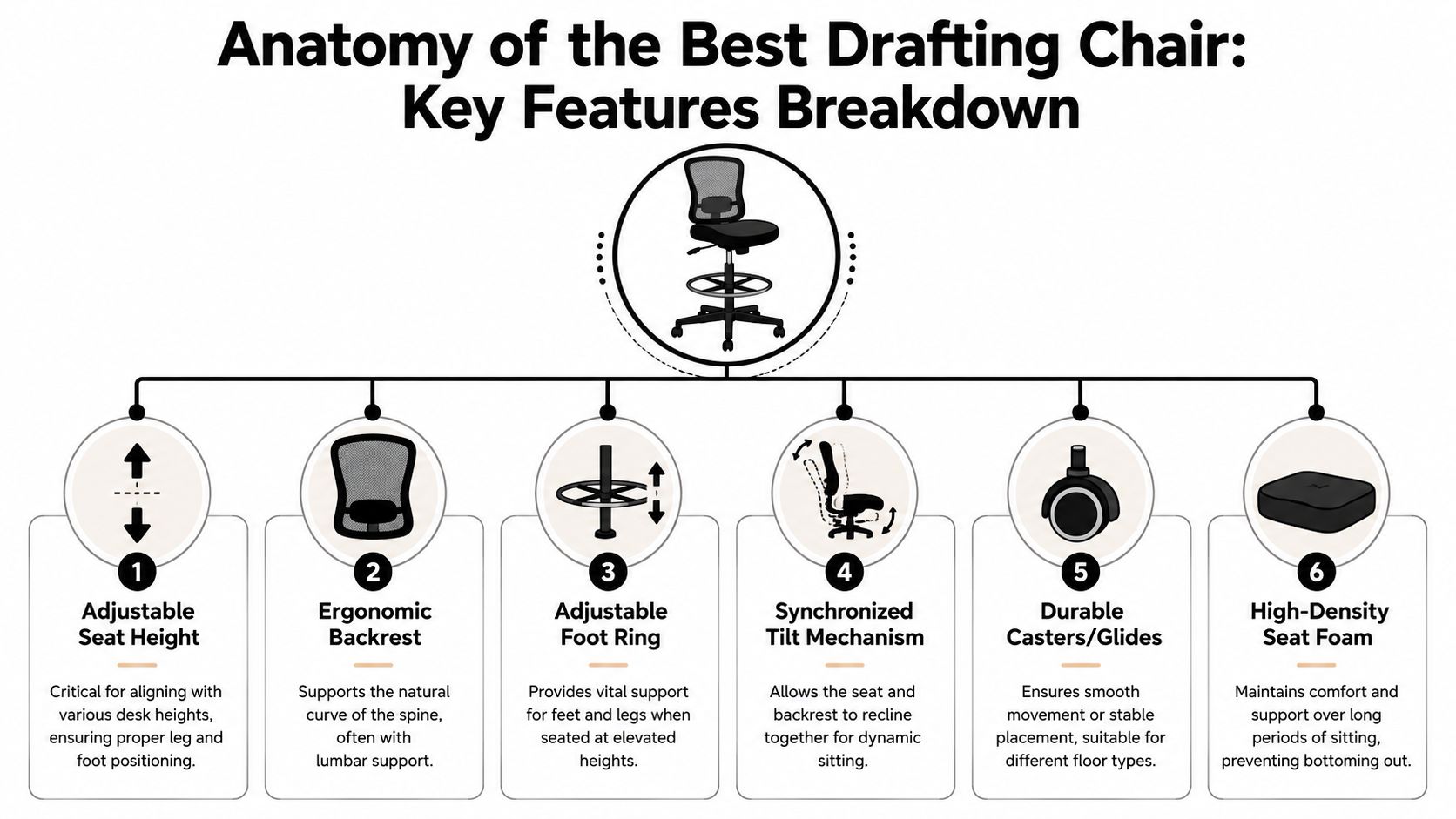
Anatomy of the Best Drafting Chair Key Features
Once you've confirmed that drafting seating is the right category, the next step is reading the spec sheet with a stricter eye. Product pages often bury the details that matter most. In practice, a drafting chair succeeds or fails on how well its parts work together under intensive use.
Start with the height range
A useful benchmark comes from a widely sold model that lists a 24.5-inch to 32.5-inch seat-height range, along with an integrated footrest ring and adjustable armrests (Vari drafting chair specifications). That combination shows what matters most. The chair doesn't just go high. It supports the body once it gets there.
When I review chair specs for high workstations, I want enough range to match the intended desk or counter, but I also want confidence that users won't lose lower-body support at the top of that range.
Features that earn their keep
Some features sound nice in marketing copy but don't change daily use much. Others are worth paying attention to immediately.
- Seat-height adjustment with a wide range: A broader adjustment envelope gives facilities teams more flexibility when one chair may serve different stations or users.
- Adjustable foot ring: This is far better than treating the ring as a fixed decoration. Users need it in a position that supports their legs.
- Back support with real movement: A static upright back can feel acceptable for short tasks and irritating for longer ones.
- Arm options that fit the task: Adjustable arms help keyboard-heavy work. For some studio, lab, or counter tasks, armless models can reduce interference.
- Stable base and appropriate mobility: Seating at height exaggerates instability. A weak base feels worse when the chair is fully raised.
Practical rule: Don't buy on maximum height alone. Buy on usable height, meaning the range where a person can still sit, brace, and work comfortably.
Material choices affect operations
Material isn't just an aesthetic choice. It should match how the workspace is used.
A mesh back can help in office settings where users sit for longer stretches and want airflow. Fabric tends to feel more familiar in administrative spaces. Vinyl or easier-clean surfaces can make more sense where spills, dust, or frequent wipe-downs are part of the routine.
In denser office plans, caster performance also matters more than people expect. A chair that rolls too freely can be annoying at a high counter. One that drags can frustrate users moving between monitors, shelves, and adjacent stations.
Features people overvalue and undervalue
Buyers often overvalue thick padding. Cushion matters, but it won't rescue a chair that sits at the wrong height or lacks leg support.
They often undervalue seat depth, back tilt, and the relationship between the foot ring and the seat. Those details determine whether the chair works for a full work session or just for a short perch.
If the chair is going into taller workstation cubicles, these details matter even more. Users are tasking, turning, reaching, and staying in one zone for long stretches. The chair has to support movement without becoming bulky.
Ensuring the Perfect Ergonomic Fit for Every User
A facilities team usually notices fit problems after rollout. Complaints start with vague language like “this chair feels off” or “nobody uses the raised setting.” The underlying issue is usually more specific. The chair matches the workstation, but it does not fit the range of people assigned to it.
I see this most often in shared stations and support departments where one chair is expected to serve a tall user on one shift and a shorter user on the next. On paper, the adjustment range looks acceptable. In practice, the shorter user may reach the work surface only by perching forward, losing back contact, or resting on the foot ring at an awkward angle.
That is a fit failure, and it affects output.
How to check fit before you order
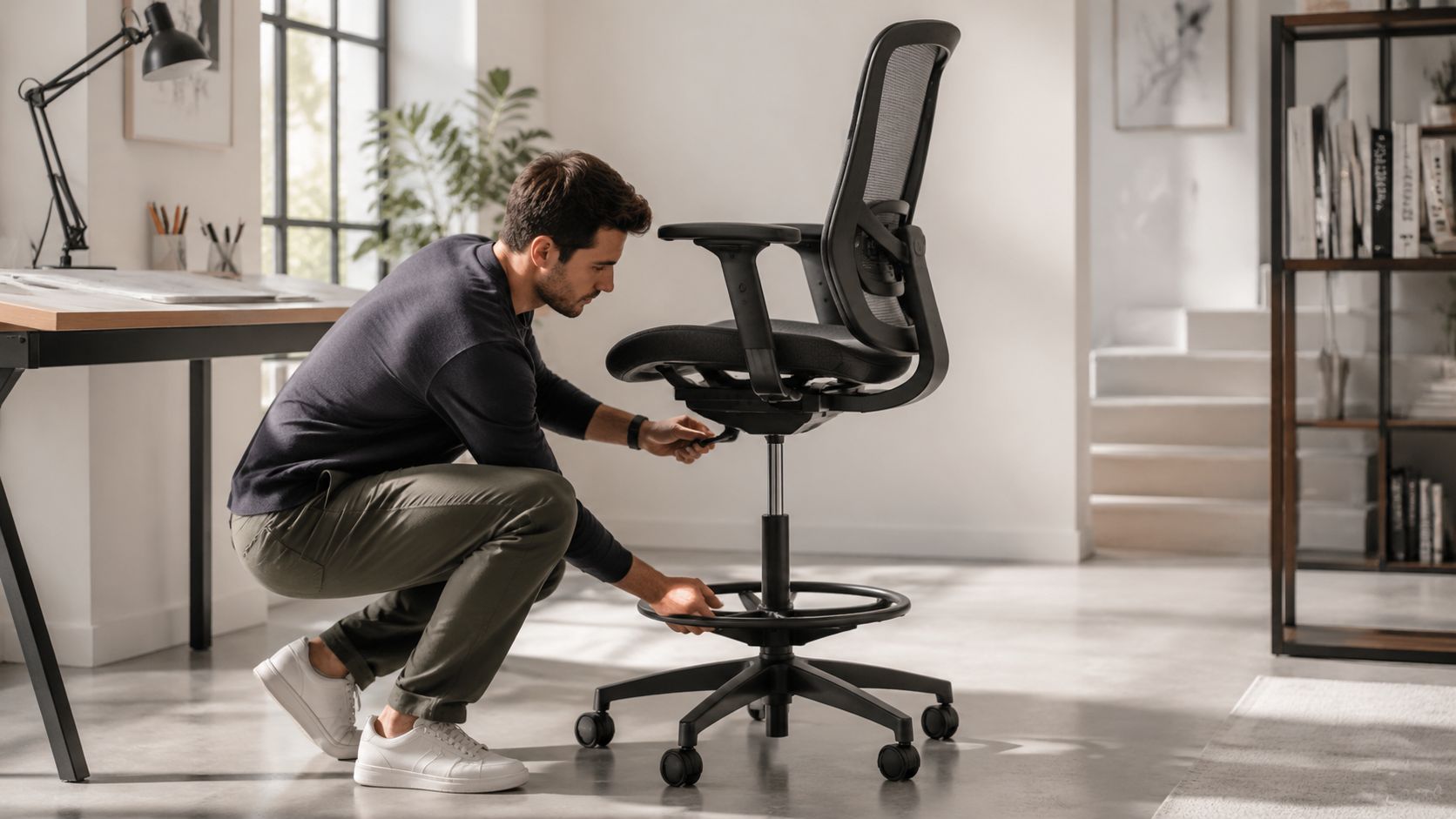
Run the check at the actual workstation, with the desk or counter set to the height people will use day to day.
Set the work surface first
Measure the actual working height, not the manufacturer's stated range and not the lowest or highest possible position.Set the chair for elbow support
The user should reach keyboard, documents, or tools with relaxed shoulders and neutral wrists.Check the foot ring under load
Once seated at task height, the user should be able to brace both feet without pointing toes down or pulling knees too high.Check back contact without forcing a perch
The user should reach the backrest while keeping a stable seated position. If the seat is too deep, shorter users slide forward and lose support.Watch one minute of normal work
Reaching, turning, and re-centering reveal problems faster than a static showroom sit test.
Shared environments need a wider fit window than assigned offices. That is especially true in hot desks, team tables, and spaces planned around ergonomic office equipment for shared workstations. A chair with complicated controls or a narrow comfort range creates friction every time the user changes.
What works better in mixed-user spaces
Procurement teams usually get better results by prioritizing adjustment access over feature count.
Choose for:
- Simple height and tilt controls: Users should find and use them without a supervisor walking them through the chair.
- A foot ring with practical adjustability: It needs to support different leg lengths, not just exist as a checkbox feature.
- Moderate seat dimensions: Seats that are too large often create as many problems as seats that are too small.
- Back support that meets the user quickly: In rotating-use stations, people rarely fine-tune every setting before starting work.
A quick visual walkthrough can help your team spot fit issues before they become complaints:
What to watch with shorter users
Shorter users expose weak chair specs fast. A chair may reach the right seat height for the workstation and still fail because the seat pan is too deep, the ring sits in the wrong place, or the backrest does not support them once they are positioned to work.
Common signs show up quickly:
- Forward perching: The user sits on the front edge because full back contact pushes them too far from the desk.
- Poor lower-leg support: The feet touch the ring, but the leg angle still creates pressure under the thighs.
- Avoidance of the raised posture: The user drops the desk height or abandons the station instead of using the chair as intended.
In denser layouts, these problems spread beyond comfort. In call center cubicles, a small fit problem repeated across dozens of stations turns into lower consistency, more adjustment complaints, and less use of the workstation as designed.
The right ergonomic result is a chair that supports posture changes without making any one user fight the setup.
Integrating Drafting Chairs into Your Modern Workplace
A drafting chair might work well in a product showroom and fail completely in a dense operations area. The seat itself can be fine, while the workplace around it makes daily use awkward. That's why facilities teams need to evaluate drafting chairs in context.
The first context is the workstation. A chair should match the actual raised surface, not the general idea of a standing desk. Some users work at sit-stand desks all day. Others use raised counters, touchdown points, or project tables where posture changes are shorter and more frequent.
Fit the chair to the plan, not just the desk
In a private office, a drafting chair has room to swivel, roll, and reposition. In a tighter footprint, every inch of movement matters. Arm width, base diameter, and how far the back projects can all affect aisle clearance and nearby storage access.
That's especially important around custom office cubicles. Higher seating can work very well there, but only if the layout accounts for turning radius, approach angle, and whether users can get in and out without catching chair arms on panels or pedestals.
A drafting chair also changes how a user occupies vertical space. When seated higher, the sightline over panels and toward adjacent workstations shifts. That can improve collaboration in some layouts and create distraction in others.
Open and enclosed spaces behave differently
In open neighborhoods, drafting chairs often support quick perch work, touchdown collaboration, and shared adjustable stations. In enclosed settings, they may function more like primary seating for specialized tasks.
With glass office partitions, high seating deserves extra attention. Glass keeps visual openness, but a higher seated posture changes eye-level interaction, privacy expectations, and monitor visibility from circulation paths.
Here are the practical trade-offs to review before specifying a model:
- Mobility versus control: A highly mobile chair helps active work but may feel busy in narrower footprints.
- Arms versus clearance: Arms add support for some users and create collisions in compact plans.
- Larger footprint versus stability: A wider base often feels better at height, but it can crowd tighter workstation layouts.
Plan around behavior, not brochure photos
The best drafting chair works when people can use it naturally. If users have to twist around storage, slide under undersized worksurfaces, or constantly move the desk just to sit down, adoption will drop.
That's why I recommend reviewing drafting seating alongside flexible seating arrangements, circulation patterns, and neighboring furniture. The chair should support the flow of the office, not create a new obstacle in it.
Your Procurement and Maintenance Checklist
By the time a drafting chair reaches purchasing, most of the costly mistakes have already been made. The workstation wasn't measured, shared-user needs weren't discussed, or the vendor quote focused on finish options instead of fit. A simple checklist prevents most of that.
What procurement should verify
Before sending a purchase order, confirm the following:
- Worksurface reality: Verify where the desk or counter will be used, not just its nominal range.
- User profile: Identify whether the chair is for one assigned user or a mixed-height shared station.
- Adjustment priorities: Decide which features are required and which are optional.
- Floor condition: Check whether rolling or gliding makes more sense for the area.
- Assembly and deployment: Make sure delivery, install, and adjustment support are clear.
If you're managing a larger order, reviewing office chairs in bulk can help frame freight, standardization, and replacement planning before the quote stage.
Drafting Chair Procurement Checklist
| Phase | Action Item | Status |
|---|---|---|
| Planning | Measure each elevated workstation in actual use position | ☐ |
| Planning | Identify single-user or shared-user assignment | ☐ |
| Planning | Note armrest, mobility, and cleaning needs by department | ☐ |
| Vendor Review | Confirm seat-height range and foot support details | ☐ |
| Vendor Review | Review warranty, return terms, and replacement parts process | ☐ |
| Pre-Install | Verify chair footprint against workstation clearances | ☐ |
| Pre-Install | Plan assembly, delivery sequencing, and user setup support | ☐ |
| Post-Install | Inspect casters, controls, and foot ring adjustment after setup | ☐ |
| Ongoing Use | Create a simple maintenance check for lift, upholstery, and base condition | ☐ |
Maintenance is simpler than replacement
Drafting chairs often fail early for preventable reasons. They get dragged by the foot ring, used on the wrong floor surface, or ignored after controls loosen. A quick recurring inspection catches most of that.
Buy with maintenance in mind. If the chair is hard to adjust, hard to clean, or hard to service, the problem will show up long before the chair reaches the end of its useful life.
For facilities teams, the maintenance routine doesn't need to be complicated. Check whether the gas lift holds position, whether casters move correctly, whether the foot ring stays secure, and whether upholstery still suits the environment. Those basics do more than a thick operations manual no one opens.
Let Cubicle By Design Handle the Details
A drafting chair purchase looks simple until it collides with a real office. Then the hard parts show up. Which stations need taller seating? How many users will share each chair? Will the base clear storage, panels, and adjacent circulation paths? Who confirms that the finished plan still works after installation?
That's where project support matters more than product browsing.
A furniture partner should help connect the chair decision to the rest of the workplace. That includes workstation dimensions, privacy strategy, panel heights, access paths, and how taller seating fits within the daily movement of the office. The seat is one component. The workplace has to function as a whole.
For facilities managers working through reconfigurations or new layouts, the Cubicle Designer tool is one practical way to visualize dimensions, privacy levels, storage, and related planning choices before furniture lands on site. That's useful when drafting chairs need to work beside modular stations instead of being treated like an isolated add-on.
The same logic applies when your office includes sit-stand desks, enclosed focus areas, collaborative touchdown zones, and departments with different task patterns. Procurement gets easier when one plan accounts for all of those interactions up front.
A good outcome usually comes from disciplined coordination:
- Space planning first: Make sure higher seating fits the intended station footprint.
- Specification review next: Confirm the chair's adjustment profile matches the users.
- Installation follow-through: Check fit, movement, and user access after the furniture is in place.
That process reduces reorders, workarounds, and the familiar complaint that “the chair is fine, but it doesn't work here.” In office furniture, that distinction matters.
If you're planning taller workstations, reworking team layouts, or trying to standardize seating that fits the job, talk with Cubicle By Design. They can help you evaluate how drafting chairs, workstation dimensions, partitions, and layout decisions fit together before you buy.