



Moving an office can cost under $1,000 for a very small local move and more than $30,000 for a large or long-distance relocation. The number that catches people off guard is that the movers are often only one part of the bill.
The Cost of Moving an Office
If you're the one who got handed the move, you're probably already seeing the problem. One vendor talks about trucks and labor. Another talks about cabling. Your lease mentions restoring the old suite. Finance wants a single budget number, but the project doesn't behave like a single expense.
That's why the cost of moving an office needs to be handled like a facilities project, not a shipping task. The companies that stay on budget usually do two things early. They define what is moving, and they budget for what has to happen before and after the truck leaves.
How to Start Planning Your Office Move
Most office managers begin with the wrong question. They ask, "What do movers charge?" The better question is, "What has to happen for our team to leave one space and be fully operational in the next one?"
That shift matters because the pricing range is wide. A widely cited U.S. benchmark puts the average office move at about $5,000, but the actual cost changes sharply with size and distance. One market reference puts a 1,000-square-foot office at $750 to $4,000, a 10,000-square-foot office at more than $30,000, and local moves under 100 miles at $1,000 to $5,000, compared with $6,500 to $30,000 for relocations of 2,000 miles or more according to Angi's office moving cost breakdown.
A move gets easier to control when you break it into stages. First, identify what stays, what moves, and what gets disposed of. Then map the new site, review the old lease, and build the budget in layers instead of chasing one grand total.
Start with scope, not quotes
Before you call movers, write down these basics:
- What is moving: desks, chairs, files, IT hardware, breakroom items, signage, storage, and specialty equipment.
- What is changing: headcount, layout, departments, privacy needs, and conference room count.
- What the buildings require: loading dock rules, elevator reservations, certificates of insurance, after-hours access, and protection requirements.
- What has to work on day one: internet, phones, access control, print stations, and assigned seating.
If you skip that step, every quote you receive will describe a different job.
Treat layout planning as an early budget tool
Early planning also helps you avoid paying to move furniture that no longer fits your next floor plan. That's where office space planning and design becomes practical, not cosmetic. A clean layout plan helps you decide whether to relocate existing workstations, reconfigure them, or leave them behind and furnish the new office differently.
Practical rule: The fastest way to overspend is to move first and solve fit issues after move-in.
Deconstructing Your Office Relocation Budget
The cleanest way to estimate the cost of moving an office is to separate the budget into five buckets. That gives finance, operations, IT, and leadership a clearer view of what they're approving.
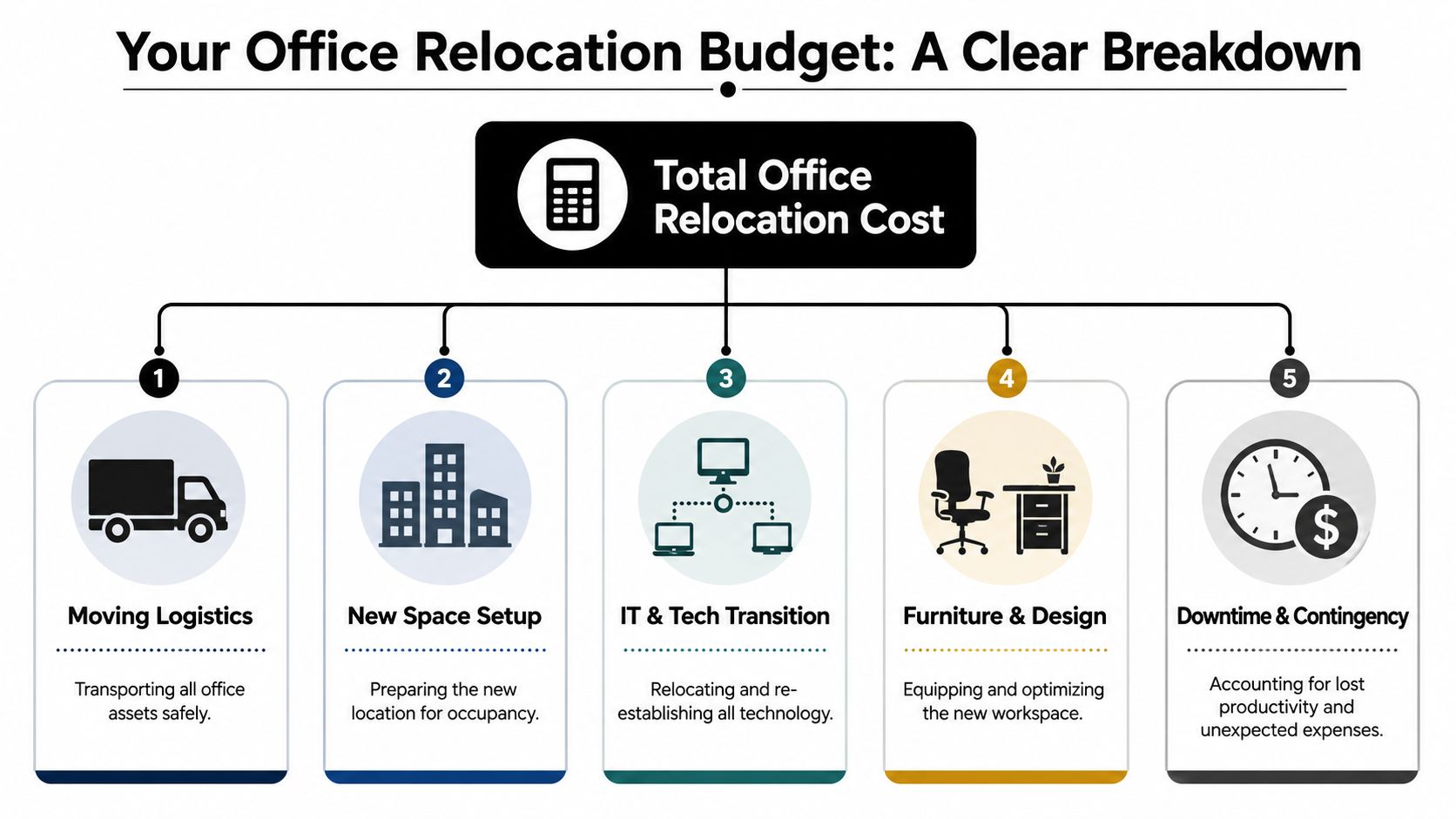
Independent commercial moving guidance shows how sharply mover pricing changes by scale. A small office may run about $1,000 to $5,000, a medium office about $5,000 to $15,000, and a large office $20,000+. The same source places local moves under roughly 100 miles at $1,000 to $5,000, while relocations of 2,000 miles or more can climb to $7,000 to $30,000+ based on Chicago Office Movers' pricing guide.
The five budget categories
| Budget area | What it usually includes | Why it matters |
|---|---|---|
| Moving logistics | labor, trucks, packing support, disassembly, transport, placement | This is the visible line item, but not the whole project |
| IT and tech transition | disconnects, reconnects, cabling, device mapping, testing | Teams can't work if the network, phones, and access systems aren't ready |
| Furniture and design | workstation reconfiguration, new pieces, installation, layout corrections | A poor furniture plan creates double handling and change orders |
| Administrative and compliance costs | building access, certificates, permits, landlord coordination, signage updates | These aren't glamorous, but delays often start here |
| Downtime and contingency | business interruption, after-hours work, unexpected site conditions | This protects the project from becoming a scramble |
What each bucket tends to miss
The truck quote usually won't show everything your team will pay for. IT scope is a common gap. If you're comparing whether to rebuild, refresh, or shift systems during the move, this overview of uncovering hidden IT fees is useful because it frames technology costs as an operating decision, not just a move-day task.
Furniture gets underestimated for a different reason. People assume every desk goes from old suite to new suite. In practice, receiving conditions, dimensions, electrical access, and department changes often make that impossible without redesign, parts, or replacement. A preliminary budget built from a workspace price planning reference helps expose those decisions before installation day.
The budget works best when each department owns its line items, but one project lead owns the full picture.
The Hidden Costs of Leaving Your Old Office
A lot of office move budgets start at the loading dock and end at the new reception desk. That's the mistake.
The old office has to be emptied, cleaned, disconnected, and often restored to lease condition. Industry guidance cited by WCRE says decommissioning can be 3 to 5 times higher than the actual relocation itself, noting that "emptying or decommissioning your office space is typically a significant portion of your budget, sometimes adding up to 3-5 times that of the actual relocation itself."
What decommissioning actually includes
If your current office has been occupied for years, the exit scope is rarely simple. It often includes:
- IT disconnect work: servers, access control, low-voltage cabling, wall devices, and secure hardware handling
- Removal of built-ins: custom millwork, mounted screens, shelving, whiteboards, and branded elements
- Furniture disposition: relocation, liquidation, recycling, donation coordination, or disposal
- Repairs and restoration: patching walls, paint touch-up, flooring repair, and returning altered areas to prior condition
- Final cleaning and waste removal: janitorial work, debris haul-off, and landlord inspection prep
The painful part is that many of these costs show up late, after the relocation contract is already signed.
Read the lease before you approve the mover
A make-good clause changes everything. If the lease requires you to restore the space, your cheapest move quote may end up attached to your most expensive project.
Some landlords expect the space back in near-original condition. Others allow parts of the fit-out to remain. The only safe assumption is that you need clarity in writing. Teams that wait until the final month usually end up paying rush rates, disposal fees, and avoidable contractor charges.
Watch for this: Custom installations that helped your team work better in the old office can become removal costs when you leave.
This is also where experienced decommissioning support matters. If you need a practical view of what proper closeout looks like, professional office decommissioning is worth reviewing before you finalize your exit plan.
What works and what doesn't
What works is creating a separate exit budget and assigning one person to own landlord coordination, disposal decisions, and final-condition signoff.
What doesn't work is assuming your mover will handle the old office closeout unless it's explicitly in scope. Movers move. Decommissioning crews disconnect, strip, clean, sort, recycle, and document. Those are different jobs, even when one vendor offers both.
A clean exit protects more than the security deposit. It prevents the old office from continuing to cost you money after everyone has left.
Planning Your New Office Space and Furniture
The new office is where departments have the best chance to either save money or create it. A relocation forces decisions that many companies postpone for years. Do we keep the same workstation footprint? Do we need more enclosed privacy? Can departments share support space more efficiently? Should we move old furniture that no longer matches how people work?
In major commercial markets, complete office fitouts can range from about $2,500 per square meter to more than $5,000 per square meter, and a modest 100-square-meter office could require roughly $250,000 to $500,000+ before furniture, IT, and downtime are added, based on Tenant CS's office relocation cost benchmark.
Move existing furniture or replace it
There isn't one right answer. The decision comes down to fit, condition, and labor.
Keep existing furniture when the systems are still in good shape, the panel sizes work in the new floor plan, and the stations can be reassembled without major compromise. Replace or supplement when the old footprint wastes usable area, privacy needs have changed, or the labor to reconfigure old inventory starts to rival the value of the furniture itself.
A few common examples:
- Open-plan teams: custom office cubicles can help use floor space more efficiently than forcing older layouts into a new shell.
- Private office and meeting zones: glass office partitions create separation without making the suite feel closed in.
- High-density operations: call center cubicles solve a different problem than executive benching or hybrid touchdown space.
- General workstation planning: standard workstation cubicles are often easier to plan around than a patchwork of reused pieces.
Use the move to fix layout problems
A move is the best time to resolve circulation, storage, privacy, and adjacency issues. Waiting until after move-in usually means paying for changes twice.

A planning tool like the Cubicle Designer helps teams test dimensions, privacy levels, storage, and electrical options before they commit to a final layout. That matters because furniture planning isn't just about what looks good on a floor plan. It affects power distribution, aisle width, supervisor visibility, acoustics, and installation sequencing.
Good furniture planning cuts rework. It also reduces the number of items you pay to move, store, or dispose of.
Buy for the next layout, not the last one
If you're already questioning whether your current office supports hybrid work, growth, or department changes, don't use the move to recreate the same problems in a new suite.
A practical buying review should cover:
- Workstation sizes that match actual tasks, not assumptions.
- Panel heights and privacy levels based on noise, supervision, and collaboration.
- Storage strategy so paper-heavy teams and digital teams aren't furnished the same way.
- Power and cable management planned before installation.
- Phased purchasing if some departments are ready for new furniture before others.
For a broader framework on evaluating options, this office furniture buying guide is a useful checkpoint before procurement starts.
Calculating the True Cost of Business Downtime
Downtime is the budget line many companies feel but never price. That's why it keeps surprising people.

One industry analysis frames the issue clearly: with the average office worker generating $100 to $200 in daily value, a 3-day move for a 50-person team can cost $15,000 to $30,000 in lost productivity alone. That can exceed the physical move budget. The same analysis notes that off-hours moving crews may cost 20 to 30 percent more, but can still be the better financial decision when they preserve working time.
A simple way to estimate your own downtime cost
You don't need a perfect model to make better decisions. A usable internal estimate looks like this:
daily value per employee × number of affected employees × days of disruption
That won't capture every operational nuance, but it gives leadership a hard number to compare against premium services like weekend work, phased relocation, advance setup, or temporary swing space.
Downtime isn't just people sitting idle. It includes partial productivity from unpacking, login issues, misplaced files, unavailable conference rooms, and equipment that technically arrived but isn't usable yet.
What actually reduces downtime
The teams that keep disruption under control usually do a few specific things well:
- Phase the move by function: move back-office teams differently from revenue or client-facing teams.
- Use after-hours or weekend windows: higher direct cost can still be cheaper than losing weekday operations.
- Pre-label every seat and device: confusion burns hours fast.
- Bring IT in early: network readiness and device mapping shouldn't wait for move week.
- Test critical spaces first: reception, executive offices, conference rooms, print areas, and support departments.
A strong operational checklist helps. These facilities management best practices are useful because they frame the move as a continuity exercise, not only a logistics event.
Operational insight: If a Monday morning start matters, the move isn't complete when the truck unloads. It's complete when users can sign in, take calls, print, meet, and work.
A short walkthrough can help teams think beyond boxes and floor plans:
Where companies make the wrong trade-off
They approve the cheaper move and absorb the more expensive interruption.
That choice looks sensible when finance only sees the mover invoice. It looks much worse when operations loses several working days, managers spend their time troubleshooting, and the client-facing team is running from mobile phones and folding tables.
Your Office Move Checklist and Timeline
A move comes together faster when the timeline is tied to decisions, not just tasks. The checklist below works best when one person owns deadlines and every vendor knows who approves changes.
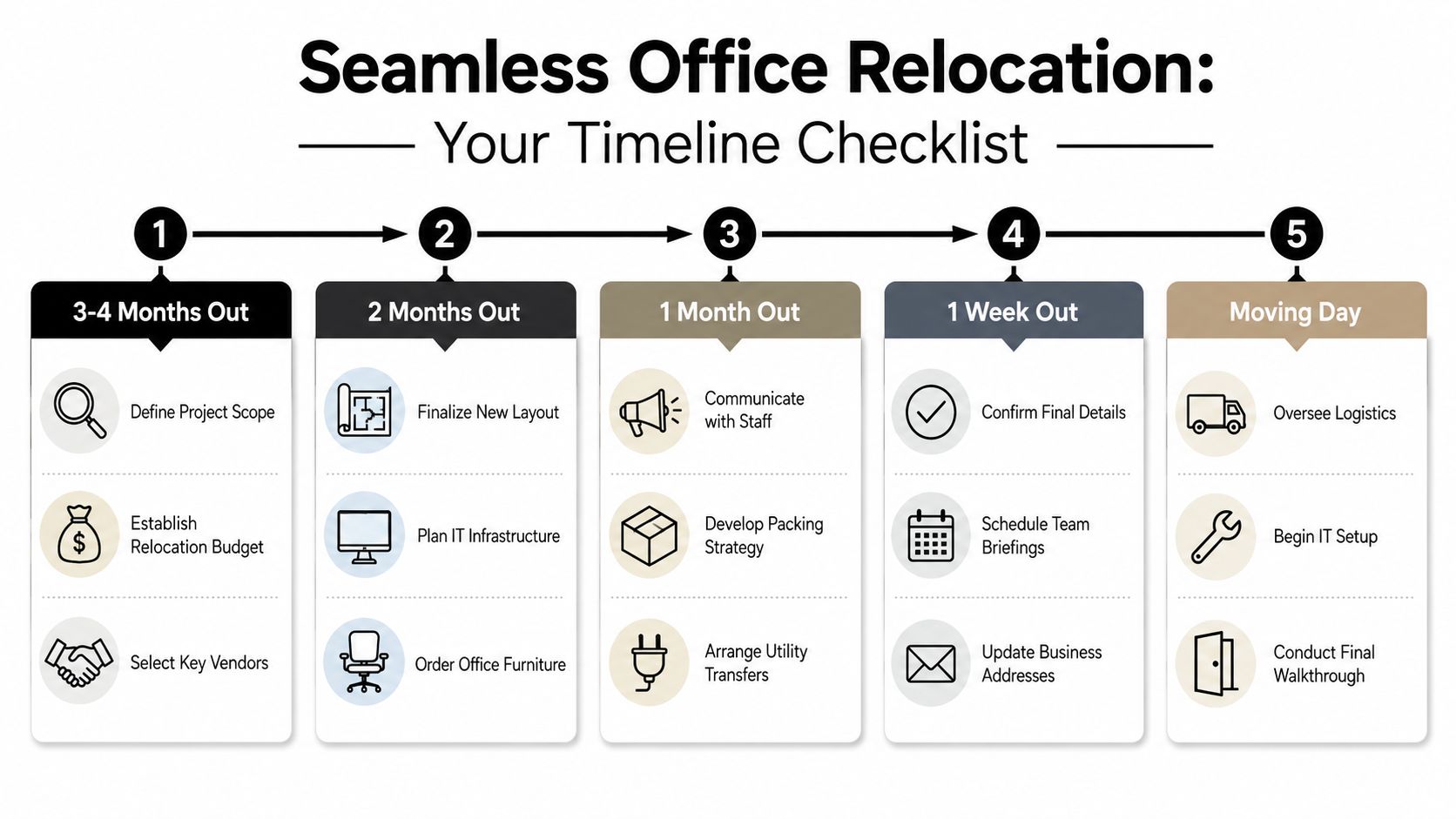
Three to four months out
Start with the expensive decisions first.
- Review the lease: confirm make-good obligations, access rules, and landlord notice requirements.
- Define scope: decide what moves, what gets liquidated, and what needs decommissioning.
- Choose key vendors: mover, IT support, furniture installer, cabling team, and disposal partner.
- Set the first layout plan: test workstation counts, circulation, support areas, and storage needs.
Two months out
This is the stage where the new office either starts to take shape or starts to drift.
- Finalize the floor plan: assign departments, workstation types, conference rooms, and shared areas.
- Lock IT infrastructure decisions: internet, cabling, access control, print locations, and device mapping.
- Order furniture and finish selections: don't wait until move month if any custom configuration is involved.
- Confirm building coordination: loading dock windows, elevator reservations, and insurance paperwork.
If you're comparing relocation providers or studying how logistics planning differs by market, this detailed guide for your Perth move is a useful example of the kind of operational detail worth asking about in any region.
One month out
The move becomes real for staff here, so communication matters.
| Timeframe | Priority | Why it matters |
|---|---|---|
| One month out | staff communication plan | people pack better and panic less when they know where they're going |
| Two to three weeks out | labeling and packing rules | room-by-room labeling prevents unpacking chaos |
| Two weeks out | utility and vendor transfers | service gaps usually start with missed coordination |
| One week out | final confirmations | this catches access errors, missing certificates, and schedule conflicts |
The smoothest move days usually look uneventful. That's a sign the planning was done early.
Move week and move day
Protect the sequence. Don't let vendors improvise around each other.
- Confirm chain of command: one facilities lead, one IT lead, one mover foreman.
- Walk the old space before loading begins: identify hold items, disposal items, and landlord-sensitive areas.
- Test the new site in priority order: internet, power, access control, key user stations, then common areas.
- Complete a final old-space walkthrough: document condition before turning over the suite.
If you need broader support on layouts, furniture coordination, and installation planning, Cubicle By Design is a practical partner to have involved early, not only after the lease is signed.
Frequently Asked Questions About Office Moving Costs
How do I compare mover quotes accurately
A low quote usually means scope is missing.
Give every bidder the same inventory, building rules, destination plan, and move window. Require each quote to show the same line items, including disassembly, packing materials, crate rental, elevator time, after-hours labor, reinstallation, and debris removal. That is the only way to see who is cheaper and who is leaving work out of the proposal.
Is insurance usually included in the move
Basic mover valuation is not the same as the coverage your property manager or landlord may require.
Ask for certificates of insurance early. Confirm liability limits, cargo coverage, and who is responsible if something is damaged during teardown, transport, staging, or reinstallation. I also advise clients to check whether their own business policy fills any gaps, because disputes over responsibility can stall closeout and add unplanned cost at both locations.
How should I think about IT and cabling costs
Treat IT as part of occupancy readiness.
For many offices, cabling, device reconnects, conferencing setup, access control, and internet turn-up can cost as much attention as the physical move itself. The practical takeaway is that technology scope can rival the physical move, especially if port counts, room technology, security devices, and testing steps are defined late. In budget reviews, this is one of the categories I watch closely because delays here often create the more expensive problem, staff downtime.
What costs get missed most often
Two line items cause the most budget surprises. Decommissioning the old office and the cost of interrupted operations.
Decommissioning can include patching walls, removing abandoned cabling, disposing of unwanted furniture, cleaning, repairing damage, and restoring landlord-required items before surrender. Downtime shows up differently. Payroll for teams who cannot work, missed client activity, delayed billing, and IT outages on day one. Mover fees are visible, so companies plan for them. Exit costs and lost productivity are easier to underestimate, and they can change the total move budget fast.
What should be on my final pre-move review
Use one short control document. It should confirm the final floor plan, seat assignments, labels, vendor contacts, access instructions, disposal lists, decommissioning responsibilities, and first-day test priorities.
If you want a second reference to check your internal plan against, this office relocation checklist is a useful external cross-check.
Should we move everything we already own
No. Move what fits the new plan, still performs well, and will not cost more to reconfigure than it is worth.
Furniture planning is essential for protecting the budget. A workstation system that worked in the old suite may need new panels, power components, surfaces, or layout changes to fit the new footprint. Some pieces are worth reusing. Others cost more to modify, store, or install than replacing them with the right solution for the new space. The right call comes from comparing reuse cost, installation labor, and how well the furniture supports the new layout on day one.
If you're planning a relocation, reconfiguration, or full office reset, Cubicle By Design can help you think through the parts that usually get missed, from layout planning and workstation selection to furniture coordination and installation strategy. A well-run move gets your team operational quickly and reduces costly corrections after move-in.