


If you're trying to figure out what a "standard" cubicle size is these days, you're not alone. The simple answer is that the 6'x6' footprint has pretty much become the new go-to. It strikes a great balance between giving an employee enough personal space to work comfortably while still being efficient for the overall office layout.
This size has largely taken over from the much larger, clunkier workstations you might remember from years past, thanks to smaller tech and the need for more flexible floor plans. At Cubicle By Design, we help businesses find the perfect fit for their teams.
Why Today's Standard Cubicle Sizes Exist
The cubicle dimensions we consider normal today didn't just happen overnight. They’re the product of decades of changing office cultures, real estate costs, and the ongoing tug-of-war between employee comfort and bottom-line efficiency.
It all started with a much grander vision. The original cubicle concept, called the 'Action Office', was meant to be spacious and modular, giving workers a private, adaptable area all their own. But as business needs changed and the cost per square foot for office space shot up, that ideal gave way to more practical, space-saving designs.
The Shift to a Standard Footprint
The move from big ideas to standardized sizes happened fast. You can trace the history of the cubicle and see how economic realities and new technology steadily shrunk the average workstation. Back in the 1960s, when Robert Propst at Herman Miller first invented the modern cubicle, offices were huge. It wasn't uncommon for a single worker to have around 250 square feet of space, a standard reflected in U.S. brokerage surveys as late as 2000.
But the tide turned quickly. By 1974, cubicles made up 20% of all new office furniture sales, and that number jumped to nearly 50% by 1980. Why? They were simply more cost-effective and let companies fit more people into a single floor. If you want to dive deeper into this topic, you might be interested in the evolution of the office cubicle.
Knowing this backstory is incredibly helpful. It shows that today's standard sizes aren't just about ergonomics; they’re a direct result of economics.
This historical context shows that today's "standard" sizes are not rigid rules but flexible starting points. They were born from a long history of workplace adaptation, blending the need for individual focus with the realities of commercial real estate.
This understanding allows businesses to make smarter, more practical decisions. You can create a functional workspace that truly supports what your team does, whether it’s a high-density call center that needs compact workstation cubicles or managers who need more room in private office cubicles. Once you understand the "why," it’s much easier to choose the "what."
Let's break down the most common footprints and what they're typically used for.
Common Cubicle Footprints at a Glance
This table gives you a quick snapshot of the standard cubicle sizes you'll see most often and the roles they're best suited for. Think of it as a starting point for planning your own space.
| Footprint (Width x Depth) | Total Square Feet | Best For | Common Roles |
|---|---|---|---|
| 5' x 5' | 25 sq. ft. | High-density, task-based work | Call center agents, data entry clerks, telemarketers |
| 6' x 6' | 36 sq. ft. | The all-purpose standard for most roles | Administrative staff, accountants, customer service reps |
| 6' x 8' | 48 sq. ft. | Roles needing extra surface or storage space | HR specialists, project managers, technical support |
| 8' x 8' | 64 sq. ft. | Mid-level management or focused individual work | Supervisors, team leads, engineers, developers |
| 8' x 12' | 96 sq. ft. | Private offices for executives or managers | Department heads, directors, executives |
Keep in mind that these are just guidelines. The right size for your team will always depend on their specific daily tasks, the equipment they use, and your company's culture.
At Cubicle By Design, we lean on this deep industry knowledge to help companies find the right cubicles for their unique situations. Whether you're designing a new office or just reconfiguring your current one, our online cubicle designer is a great tool for building a workspace that’s both productive and efficient.
Matching Cubicle Dimensions to Team Roles
Picking the right cubicle size isn't just about Tetris-ing your floor plan; it’s about giving your team the right tool for the job. A one-size-fits-all approach is a recipe for frustration. You end up with some employees feeling boxed in while others have more space than they know what to do with. The dimensions you choose should be a direct reflection of what each role actually entails day-to-day.
Think of it like setting up a professional kitchen. The line cook needs a tight, efficient station to move fast, but the pastry chef needs a huge, flat surface for precision work. Your office runs on the same logic: the space has to match the function. This means ditching a single standard and adopting a smarter, role-based strategy for your office layout.
The Compact Footprint for High-Volume Work
For roles that are all about focus and repetition, like in a call center or a data entry department, a smaller footprint is often the most sensible choice. The 5'x5' cubicle is a go-to for these kinds of high-density environments.
At 25 square feet, it gives an employee plenty of room for a computer, a headset, and the essentials without eating up valuable real estate. This compact design lets you maximize your headcount in a specific area while still giving everyone their own defined station. The name of the game here is efficiency and focus, creating a productive hub for task-driven teams.
The chart below shows how the 6'x6' standard is often seen as the sweet spot between efficiency and personal space, which helps put other sizes into context.
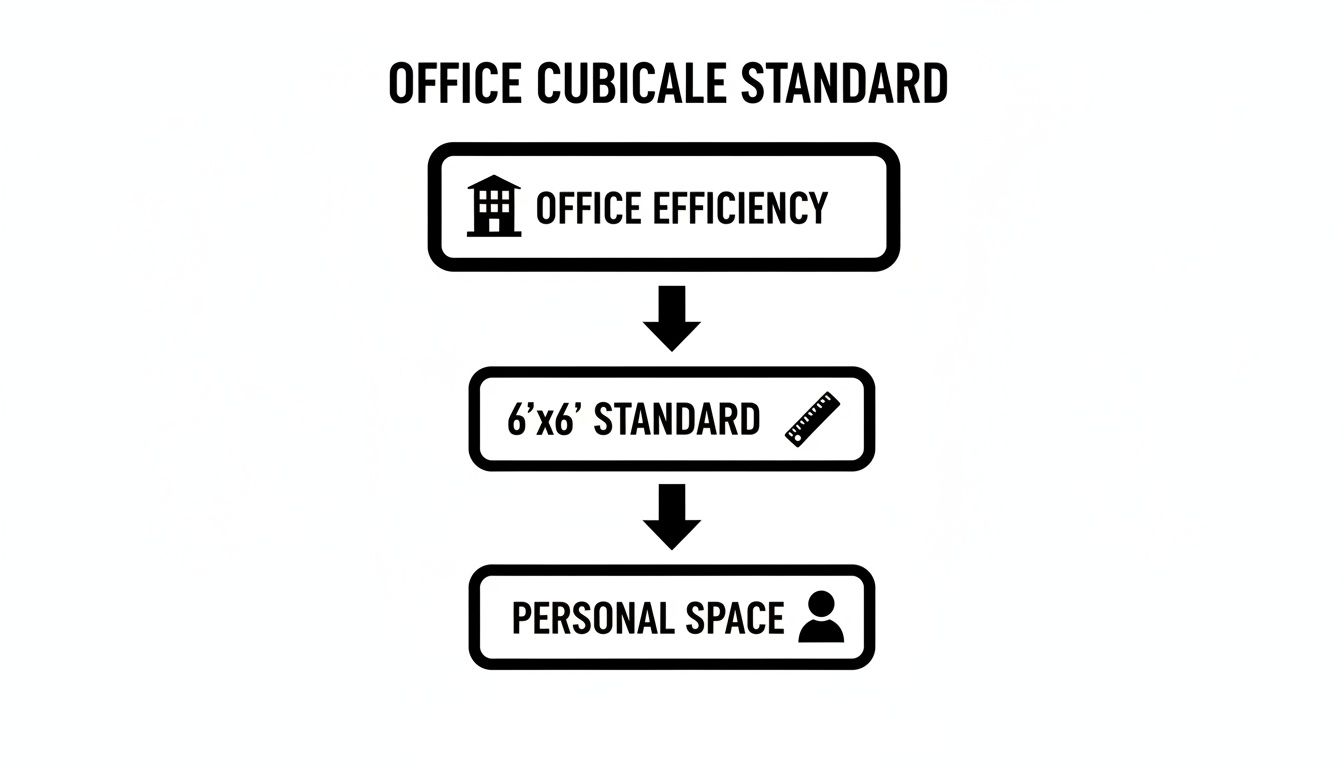
While different sizes serve specific purposes, this visual makes it clear why the 6'x6' dimension has become such a versatile foundation for general office planning.
The Versatile Standard for General Staff
The 6'x6' cubicle is the industry’s workhorse, and for good reason. Clocking in at 36 square feet, it hits the sweet spot for a huge range of administrative, support, and professional roles. It can comfortably handle a computer, some physical paperwork, and personal items, making it perfect for your HR, accounting, or customer service staff.
This versatile cubicle size standard provides enough room for employees to work without feeling claustrophobic, but it's still efficient from a space-planning angle. It’s the perfect middle ground, supporting both individual work and the occasional chat with a coworker, making it the default choice for most offices.
Upsizing for Specialized and Managerial Roles
Some jobs just demand more surface area, more storage, and more room for equipment. For these roles, bigger footprints aren't a luxury—they're essential for getting the job done.
- For Technical and Creative Roles: An 8'x8' cubicle delivers 64 square feet, which is ideal for engineers, developers, or designers who are constantly juggling multiple large monitors, blueprints, or even physical prototypes.
- For Managers and Executives: A spacious 9'x12' setup starts to feel more like a semi-private office. These private office cubicles offer 108 square feet, giving you enough room for a main desk, a small table for one-on-one meetings, and extra storage.
The evolution of technology has had a huge impact on these standards. As we moved from clunky hardware to sleek digital tools, cubicle sizes shrank dramatically. Back in the day, offices needed massive 10'x10' cubicles just to hold a CRT monitor and stacks of paper. The shift to digital in the 90s brought that down to 8'x8'. By the 2000s, space per worker in the U.S. had already dropped from 250 sq ft to 190 sq ft, and the trend has only continued, landing us at today's common 6'x6' footprint—a whopping 64% smaller than its 90s predecessors. You can read more about how cubicle dimensions became standard on our blog.
Key Takeaway: Matching cubicle size to job function is one of the most critical decisions you'll make for your office. It has a direct impact on employee comfort, focus, and productivity, ensuring every square foot is pulling its weight.
When you thoughtfully assign workstation cubicles based on what people actually do, you create a far more effective and dynamic workplace. This strategic approach makes sure that everyone, from call center agents to senior managers, has the right space to do their best work. At Cubicle By Design, we can help you find that perfect mix, and you can even play around with layouts yourself using our interactive cubicle designer.
How Panel Height Shapes Your Office Environment
A cubicle's footprint is just one piece of the puzzle. The real secret to controlling your office's atmosphere lies in the height of its walls. While length and width provide the square footage for someone to work, it’s the panel height that dictates privacy, manages acoustics, and either encourages or discourages collaboration among your team.
Think of it like building a fence in a neighborhood. A low picket fence clearly marks a property line but still invites a casual chat with the neighbors. In contrast, a tall privacy fence creates a secluded sanctuary. This same principle applies directly to your cubicle choices and their wall heights.
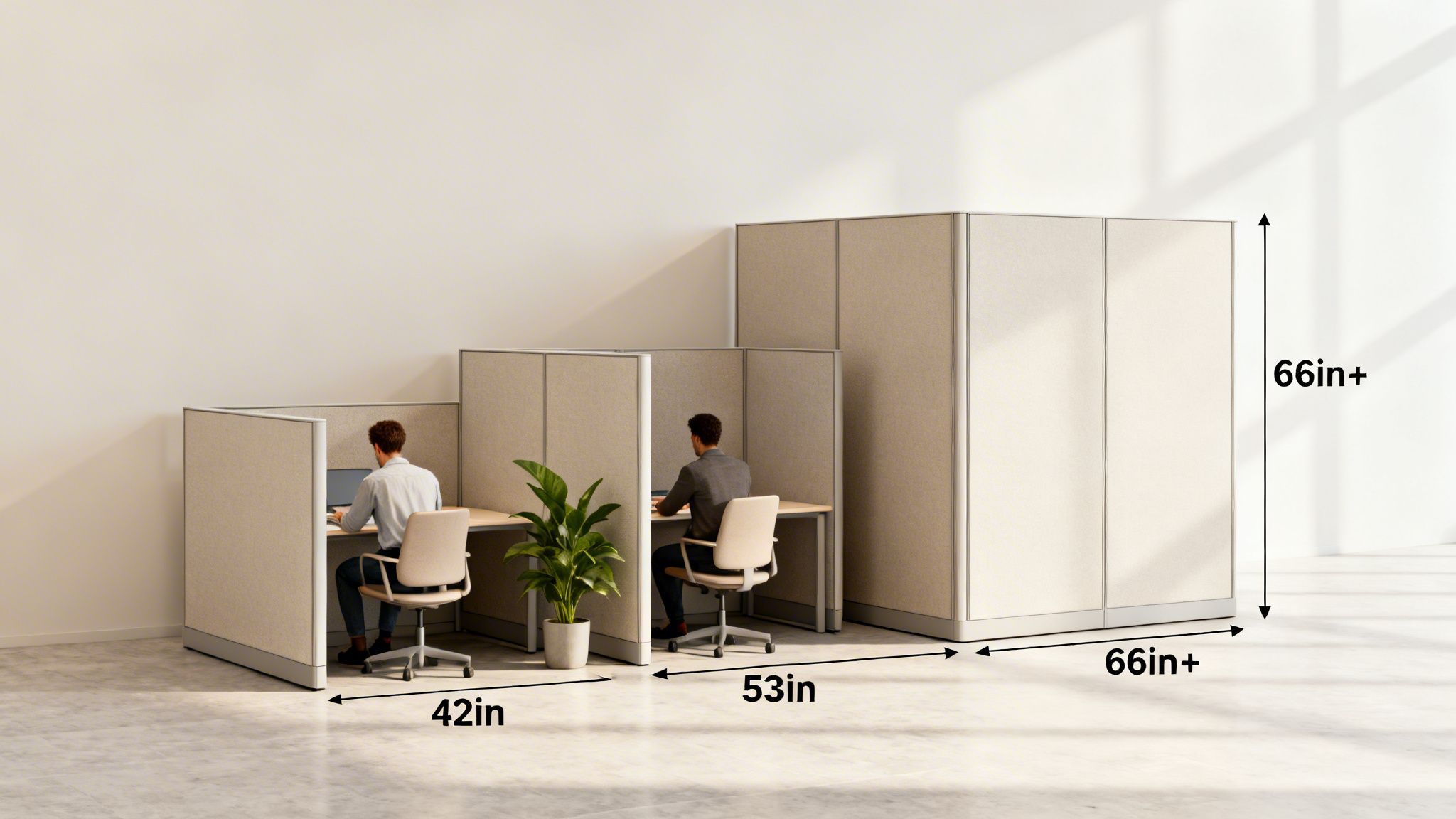
Striking the right balance is all about matching your company culture's need for openness with your employees' need for focus.
Low Panels for Open Collaboration
Cubicle panels standing around 42 inches high are purpose-built for open communication. At this height, employees have clear sightlines across the office, making it effortless to ask a quick question or share an idea. This setup is perfect for dynamic, fast-paced environments where constant interaction is a core part of the workflow, not a distraction.
These low-walled workstations promote a sense of community and transparency. They work exceptionally well for sales teams, creative departments, or any group that thrives on spontaneous brainstorming and a lively, energetic atmosphere. The low barrier keeps communication fluid and prevents teams from feeling siloed.
Mid-Height Panels for Seated Privacy
The most popular and versatile option by far is the mid-height panel, typically around 53 inches. This height offers what we call "seated privacy." When an employee is sitting down, they are shielded from most visual distractions, letting them get in the zone for individual tasks. The moment they stand up, they can easily see and speak with colleagues.
This makes it a fantastic middle-ground solution, blending the need for focused work with the desire for accessibility. It’s an ideal choice for a wide range of roles, from administrative staff to project managers, who need to balance heads-down work with frequent team interactions.
This versatile height provides the best of both worlds, fostering individual productivity without sacrificing the collaborative spirit of an open office. It’s the go-to choice for businesses aiming for a balanced and flexible work environment.
Full-Height Panels for Deep Focus
When a role demands deep concentration, confidentiality, or significant acoustic control, full-height panels are the answer. At 66 inches or taller, these panels essentially transform a standard cubicle into a semi-private office. They dramatically reduce both visual and auditory distractions, creating a sanctuary for focused work.
These setups are a smart choice for employees in legal, finance, or HR who handle sensitive information. They are also invaluable for developers, writers, or anyone whose role requires long periods of uninterrupted thought. These more private cubicles provide the quiet and seclusion necessary for high-stakes, detailed work, ensuring privacy and minimizing errors. For an added layer of customization, you can learn more about how different panel privacy screens can further enhance this seclusion.
Matching Panel Height to Your Culture
The panel height you choose sends a powerful, unspoken message about how work gets done at your company. An office filled with low-walled cubicles communicates transparency and teamwork. Conversely, a space dominated by high-walled workstations prioritizes quiet, heads-down performance and individual achievement.
This decision is a strategic one. It's not just about furniture; it's about consciously designing an environment that reinforces your company's core values. Many businesses find that a mixed-height approach works best, allowing them to create different "zones" tailored to specific departments. This lets you build a truly functional layout that supports every single person on your team.
Mastering Your Office Layout and Flow
Once you’ve picked out the right cubicles, the real fun begins: laying them out on your floor plan. This is where an office truly starts to feel like a functional space. Think of it like a bit of miniature city planning. You’re not just dropping desks on a map; you’re creating highways for foot traffic, quiet neighborhoods for focused work, and bustling town squares for team collaboration.
Getting this right means designing an environment that just feels right—intuitive, comfortable, and safe for everyone. The empty space between the cubicles is every bit as important as the workstations themselves. If your walkways are too tight, you’ll create frustrating bottlenecks, a cramped feeling, and even potential safety issues. The goal is to carve out clear, defined pathways so people can move around freely without constantly bumping into their coworkers.
Essential Rules for Walkways and Circulation
To get a functional and compliant office off the ground, there are a few key measurements you absolutely have to nail. These rules of thumb ensure smooth traffic and make the space accessible for every person on your team.
Here are the critical numbers you’ll want to keep in mind:
- Main Aisles (Major Walkways): These are the superhighways of your office—the primary routes leading from the entrance to different departments. You’ll want these to be 48 to 60 inches wide. This leaves plenty of room for two-way traffic and makes getting around a breeze.
- Secondary Aisles (Minor Walkways): Think of these as the local streets that lead to individual desks or small clusters of cubicles. A minimum width of 36 inches is the standard here, which is essential for comfortable movement and meets basic ADA (Americans with Disabilities Act) compliance.
- Chair Clearance: Always, always leave at least 3 feet (36 inches) of clear space between the back of a seated employee's chair and whatever is behind them, whether it's a cubicle wall or another desk. This gives them enough room to push back, stand up, and get out of their workstation without a struggle.
Key Insight: A smart layout with proper clearances does more than just prevent office traffic jams. It smooths out the little frustrations of daily life, makes the entire office feel bigger, and fosters a calmer, more organized atmosphere.
Sticking to these standards isn’t just a suggestion; it's a must for creating a workspace that is safe, accessible, and efficient. An office that feels open and is easy to navigate has a huge impact on employee comfort and productivity.
Before you start moving furniture, it helps to have a checklist. This simple table breaks down the most important spatial considerations to keep top of mind.
Essential Cubicle Space Planning Checklist
| Planning Element | Recommended Standard | Why It Matters |
|---|---|---|
| Main Walkways | 48-60 inches wide | Ensures easy two-way traffic flow and prevents major bottlenecks. |
| Secondary Walkways | Minimum 36 inches wide | Meets ADA compliance and allows comfortable passage to individual desks. |
| Chair Push-Back Space | Minimum 36 inches | Allows employees to stand up and move without bumping into things. |
| Fire Code Egress | Check local codes (often 44 inches+) | Critical for safety, ensuring clear and unobstructed emergency exit paths. |
| Around Shared Equipment | 36-48 inches clearance | Prevents crowding around printers, copiers, and other shared resources. |
Having these numbers handy during the planning phase will save you a world of headaches down the road. It’s all about creating a space that works with your team, not against them.
Strategic Grouping and Office Zoning
Beyond just walkways, how you group your cubicles can completely shape your office culture. By strategically clustering workstations, you can create distinct zones designed around the way different teams actually work. It’s a much smarter approach than just laying out a uniform grid of identical cubicles.
Try thinking about creating "neighborhoods" within your office. For example:
- Collaborative Pods: You could arrange four 6'x6' workstation cubicles in a pinwheel layout with low, 42-inch walls. This creates a natural hub for a marketing or creative team, making it easy for them to spin around, share ideas, and work together on the fly.
- Focus Zones: For departments that need to buckle down and concentrate—like finance, legal, or HR—a dedicated "quiet zone" is a game-changer. Line up rows of private office cubicles with high 66-inch walls to cut down on both visual and acoustic distractions.
This zoning strategy ensures your layout actively helps each team do its best work. It lets your collaborative folks buzz with energy without derailing those who need peace and quiet to concentrate. For a deeper dive, professional office space planning and design services can help you dial in these layouts perfectly.
At the end of the day, mastering your office flow is about being deliberate. From ensuring you have clear exit paths for fire code compliance to designing intuitive department groupings, every decision contributes to the final experience. We help businesses turn these principles into a reality every day.
Integrating Power, Data, and Ergonomics
A modern cubicle is more than just partitions and a desktop—it’s the command center where your team gets things done. But too often, power and data planning gets pushed to the end of the process. The result? A messy, hazardous web of extension cords and power strips snaking across the floor.
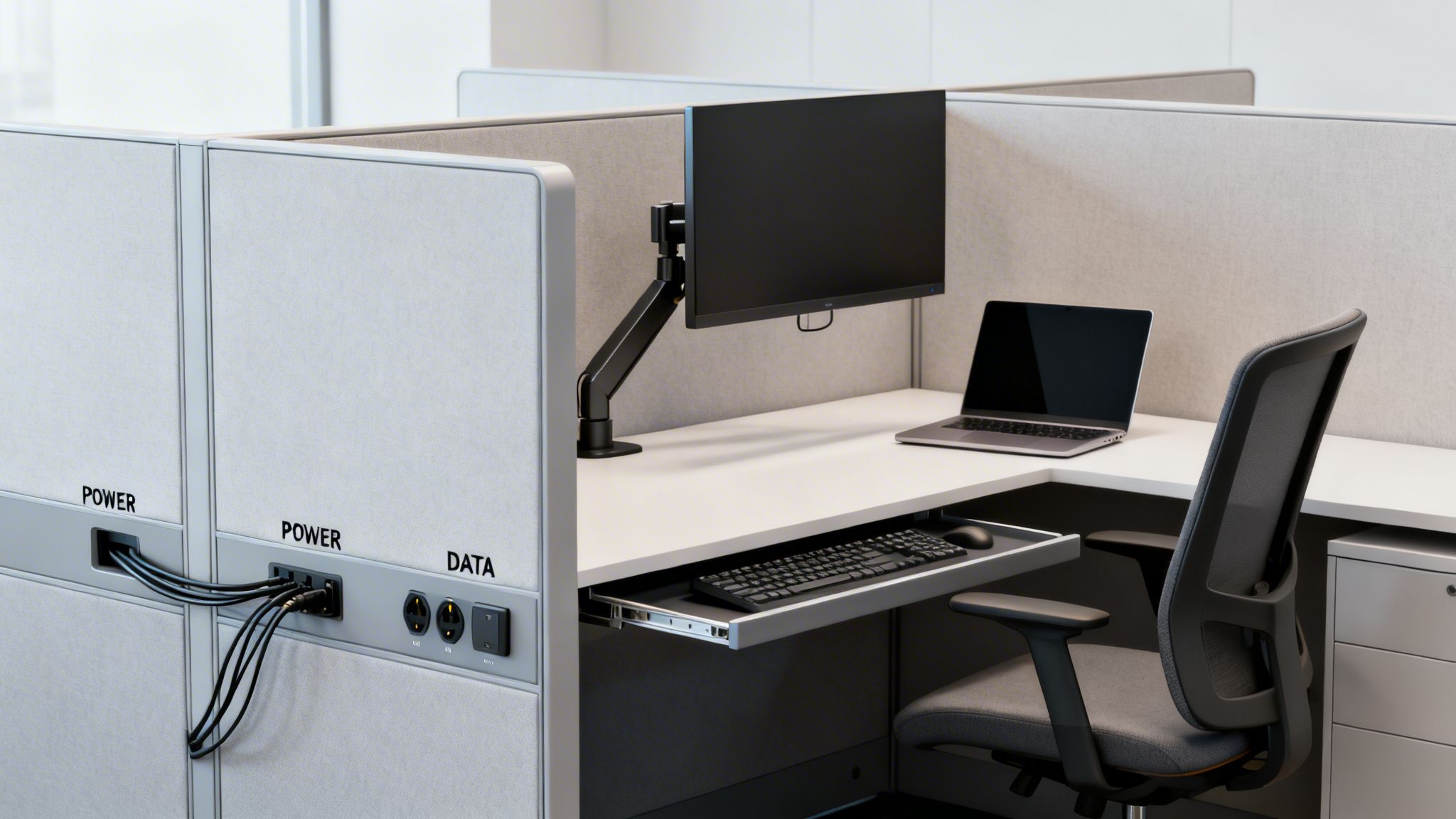
To create a space that actually works, you have to think about your electrical and data needs from day one. It’s about building an infrastructure that’s as clean and efficient as the furniture itself. When power is built right into the cubicle panels, you get a seamless, professional environment that’s ready for anything.
Planning Your Power and Data Needs
First things first: figure out what your team actually needs to plug in. A typical employee setup these days includes a computer, at least one or two monitors, a phone, and a charging port for a mobile device.
To be safe, each station should have a minimum of four to six power outlets. This prevents people from "daisy-chaining" power strips, a dangerous practice that can overload circuits and violate fire codes.
On the data side, plan for at least two data ports per workstation. One is for the computer, and the second is perfect for a VoIP phone or another networked device. This gives you a stable, hardwired connection and some breathing room for future tech without having to tear things apart later.
For a really clean setup, systems with base-in power feeds are a game-changer. They run all the wiring discreetly through the base of the cubicle panels, bringing connections right up to the desktop. Everything stays hidden, organized, and protected. If you're exploring options, you can learn more about installing an office cubicle power pole for a flexible solution.
Connecting Technology to Ergonomic Health
A well-powered cubicle is also a healthier one. When outlets are right there on the desktop, employees don’t have to crawl around on the floor to plug things in, which helps reduce the risk of strains and injuries. It’s a small detail that makes a big difference in workplace wellness.
Properly integrated power and data access is a cornerstone of good ergonomic design. It allows employees to position monitors, lighting, and other tools exactly where they need them for optimal comfort and posture, without being limited by the reach of a power cord.
This freedom is huge for ergonomic health. With power right where they need it, employees can:
- Position Monitors Correctly: Place screens at the perfect height and distance to prevent neck and eye strain, without being stuck near a wall outlet.
- Use Ergonomic Accessories: Easily plug in adjustable task lights, sit-stand desk converters, and other wellness tools that need a power source.
- Maintain a Clear Workspace: Keep the desk surface free of tangled extension cords, creating a more organized and focused environment.
Ultimately, thinking about these technical details from the start is about creating a workspace that is efficient, safe, and comfortable. By planning for power, data, and ergonomics together, you’re building a foundation that truly supports your team's well-being and productivity.
Build Your Ideal Workspace with Our Custom Designer
Alright, you've made it through the nuts and bolts. You know the cubicle size standard, you see how different footprints work for different roles, and you get how panel height can completely change the vibe of an office. Now for the fun part: putting all that theory into practice.
This is where the measurements on a page start to feel real. It can seem like a big jump from planning to actually building, but it doesn't have to be intimidating. With the right tool, you can bridge that gap and see exactly how your ideas will look and function in your space before you commit to anything.
From Informed Reader to Active Designer
The best way to get started is to jump right into our interactive Cubicle Designer. Think of it as your digital sandbox. It’s built to let you apply everything you've just learned, turning you from someone who knows about cubicles into the architect of your own workspace.
Stop trying to picture how a 6'x6' footprint with 53-inch panels will feel next to a manager's private office. Just build it and see for yourself.
In minutes, you can:
- Play with Dimensions: Set the exact length and width for your workstation cubicles or layout a few private office cubicles.
- Test Panel Heights: See the real difference between low, social-friendly walls and taller panels built for deep focus.
- Pick Your Finishes: Experiment with fabrics and surface colors to match the look you're going for.
- Add the Essentials: Drag and drop in overhead bins, file cabinets, and power outlets to make sure each station is truly functional.
Visualizing Your Perfect Office Layout
This tool takes the guesswork out of space planning. You're not just dropping furniture into a box; you're crafting a blueprint for how your team will work, feel, and collaborate. When putting together a full project, estimating all the furniture, fixtures, and equipment (FFE) is a major step. Tools like Exayard FFE takeoff software are designed for this, and our designer gives you a fantastic visual starting point for that process.
The ability to instantly visualize your layout is a game-changer. It removes the guesswork, allowing you to create a code-compliant and efficient floor plan with confidence, ensuring every piece fits perfectly.
Once you land on a layout that feels right, you can get an instant preview and a solid starting point for a quote. This is the final step in your journey—turning your knowledge of the cubicle size standard into a custom, effective, and perfectly designed workspace.
Ready to give it a shot? You can learn more about how to transform your office with our interactive cubicle designer in our detailed guide.
Common Questions About Cubicle Standards
Even the best-laid plans can hit a snag. Before you pull the trigger on a new office layout, a few practical questions almost always come up. Getting straight answers to these common concerns is the final step to moving forward with confidence and making sure your new workspace is a home run from day one.
What’s the Go-To Cubicle Size for a Typical Office?
The 6'x6' (36 square feet) cubicle is, without a doubt, the most popular and versatile choice out there. It hits that perfect sweet spot, offering enough personal work area for a computer and paperwork without eating up too much of your valuable floor space.
This adaptability makes it the unofficial cubicle size standard for all sorts of roles, from support staff to technical teams. It’s the foundation of an efficient and flexible layout. You can see a bunch of these workhorse stations in our collection of workstation cubicles.
How Much Room Do I Need for Walkways?
You’ll want to plan for a minimum of 36 inches for the smaller aisles between cubicle rows. For the main arteries of your office, we strongly recommend bumping that up to 44 to 48 inches. This isn't just for comfort—it ensures smooth two-way traffic and keeps you in line with ADA (Americans with Disabilities Act) accessibility guidelines.
Proper spacing is more than just a nice-to-have; it's critical for safety, easy navigation, and creating an open, uncrowded feel. Think of it as a non-negotiable part of good space planning.
Getting this right prevents those frustrating traffic jams near the coffee machine and contributes to a much calmer, more organized atmosphere for the whole team.
Is It a Good Idea to Mix and Match Cubicle Sizes?
Absolutely. In fact, mixing sizes and wall heights is a fantastic strategy for creating a dynamic workspace that’s built around what your teams actually do. This approach supports different work styles and seriously boosts overall productivity by making sure every square foot has a clear purpose.
For example, you could set up:
- Low-wall 6'x6' cubicles for your collaborative teams who need to chat and share ideas easily.
- Larger 8'x8' workstations with mid-height walls for managers who need a bit more room to spread out.
- Full-height private office cubicles for departments like HR or finance that are constantly handling sensitive information.
This kind of flexible design is surprisingly easy to pull off with modern modular systems. When you tailor the space to the function, you create a far more effective and supportive environment for every single person on your payroll.
Ready to design a workspace that fits your team like a glove? At Cubicle By Design, we specialize in creating functional, stylish office layouts that respect your budget. From the first sketch to the final installation, we’re here to help bring your vision to life. Start exploring your options today by visiting us at https://cubiclebydesign.com/.