


Basic modular workstations often start around $400 to $800, while commercial office systems usually land in the $900 to $2,500+ per seat range depending on privacy, power, storage, and layout complexity. If you’re budgeting a real office project, the modular workstation price on the product page is only the starting point, because installation, electrical, freight, and future layout changes can shift the actual project cost in a big way.
That’s the point where many facilities managers get stuck. A quote looks clean on paper, leadership wants a fast answer, and the first instinct is to compare per-seat numbers side by side. That works for buying simple desks. It doesn’t work well for modular systems.
A modular workstation is a small construction project disguised as furniture. Panel height affects material and labor. Power integration changes both product cost and field work. Storage, finish level, and layout density all change what the final number looks like once the furniture reaches the floor.
The smarter way to evaluate cost is to look at total ownership, not just purchase price. If you’re planning a new office, expanding a team, or reworking an existing floor plate, start with the budget ranges below and then pressure-test what the quote includes. For teams comparing layouts, finishes, and installation scope, Cubicle By Design is one starting point for seeing how modular systems are typically specified.
Decoding the True Cost of Your Next Office Layout
Many buyers searching modular workstation price want one clean number. In practice, you need two. One number covers the furniture itself. The other covers what it takes to make that furniture usable in your space.
That distinction matters the moment you move past a sample rendering and into an actual project. A benching layout with no integrated power can look affordable up front. A higher-privacy workstation with electrical feed, storage, and more assembly time may cost more per seat, but it can solve noise, cable clutter, and daily usability problems the cheaper option leaves behind.
Facilities teams usually run into the same issue during budgeting. The initial quote answers, “What does the product cost?” Leadership is asking, “What will this project cost us to buy, deliver, install, and live with for the next few years?” Those are not the same question.
Practical rule: If a quote doesn’t separate furniture, freight, installation, and power scope, you still don’t know the real project cost.
There’s also a planning problem hidden inside the price discussion. Modular systems are supposed to support change. If your headcount shifts, departments move, or hybrid schedules evolve, the value of the system comes from how easily it can be reconfigured. A low purchase price loses its appeal fast when every future change requires extra field labor, replacement parts, or a fresh electrical plan.
For a new facilities manager, the best approach is simple:
- Start with the seat type: open desk, cubicle, call center station, or higher-privacy workstation.
- Ask what’s included: work surfaces, panels, pedestals, power components, delivery, and installation.
- Budget for the room, not the catalog photo: aisles, columns, outlets, data paths, and access restrictions all affect cost.
- Think one move ahead: choose a system that can adapt without turning every reconfiguration into a mini renovation.
That’s where the actual modular workstation price conversation begins.
Understanding Typical Modular Workstation Price Ranges
A facilities manager might see one quote at a few hundred dollars per seat and another at more than double that, then assume one vendor is overpriced. In practice, those numbers are often describing different scopes. One may cover a basic freestanding station. The other may include panels, power components, delivery coordination, and field installation.
That is why price ranges only help if you separate product cost from project cost.
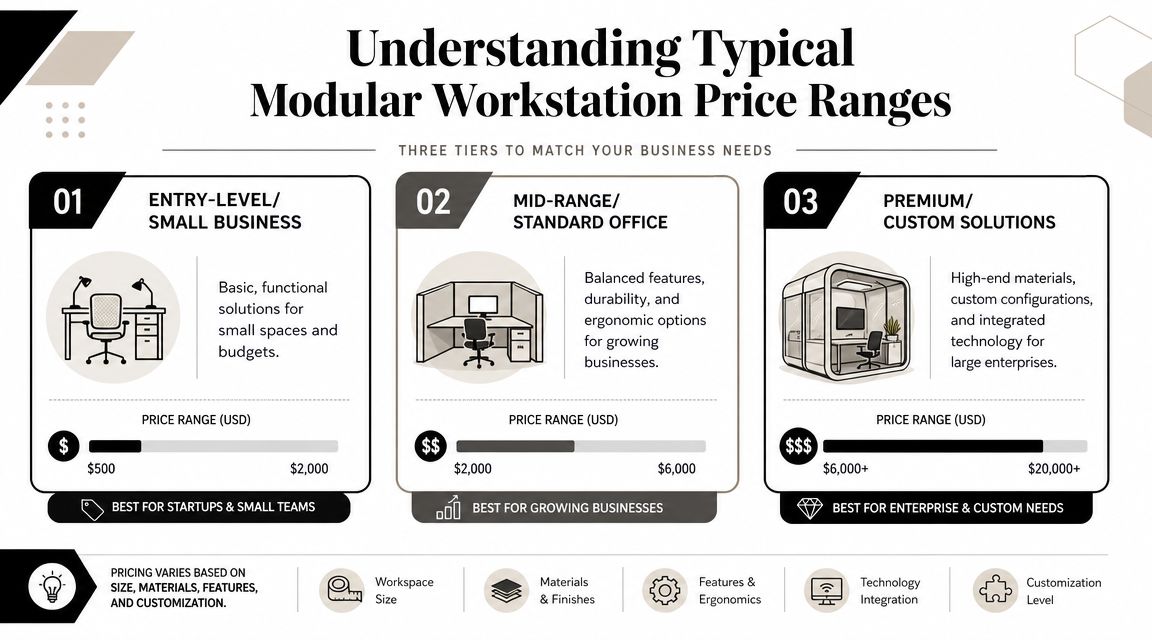
Commercial and light-duty modular workstations often fall into entry and mid-market bands, while industrial, lab, and highly customized systems land much higher because the specification is different from the start. For office environments, a practical benchmark for cubicle-style systems is $900 to $2,500 per workstation, with lower-cost options near $900 to $1,500 and more specified versions at $1,500 to $2,500 depending on panel height, storage, ergonomic features, and built-in power, based on commercial cubicle workstation pricing benchmarks.
Entry-level and small office setups
At the low end, buyers are usually looking at simple stations for startups, temporary swing space, or basic administrative use. These setups generally cover the furniture itself: work surfaces, light divider elements, and standard finishes with few integrated features.
That lower entry price can be perfectly reasonable. It also usually assumes the room already solves power, data, and privacy another way. If the floor plan needs panel-mounted electrical, better cable control, or more acoustic separation, the installed cost rises fast.
Mid-range commercial office systems
Many offices end up at this stage. The furniture is still standardized, but the system starts to carry more of the workload. Taller panels, shared spines, pedestal storage, tackable surfaces, and integrated power all shift the quote upward because they add both parts and labor.
For teams comparing practical layouts, modular office cubicle options are useful because they show how a workstation changes from a basic desk setup into a project that includes privacy, wire management, and service access.
A quote in this range often looks higher at first glance and lower after the full budget is built. That is a common trade-off in office planning.
| Tier | Typical use case | What usually drives the price |
|---|---|---|
| Entry-level | Small offices, temporary setups, simple admin seating | Basic materials, minimal features, simple assembly |
| Mid-range commercial | General office environments, hybrid teams, growing businesses | Panel height, storage, ergonomics, integrated power |
| Premium custom | Executive areas, specialized use, high-visibility spaces | Custom finishes, power/data routing, advanced adjustability |
Premium and custom builds
Higher-end modular workstations make sense when the station has to solve more than seating. Executive areas, client-facing offices, trading environments, and specialized departments often need cleaner detailing, stronger materials, integrated technology, or more adjustability.
This is also the tier where buyers can miss the total landed cost if they focus only on unit price. Custom finishes, powered height-adjustable components, field electrical connections, special freight handling, and future reconfiguration all affect what the workstation will cost to own.
A low online number may reflect a stripped-down kit. A project-grade workstation is priced around what it takes to deliver, install, connect, and maintain it in a working office.
Key Cost Drivers That Shape Your Final Price
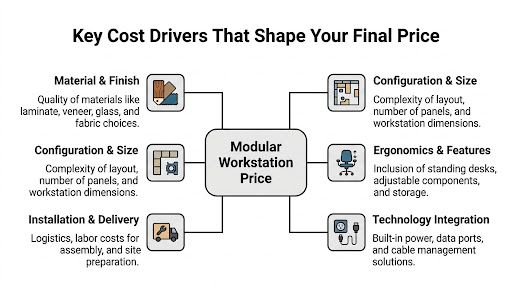
A workstation quote moves for practical reasons. The big changes usually come from what has to be built, what has to be delivered, and what has to be coordinated on site.
Materials and finish level
Materials set the starting point, but they also affect freight, handling, and install risk. Standard laminates are common because they hold up well, clean easily, and keep fabrication straightforward. Add glass, specialty laminates, metal trim, or custom paint, and the price rises because more parts need tighter tolerances and better protection in transit.
Privacy choices also change the project scope. Buyers comparing panel systems with custom office cubicles and more architectural options like glass office partitions are often comparing two different levels of site coordination, not just two aesthetics.
Configuration and footprint
Layout complexity changes price faster than many first-time buyers expect. A straight bench run is usually efficient to build and install. Corners, shared spines, 120-degree stations, mixed panel heights, and tight floor plans add connectors, trims, planning time, and field adjustments.
The floor plan matters as much as the workstation itself. Columns, window lines, exit paths, and uneven walls can force custom cuts or extra fillers. If the furniture has to work around existing power locations, the layout can become more labor-intensive before a single panel is unloaded.
I usually tell facilities teams to review the plan for complexity, not just seat count. Ten simple stations can cost less to deliver and install than eight stations in a dense layout with odd angles and limited access.
The lowest per-seat number often disappears once a layout needs extra connectors, fillers, field cuts, or difficult installation sequencing.
A practical way to evaluate layout trade-offs:
- Low panels: lower material use, easier sightlines, less acoustic control
- Higher panels: better privacy and space definition, more material and more install time
- Shared clusters: better space efficiency, more coordination at the spine for power and assembly
- Larger footprints: more user comfort, fewer seats on the floor, higher occupancy cost per person
This installation walkthrough is helpful if you’re trying to understand how field conditions affect labor:
Power, data, and ergonomic upgrades
Power is where sticker price and landed cost often separate. A powered station is not just a desk with outlets. It may include base feeds, in-feed locations, harnesses, duplexes, data pathways, and coordination with the electrician responsible for the building connection. Height-adjustable bases, monitor arms, and task lighting add useful function, but they also add components that affect lead time, assembly, and long-term service.
That is why total cost of ownership matters more than unit price on projects with integrated power or frequent churn. Facility Management Insights’ TCO advice is aligned with what we see in the field. The cheaper workstation package is not always the lower-cost decision once installation, electrical coordination, and future reconfiguration are included.
Installation scope needs the same scrutiny as the furniture specification. Buyers should ask whether the quote includes receiving, debris removal, punch corrections, phased installation, and electrician coordination. Vendors also vary widely in what they include under office furniture installation services, so that line item deserves a direct review before you compare proposals side by side.
Budgeting Beyond the Workstation Sticker Price
A per-seat number can be useful for rough planning. It becomes misleading when it’s treated as the full project budget. Most modular workstation price pages stop at the furniture figure, even though the furniture is only one part of what you’ll pay to get a working office.
The main gap is landed cost. Powered clusters and simple non-powered units can look similar in a search result, but they carry very different total-cost profiles. Product pages often skip what electrical integration, freight, and assembly add on real projects, which is exactly why this discussion of powered modular furniture and landed cost matters for buyers trying to budget realistically.
What usually gets left off the first quote
The hidden costs aren’t always deceptive. Sometimes they belong to another trade or another line item. That still means they affect your budget.
- Freight and delivery conditions: Dock access, stairs, elevators, and delivery windows can change the job.
- Assembly labor: Modular systems need more than box opening. Panels, tops, connectors, and trims all take time.
- Electrical scope: Furniture power, building feeds, and coordination with electricians are separate questions.
- Project management: Someone has to verify site conditions, sequence delivery, and solve field issues.
- Future changes: Reconfiguration has a cost even when the furniture is reusable.
A useful outside reference for procurement planning is Facility Management Insights’ TCO advice, because it frames ownership cost the way facilities teams experience it. The cheapest initial purchase isn’t always the lowest-cost decision over the life of the workspace.
Why cheaper furniture can cost more later
The failure point is usually change. A layout works for the move-in, then a team grows, departments swap neighborhoods, or privacy expectations shift. If the original system wasn’t chosen with reuse in mind, reconfiguration becomes expensive and disruptive.
That’s one reason some buyers look at used office furniture options for selective applications. Used inventory can lower up-front spending, but it still needs the same discipline around fit, installation, and future compatibility.
A low unit price is only a win if the system arrives on time, fits the space, supports power where people work, and can be changed without starting over.
Sample Pricing Scenarios for Different Businesses
Pricing gets clearer when you tie it to actual workplace needs instead of abstract seat counts. The same square footage can produce very different costs depending on density, privacy, and how much infrastructure the furniture needs to carry.
Startup office with simple workstation needs
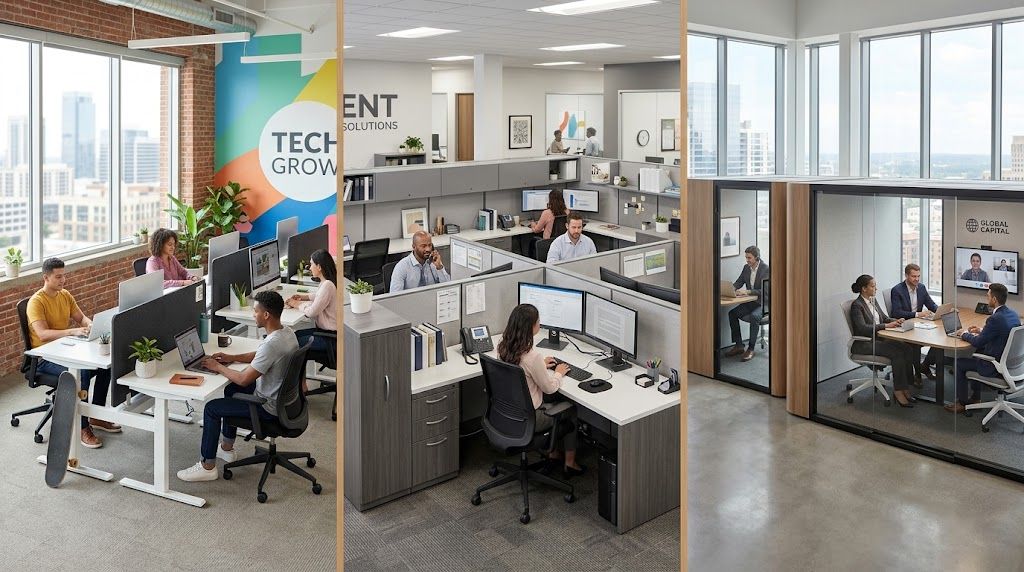
A small startup usually wants speed, flexibility, and a layout that doesn’t lock the company into one headcount forever. In that case, buyers often stay near the lower end of the commercial spectrum or use simpler modular layouts with limited built-in features.
The smart move is usually to avoid overspecifying. Keep paneling modest, use durable but standard finishes, and only integrate power where it removes a real pain point. What doesn’t work is buying the absolute cheapest online package and then discovering it doesn’t coordinate well with the room, cable paths, or basic daily workflow.
A practical planning checklist for this kind of office:
- Choose adaptable footprints: stations that can be regrouped as teams change.
- Keep finishes standard: good-looking basics usually age better than trend-driven upgrades.
- Limit accessories at first: add-on storage and specialty pieces can come later.
- Protect installation quality: rushed assembly creates problems that show up immediately.
High-density support team or call center
A call center usually values density, consistent power access, and enough privacy to reduce distraction without wasting floor area. Buyers need to be careful with modular workstation price comparisons in these situations because a dense layout can look efficient on paper but become frustrating if acoustics and cable management are ignored.
Teams planning these environments often evaluate purpose-built call center office cubicles because the layout logic is different from a general administrative floor. You’re balancing seat count, supervisor sightlines, aisle clearance, and headset-heavy daily use.
If the project includes relocation or phased deployment, IT coordination becomes just as important as furniture selection. A good reference is TLC Moving & Storage’s IT move guide, especially for understanding how workstation moves affect devices, cabling, and handoff timing.
In dense environments, the wrong workstation spec creates daily friction. The right one quietly supports the work and disappears into the background.
Headquarters refresh with mixed work styles
A larger corporate refresh usually combines more than one workstation type. Open collaborative zones, higher-privacy focus areas, and select enclosed elements often live on the same floor. Buyers in this category usually spend more time resolving consistency across departments than chasing the lowest seat cost.
This is also where finish level matters more. Leadership often wants the workplace to feel intentional, not pieced together. That pushes decisions toward cleaner details, stronger privacy where needed, and better integration between workstations and adjacent architectural elements.
What works in these projects is disciplined standardization. Use a family of parts that can create different experiences without introducing a completely different system in every area. What doesn’t work is mixing too many unrelated products, which tends to complicate installation, replacement, and future reconfiguration.
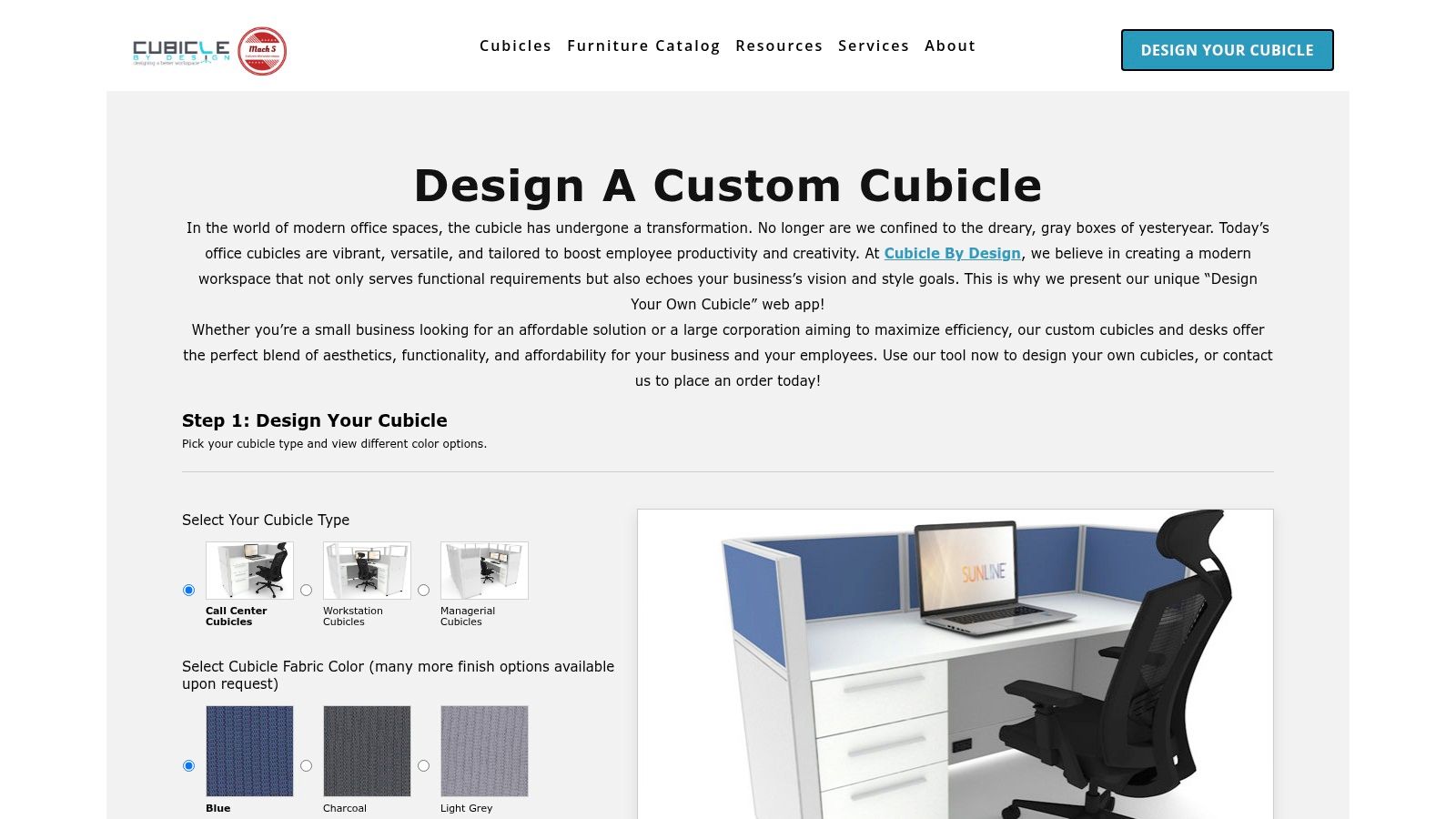
Use Our Custom Cubicle Designer to Estimate Your Cost
The easiest way to turn a rough budget into something usable is to build a configuration and see which choices move the number. That’s where a design tool helps. It forces you to specify the details that directly affect cost instead of comparing vague product photos.
What to configure first
Identify the essential requirements first. Seat count, footprint, and privacy level shape the layout before finishes do. After that, look at storage, work surface size, and whether power needs to live inside the furniture or outside it.
One practical tool for this is the Custom Cubicle Designer. It lets buyers configure dimensions, panel heights, finishes, storage, and electrical options so the estimate reflects actual specification choices instead of a generic starting price.
How to use the estimate well
Treat the first result as a planning number, not a final contract amount. Then review it against your site conditions.
Ask these questions before you rely on any estimate:
- Does the layout match the room? Columns, walls, and circulation matter.
- Is power included in the same way you need it? Surface access and building feeds are different issues.
- Are storage and ergonomic features realistic for the team? Under-specifying often leads to immediate add-ons.
- Will this still work after a headcount shift? Flexibility is part of the value.
The goal isn’t to chase the cheapest configuration. It’s to get to a specification that fits the space, supports the work, and won’t force a costly reset later.
Making a Smart Investment in Your Workplace
A facilities manager approves a low per-station number, then the project total rises after freight, electrician time, access restrictions, and panel rework hit the quote. That is how workstation budgets get missed.
A smart investment starts with total landed cost. For modular workstations, that means the furniture price plus delivery, installation, power distribution, building electrical connections, permits where required, and the labor needed to adjust the system later. A quote that looks competitive on paper can lose its edge fast if those items are excluded or left vague.
Modular systems still earn their place because they can adapt to headcount changes, department moves, and phased renovations better than fixed casework or one-off built-ins. That flexibility has value, but only if the specification supports it. Standard panel sizes, repeatable components, and accessible power paths usually cost less to rework than highly customized layouts that look efficient on day one and become expensive every time the plan changes.
What a disciplined buyer does differently
Disciplined buyers review the quote in two layers. First, they confirm what is included now. Second, they test what the system will cost to change later.
That usually comes down to four checks:
- Confirm scope line by line: furniture, freight, installation, electrical components, and site services should be listed separately.
- Check site conditions before approving numbers: elevators, stair carries, after-hours access, union labor rules, and floor protection can change install cost quickly.
- Price the next reconfiguration now: ask what it will cost to add stations, swap panel heights, or move a team six months from now.
- Choose parts you can repeat: standard finishes and common component sizes are easier to replace, expand, and service.
The best buy is rarely the lowest unit price. It is the workstation package that fits the room, supports the team, and stays affordable to own after move-in.
If you’re pricing a new layout, a reconfiguration, or a phased office rollout, Cubicle By Design can be used as a starting point to review workstation options, compare configuration choices, and request a quote that reflects the details of delivery, installation, and power planning.