



A lot of offices hit the same point at once. Assigned desks sit empty half the week, collaboration happens in aisles instead of planned spaces, and the old workstation layout no longer matches how people work. Facilities teams feel it first because they're the ones asked to make the office look better, seat more people, and still control cost.
That's where office benching furniture usually enters the conversation. Not because it's fashionable, but because it solves a real planning problem. It can support denser seating, cleaner sightlines, and easier reconfiguration than many traditional layouts, but only if the project is sized correctly and built around real attendance patterns instead of assumptions.
Office Benching Furniture Design Guide 2026
Is Your Office Ready for a Change
A common first benching project starts with an office that isn't broken enough to justify a full rebuild, but isn't working well enough to leave alone. Maybe your team gave up private offices years ago and now sits in dated cubicles that feel bulky. Maybe you downsized your footprint and need more useful seats without creating a cramped floor. Maybe hybrid scheduling changed traffic patterns so much that half your desks are empty while the busiest team still can't find a place to sit together.
That situation is exactly why many organizations revisit workstation design. The Cubicle By Design website is useful at this stage because it shows the broader range of modular workstation options available before you lock yourself into one approach.

What usually triggers a benching project
The market context tells you this isn't a fringe purchase. The U.S. office furniture industry generated nearly $18 billion in revenue in 2023, with systems like benching forming part of the mainstream workplace category, according to Statista's overview of office furniture in the U.S..
In practice, the trigger is usually one of these:
- Hybrid inconsistency: Teams no longer need one desk per person every day, but they do need neighborhoods where they can land together.
- Inefficient footprint: Older stations often consume more floor area than current work patterns justify.
- Slow reconfiguration: Traditional layouts can make departmental changes feel like a renovation instead of a furniture move.
- Visual heaviness: High panels and mismatched add-ons can make even a decent office feel dated.
Practical rule: If your office has more seats than daily users but still feels short on useful work areas, the issue usually isn't seat count. It's layout logic.
What clients often get wrong early
The biggest mistake isn't choosing benching. It's treating benching like a furniture order instead of a planning exercise. A benching system only works when circulation, privacy, storage, power, and scheduling rules are decided at the same time.
That's why first projects need more than a finish selection. They need honest answers to a few uncomfortable questions. Who is in the office on the same days? Which groups need heads-down focus? Who can share storage? Where does overflow go when attendance spikes?
If you answer those questions before you buy, office benching furniture can make an office feel current, efficient, and easier to manage. If you skip them, you can end up with a sleek-looking empty floor that frustrates everyone.
What Is Office Benching and Why Choose It
Office benching is best understood as a professional shared desk platform. Instead of a field of separate enclosed stations, you have connected runs of worksurfaces where employees sit side by side, often with minimal partitioning and shared structural components.
Independent office furniture guidance describes benching as a high-density workstation format that places employees on shared runs with minimal partitioning. It can halve the physical footprint of enclosed cubicles and lower material costs, but it also needs careful planning to control distraction, as explained in this guide to benching workstations.
Why companies choose it
The appeal is straightforward. You get more usable floor area, a cleaner planning grid, and easier team clustering. Benching also makes it simpler to build rows, pods, or neighborhoods that can expand and contract with staffing changes.
For many first-time buyers, these are the most practical advantages:
- Seat density: More people can work in the same footprint without every seat becoming a separate furniture assembly.
- Simpler reconfiguration: Shared frames and modular surfaces are easier to rearrange than older, heavier stations.
- Lower visual clutter: Open sightlines can make a floor feel larger and brighter.
- Team proximity: Groups that collaborate constantly don't have to work around high barriers.
A good place to compare related formats is modular office desk systems, especially if you're deciding between benching, clustered desking, and more traditional modular stations.
Why it isn't a new idea
Benching feels modern, but the logic behind it has been around for decades. Open-plan workplace design traces back to 1958, when the German consulting group Quickborner Team introduced Burolandschaft, or “office environment,” a layout approach meant to move away from rigid cellular offices. Offices later swung back toward higher cubicle panels in the 1970s through early 1990s, with panel heights averaging 60 to 84 inches, before shifting again toward lower 3 to 4 foot panels and more open environments, as described in this history of office layout evolution.
That history matters because it explains the trade-off. Benching works when an employer values openness, density, and faster change more than enclosed privacy.
Benching works best when the work itself is team-based, digital, and changeable. It struggles when every role needs quiet, paper storage, and uninterrupted concentration all day.
So why choose it now? Because many offices no longer need permanent one-person territories. They need flexible shared infrastructure that supports touch-down work, scheduled collaboration, and a smaller real estate footprint without making the office feel temporary.
The Anatomy of a Benching System
A benching system looks simple from a distance. Up close, it's a kit of interdependent parts. If one decision is off, the whole row suffers. A worksurface that's fine on paper can fail once monitor arms, shared power, and mobile pedestals are added. A clean frame can become a cable mess if the wire path isn't designed early.
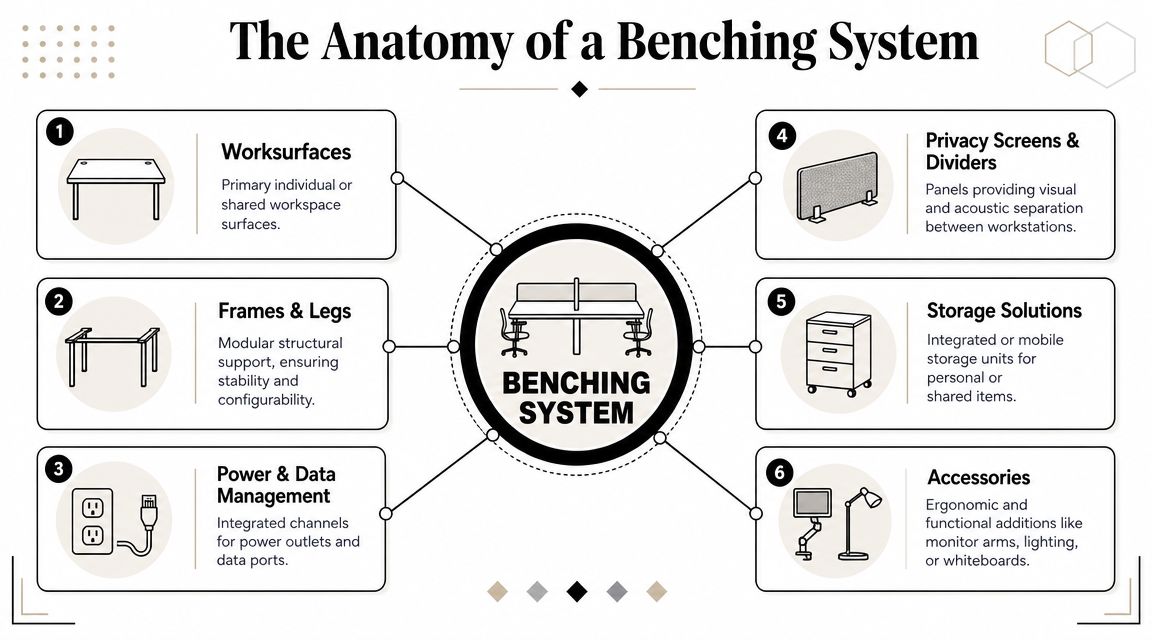
Worksurfaces and structure
The first decision is the desk itself. Benching can use individual tops on a shared frame or longer continuous runs. Either can work. What matters is whether each person has enough task space once screens, docks, and personal items are in place.
The frame is the hidden backbone. T-legs, loop legs, and shared beam systems each change how open the bench feels underfoot and how easy it is to clean, cable, and reconfigure. Buyers often focus on finish before they settle the support structure, but installers feel the difference immediately.
When clients want a more environmentally conscious specification, it also helps to look at examples of sustainable office benches to understand how manufacturers package materials, modularity, and longevity into the same product category.
Privacy and storage choices
Most benching projects need at least some separation. The question isn't whether to add privacy. It's where and how much. Divider screens can sit at the centerline, between seats, or at aisle edges. Storage can be mobile, shared, or integrated.
Useful components usually include:
- Center screens: Good for basic sightline control between opposing users.
- End panels: Helpful where benches terminate near traffic paths.
- Mobile pedestals: Better for unassigned seating than fixed overhead storage.
- Shared credenzas: Useful in team neighborhoods where not everyone needs the same level of personal storage.
Power and accessories
Power planning changes the success of a benching installation more than most buyers expect. Bench systems often rely on troughs, beam channels, floor feeds, or vertical drops to keep cable paths controlled. If you're planning feeds from above or need a clean route from building power to the furniture, a cubicle power pole can help frame the discussion with your electrician and furniture planner.
Accessories matter too. Monitor arms, task lights, CPU holders, keyboard trays, and tackable screens aren't afterthoughts. They define how usable the bench is after move-in.
A benching row should be designed fully loaded, not as an empty rendering. Screens, monitors, bags, chargers, and personal storage all change how generous the station really feels.
Planning Your Layout for Modern Work
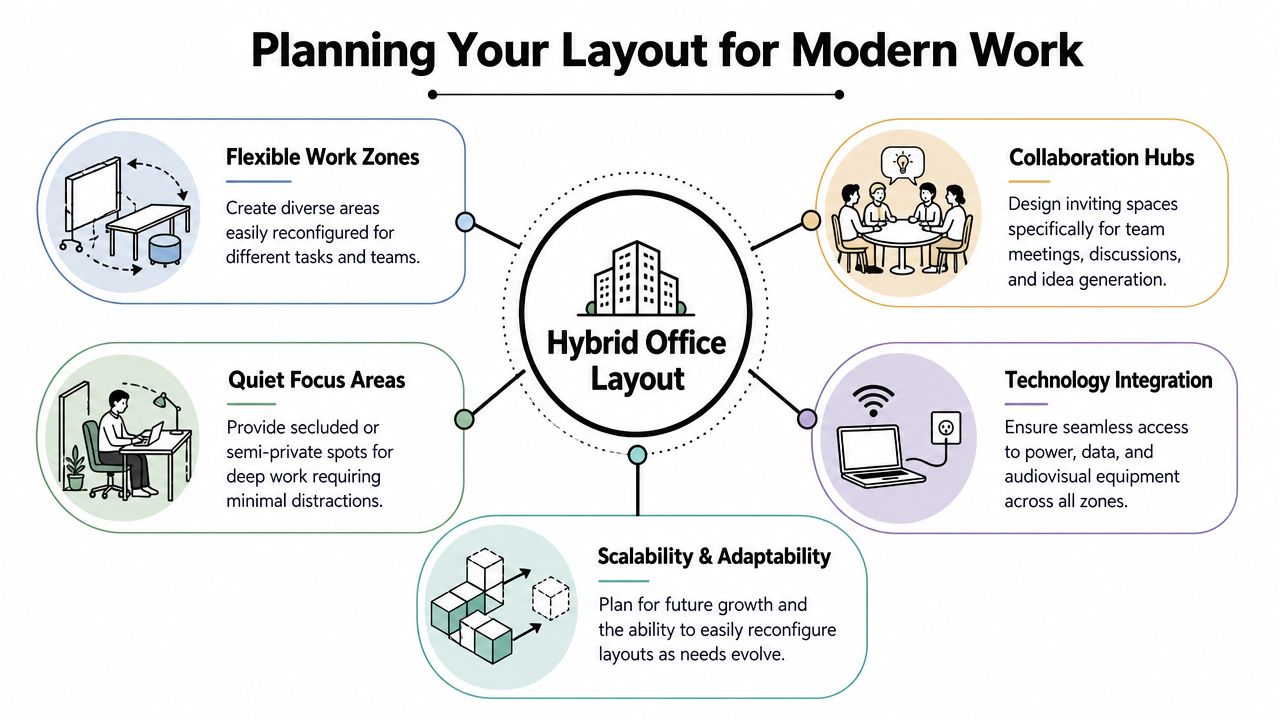
The hardest part of a benching project isn't choosing the furniture. It's deciding how many seats you need and where those seats should live. Hybrid offices complicate this because headcount no longer equals daily attendance. If you plan for everyone at once, you risk building an expensive empty office. If you under-plan, the busiest days turn chaotic.
Start with attendance, not org chart
Recent market-facing guidance on benching notes a key challenge: hybrid work can make benching look flexible in theory while still creating utilization risk in practice. The more useful planning approach is to right-size around actual utilization data and seat-sharing ratios, rather than peak headcount, as discussed in this benching overview focused on hybrid use.
That means you should map who comes in, when they come in, and whether they need assigned or shared seating. Often, a mix is needed, not a single rule.
A workable planning sequence looks like this:
- Track actual attendance patterns: Badge data, reservations, or manual observation are all better than guesswork.
- Group by work mode: Sales, support, engineering, HR, and leadership usually use space differently.
- Build neighborhoods: Keep frequently collaborating teams near one another.
- Reserve overflow strategy: Decide where peak-day spillover goes before it happens.
A floor plan gets sharper when it's tied to real use patterns. For organizations working through those scenarios, the office layout planning guide is a practical reference point.
Choose the right benching configuration
Different layouts solve different problems. A straight run is efficient and simple to cable. Back-to-back benches increase density and often work well for larger departments. Pods can support team clusters but need more careful circulation planning around them.
Use this quick comparison when reviewing concepts:
| Layout type | Works well for | Watch for |
|---|---|---|
| Linear run | Perimeter walls, touchdown areas, narrow floor plates | Can feel exposed without nearby support spaces |
| Back-to-back | Large teams, dense departments, call-heavy groups | More acoustic spill if rows are too long |
| Team pod | Project groups, hybrid neighborhoods | Needs disciplined power and traffic planning |
The best hybrid layouts rarely rely on benching alone. They pair benches with enclosed rooms, small collaboration tables, and quiet landing spots. That mix keeps the office useful on both low-attendance and high-attendance days.
A planning tool can also speed up early decisions. The Custom Cubicle Designer lets teams test dimensions, privacy levels, and workstation options before a final quote or installation plan is built.
Here's a short visual overview of modern office planning in practice.
Keep circulation and support spaces honest
Benching often fails because every square foot gets pushed into desk count. That's where the office starts to feel tight even when the furniture itself is compact. People need room to pass behind chairs, pull out storage, and reach shared devices without blocking one another.
The best-performing benching plans usually protect these non-desk needs:
- Arrival space: A clear landing zone keeps people from dropping bags into circulation paths.
- Nearby meeting space: Quick conversations should move out of the bench row.
- Focus alternatives: Not every task belongs in an open environment.
- Storage discipline: Shared seating collapses fast when personal items have nowhere to go.
Hybrid benching should absorb variation, not punish it. If the plan only works on a perfectly average day, it isn't finished.
Managing Acoustics Privacy Power and Data
Benching gets rejected for four reasons more than any others. It's too noisy. It feels too exposed. Devices end up plugged in everywhere. Cable management turns into a visible mess. All four problems are solvable, but none should be left for post-installation fixes.
Tuning privacy without closing the office
Privacy in benching isn't all or nothing. It's adjustable. Industry guidance on benching partition options shows that panel heights typically range from 39 to 53 inches, which gives planners a way to add modest acoustic and visual separation without fully giving up the benefits of open layout, as shown in this office benching panel example.
That range is useful because different edges of the same office need different responses. A row near a main circulation path may need more screening than one placed against a quiet wall. Teams that spend long stretches on video calls often need more visual shielding than teams doing short collaborative tasks.
Practical acoustic and privacy moves include:
- Use low screens strategically: Add them where sightline interruption matters most, not automatically at every seat.
- Finish the room, not just the desk: Upholstered panels, carpet, ceiling treatment, and soft seating all affect noise.
- Create escape valves: Pair open benching with enclosed rooms and retreat spaces.
- Use transparent enclosure where needed: Glass office partitions can provide separation for focused rooms without making the whole floor feel chopped up.
Build power and data early
Power should be coordinated while the layout is still fluid. Once the furniture order is placed, changing feed points gets harder and more expensive. Shared benches can support cable troughs, under-surface routing, beam channels, floor core connections, or overhead drops, but each method affects the final installation sequence.
The practical questions are simple:
- Where does building power enter the furniture zone?
- Will users dock laptops, run dual monitors, or need task lighting?
- Are floor boxes aligned to the proposed bench runs?
- Is IT expecting hardwired data, or mostly wireless with selective drops?
This is also where compliance matters. Facilities teams should coordinate furniture power design with licensed commercial electrical work and code review. If your team needs a plain-language reference on that side of the process, this guide on ensuring compliance in commercial electrics is a useful companion read.
For noise control beyond screens alone, office acoustics solutions can help shape a broader strategy that covers panels, dividers, and surrounding room treatments.
Open benching doesn't require a loud office. It requires a deliberate acoustic plan.
Budgeting for Benching vs Traditional Cubicles
Furniture budgets get easier to defend when the conversation moves beyond sticker price. Benching and traditional cubicles solve different operational problems, so the cleaner comparison is total project logic: how much structure you're buying, how hard it is to install, and how expensive it will be to change later.
The market has cycled through open and enclosed formats before. After the era of high-paneled cubicles, workplaces moved back toward lower panels and more open environments in support of collaboration, density, and faster reconfiguration, as noted in this overview of the office design cycle. That reconfiguration point is where benching often makes financial sense.
Cost comparison benching vs traditional cubicles
| Factor | Office Benching | Traditional Cubicles (Mid-Height) |
|---|---|---|
| Primary cost driver | Shared frames, shared runs, fewer barriers | More panel components, more individualized boundaries |
| Material intensity | Usually lighter and simpler | Usually heavier and more segmented |
| Installation complexity | Often simpler if power is planned well | Often more component-heavy |
| Reconfiguration effort | Typically easier for departmental changes | Typically slower when panel systems must be rebuilt |
| Storage model | More likely to use mobile or shared storage | More likely to include dedicated station storage |
| Best fit | Hybrid teams, open neighborhoods, dense planning | Roles needing stronger territorial definition |
Where buyers misread the budget
Benching can look less expensive at first glance because there are fewer barriers and more shared parts. That's often true, but the savings disappear if you skip support spaces, under-spec privacy, or force a benching layout into a team that really needs more enclosure.
Traditional cubicles still make sense for some departments. If your office includes confidential work, heavy document handling, or concentration-intensive tasks, a mix of formats can be smarter than a full conversion. That's why many clients compare custom office cubicles, call center cubicles, and workstation cubicles alongside benching before they finalize a plan.
If you're trying to build a budget framework before requesting drawings, a modular workstation price guide helps establish the right categories to compare.
The real budgeting question
The right question isn't “Which is cheaper?” It's “Which layout will cost less to live with for the next several years?” If your team changes frequently, benching often wins on flexibility. If the work depends on predictable personal territory, traditional stations can prevent expensive dissatisfaction later.
Your Benching Project Checklist
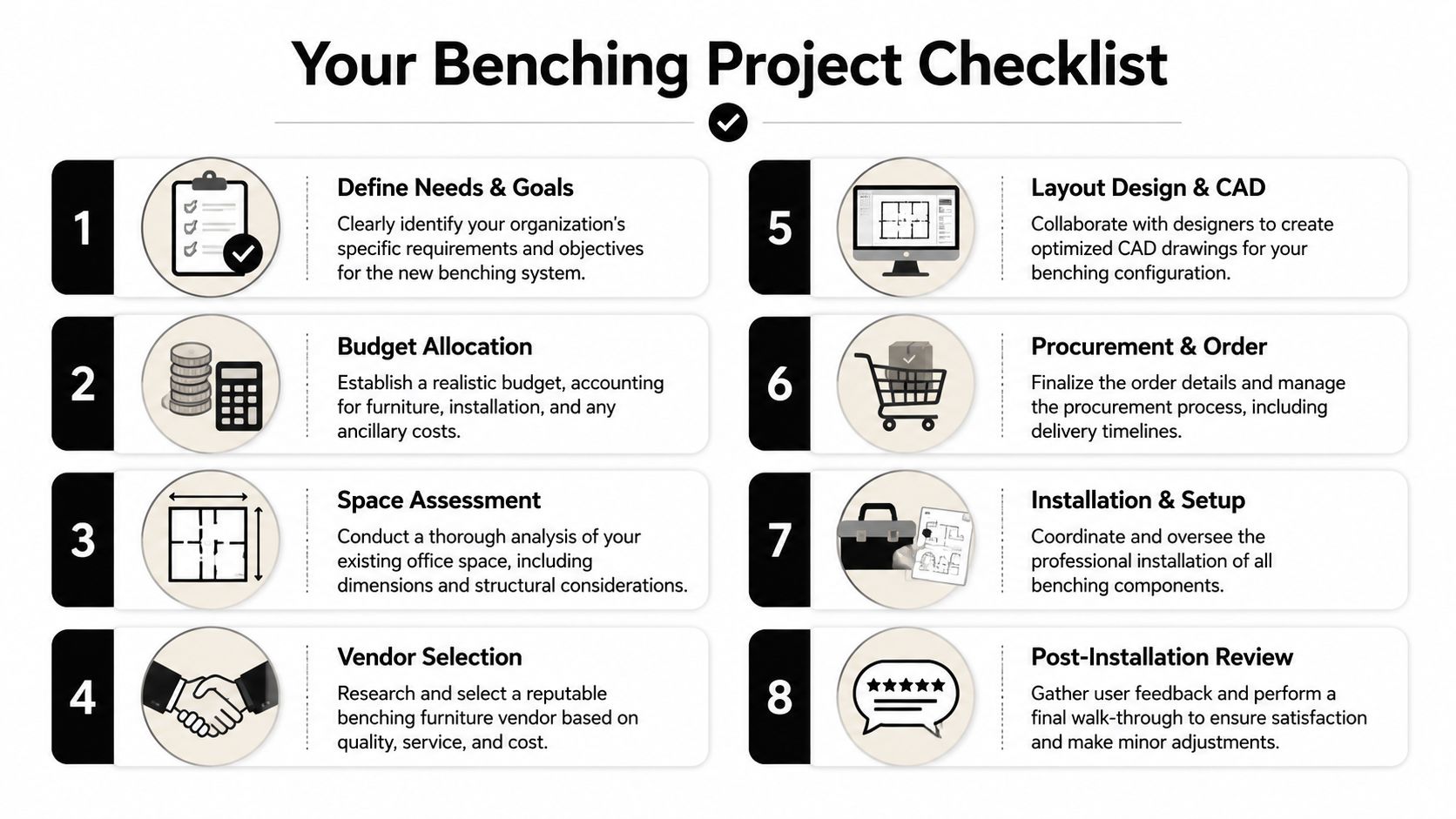
A successful benching project is usually boring in the best possible way. The order is clear, the utility coordination is finished before installation day, and users understand how the space will work before they move in.
The practical sequence
- Define work patterns first: Confirm who needs assigned seating, who can share, and which teams should sit together.
- Measure the room thoroughly: Include columns, doors, glazing, floor boxes, and any circulation constraints.
- Test the layout digitally: Use the Custom Cubicle Designer to explore sizes, privacy levels, storage, and electrical options before ordering.
- Choose privacy intentionally: Decide where open benching is appropriate and where low panels or enclosed support rooms are needed.
- Coordinate technology early: Finalize power entry points, cable paths, monitor requirements, and data strategy with facilities and IT.
- Review installation access: Confirm freight elevator, loading dock, delivery windows, and staging rules with building management.
- Plan assembly support: If your move or reconfiguration involves local logistics help, references such as this article on furniture assembly in Ajax, ON show the kinds of issues professional installers help prevent.
- Do a post-install walk-through: Check cable control, screen alignment, chair clearance, and how people use the bench after move-in.
What to confirm before approval
A benching order should not be approved until these questions have clean answers:
- Are seat counts based on actual attendance patterns?
- Is there enough nearby space for calls, focus work, and informal meetings?
- Do users have the right storage model for assigned or shared seating?
- Has power and data coordination been reviewed with the trades?
- Does the installation plan fit the building's access rules?
When those answers are settled, office benching furniture becomes much easier to buy, install, and manage.
If you're planning a reconfiguration, expansion, or first hybrid seating project, Cubicle By Design can be part of the process for layout development, workstation configuration, and quote-ready planning.