


If you’re planning a major office reconfiguration, you’re probably dealing with the same pressure points typically encountered at the same time. The open area is too noisy. A few people need heads-down focus. Others need to collaborate without taking over the whole floor. IT wants cleaner cable routing. Facilities wants something easier to rework than drywall.
A partition cubicle wall sits in the middle of all of those decisions. It isn’t just a divider. It’s part furniture, part space-planning tool, and part infrastructure strategy. The right system can create privacy without making the office feel closed off. The wrong one just gives you visual barriers and leaves the actual problems untouched.
What Is a Partition Cubicle Wall
A partition cubicle wall is a modular panel system used to define work areas, create separation, and add structure to an office without building permanent rooms. Unlike drywall, it can usually be reconfigured, expanded, or reduced as teams change. That flexibility matters when headcount moves, departments shift, or a hybrid schedule changes how much assigned seating you need.
Most buyers first think about privacy. That’s fair, but privacy is only one job these walls handle. A good partition system also helps with circulation, workstation organization, cable routing, visual boundaries, and the overall feel of the floor. In practice, it lets you shape the office in a way that permanent construction often makes too expensive or too slow.
The category has deeper roots than many people realize. The modern format traces back to 1968, when Robert Propst developed Herman Miller’s Action Office system. Office planners later standardized those ideas into denser layouts, and panel heights in the 1970s through early 1990s commonly averaged 60 to 84 inches, which helped define the more enclosed cubicle era described in this history of the office cubicle.
How It Differs From Permanent Walls
If you’re comparing cubicle partitions to construction, the easiest way to think about it is this:
- Drywall creates rooms
- Partition systems create adaptable zones
- Furniture-integrated panels create work settings
That distinction matters when you start budgeting for moves, adds, and changes. Teams that need a refresher on what counts as a structural wall versus an interior divider often benefit from understanding non-load bearing walls before they lock in a plan.
A partition cubicle wall also tends to move faster from approval to usable space. You still need thoughtful planning, but you aren’t committing to the same level of demolition, patching, or long-term permanence.
What Buyers Usually Get Wrong
The biggest mistake is treating panels as a cosmetic purchase. They aren’t.
Practical rule: Buy the wall for the problem you’re trying to solve. Noise control, privacy, circulation, and cable management often point to different panel styles.
Another common mistake is specifying height before workflow. If your team needs frequent cross-desk interaction, tall panels can create friction. If your team spends hours on calls, low panels won’t do enough. The right answer usually starts with how people work, then moves to dimensions and finishes.
If you’re comparing system styles, panel heights, and layout approaches, it’s worth reviewing office panels and partitions before you narrow your shortlist.
Exploring Types of Cubicle Partitions
A team usually notices partition type only after the layout starts affecting the work. Calls carry farther than expected. Managers lose sightlines they assumed they would keep. Desks look organized on plan, but power drops and data paths become awkward once panels are in place. Partition selection needs to start with work patterns, noise tolerance, and how the office will be serviced over the next few years.
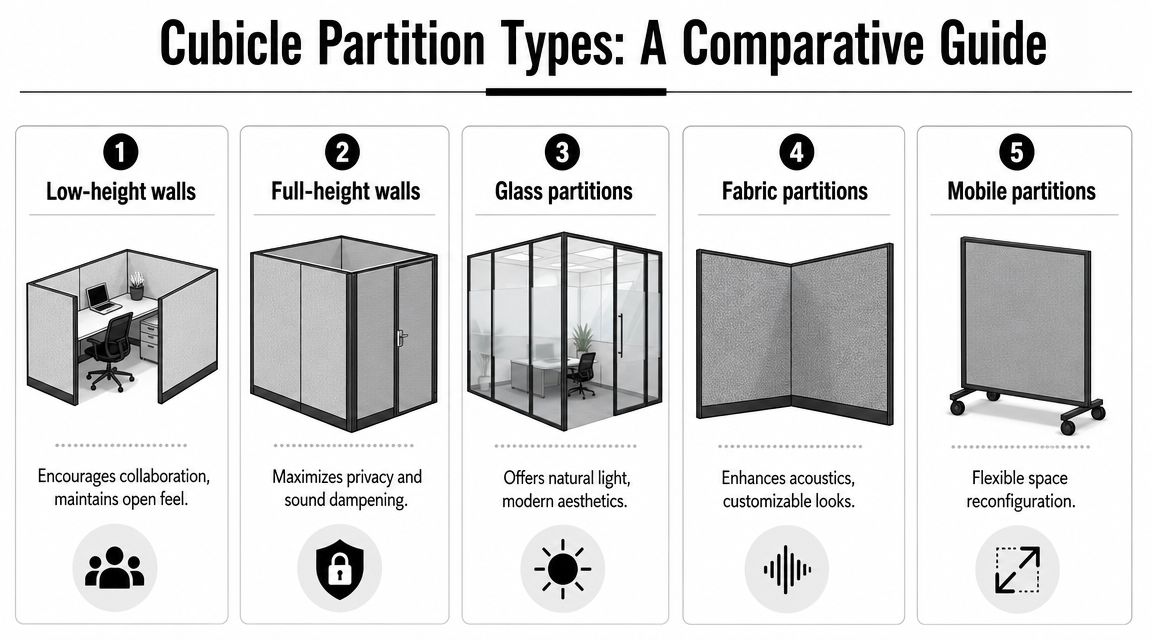
Low and Mid-Height Panels
Low-height partitions suit areas where fast interaction matters more than screening. They mark out individual work points, keep the floor visually open, and let daylight travel further. Mid-height panels add a better balance for teams that spend part of the day collaborating and part of it working heads-down.
These systems fit well in a few specific cases:
- Project benches: Staff need quick verbal check-ins and clear sightlines.
- Hybrid workstations: People want a defined place to land without a heavily enclosed setup.
- Tighter floor plates: Lower panels help the office feel less compressed.
The trade-off is straightforward. Low and mid-height panels do little to stop speech from traveling. They can support some privacy at seated eye level, but they will not solve distraction in departments handling calls, concentrated analysis, or confidential material.
Full-Height and High-Privacy Panels
High panels are the better tool when the complaint is interruption, not appearance. They block more visual movement, improve screen privacy, and create a stronger sense of personal territory. In practice, they are often the right choice for finance teams, HR functions, support groups on frequent calls, and any workstation cluster where focus time has real value.
They also raise planning demands. Tall panel runs can make circulation feel narrower, reduce passive supervision, and create dead spots for light if the layout is not handled carefully. They also put more pressure on early decisions about cable routing, outlet locations, and future reconfiguration, which buyers often underestimate.
For teams planning around change, modular office wall systems that can be reconfigured later are worth reviewing before finalizing panel height across the whole floor.
A similar logic appears in facilities planning, where modular storage partition systems are used to separate functions while preserving flexibility. Office projects benefit from the same discipline. Build enough definition for the current need without making every future change expensive.
Glass, Fabric, and Mobile Options
Material and mobility change how a partition behaves, even when the footprint looks similar on a plan.
Glass partitions keep sightlines open and borrow light from adjacent areas, which helps reception zones, manager spaces, and collaborative settings feel less boxed in. They do very little for true acoustic privacy unless the system is detailed as an enclosed room solution, so they need to be specified carefully if focus work is part of the brief.
Fabric panels usually perform better in open-plan workstation settings because they soften reflected sound while adding pin-up utility. They are often the more practical choice for day-to-day desk environments where employees need a visual barrier and some help with noise control.
Mobile screens work best as short-term tools. They are useful for swing space, temporary project zones, and training setups, but they are not the strongest answer for a permanent workstation plan that needs integrated power, clean cable management, and consistent alignment.
This quick comparison helps:
| Type | Best for | Trade-off |
|---|---|---|
| Low-height walls | Open collaboration | Limited seated privacy |
| Full-height walls | Focus and screening | Can feel more enclosed |
| Glass partitions | Light and modern aesthetics | Less forgiving for visual privacy |
| Fabric partitions | Acoustic absorption and warmth | Can show wear sooner in rough environments |
| Mobile partitions | Flexible reconfiguration | Less stable as a permanent planning tool |
For a visual example of how different systems change a floor, this walkthrough is useful:
If your goal is transparency with defined boundaries, glass office partitions can complement or replace traditional panel runs in selected zones.
Understanding Wall Materials and Finishes
Material selection changes more than appearance. It affects how a partition cubicle wall handles wear, cleaning, moisture, acoustics, and long-term maintenance. Many projects go off budget as a result. A finish that looks good in a sample book can turn into a poor fit once people start bumping chairs into it, pinning things to it, and cleaning it every week.
Fabric, Laminate, Glass, and Solid Surface
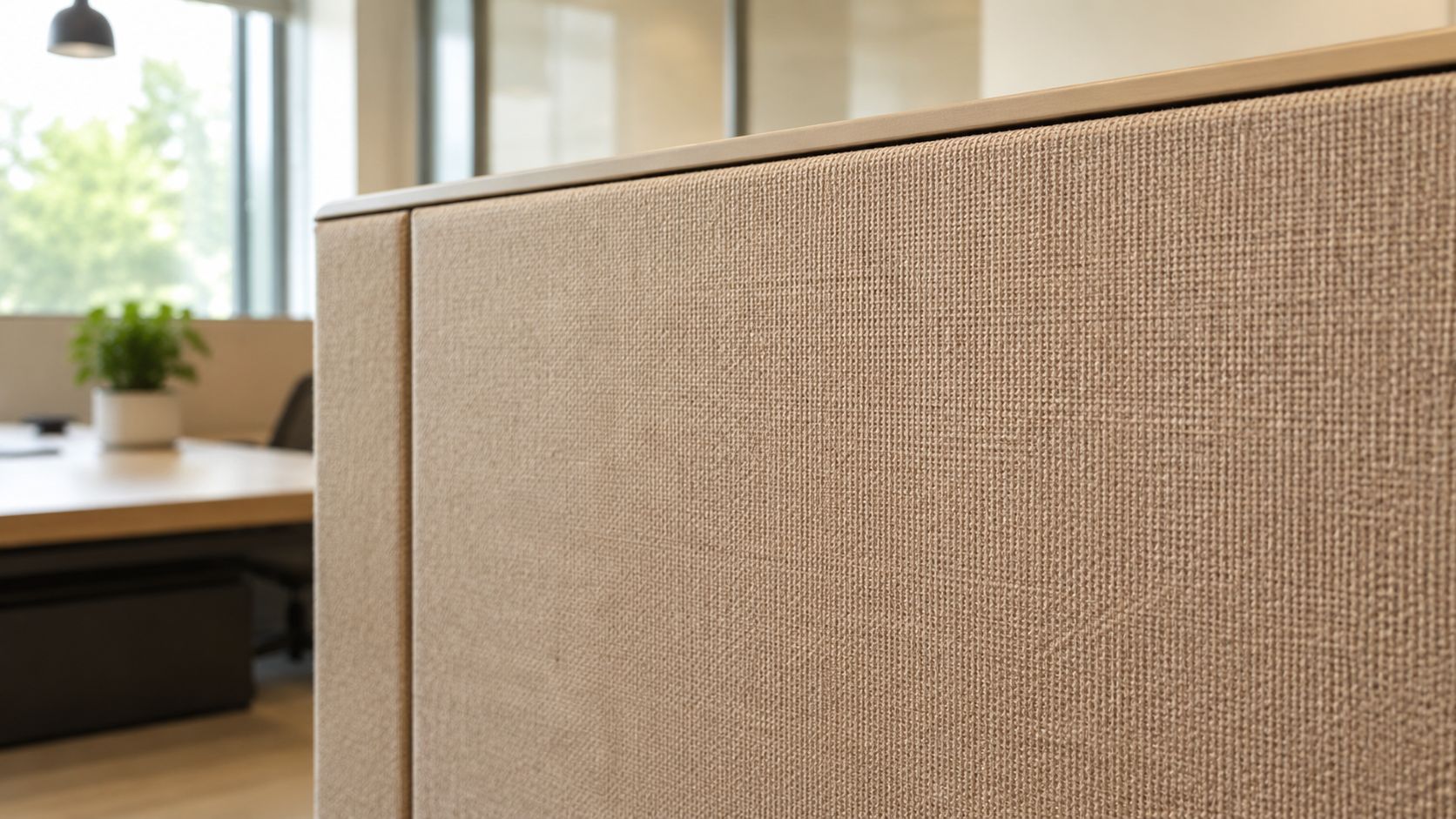
Fabric-wrapped panels are common because they soften the look of a workstation and can support sound absorption. They also give teams tackable surfaces, which still matters in departments that live off printed schedules, process maps, or pinned notes.
Laminate and melamine-faced surfaces usually make more sense in harder-use spaces. They wipe down easily and tend to look cleaner longer in busy environments. If you have shared seating, frequent guest traffic, or a mixed office and operational setting, easy-clean surfaces deserve serious attention.
Glass changes the feel of the office immediately. It opens sightlines and moves light further into the floor plate. It’s often a smart move in manager offices, meeting areas, and front-facing spaces where you want a more architectural look. For a closer look at those applications, see glass partition walls for offices.
Why Specifications Matter
A material spec tells you whether a panel is built for real use or just a showroom floor.
One institutional-style partition specification calls for 13 mm solid-surface panels designed for humid conditions, which points to durability and moisture resistance in demanding settings, as shown in this technical description. In office terms, that means some panel constructions are far better suited to heavy cleaning, breakroom-adjacent areas, or spaces with fluctuating conditions than a basic decorative finish.
Choose finishes based on abuse level, not just design preference. The reception-adjacent workstation, the HR pod, and the call floor may need different panel skins.
What to Ask Before You Approve Samples
A short checklist helps avoid expensive regrets:
- How will it be cleaned: If your cleaning crew uses stronger products, delicate textiles may age poorly.
- Who uses the area: Shared workstations and visitor-facing areas need tougher surfaces.
- Will the panel be moved later: Some finishes and edge details hold up better during reconfiguration.
- Does the frame matter: Steel framing and coated finishes usually wear better when systems are repositioned often.
If you’re specifying custom office cubicles, don’t stop at color and texture boards. Ask what the substrate is, what the edge treatment is, and how the finish will look after repeated use, not just on day one.
Acoustic and Privacy Considerations
Most noise complaints in offices aren’t about dramatic sound. They’re about speech. People can tolerate a steady HVAC hum better than one nearby conversation they can’t ignore. That’s why acoustic planning for a partition cubicle wall has to focus on absorption, interruption of direct sound paths, and the practical level of speech privacy the space can support.
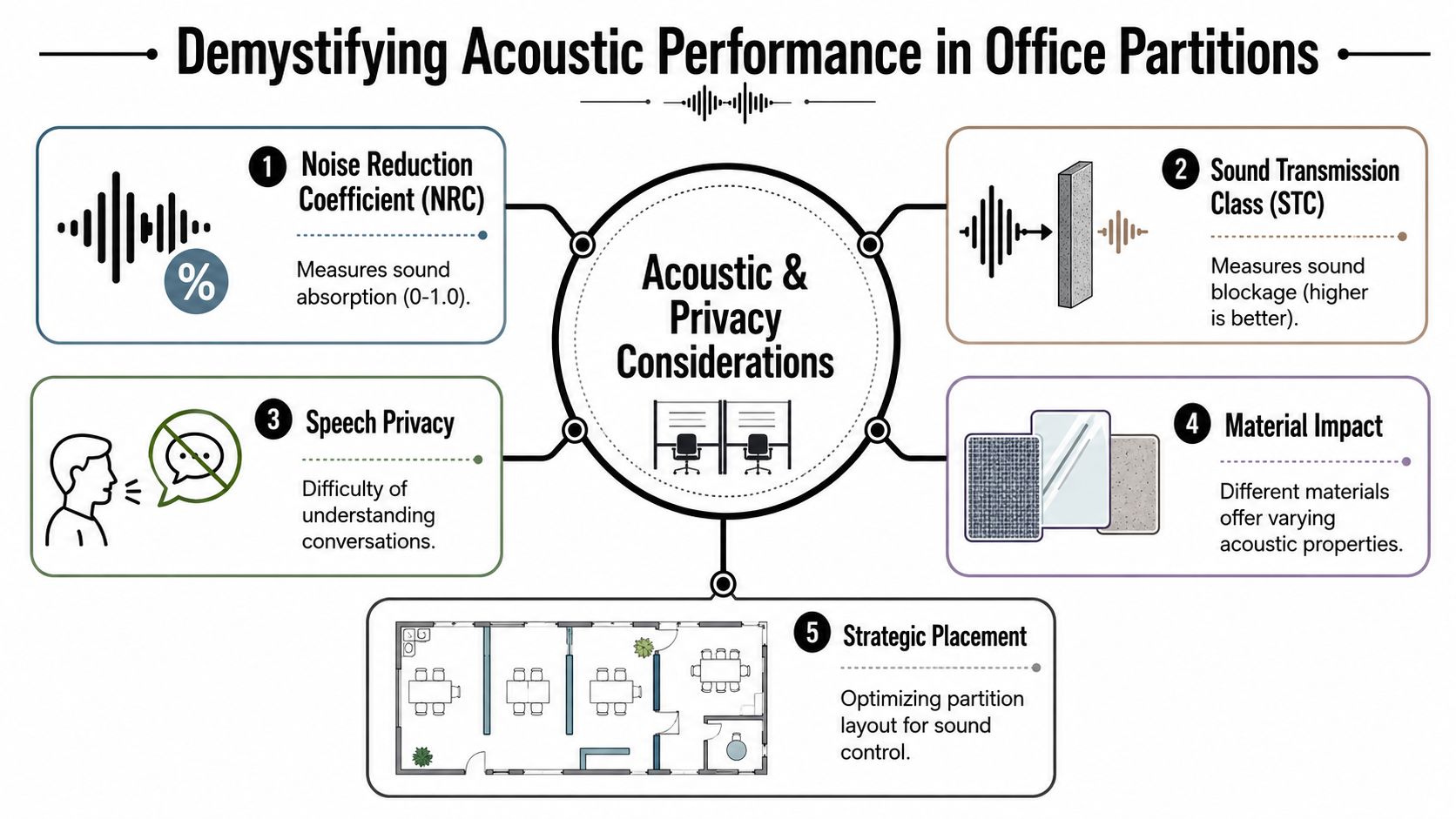
What NRC Actually Means
A practical number to know is Noise Reduction Coefficient, or NRC. It measures how much sound a material absorbs rather than reflects back into the room.
One commercial acoustic panel specification lists an NRC of more than 0.86 for a 15 mm polyester-fiber partition panel, which indicates strong absorption performance for a lightweight divider according to this acoustic office partition specification. In simple terms, that kind of panel can help reduce reflected speech and general reverberation.
That doesn’t mean one absorptive panel solves the whole floor.
What Works and What Doesn’t
Panels help most when they interrupt a direct line between one speaker and another listener. If the partitions are too low, too sparse, or full of gaps, people still hear the conversation clearly. Junctions matter too. Even a good panel loses effectiveness if corners, connectors, and edges leave too much sound path around it.
Here’s the straightforward version:
| Acoustic move | What it helps | What it won’t fix |
|---|---|---|
| Taller panels | Reduces direct speech path | Ceiling bounce and distant noise |
| Absorptive surfaces | Cuts echo and reverberation | Confidential speech in open layouts |
| Better connections | Reduces leakage at seams | Poor space planning |
| Strategic layout | Separates noisy and quiet uses | Loud behavior in the wrong zone |
The panel itself is only part of the system. Height, layout, and junction quality decide whether people feel a difference.
Different Goals for Different Teams
A focus zone needs a different acoustic recipe than a call floor. For heads-down work, the goal is usually fewer distractions and less speech spill. For phone-heavy departments, the bar is higher because many people are speaking at once.
If you’re planning denser voice-based seating, call center cubicles are worth reviewing because panel height, spacing, and material choice matter more there than in a general office benching layout.
For broader planning around sound control in workstation environments, office acoustics solutions can help compare panel-based approaches with complementary treatments. The important point is simple. If your team says, “We need privacy,” ask whether they mean visual privacy, reduced distraction, or actual speech confidentiality. Those are not the same requirement.
Customization Power and Data Integration
Customization usually starts with finishes, panel heights, and storage. The more important conversation is what happens inside and around the wall. A partition cubicle wall only works as a real workstation system if power and data are planned at the same time as the layout.
First-time office reconfiguration projects often get expensive. Teams approve workstation footprints, then discover too late that outlet locations don’t line up, cable runs are messy, and floor access points don’t support the new desk arrangement. Retrofitting after the fact usually costs more and looks worse.
Build the Infrastructure Before the Aesthetics
The U.S. General Services Administration’s workplace guidance highlights the need for flexible power and data distribution as offices adapt to layout changes and evolving technology needs, as noted in this referenced guidance context. That point matters because modular walls are often sold visually, but they succeed operationally.
A few decisions deserve attention early:
- Base or beltline raceways: These help route cabling cleanly through panel runs.
- Outlet placement: Decide where people work, not where the old floor plan assumed they would.
- Data drop strategy: Plan for present demand and likely future rearrangements.
- Shared versus dedicated power: The right answer depends on seating density and equipment use.
What Buyers Should Ask the Vendor
Don’t settle for “power can be added.” Ask the more useful questions.
- Can the system support future reconfiguration without replacing major components
- Where do cables enter and exit the run
- How accessible are connections after installation
- What happens if one team grows and another shrinks
- Will monitor arms, sit-stand desks, and task lights affect cable paths
These answers shape daily usability. They also affect how disruptive the next office change will be.
A clean-looking workstation can still be a bad installation if nobody planned for chargers, monitors, docking stations, and future desk moves.
Customization That Improves Function
Storage, screens, overheads, marker surfaces, and glass toppers all have value, but they should support how the team works. A recruiting pod may need more visual privacy and guest-facing order. A finance team may need stronger seated separation and cleaner monitor cabling. A hybrid neighborhood may need simpler touchdown access and less built-in storage.
One practical tool for testing those combinations is the custom cubicle designer, which lets teams compare dimensions, privacy levels, finishes, storage, and electrical options before ordering. Used properly, customization isn’t decoration. It’s operational planning hidden inside furniture.
Space Planning and The Installation Process
A successful partition project usually feels uneventful once installation begins. That only happens when the planning work was done early. Most site problems aren’t surprises. They’re decisions that nobody made in time.
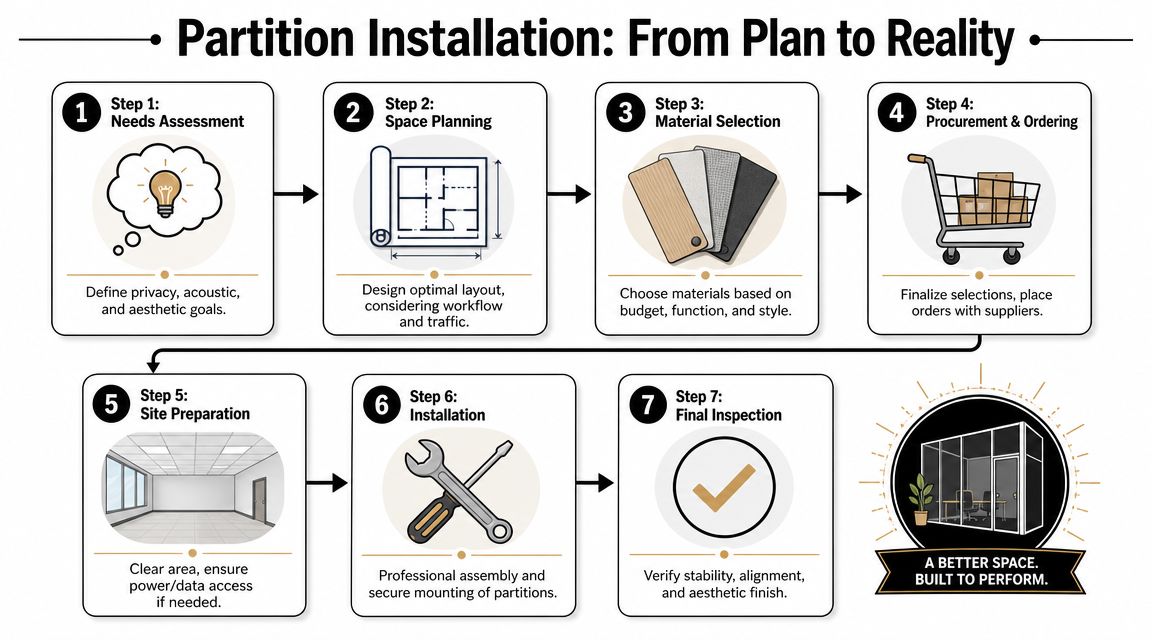
The Planning Sequence That Keeps Projects on Track
The cleanest projects tend to follow a straightforward order:
-
Needs assessment
Start with work patterns, privacy needs, and team adjacencies. Don’t begin with panel colors. -
Field verification
Measure the space as it exists. Columns, outlets, doors, glazing lines, and uneven conditions all matter. -
Layout development
Test circulation, workstation count, access paths, and support spaces before anything is ordered. -
Infrastructure coordination
Confirm power, data, and any building constraints while revisions are still cheap. -
Procurement and scheduling
Lock the product details only after the layout is stable. -
Installation and punch review
Check alignment, fit, stability, and finish condition before sign-off.
Common Issues That Need Attention Early
Accessibility, egress, and fire-life-safety issues don’t disappear because the system is furniture-based. A layout can still create circulation problems if aisles tighten up or panel runs interfere with movement. The best teams review these practical constraints before they start debating fabrics.
This is also the point where workflow matters. If customer service, recruiting, and finance all share one floor, they may need different settings even if they use the same product family. Grouping by job function usually produces a better result than forcing a perfectly uniform layout.
For teams that want support with delivery, assembly, and project coordination, office furniture installation is often part of the process, not an afterthought.
What Good Installation Looks Like
A strong install isn’t just “panels are standing.”
Look for:
- Clean alignment: Runs should look intentional, not forced into the room.
- Stable connections: Movement at corners and seams is an early warning sign.
- Consistent reveals: Uneven gaps usually point to rushed field adjustment.
- Usable access: Power and data shouldn’t become unreachable once desks are in place.
Good installation protects the reconfiguration value of the system. If a crew improvises too much in the field, the next move becomes harder and more expensive.
The handoff should also include a simple record of what was installed and where. That matters when departments shift and you need to know what can be reused.
Choosing the Right System and Budgeting for ROI
A client usually feels the budget pressure near the end of planning. Quotes are in, leadership wants a number, and the cheapest panel line starts to look tempting. That is often the point where expensive mistakes get approved.
Partition cubicle wall systems pay off when they reduce future disruption, not just when they trim the first invoice. A system that can handle team growth, department moves, and changing workstyles without sending you back into demolition has a longer useful life. That matters even more if your office depends on quiet focus zones and reliable access to power and data at every station.
How to Compare Systems Without Getting Distracted by Price
Start with the questions that affect operating cost a year from now.
- How much of the system can be reused if headcount or team structure changes?
- What acoustic information is documented?
- How are power and data routed, and how easy is it to add or relocate connections later?
- Which finish options hold up under your real cleaning and traffic conditions?
- Can the dealer still supply matching parts, panels, and electrical components after the first install?
- Can the project be phased without leaving half-finished runs or stranded infrastructure?
Vendors with solid systems answer those questions clearly. Weak proposals tend to stay vague on acoustics, avoid specifics on cable routing, or assume future changes will be someone else’s problem.
That is where ROI usually gets won or lost.
Budget for the Full Use Cycle
The purchase price is only one line item. The actual cost includes rework, downtime, replacement parts, electrician time, IT coordination, and the productivity hit that comes from getting privacy wrong. A low-cost system that still leaves staff exposed to noise or forces extension cords and ad hoc data drops across the floor is not a budget success.
For teams weighing modular systems against more permanent construction, this landlord’s guide to tenant improvement costs gives helpful context on how furniture-based separation compares with heavier interior work.
One practical starting point for product comparison is workstation cubicles, especially for offices trying to balance assigned seating, density, and reuse across different departments.
What ROI Looks Like in Practice
In real projects, return usually shows up in four places:
| ROI area | What to look for |
|---|---|
| Flexibility | Fewer major layout changes that require construction crews |
| Infrastructure | Power and data that can be accessed, modified, and expanded without tearing stations apart |
| Employee performance | Better speech privacy and fewer interruptions in focus-heavy roles |
| Asset life | Panels, connectors, and electrical parts that stay in service through multiple reconfigurations |
Cubicle By Design is one option in this category for organizations that need modular cubicles, glass walls, space planning, and configurable electrical options within one workplace project.
The better budget decision is usually the system that solves today’s privacy and infrastructure needs while still giving you room to reconfigure later.