


You’re standing in an empty room with a floor plan, a tape measure, and a rough headcount. On paper, it seems simple. Buy a conference table that seats the team and move on.
In practice, that’s where most mistakes start.
A table can be technically the right length and still make the room feel cramped, block movement, create bad camera angles, or leave people fighting over outlets. The right size of a conference table isn’t just a furniture question. It’s a space planning decision that affects comfort, circulation, hybrid meetings, accessibility, and the way people work together.
The Right Size of a Conference Table: A 2026 Guide
Most clients start with one question: how big should the table be? The better question is how the room needs to function once people are in it.
A conference room isn’t just a place to put chairs around a tabletop. It’s where teams present, review plans, host clients, run video calls, spread out documents, and make decisions. That means the size of a conference table has to support the use of the room, not just the seat count printed on a product page.

When I evaluate a meeting space, I look at four things first:
- Seating needs. How many people need a seat during a typical meeting, not just the occasional all-hands moment.
- Room fit. A table has to leave enough space for chairs to move and people to walk comfortably.
- Shape and use. A rectangular boardroom table creates a different meeting dynamic than a round or boat-shaped table.
- Technology and access. Power, cable routing, camera placement, and inclusive access all change what “right size” really means.
A conference table that fills the room usually looks impressive on day one and feels like a mistake by week two.
That’s why a smart selection process starts with layout, not finishes. If you’re reviewing options for a table for meeting room layouts, the right answer comes from balancing people, movement, and function.
A good conference table should anchor the room without dominating it. When the proportions are right, the space works better, the room looks cleaner, and meetings feel easier to run.
How to Determine Table Size for Your Team
A room scheduled for eight people rarely behaves like a room for eight. Two attendees bring laptops and chargers. One spreads out a set of drawings. Another joins by video and needs a clear camera angle. That is why I size conference tables around real meeting behavior, not the maximum seat count on a spec sheet.
Start with the group that uses the room most often. Then decide how much working space each person needs on the tabletop.
For a tight setup, allow enough room for people to sit and talk comfortably. For a better day-to-day setup, give each person space for a laptop, notebook, coffee, and a little elbow room. If the room handles client presentations, hybrid meetings, or document-heavy reviews, plan for more surface area per seat. That extra width prevents the table from feeling crowded long before every chair is occupied.
Table height matters too. Most conference tables are built to standard office chair height, which keeps seating predictable and makes product comparisons easier. The bigger sizing decision is length and width, because those dimensions determine whether people can work at the table or only sit at it.
What the per-person rule means in practice
I usually break sizing into three use cases:
- Tight seating for short internal check-ins where people are not working from the table for long.
- Working seating for typical office meetings with laptops, notebooks, and shared materials.
- Generous seating for executive rooms, client-facing spaces, and hybrid meetings where microphones, cable access, and personal devices all compete for surface area.
A table can have enough chairs and still be the wrong size. I see that mistake often in rooms designed around occasional peak attendance instead of weekly use.
Conference table size recommendations by seating capacity
| Seating Capacity | Rectangular Table Length (Comfortable Fit) | Round Table Diameter |
|---|---|---|
| 4 to 6 people | Start near 6 feet | Best chosen based on room fit and meeting style |
| 8 people | Often falls between small-room and larger boardroom sizing | Often chosen when equal participation matters |
| 10 people | 10 to 12 feet | Depends on room width and how much circulation you can preserve |
| 12 people | 14 to 16 feet | Usually less efficient than a rectangular or oval option at this size |
Those ranges are useful starting points, not final answers. A 10-person room used for weekly leadership meetings has different needs than a 10-person room used for training, interviews, or Zoom calls with one in-room participant presenting to everyone else.
Mistakes I see all the time
The most common error is sizing for the rare all-hands moment. That usually produces a table that dominates the room and leaves no flexibility for technology, guest chairs, or comfortable movement.
Use these questions before you choose a size:
- How many people use this room in a normal week
- Are they working on laptops, reviewing plans, or just talking
- Will the room support hybrid meetings with cameras, microphones, and power access
- Do the end seats need to function as full seats during active meetings
- Will anyone need easier access around the table for mobility reasons
Practical rule: If people will use laptops in regular meetings, choose the smallest table that still gives everyone workable personal space.
If this room is part of a larger layout decision, our office space size planning guide helps you place meeting rooms in context with headcount, circulation, and the rest of the floor plan.
Planning Your Room Layout and Clearances
A table can be the right size for the team and still be wrong for the room.
Clearance is what separates a room that works from one that feels awkward every time someone stands up. A common planning rule is to leave at least 3 feet of clear perimeter space around the table, while some buying guides recommend 48 inches on all sides for more comfortable movement and chair use. One practical example is that an 18-foot-long room is a much better fit for a 10-foot table once walking space is included, according to this conference room buying guide from Branch Furniture.

The clearance rule that keeps rooms usable
The minimum clearance keeps chairs from hitting walls and gives people a basic path around the table. The more generous clearance is what makes the room feel comfortable during real use.
That extra space matters for several reasons:
- Chair pullback so people can sit down without scraping the wall
- Walkways so others can move behind occupied seats
- Access routes for deliveries, cleaning, and day-to-day use
- Better sightlines because the room doesn’t feel packed edge to edge
A simple planning method
I usually work backward from the room dimensions.
- Measure the usable room, not just the wall-to-wall shell
- Subtract circulation space on every side
- Check doors, credenzas, screens, and columns
- Then select the table shape and size
That process often changes the answer. A room that looks large enough on paper may lose useful space once you account for door swing, display walls, or storage.
If people have to turn sideways to get behind a chair, the table is too big for the room.
Flexible room construction proves useful. With glass office partitions, teams can create meeting rooms with clearer boundaries and better visual openness without committing to heavy permanent walls. That gives you more control over how a room is sized around the table, instead of forcing the table to adapt to an awkward footprint.
What works and what doesn’t
What works is leaving breathing room. The room feels calmer, chairs move freely, and the space handles guests better.
What doesn’t work is chasing the largest possible table. Oversized tables make even nice conference rooms feel tight and poorly planned. They also limit where displays, cameras, and support furniture can go.
For most projects, the best result comes from choosing a table that fits the room comfortably, not one that fills it.
If you need help balancing conference rooms with the rest of the floor plan, office space planning and design is usually the point where layout decisions start to come together.
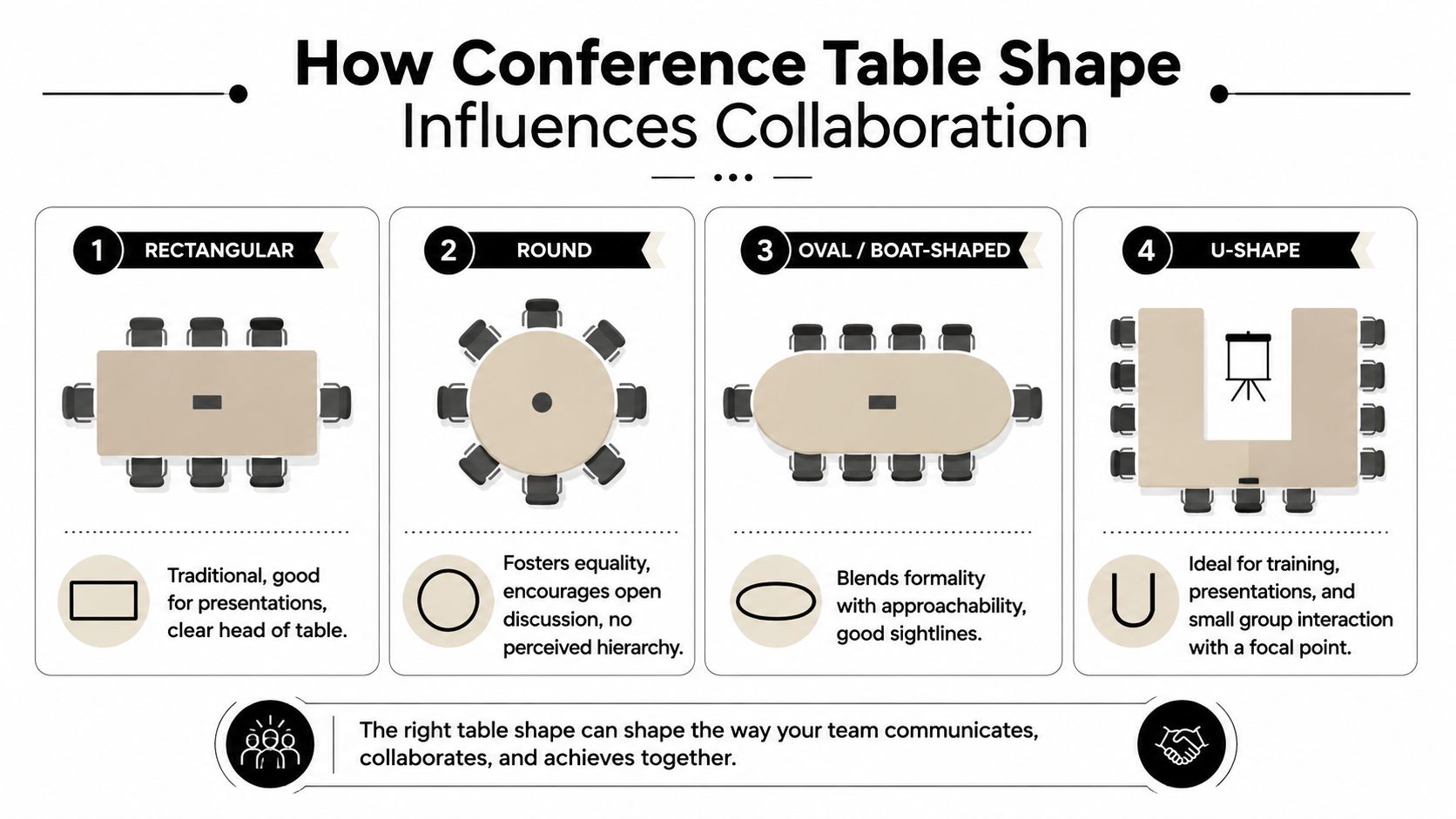
How Table Shape Influences Collaboration
Shape changes the way a meeting feels before anyone says a word.
Two tables can seat the same number of people and create completely different behavior in the room. One can direct attention to a presenter. Another can encourage open discussion. That’s why I never treat shape as a decorative choice alone.
Rectangular and round tables
Rectangular tables are still the standard in many boardrooms. They fit naturally in rectangular rooms, preserve seating efficiency, and create a clear focal point at one end. That makes them useful for presentations, leadership meetings, and spaces where one person often leads the discussion.
The trade-off is hierarchy. End seats carry more visual weight, and people near the middle of a long table can feel less connected to those across from them.
Round tables do the opposite. They remove the head-of-table effect and make participation feel more equal. For smaller groups, that can improve discussion and make quick team meetings feel less formal.
The drawback is room efficiency. A round table often needs more surrounding space to work well, and it becomes less practical as team size grows.
Oval, boat-shaped, and U-shaped tables
Oval and boat-shaped tables sit in the middle. They keep some of the order of a rectangular table but soften the visual formality. I often recommend them when a company wants a polished room that still feels approachable.
They also tend to improve sightlines. People can see one another more easily, and the room often feels less rigid.
U-shaped tables serve a different purpose. They work well when the room supports training, presentations, collaborative workshops, or a front-facing display. The open center gives presenters room to move and makes the focal point obvious.
Matching shape to actual meeting behavior
Here’s the practical filter I use:
- Choose rectangular if the room handles formal presentations, leadership meetings, or larger seated groups.
- Choose round if the room is small and conversation-driven.
- Choose oval or boat-shaped if you want a balance of formality and visibility.
- Choose U-shaped when instruction, demos, or front-facing interaction drive the room.
The right table shape supports the meeting you actually run, not the one you imagine on a showroom floor.
A mismatch shows up quickly. A round table in a presentation-heavy room can feel directionless. A long rectangular table in a small collaborative room can feel stiff. Shape should help the room do its job with less friction.
Factoring in AV, Power, and Accessibility Needs
A modern conference table has to do more than seat people. It has to support devices, video calls, charging, and access for everyone who uses the room.
That changes the way I judge table size. Once AV and accessibility enter the discussion, the table stops being just a surface and becomes part of the room’s infrastructure.
Power and cable management
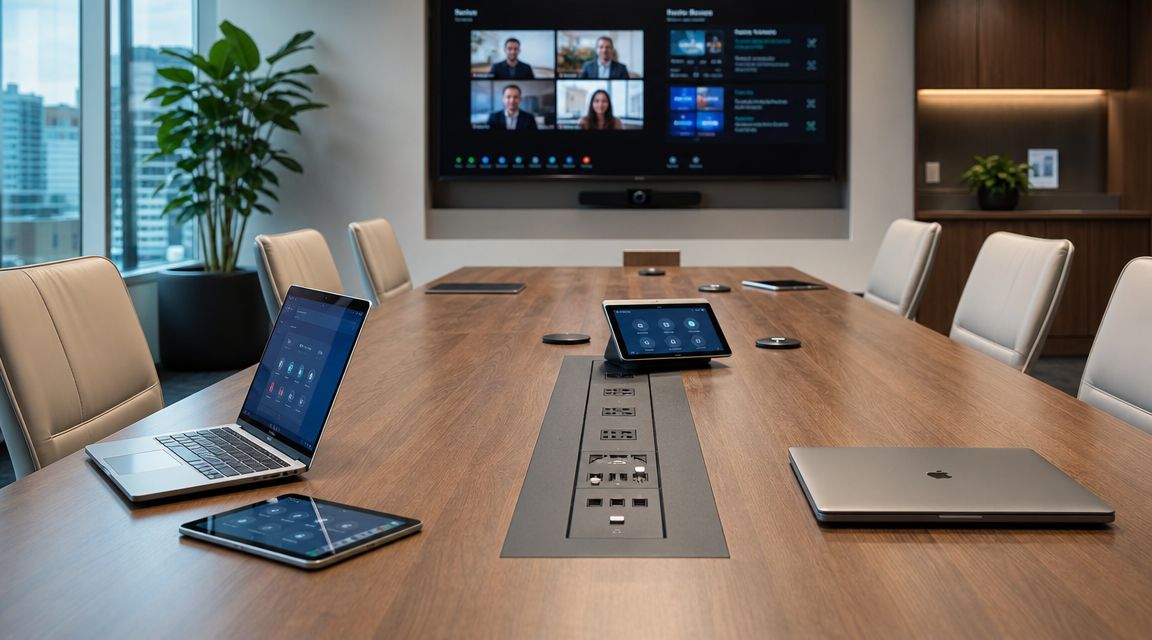
If people bring laptops into the room, power access needs to be planned from the start. Retrofitting outlets later usually leads to exposed cords, floor clutter, or extension-strip solutions that make the room look unfinished.
I typically look for a few basics:
- Integrated power modules for convenient charging
- Cable routing paths that keep cords off the floor
- Grommets or access covers that don’t interrupt usable work surface
- Clean coordination with floor or wall power
A table can look large enough until power modules start taking up the center line. That’s why tech planning should happen before the final dimensions are locked in. If you’re comparing options, conference table electrical outlets are worth reviewing early so the table and the room infrastructure work together.
Video meetings and camera placement
Hybrid meetings expose bad planning fast. A table that works for in-person meetings can create poor camera framing, blocked sightlines, and audio dead spots if the room wasn’t designed around the screen and camera position.
For teams evaluating equipment for modern learning environments, the useful takeaway is that the table, camera, display, and user positions all have to be considered together. A conference room performs better when the furniture supports the technology instead of fighting it.
Here’s the video reference I often suggest clients review while thinking through room use and equipment placement.
Accessibility and usable design
Accessibility shouldn’t be treated as a final compliance check. It should shape the layout from the beginning.
That means asking practical questions:
- Can someone approach and use the table comfortably
- Do pathways stay clear when chairs are occupied
- Do base styles block knee space or leg movement
- Can every participant join the meeting without an awkward workaround
Some clients use a planning tool before ordering to test these decisions visually. The Cubicle Designer can help teams think through layout, dimensions, and electrical coordination as part of a larger office plan.
The best conference rooms don’t just look clean in a rendering. They stay usable when every seat is occupied, every laptop is open, and the meeting includes both in-room and remote participants.
Bringing Your Vision to Life with Custom Solutions
By the time a team reaches the buying stage, the table decision usually feels like the final step. It isn’t. It’s the visible result of earlier planning choices about people, layout, work style, and infrastructure.
The right size of a conference table comes from getting those decisions in the right order. First, size for the team. Then check the room. Then choose a shape that matches the way meetings run. After that, account for power, video, and access needs before finishes and materials enter the conversation.
What a good decision process looks like
The conference rooms that work best usually follow a disciplined process:
- Start with real attendance patterns instead of occasional peak occupancy.
- Measure usable space carefully and include walls, doors, display zones, and support furniture.
- Choose shape by meeting behavior rather than trend or appearance alone.
- Plan for technology early so the table doesn’t become an obstacle.
- Review the whole office context because conference rooms are part of a wider workplace system.
That last point matters more than people expect. A meeting room that works in isolation can still fail the office if circulation is poor, nearby workstations lose privacy, or adjacent departments need a different balance of open and enclosed space.
Why custom planning often solves the hard problems
Standard tables fit standard rooms. Many offices aren’t standard.
Irregular footprints, structural columns, hybrid meeting requirements, brand-specific finishes, and phased expansions often push a project beyond off-the-shelf choices. That’s where custom planning becomes useful. Not because every room needs something elaborate, but because many rooms need something precise.
A thoughtful workplace plan often extends beyond one conference room. The same logic applies to custom office cubicles, where dimensions, privacy levels, and power coordination need to reflect actual team workflows. It also applies to high-density operations using call center cubicles and to more flexible layouts built around workstation cubicles.
Good office furniture planning isn’t about filling square footage. It’s about making each area work the way people need it to work.
When teams rush the conference table decision, they usually pay for it later with layout revisions, cable fixes, or a room that nobody wants to use for long meetings. When they slow down and plan it as part of the workplace, the result is cleaner and more durable.
If you’re comparing products, finishes, and configurations across a larger project, an office furniture buying guide can help narrow the decision-making criteria before you commit.
A conference room should feel intentional. The table should fit the room, support the meeting style, and work with the technology instead of competing with it. When those pieces line up, the room feels right immediately.
If you’re planning a meeting room or a broader workplace update, Cubicle By Design can help you evaluate layouts, furniture types, and practical fit before you place an order. Start with the room you have, the way your team works, and the constraints you need to solve. That usually leads to a better result than choosing by dimensions alone.