


10 Space Planning Best Practices for 2026
From Blueprint to Productivity: A Manager's Guide to Office Space Planning
You approve a layout, pricing moves forward, and then critical questions start. Where do private calls happen. How will power reach benching without exposed cords. Can the circulation path still meet code once storage, copy points, and guest seating are added. If attendance rises on peak days, will the office still work without another round of construction.
Good space planning answers those questions before furniture is ordered. A usable plan has to support focused work, quick collaboration, acoustical separation, circulation, code compliance, power and data distribution, and future changes that are likely to come sooner than anyone expects. In hybrid offices, that usually means planning for variability instead of treating every seat the same.
Utilization still matters, but not as a stand-alone target. Track how often seats, rooms, and support spaces are used, then compare that against the work your teams are expected to do. A floor plan can look efficient on paper and still fail in practice if meeting rooms are overbooked, quiet space is missing, or shared desks create daily friction.
The strongest plans connect strategy to buildable decisions. If you adopt Activity-Based Working, you also need to decide which teams can share settings, where enclosed rooms belong, how much acoustic separation open areas need, and whether modular cubicles, glass fronts, or demountable walls fit your budget and timeline. You also need a phasing plan that covers procurement, installation, power, IT coordination, and compliance reviews, so flexibility does not turn into expensive rework.
The ten practices below reflect how workplace projects succeed in the field, from early planning logic to the furniture and partition choices that determine whether the office works six months after move-in.
1. Activity-Based Working Planning
Activity-Based Working works when you stop assigning space by hierarchy and start assigning it by task. Most offices need a mix of focus workstations, small collaboration points, bookable meeting rooms, quiet call zones, touchdown seating, and social space. If every square foot is treated like generic desk area, the layout usually underperforms within weeks of move-in.
Hybrid work made this more obvious. Recent workplace guidance emphasizes flexible, data-driven planning that tracks square feet per person, desk-to-employee ratios, meeting-room utilization, peak and average utilization, and hybrid-policy compliance. One 2026 planning guide cited a post-pandemic comfort density of 15 m² per person, up from 6 m² in older assumptions (Tradeline on space utilization and planning).
Start with one department
Don't roll ABW across the entire office on day one. Pilot it with a department that has mixed work modes, such as sales, customer success, or a project team that splits time between calls, heads-down work, and internal meetings.
A practical pilot usually includes:
- Focus settings: Use enclosed or semi-enclosed workstations for concentrated work that can't happen next to casual collaboration.
- Call support: Add small phone rooms or clearly designated quiet booths so calls don't spill into open desks.
- Shared team zones: Give departments a home base even if individual seats aren't permanently assigned.
- Simple signage: Label spaces by intended activity so people know what belongs where.
Practical rule: ABW fails when planners overbuild social space and underbuild quiet space.
I've seen offices add stylish lounge settings and then wonder why people camp in conference rooms for private work. If your staff spends long stretches on calls, in spreadsheets, or writing detailed work, you still need acoustically controlled settings. Activity variety matters more than visual variety.
2. Acoustic Performance and Privacy Zoning
Open offices don't fail because they're open. They fail because no one planned where noise would go.
Acoustic zoning should be one of the earliest space planning best practices you lock in. If your break area backs up to focus desks, or your collaboration bench sits beside a finance team handling sensitive calls, no amount of decorative acoustic felt will fully solve the problem later. Zoning does most of the work. Materials and partitions refine it.
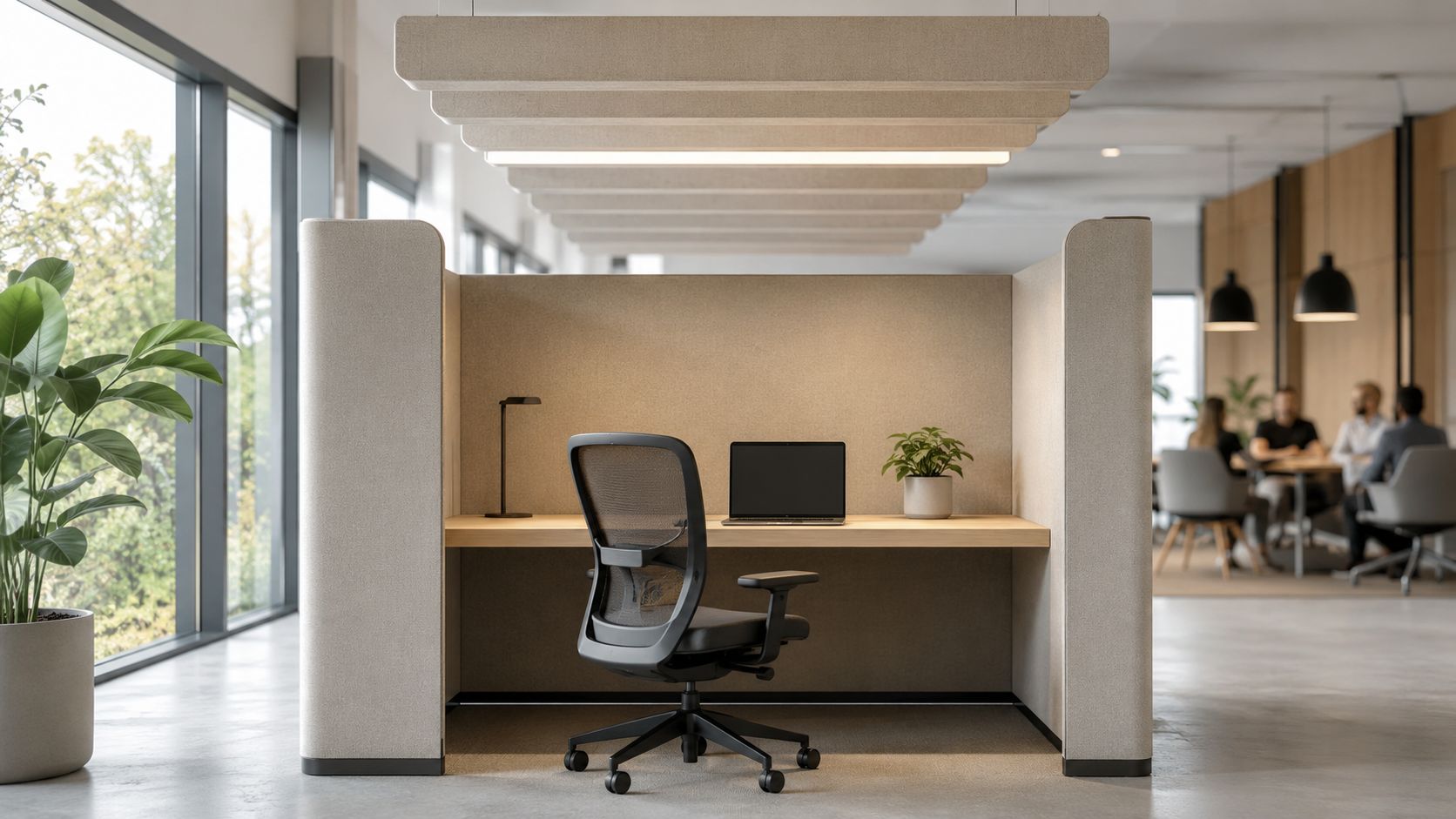
A call center is the easiest example. Teams taking back-to-back calls need separation, higher panels, and consistent sound absorption. The same applies to HR, legal, healthcare administration, and any group discussing private information. In those settings, I usually treat privacy, visual shielding, and speech control as planning requirements, not upgrades.
Here's the kind of setting this section is really about:
What actually helps
Some acoustic fixes work better than others:
- Higher panels where work requires privacy: For concentrated or phone-heavy work, panel height often matters more than decorative finishes.
- Absorptive surfaces: Fabric panels, acoustic ceiling treatments, and softer finishes reduce reflected sound.
- Separation by use: Keep copy areas, cafés, and circulation spines away from heads-down zones.
- Transparent privacy where needed: Office acoustics solutions can combine panel systems, glass, and material choices without making the office feel sealed off.
Glass can help when you want openness and supervision but still need physical separation. High partitions help when speech privacy matters more than visibility. Most offices need both. What doesn't work is using one planning language for every department.
Quiet work areas should feel intentionally protected, not leftover.
3. Modular and Flexible Workspace Design
If your layout only works for today's headcount, it's already outdated. Teams expand, contract, reorganize, and switch work patterns much faster than walls and millwork do. That's why modular planning consistently beats fixed planning in real workplaces.
Many managers overspend by committing to permanent construction for conditions that aren't permanent. Later, a department changes size, a hybrid policy shifts, or a new team arrives, and the office becomes a demolition project. Modular systems let you resize footprints, change panel heights, add shared storage, or convert individual workstations into team clusters with much less disruption.
Build repeatable planning logic
I recommend standardizing a small set of workstation sizes and planning rules. That gives you consistency for procurement, installation, and future changes. It also reduces the chance that every department gets its own one-off furniture condition that can't be reused later.
Good modular planning usually includes:
- A small kit of parts: Limit workstation footprints and panel families so reconfiguration stays practical.
- Known growth moves: Decide in advance which neighborhoods can absorb added seats or shared tables.
- Integrated utilities: Power and data paths should move with the workstation system whenever possible.
- Digital testing before purchase: The modular office workstation design approach helps you explore configurations before anything is ordered.
One of the strongest recent ideas in planning is treating utilization as a multi-source data problem. Leading workplace platforms recommend combining occupancy sensors, Wi-Fi or network telemetry, desk and room booking logs, badge data, HR roster data, and environmental signals in one planning layer, then reviewing dashboards, heatmaps, and floor-plan overlays in real time (Accruent on data-driven space planning).
That matters because layouts drift out of sync with behavior. Modular systems give you a practical way to respond.
4. Ergonomic Workstation Design
An office can be space-efficient and still be physically hard to work in. That's a common failure point in fast growth environments, especially when teams prioritize seat count over workstation depth, monitor placement, or adjustability.
Ergonomic planning isn't just a furniture spec exercise. It's a space planning issue because workstation size, panel location, storage placement, circulation, and power access all affect posture and movement. If a desk is too shallow for proper monitor distance, or under-desk storage blocks legroom, the problem started in planning, not in employee behavior.
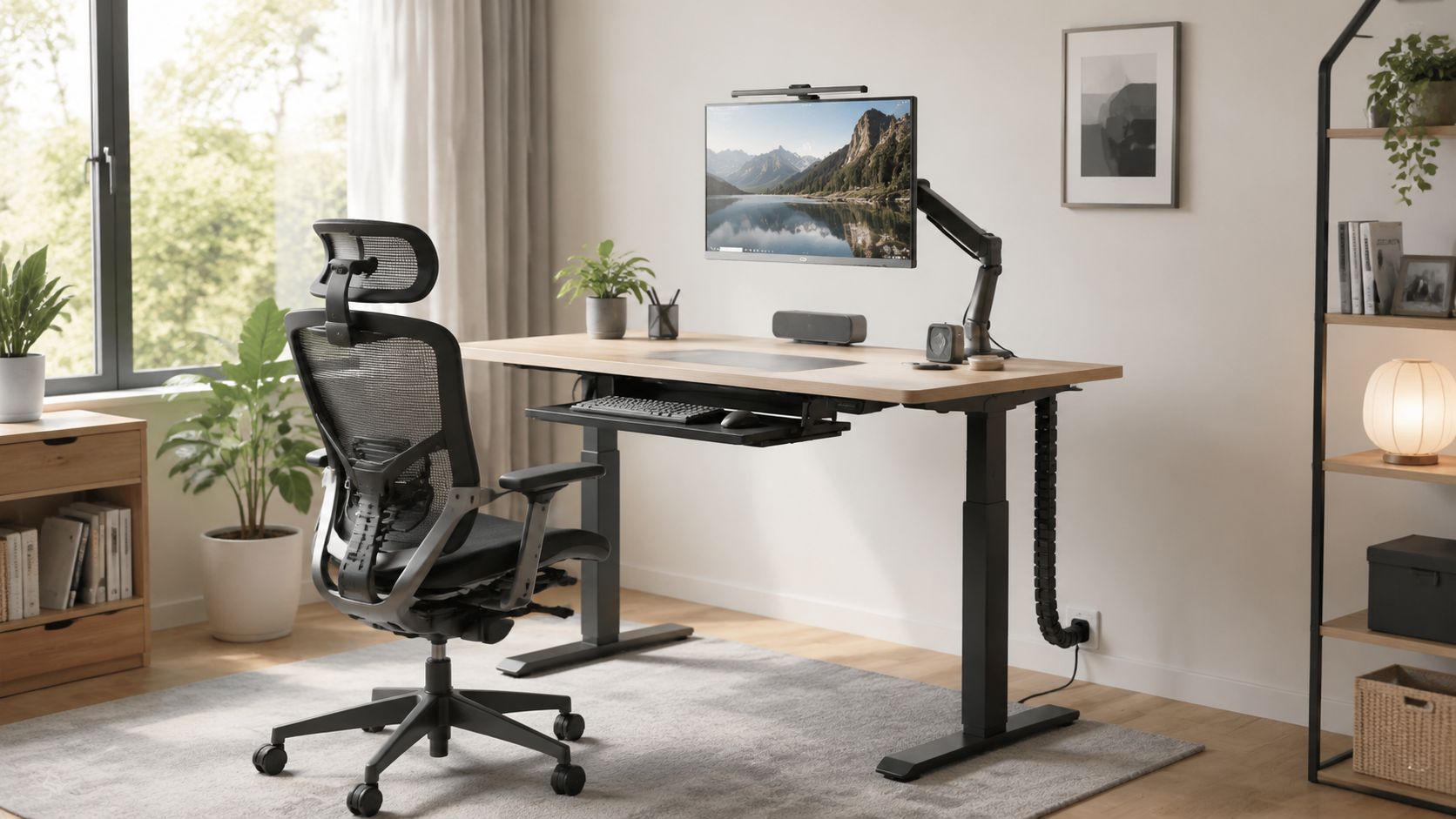
Here's the kind of ergonomic baseline worth aiming for:
Design for adjustment, not averages
Different people work differently. Some need dual monitors. Some spend most of the day on calls. Some alternate between seated and standing work. The workstation should support adjustment without forcing facilities to redesign the whole layout.
The basics are straightforward:
- Provide enough surface area: Staff need room for monitors, documents, peripherals, and everyday work without crowding.
- Choose adjustable elements: Height-adjustable desks, monitor arms, and supportive seating solve far more issues than fixed furniture.
- Protect movement: Don't let pedestal placement or panel returns restrict entry, turning radius, or leg position.
- Support setup habits: Workplace ergonomics guidance is most effective when paired with onboarding and workstation adjustment help.
I've seen very polished offices fail this test. They photograph well, but people end up using laptops on risers, storing bags under knees, and improvising around furniture that wasn't planned for actual tasks. Comfort problems usually show up first in high-focus teams because they spend the longest time at the workstation.
5. Right-Sizing Workspace and Capacity Planning
On Monday, the office feels half full. By Wednesday at 10 a.m., people are hunting for focus seats, call rooms are booked solid, and the team starts blaming the layout. In practice, that problem usually comes from bad capacity assumptions, not bad furniture.
Right-sizing starts with demand. You need enough of the right settings for your busiest predictable periods, with enough flexibility to handle weekly swings without paying for space that sits empty. That means connecting workplace strategy to actual seat types, room mix, infrastructure limits, and budget. If your occupancy model says staff will share desks, but your power, locker, and privacy plan still assumes assigned seating, the plan will fail during rollout.
A useful first check is your overall office space size planning benchmark. Then test whether that square footage is distributed correctly across workstations, enclosed rooms, touchdown areas, support spaces, and circulation.
Measure actual demand before you cut or add space
I see two expensive mistakes repeatedly. One is keeping too many assigned desks because no one wants to be the first department to give them up. The other is reducing seats based on average attendance, then discovering that peak days overload the floor.
A better process is straightforward:
- Track real usage patterns: Review desk occupancy, meeting room demand, badge data, reservations, and no-shows before changing ratios.
- Separate average use from peak demand: Plan for the busiest recurring periods, not the quietest days.
- Segment by work type: Finance, sales, engineering, and client-facing teams rarely use the office in the same way.
- Count support demand too: Phone booths, small meeting rooms, storage, and print areas often hit capacity before open workstations do.
- Model implementation constraints: A seating plan may look efficient on paper but fail once you account for column lines, egress, ADA clearances, or fixed power locations.
Benchmarks can help, but they should stay in their place. General utilization rules are useful for challenging assumptions, especially when a department insists every assigned seat is fully occupied, yet observed use says otherwise. They are not a substitute for your own occupancy data, business cycle, and staffing plan.
The strongest capacity plans also account for change over time. If you expect headcount growth, hybrid policy changes, or a phased renovation, leave yourself room to adjust with modular stations and demountable boundaries instead of forcing a full restack later.
Capacity planning works when it is tied to how the office will operate. Seat counts matter, but seat mix, timing, compliance, and infrastructure determine whether the plan holds up after move-in.
6. Circulation and Wayfinding Design
People notice circulation only when it goes wrong. They bottleneck at a pinch point, cut through work areas to reach a shared printer, or wander around looking for conference rooms because the floor plan doesn't explain itself.
Strong circulation planning makes the office easier to use, easier to supervise, and easier to keep compliant. It also improves acoustic separation because movement paths don't constantly slice through focus zones. In practice, I think of circulation as the skeleton that keeps every other planning decision from colliding.
Make routes obvious
Primary paths should carry the most traffic cleanly between entries, major departments, shared amenities, and exits. Secondary aisles should support local access without turning each workstation neighborhood into a shortcut.
A few planning habits consistently help:
- Create departmental neighborhoods: Keep related teams together so people don't travel across the floor for routine interaction.
- Put shared destinations on logical paths: Restrooms, café points, support rooms, and copier areas should be easy to reach without crossing quiet work zones.
- Use visible cues: Flooring changes, lighting, color, and signage can all reinforce the route people should take.
- Keep sightlines intentional: A clear line from entry to reception or key destinations reduces confusion immediately.
The best wayfinding doesn't call attention to itself. People simply know where to go.
This matters even more in hybrid offices with unassigned seating. If employees arrive a few days a week and have to hunt for neighborhoods, lockers, touchdown points, and meeting spaces, the office feels harder than it should. Good wayfinding lowers that friction.
7. Power, Data, and Technology Infrastructure Planning
A beautiful plan can still fail on day one if power and data weren't coordinated early. This is one of the most expensive categories of avoidable rework because infrastructure changes tend to hit construction, IT, furniture, and schedule at the same time.
Every workstation layout should be reviewed against actual device needs, network expectations, AV requirements, and cable paths. Teams doing standard office work need a different setup than media, engineering, customer support, or training groups. The problem is that many layouts are approved before anyone maps how people will plug in.
Coordinate infrastructure with furniture
The furniture plan and the electrical plan can't be separate conversations. If workstation runs, floor cores, wall feeds, and cable routes don't line up, you end up with exposed cords, overloaded convenience outlets, and ugly last-minute fixes.
Focus on these practical moves:
- Plan utilities at the same time as seat layouts: Don't wait until furniture is ordered to figure out power paths.
- Use integrated distribution where possible: Cubicle power pole options can support cleaner vertical feeds to panel-based workstations.
- Document every run: Future reconfiguration is much easier when facilities and IT know what serves each neighborhood.
- Get IT involved early: A structured approach to network pathways matters as much as outlet count. A practical resource, for instance the Houston SMB structured cabling guide, can help frame the conversation.
What doesn't work is assuming wireless solves everything. Staff still need charging, monitors, docks, peripherals, phones, and conference room connectivity. If your office is flexible, your infrastructure needs to be flexible too.
8. Biophilic Design and Wellness Integration
Wellness planning doesn't have to mean expensive architectural gestures. In most offices, the highest-value moves are simpler. Bring daylight deeper into the plan. Use materials and colors that don't feel harsh. Add planting where maintenance can support it. Make sure break areas feel like places people want to use.
Biophilic design works best when it's integrated into the space plan rather than layered on as decor. Window lines, view corridors, transparent partitions, and shared spaces all influence whether natural light and visual calm reach the people doing the work.
Use layout to support well-being
You don't need a large footprint to improve the feel of the office. You need a plan that stops blocking the useful assets you already have.
That often means:
- Keeping enclosed construction away from the best daylight when possible
- Using glass office partitions where visual openness helps light travel
- Placing shared spaces near views so more employees benefit
- Adding durable, low-maintenance planting instead of decorative items that won't survive operations
This kind of environment is often more effective than managers expect:

I've worked on offices where a simple change in partition strategy did more for the workplace than adding another amenity room. If perimeter light gets trapped behind enclosed private offices or bulky storage walls, the whole floor feels tighter and dimmer. Wellness starts with layout choices people experience all day.
9. Compliance and Code-Compliant Space Planning
Compliance isn't the final review step. It belongs in the first layout pass.
When teams treat code, accessibility, and life safety as cleanup items, they usually pay for it later in redraws, delayed approvals, furniture changes, and field modifications. The office may still get built, but it won't get built efficiently. Good planners bring compliance into adjacency planning, circulation, egress, workstation sizing, and power coordination from the start.
Keep compliance visible throughout the project
The right approach is boring on purpose. You check the basics early, document decisions, and verify them again before move-in. That discipline prevents a lot of downstream trouble.
Core priorities include:
- Accessible routes: Employees and visitors must be able to reach work areas, meeting rooms, shared amenities, and support spaces.
- Egress protection: Exit paths, travel routes, and emergency signage can't be compromised by furniture changes.
- Electrical coordination: Added workstations, monitors, and shared equipment all affect load planning.
- Documentation: Keep a clear record of layout assumptions, approvals, and revisions so the install team isn't guessing.
Field note: The most common compliance problem I see is not dramatic. It's furniture drifting into space that was supposed to stay clear.
That usually happens when the office is under pressure and someone adds storage, lounge seating, or extra stations after the main review. Treat the approved plan as an operating document, not a loose suggestion. If the layout changes, review it again.
10. Budget-Conscious Design Without Sacrificing Functionality
Budget pressure doesn't excuse bad planning. In fact, it makes disciplined planning more important because every mistake costs more relative to what you can spend.
The smartest cost-conscious projects focus on phased implementation, standardization, and reuse. They invest where failure would be expensive later, such as layout logic, code review, power coordination, and durable core workstations. They save money by reducing unnecessary variation and avoiding one-time solutions that can't adapt.
Spend where change is costly
A tighter budget usually means you can't do everything at once. That's fine. Phase the project around business priorities instead of trying to force a full transformation in one package.
That often looks like this:
- Standardize workstation families: Fewer sizes and panel types mean easier procurement and future reuse.
- Phase by department or floor area: Move the teams with the greatest need first, then build out later phases around lessons learned.
- Reuse selectively: Keep furniture that is still functional, safe, and compatible with the new plan.
- Model options before ordering: An estimating tool and layout configurator can reveal trade-offs early. The Exayard construction estimating software reflects the same principle from the construction side. Price the plan before the surprises happen.
If you're balancing budget against flexibility, modular systems usually win that argument over time because they reduce replacement pressure. That's especially true for growing teams, startups moving into their first serious office, and operations groups managing multiple reconfigurations over a lease term.
What doesn't work is buying the cheapest mix of unrelated furniture pieces and hoping it behaves like a system. It rarely does. You save upfront, then spend the difference in inefficiency, inconsistent installation, and early replacement.
Top 10 Space Planning Best Practices Comparison
| Solution | Implementation Complexity 🔄 | Resource Requirements ⚡ | Expected Outcomes 📊 | Ideal Use Cases | Key Advantages ⭐ |
|---|---|---|---|---|---|
| Activity-Based Working (ABW) Planning | Medium–High, cultural change and zone planning | Medium, modular furniture, booking tech, signage | Higher space utilization, increased collaboration, 20–30% real-estate savings | Hybrid workforces; tech; professional services | Flexible seating, supports hybrid work, cross-team interaction (💡pilot before full rollout) |
| Acoustic Performance and Privacy Zoning | Medium, technical acoustic design and installation | Medium–High, panels, high partitions, sound-rated glass | Improved focus, reduced ambient noise, better confidentiality | Call centers; legal; healthcare; focused work environments | Strong noise reduction and privacy; improves wellbeing (💡use 66"–72" partitions where needed) |
| Modular and Flexible Workspace Design | Low–Medium, component planning and standards | Medium, standardized systems, accessories, cabling | Fast reconfiguration, lower long-term capex, scalable growth | Growing companies; startups; multi-location enterprises | Reconfigurable, cost-efficient over time, quick deployment (💡plan 20–30% growth capacity) |
| Ergonomic Workstation Design | Medium, furniture selection plus user education | Medium–High, adjustable desks, ergonomic chairs, accessories | Reduced musculoskeletal issues, higher comfort and retention | Knowledge workers; call centers; data entry | Health & productivity gains; lowers absenteeism (💡monitor distance 20"–30" and offer training) |
| Right-Sizing Workspace and Capacity Planning | Medium, occupancy analysis and forecasting | Low–Medium, sensors/software, consultancy | Optimized space allocation, reduced rental/furniture waste | Organizations managing real-estate costs; hybrid-first | Data-driven reductions in space/costs; better budgeting (💡run 4–8 week occupancy studies) |
| Circulation and Wayfinding Design | Medium, spatial planning and code alignment | Low–Medium, signage, layout adjustments | Reduced congestion, improved safety and navigation | Large open-plan offices; visitor-heavy organizations | Improves flow and egress; enhances user experience (💡use 48" primary aisles) |
| Power, Data, and Technology Infrastructure Planning | High, electrical/network design and coordination | High, outlets, cabling, conduits, IT resources | Reliable connectivity, reduced clutter, future-proofed workspaces | Tech-intensive environments; media; call centers | Supports multiple devices, reduces downtime and hazards (💡spec min 3 outlets + dual data ports) |
| Biophilic Design and Wellness Integration | Low–Medium, design integration and maintenance | Medium, plants, daylighting, natural materials | Improved mental health, focus, retention, better indoor air | Creative/tech industries; wellness-focused orgs | Boosts wellbeing and attractiveness of space (💡position workstations near windows) |
| Compliance and Code-Compliant Space Planning | High, jurisdictional codes and permits | Medium–High, consultant fees, potential retrofits | Reduced legal risk, successful inspections, safer workplaces | Any organization renovating; healthcare; regulated industries | Ensures safety and accessibility; prevents fines (💡engage officials early) |
| Budget-Conscious Design Without Sacrificing Functionality | Low–Medium, phased planning and trade-offs | Low, reuse, modular systems, negotiated purchasing | Lower upfront capital, phased rollouts, retained functionality | Startups; nonprofits; SMBs; budget-constrained projects | Cost-effective, scalable solutions with acceptable function (💡standardize on 2–3 workstation sizes) |
Design Your Better Workplace Today
The best space planning best practices have one thing in common. They connect daily work behavior to physical decisions you can build, manage, and adjust. That's the difference between a layout that looks good in a rendering and a workplace that keeps functioning once people move in.
If you're managing a renovation, expansion, consolidation, or hybrid reset, treat the office as an operating system. Start with how teams work. Verify what the space is doing now. Decide where privacy matters, where modularity matters, where shared settings make sense, and where fixed construction will create more rigidity than value. Then build a plan that your budget, timeline, and facilities team can support.
This is also why office planning shouldn't stop at move-in. Workplace guidance increasingly treats planning as an ongoing management discipline supported by live reporting, predictive analysis, booking data, and iterative adjustment rather than a one-time layout exercise completed before occupancy. That's the right mindset for modern facilities teams. Space use changes. Team structure changes. The plan should be able to change with it.
For many organizations, product choice is where strategy becomes practical. Modular systems can support phased growth. Glass fronts can preserve openness and daylight where fully opaque construction would close the office down. Higher acoustic panels can protect concentrated work or call-heavy teams. Integrated power planning can keep reconfiguration from becoming an IT problem every time a department shifts.
If you're ready to test layouts and budget scenarios, the online Cubicle Designer is a useful place to start. It lets you visualize workstation configurations and explore different privacy, size, and finish options before committing to a plan. That kind of early testing helps you avoid one of the most common planning mistakes, choosing products first and figuring out the layout later.
Cubicle By Design works in the part of the process where managers usually need the most support: turning broad planning goals into actual workstation layouts, partitions, and phased installation decisions. If you're evaluating custom office cubicles, glass office partitions, specialized call center cubicles, or standard workstation cubicles, the key is choosing a system that fits your workflow, building constraints, and likely future changes.
A better workplace usually doesn't come from one dramatic design move. It comes from a series of sound planning decisions made early, checked carefully, and implemented in the right order.
If you're planning a new office, refreshing an existing layout, or trying to make hybrid seating work without wasting space, Cubicle By Design can help you turn your floor plan into a practical, code-conscious workplace that fits your timeline and budget.