


When you're trying to figure out the most common cubicle size, the industry overwhelmingly points to the 6'x6' (six-foot by six-foot) footprint. This versatile 36-square-foot space hits the sweet spot for most office tasks, giving it a well-earned reputation as the go-to starting point for any layout plan from Cubicle By Design.
Decoding the Language of Cubicle Dimensions
Staring at a blank floor plan can feel like trying to solve a puzzle with half the pieces missing. You’ll hear terms like "6×6" or "8×8" thrown around, but what do those numbers actually mean for your team’s comfort and productivity? Choosing the right size is about more than just measurements—it’s about designing a space that just works.
The office has come a long way from the paper-stacked mazes of the past. Today's workspaces are dynamic, tech-driven hubs built for both deep-focus work and quick collaboration. We dive into this shift in our guide on the evolution of the office cubicle, which really explains why certain dimensions became the industry standard.
From Footprints to Functionality
The key is to think beyond simple dimensions. Every footprint directly impacts an employee's ability to concentrate, collaborate, and stay organized. The goal isn't just to fill a room; it's to match the space to the demands of the job.
Just as a chef needs different counter space for different tasks, an employee's workspace must support their specific workflow. A one-size-fits-all approach rarely leads to peak efficiency or satisfaction.
This guide will break it all down, starting with a quick-reference table to help you visualize how different cubicle footprints translate into real-world applications for your team.
Quick Guide to Common Cubicle Sizes by Role
Think of this table as a cheat sheet for kickstarting your office plan. It lines up the most common cubicle dimensions with the roles they serve best, making it easier to picture how each size fits into a modern office.
| Cubicle Size | Typical Use Case | Key Benefit |
|---|---|---|
| 5' x 5' | Call centers, data entry, touchdown stations | High-density efficiency and space savings |
| 6' x 6' | General office staff, HR, administrative roles | Versatile balance of space and privacy |
| 6' x 8' | Tech roles, designers, engineers needing more room | Extra surface area for monitors or layouts |
| 8' x 8' | Managers, supervisors, roles requiring meetings | Accommodates a guest chair and storage |
As you can see, each size is tailored for a specific type of work. The versatile 6'x6' became the industry gold standard for good reason—it provides enough room for most general office staff without eating up too much valuable floor space. For a look at our full range, check out our cubicles.
Breaking Down Common Cubicle Dimensions
Choosing the right cubicle size is about more than just numbers on a floor plan. It’s about getting a feel for the real-world experience of working in that space day in and day out. Each footprint is built for a specific kind of workflow, directly shaping everything from an employee's focus to their ability to collaborate. This is where we stop talking about abstract measurements and start talking about practical, functional workspaces.
Let’s translate those common cubicle sizes into tangible workstations you can actually visualize for your team. Once you understand how each dimension feels and functions, you can make smart decisions that line up with your company’s needs and its culture.
This infographic really gets to the heart of office planning, showing how privacy, collaboration, and budget are all tangled together.
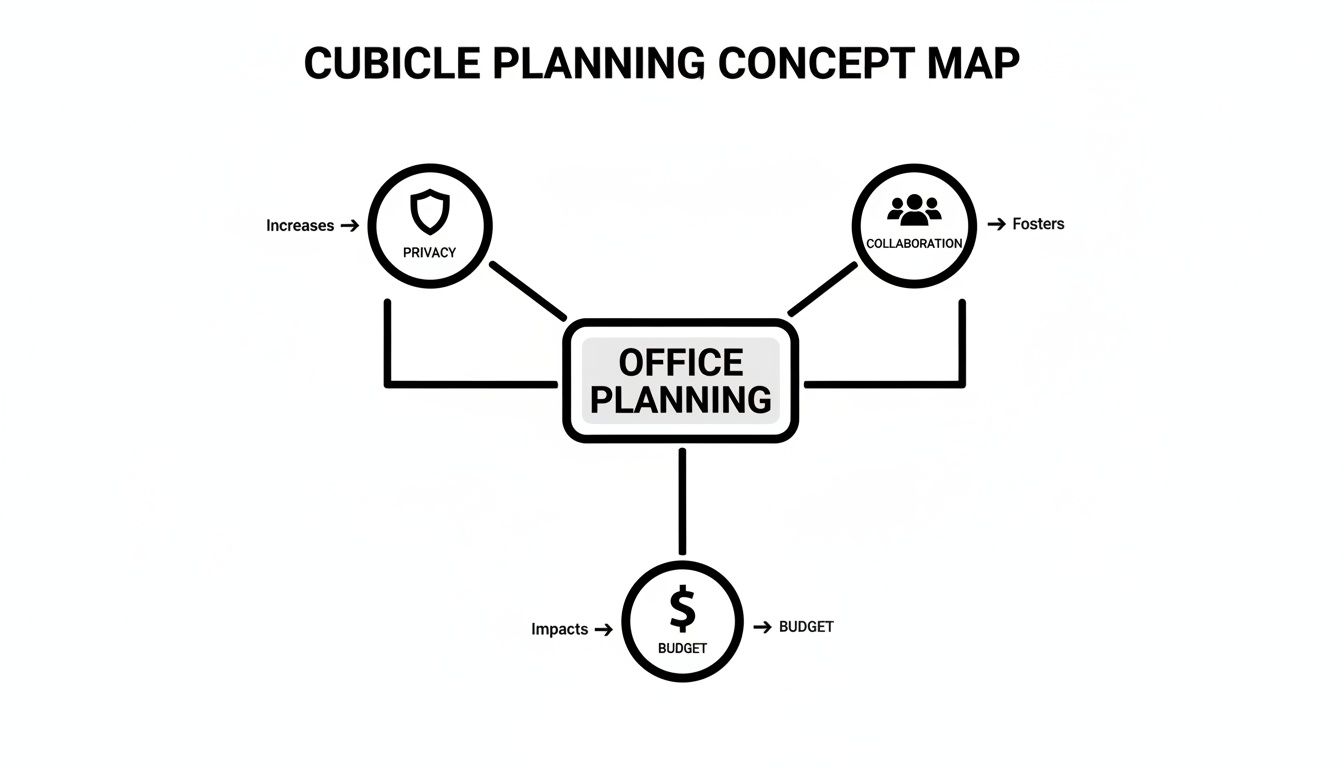
As you can see, a great office layout finds that sweet spot where all three factors meet. The goal is a space that's not only cost-effective but also genuinely supportive of how your team actually works.
The Compact 5'x5' Footprint
The 5'x5' cubicle is the definition of efficiency. It offers a tight 25-square-foot workspace designed for high-density environments where you need to maximize every inch. This size is a perfect match for roles that are almost entirely computer-based and don’t involve much physical paperwork, like call centers, data entry clerks, or telemarketing teams.
Think of it as a focused cockpit. There's just enough room for a computer, a phone, and the essentials—and not much else. This compact setup is brilliant for minimizing distractions and maximizing the number of workstations you can fit into an area, making it a budget-friendly choice for large teams handling repetitive tasks.
The Versatile 6'x6' Footprint
We mentioned it before, but the 6'x6' cubicle is the undisputed industry standard for good reason. At 36 square feet, it strikes an ideal balance between personal space and spatial efficiency, making it the go-to workhorse for most general office roles. This is the sweet spot for administrative staff, HR professionals, and project coordinators.
An employee in a 6'x6' station has plenty of room for an L-shaped desk, a couple of monitors, and some personal storage like a filing pedestal. It offers just enough "breathing room" to feel comfortable and focused without completely isolating team members from one another. For a deeper dive into how these can be laid out, check out our overview of popular cubicle configurations.
The 6'x6' cubicle is the jack-of-all-trades in office design. It’s large enough to support focused, multi-faceted work but compact enough to maintain a sense of team cohesion and fit within most floor plans.
The Expansive 6'x8' Footprint
When a role demands more real estate, the 6'x8' cubicle is the answer. Offering a generous 48 square feet of space, this dimension is ideal for employees who need to spread out. Think engineers, designers, or architects who are constantly working with large drawings, blueprints, or multiple oversized monitors.
That extra room is crucial for work that goes beyond a single screen. Those extra two feet can accommodate a much larger U-shaped work surface, more extensive storage, or simply provide more room to move around. It’s a significant upgrade that supports complex, detail-oriented tasks without needing to jump to a fully private office.
The Private 8'x8' Footprint
At a roomy 64 square feet, the 8'x8' cubicle starts to blur the line between a workstation and a small office. This generous footprint is typically reserved for managers, supervisors, and employees whose roles require a high degree of confidentiality or frequent small, private meetings.
This size easily fits a guest chair, making it simple to have one-on-one conversations without having to hunt down an open conference room. These spacious layouts are almost always paired with higher panels to create a true sense of privacy, making them an excellent choice for roles in finance, legal, or management.
How Panel Height Shapes Your Office Culture
A cubicle's size isn't just about its footprint on the floor. What really shapes the employee experience—and your company culture—is the height of the walls. This one factor directly controls privacy, manages noise, and dictates how easily people can collaborate.
Think of panel height as a privacy dial for your office. Turn it down low, and conversation flows freely. Turn it up high, and you create a secluded world for deep focus. Striking the right balance is all about matching your team's need for focus with your company's desire for an open, connected atmosphere.
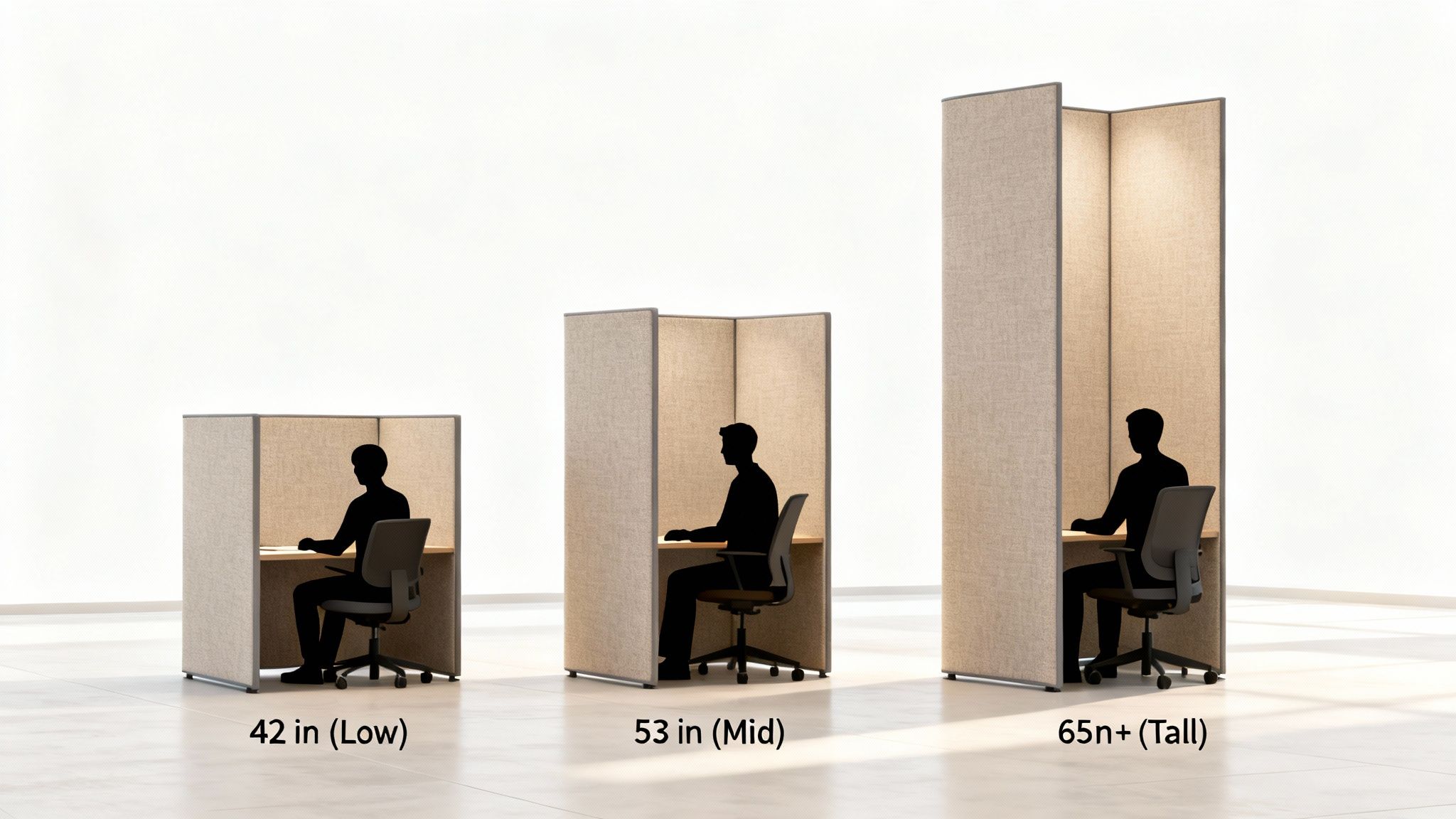
Choosing the right height is a strategic decision. It sends a clear message about how you expect work to get done.
Low Panels: Built for Collaboration
Low panels, usually around 42 inches tall, are all about encouraging open communication. At this height, employees have clear sightlines across the office, making it effortless to ask a quick question, bounce an idea off a coworker, or just feel the buzz of the team.
This setup is perfect for high-energy departments like sales, marketing, or creative teams that thrive on constant interaction. The low walls cultivate a real sense of community and transparency, which can be a powerful tool for building team spirit.
Mid-Height Panels: The Best of Both Worlds
By far the most common and versatile choice, mid-height panels stand around 53 inches. They offer what we call "seated privacy"—when an employee is sitting, they’re shielded from visual distractions, letting them get into the zone.
But the moment they stand up, they can see and speak with colleagues. This makes mid-height panels a fantastic middle ground, perfectly balancing the need for individual concentration with the ability to connect. It’s the go-to for a huge range of roles, from admin staff to project managers, because it just works.
Mid-height panels give employees a personal space for deep work while keeping them connected to the team. It prevents the isolation that can creep in with high-walled workstations.
This adaptability is exactly why the 53-inch height is so popular in modern office design. It allows for quiet focus without killing the collaborative vibe.
Tall Panels: For Maximum Focus and Confidentiality
When a job demands serious concentration or involves sensitive information, tall panels of 65 inches or more are the only way to go. These panels create semi-private offices that dramatically cut down on both visual and auditory distractions.
High-walled workstations are a no-brainer for finance, legal, or HR teams handling confidential data daily. They're also ideal for anyone who needs long, uninterrupted stretches of thought—think developers, writers, or researchers. If you want to learn more about creating these zones, you can explore our guide on effective office cubicle privacy.
Many businesses find a mix-and-match approach works best. You can design a high-energy "collaboration hub" with low panels for your sales team, then create a "quiet zone" with tall panels for your accounting department. With the flexibility of Cubicle By Design, you can build a truly dynamic layout that supports every single person on your team.
Mastering Your Office Layout and Space Planning
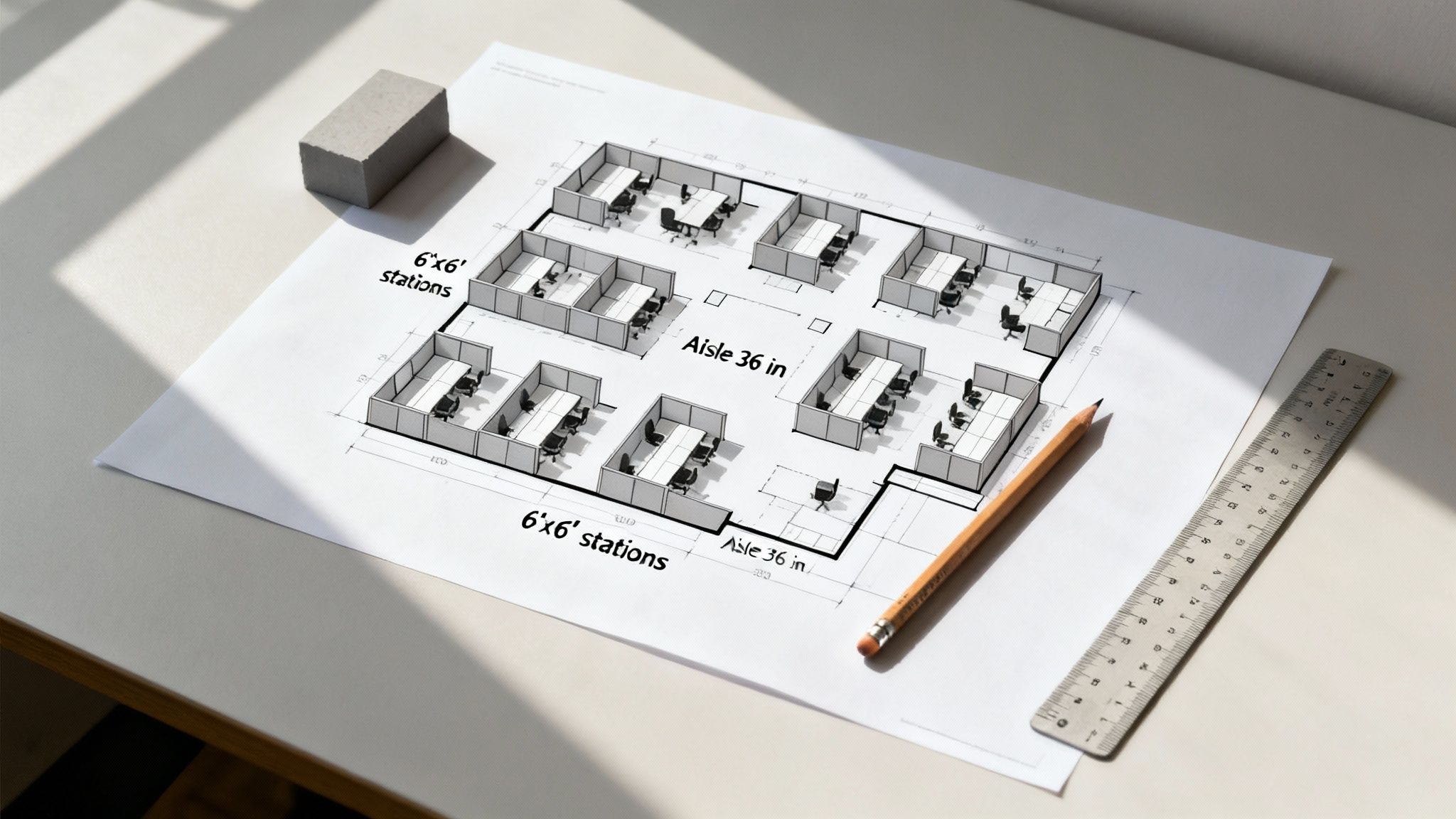
Once you have a feel for the right cubicle footprints and panel heights for your teams, the next big step is arranging them into a floor plan that actually works. This is so much more than just a game of office Tetris; it’s about creating a functional, intuitive environment where work can flow without a hitch. Thinking about the standard size of cubicle you've chosen gives you a predictable building block for mapping out the entire workspace.
A well-designed layout doesn't just squeeze everyone in—it boosts productivity, ensures safety, and frankly, just makes the office a better place to be. This means taking a thoughtful approach to walkways, shared spaces, and the overall circulation of people throughout the day.
Calculating Your Space Per Employee
Before you start placing a single cubicle on your blueprint, you absolutely have to understand your total space allocation. A common mistake we see is people only counting the workstation itself. The real calculation for square footage per employee must also include their slice of common areas like hallways, break rooms, conference rooms, and the reception area.
As a general rule of thumb, industry benchmarks suggest aiming for 150 to 200 square feet per person. This is a comfortable average for a traditional office layout that accounts for both personal and shared spaces, helping you avoid a cramped, inefficient environment. Of course, this can shift. For higher-density layouts like call centers, the number might shrink to around 80-150 sq. ft., while more spacious executive layouts could easily expand to 250 sq. ft. or more.
Think of it like city planning. A residential lot (the cubicle) is important, but you also need to account for roads, parks, and public buildings to create a functional community.
Ensuring ADA Compliance and Safe Walkways
The space between cubicles is just as critical as the workstations themselves. Getting the aisle width right is completely non-negotiable for safety, accessibility, and creating a comfortable flow of foot traffic. If you ignore these guidelines, you're setting yourself up for frustrating bottlenecks and, worse, serious compliance issues.
To make sure your office is accessible to everyone, stick to these key ADA (Americans with Disabilities Act) guidelines:
- Main Aisles: These are the primary corridors in your office. They should be a minimum of 44 inches wide, though we often recommend 48-60 inches for high-traffic areas.
- Secondary Walkways: These are the smaller paths that lead to individual workstations. You'll need a minimum width of 36 inches here for comfortable passage.
- Clearance Behind Desks: Always leave at least 3 feet of space between the back of a seated employee's chair and the next obstacle. This gives them room to push back and stand up without any trouble.
Following these rules ensures your layout isn't just code-compliant but also comfortable and easy for every single member of your team to navigate.
Partnering with Experts for a Perfect Plan
While these rules of thumb provide a great starting point, creating a truly optimized layout can get complicated fast. To really get it right, it’s worth consulting a comprehensive resource for designing an effective office building layout that supports productivity and workflow.
Or, even better, you can remove all the guesswork by working with professionals. Expert layout assistance means every detail is considered, from power and data placement to figuring out which teams need to be near each other. At Cubicle By Design, our team specializes in turning your vision into a professional, code-compliant reality. You can learn more about our hands-on approach with our detailed office space planning and design services. We help you maximize every last square foot, ensuring your investment results in a workspace that is both beautiful and highly functional.
Weaving Power and Data Into Your Layout
Picking out the right size cubicle is a great start, but it's only half the battle. A modern office grinds to a halt without easy access to power and data, yet this crucial element is often an afterthought. That mistake leads to the all-too-familiar nest of tangled cables, overloaded circuits, and frustrated employees.
Thinking about your electrical needs from day one is the only way to sidestep these headaches. It’s about building power solutions right into the furniture itself, instead of daisy-chaining a bunch of extension cords and power strips after your team has already moved in.
Planning for Power and Data Needs
First things first: you need a clear picture of what each person actually needs to do their job. A developer powering multiple high-res monitors and a half-dozen gadgets has completely different demands than an admin who just needs to plug in a laptop.
A quick audit of your team’s tech needs can save you from major problems later on. For every single workstation, think about:
- How many outlets? Count it up: laptops, monitors, phone chargers, desk lamps, and anything else that needs a plug. It adds up fast.
- Data ports: Does this person need a rock-solid, hardwired ethernet connection, or is Wi-Fi good enough for their role?
- USB ports: Could built-in USB charging ports for phones and accessories help clear up some desk clutter and free up a standard outlet?
- What's next? Is it likely you'll be adding more equipment down the road? Planning for an extra outlet or two is always a smart bet.
Tidy Solutions for Cable Management
Thankfully, modern cubicle systems are designed with all this in mind, offering built-in ways to keep wires completely hidden. This isn't just about looks—it's a huge safety win, getting rid of those nasty tripping hazards.
The best systems use raceways, which are just hollow channels usually found at the base of the cubicle panels. All your power and data cables run through these channels, bringing connectivity right to the desktop without a single wire showing on the floor. Power is delivered to the entire setup through a base-in feed, which hooks the system directly into your building's electrical grid from a floor or wall connection.
Think of an integrated power system as the central nervous system of your office. When it's done right, you never see it, but it’s essential for everything to function smoothly.
Keeping Your Setup Safe and Scalable
This is one area where you absolutely don't want to DIY. Getting the electrical infrastructure for your cubicles done safely and up to code is non-negotiable. While your local codes are what matter most, resources like these Australian Electrical Wiring Standards show just how serious and detailed this work is.
Working with a full-service partner like Cubicle By Design takes all that complexity off your plate. Our team handles these technical details from the very beginning, making sure your power setup is safe, can grow with you, and fits seamlessly into your final layout. To see what a professional plan looks like, take a look at our guide to a proper cubicle electrical setup—it makes all the difference.
Build Your Ideal Workspace in Minutes
All the planning and knowledge you’ve gathered on the standard size of cubicle options and layouts comes together right here. It’s time to stop visualizing and start building. This is where your vision for a perfectly balanced workspace moves from a theoretical idea to a tangible, interactive design.
Instead of sketching layouts on paper or just trying to imagine how different pieces fit, you can step into a digital sandbox built just for this. It’s a space where you can experiment freely, test ideas, and see your future office take shape in real-time—all without any risk or commitment. This whole process takes the guesswork out and lets you make decisions you can feel confident about.
Your Personal Design Sandbox
Think of our online Custom Cubicle Designer as your personal workshop. It’s a powerful, intuitive tool that puts you in the driver's seat, letting you apply everything you’ve learned about footprints, panel heights, and workflow. With just a few clicks, you can translate your requirements into a custom configuration.
We designed it to be incredibly straightforward. You can easily drag and drop components, change dimensions, and cycle through different options to land on the perfect combination. The goal is to make designing your office accessible, efficient, and honestly, pretty enjoyable.
Here’s a quick look at what you can do:
- Select Footprints: Start with popular standards like 6'x6' or 8'x8', or create a completely custom dimension to fit your unique floor plan.
- Adjust Panel Heights: Instantly switch between low, collaborative panels and tall, private walls to create distinct zones for different teams.
- Choose Finishes: Experiment with a huge array of fabrics, laminates, and trim colors to match your company’s branding and aesthetic.
- Add Storage and Power: Seamlessly integrate pedestals, overhead bins, and electrical systems to build a fully functional workstation.
From Concept to Creation
This isn't just about picking parts from a catalog; it's about crafting a cohesive workspace that truly supports your team. Whether you’re designing high-privacy private office cubicles for your management team or open-concept workstation cubicles for a collaborative department, the designer lets you see exactly how your choices will impact the final look and feel.
This tool bridges the gap between your ideas and a functional, professional layout. It transforms complex planning into a simple, creative exercise, ensuring the final result aligns perfectly with your budget, workflow, and vision.
By the time you're done, you'll have more than just a concept—you'll have a detailed design ready for a quote. It’s the fastest way to explore the endless possibilities for your new office.
Ready to get started? Dive into the designer now and begin building the ideal workspace for your team in minutes.
Common Questions We Hear About Cubicle Sizes
Even when you think you've got the perfect floor plan nailed down, a few practical questions always seem to pop up. Think of this as a quick cheat sheet for the most common queries we get, reinforcing some of the key ideas we've covered so you can move forward with confidence.
What’s the Most Popular Standard Cubicle Size?
Hands down, the 6'x6' cubicle is the industry workhorse. Its 36-square-foot footprint just hits that sweet spot between providing enough personal workspace and being efficient with your floor space. It's the go-to for most general office roles, easily fitting an L-shaped desk and some storage without making anyone feel boxed in.
How Much Space Do I Need for Walkways Between Cubicles?
This is one of those things you can't afford to get wrong. For basic, comfortable movement, you need an absolute minimum aisle width of 36 inches.
But honestly, for main pathways where people are constantly moving, you'll want to aim for 44 to 48 inches. This isn't just about comfort; it's about meeting ADA compliance and preventing a daily traffic jam. Skimping on walkway space is a surefire way to create a frustrating and cramped office.
A little extra room in the walkways makes a massive difference in the daily flow of an office. It’s a small detail that ensures your space is welcoming and safe for every single person who walks through the door.
Can I Mix Different Cubicle Sizes in the Same Office?
Absolutely, and you probably should! Mixing and matching cubicle sizes and panel heights is one of the smartest ways to build a flexible workspace that actually supports how different teams work. It's a core principle of modern office design.
For example, you could set up a high-energy "pod" of low-panel 5'x5' workstation cubicles for a sales team that thrives on collaboration. Meanwhile, your finance or legal teams, who need quiet for deep focus, could get taller, more private 6'x8' private office cubicles.
This kind of tailored approach is exactly what we specialize in at Cubicle By Design—creating zones that help each department do their best work.
Ready to turn all this knowledge into a real-world plan? The team at Cubicle By Design is here to walk you through every step, from initial layout to final installation. Get started and bring your vision to life with our powerful Custom Cubicle Designer.