


Meta Title: Computer Desk in a Cabinet for Offices | Cubicle By Design
Meta Description: Learn how a computer desk in a cabinet supports ergonomics, security, and flexible office planning. Practical guidance from Cubicle By Design.
Popular advice treats a computer desk in a cabinet like a clever apartment trick. Hide the monitor, shut the doors, and the room looks neat again.
That advice is too small for what this furniture can do in a workplace.
In offices, the primary value is not novelty. It is control. A cabinet desk can reduce visible clutter, protect equipment after hours, create cleaner multi-use rooms, and give teams a workstation that disappears when the room needs to serve another purpose. For facilities managers dealing with hybrid schedules, sensitive hardware, or aesthetic inconsistency across departments, that is not a gimmick. It is a planning tool.
Computer Desk in a Cabinet A Guide for Offices
The Evolution from Home Gimmick to Office Workhorse
Treating a cabinet desk as decorative home-office furniture is a procurement mistake. In corporate settings, it solves three recurring facility problems at once: it contains visual clutter, secures equipment, and lets one room support more than one use without looking unfinished between bookings.
The form itself came from cabinetry, not office systems. Early armoire-style desks borrowed the proportions and enclosed storage logic of household casegoods, then adapted that enclosure for writing surfaces, monitors, and office equipment as computer use spread beyond dedicated back rooms. That origin still matters. A cabinet desk was built to hide work when the room needed to serve another function, which is exactly why it has become more useful in flexible offices than many buyers expect.
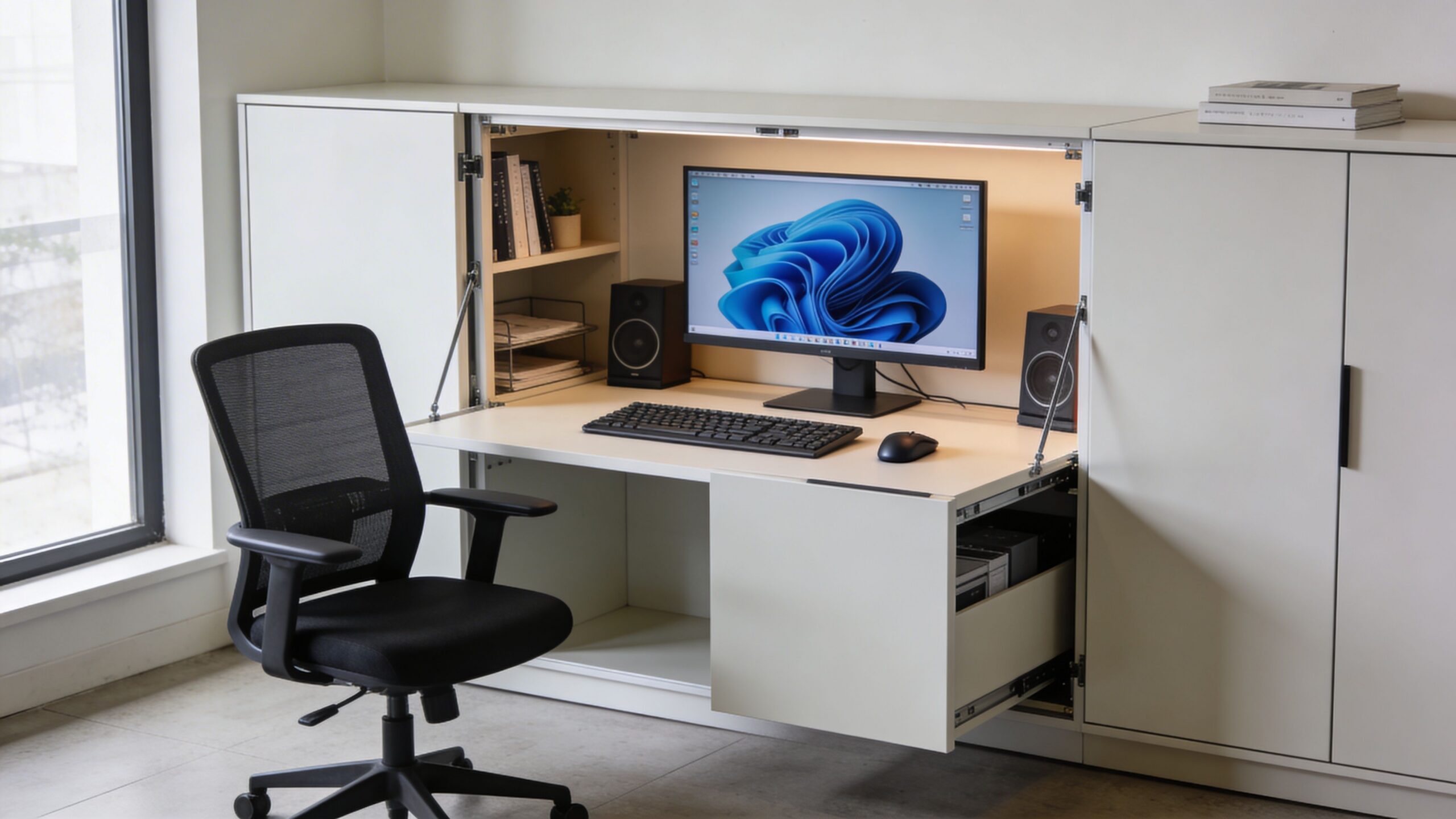
The difference is the standard of performance. At home, a cabinet desk can get by as a tidy way to close the doors on a monitor and a keyboard. In an office, it has to function as infrastructure. That means enough interior depth for current hardware, safe cable routing, hardware ventilation, lockable storage where policy requires it, and working heights that support a chair, monitor, and keyboard setup people can use for a full shift without strain. Those ergonomic checks are required for user health and productivity.
Facilities teams usually run into the same operational friction points:
- Multi-use rooms lose control quickly: Temporary setups leave screens, peripherals, and paper exposed after each session.
- Private offices drift into visible disorder: Docks, chargers, printers, and overflow files spread onto every open surface.
- Hybrid workstations vary too much: One room looks client-ready, the next looks like a leftover IT install.
- Security and design standards conflict: Teams want clean sightlines, but they also need to secure devices, media, and documents.
Specified well, a cabinet desk addresses each of those issues without forcing a full architectural rebuild.
I see the strongest results in executive offices, reservable focus rooms, enclosed project spaces, and hoteling environments where the room needs a clean reset every day. It also fits a larger shift in workplace planning toward modular systems and adaptable footprints, a pattern you can see in the evolution of the office cubicle. The same office that once standardized around panels and fixed workstations now needs enclosed, flexible furniture that handles privacy, equipment, and rapid change with less disruption.
Security is part of that shift. A cabinet desk will not replace a formal access-control program, but it does reduce casual exposure of hardware and sensitive material. For departments that handle portable devices or confidential paperwork, features associated with a desk with hidden compartments can also inform how storage is specified, especially when managers need controlled access without adding bulky freestanding pedestals.
The practical test is simple. If a room needs to switch from active workstation to presentable shared space in minutes, a cabinet desk has outgrown its old reputation and become a useful office asset.
Comparing Cabinet Desk Types for Business Use
There are two broad ways to approach a computer desk in a cabinet for business use. One is the freestanding armoire desk. The other is the fully integrated, system-built cabinet desk that is planned as part of the workspace itself.
Both can work. They solve different problems.
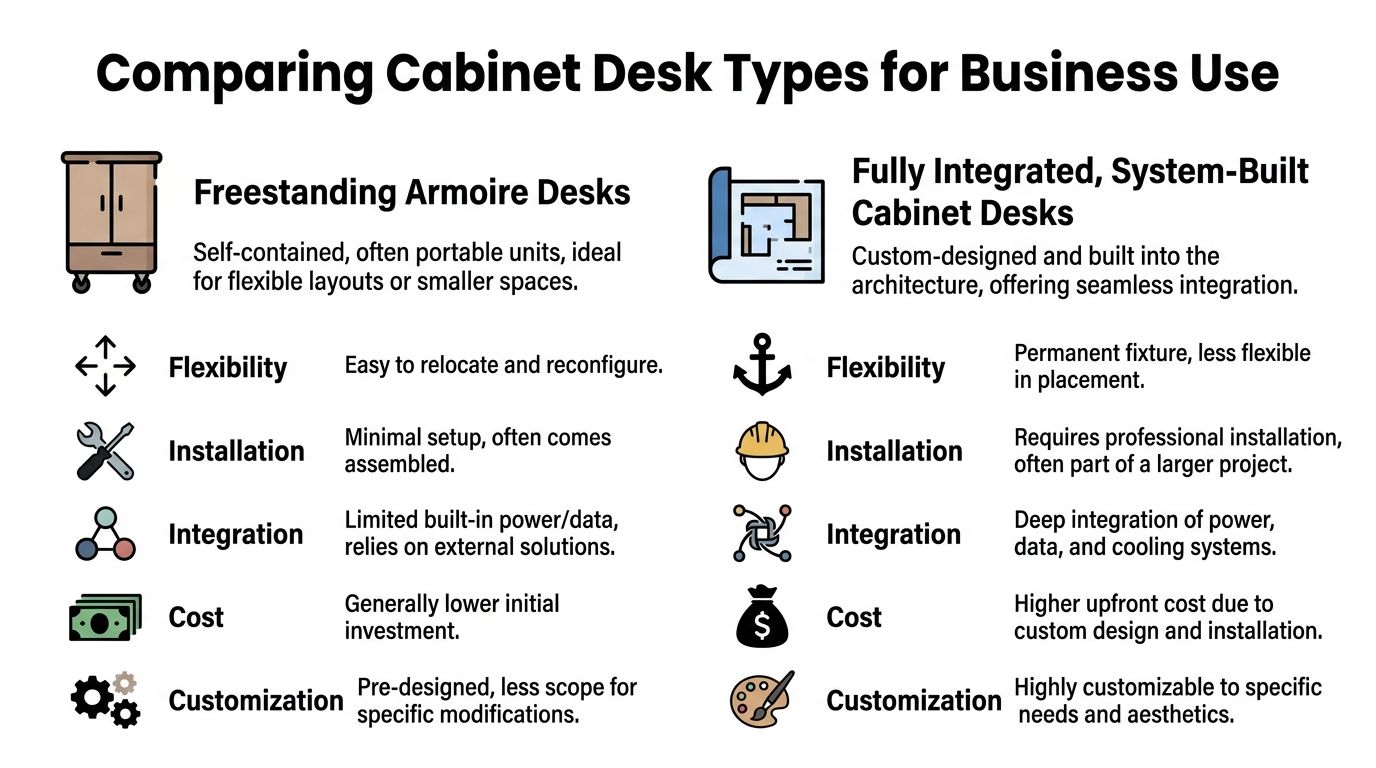
Freestanding armoire desks
Freestanding units are self-contained. You bring them in, place them, and connect them to existing power and data.
They are the easier option when speed matters or when a team is testing a concept before committing to a larger rollout. They fit well in private offices, temporary swing spaces, and smaller departments that do not need built-in infrastructure.
What works well:
- Fast deployment: They usually need less coordination with trades.
- Relocation flexibility: If the office changes, the unit can move.
- Lower design complexity: Good for departments that need an immediate fix.
What tends to go wrong:
- Cable routing often ends up as an afterthought.
- Ventilation is easy to overlook when hardware sits behind closed doors.
- Surface size and storage layout may be fixed in ways that do not match the user.
If the goal is a polished, lockable station in a private office, a freestanding piece can be the right answer. If the goal is a whole-floor standard, it usually is not.
System-built cabinet desks
Integrated cabinet desks belong in a larger workplace plan. They are specified along with partitions, power access, storage, and circulation, not chosen as isolated furniture.
This approach is better when the office needs repetition, consistency, or branded finishes across a department. It also works better when the workstation has to blend into architectural elements or modular planning systems. Teams evaluating that kind of fit often compare options with broader modular office desk systems, because the cabinet desk then becomes one part of a coordinated workstation strategy.
A side-by-side business view
| Type | Best fit | Main strength | Main trade-off |
|---|---|---|---|
| Freestanding armoire desk | Private office, pilot deployment, specialty room | Easy to move and deploy | Limited integration with building systems |
| System-built cabinet desk | Hybrid office, departmental rollout, executive suite, secure project area | Better consistency and infrastructure planning | More coordination and less flexibility after install |
Matching type to use case
A few common scenarios make the choice clearer.
R&D or compliance-sensitive team
Use a cabinet desk with lockable storage and controlled cable access. If devices, prototypes, or paper files need to be put away nightly, a loose open desk creates unnecessary exposure.
Hoteling zone for hybrid staff
Integrated units work better. People need a predictable setup. Power, docking, and storage need to appear in the same place every time.
Executive office
Either option can work, but finish quality matters more here. The desk should disappear into the room when closed and open into a workstation that still feels intentional.
Design-driven meeting room with occasional work use
A cabinet desk makes the room more versatile. Closed doors restore the room to a client-facing setting. Open doors create a temporary project station.
For leaders who want inspiration from the residential craftsmanship side, a well-made desk with hidden compartments is useful to study. Not because offices need secret compartments, but because it shows how concealment, storage, and furniture detailing can coexist without looking bulky.
Rule of thumb: Choose freestanding when the problem is local. Choose integrated when the problem is organizational.
Integrating Cabinet Desks with Ergonomics Power and Data
Cabinet desks are often dismissed as compact home-office furniture. In a corporate setting, that misses the point. Specified properly, they solve three expensive workplace problems at once: they give users a repeatable ergonomic setup, they contain power and data cleanly, and they secure equipment when the room has to switch back to a client-facing or shared-use mode.
The failure pattern is predictable. A team approves a cabinet desk because the closed elevation looks tidy. Then the full setup arrives: two monitors, a dock, a full-size keyboard, a mouse, a task light, charging cables, and a chair that needs room to move. If the unit was designed like casework instead of a workstation, users end up twisting at the shoulders, perching too close to the screen, or leaving doors open with cables spilling out.
Ergonomics is the first filter. Ergotron reports that many workers in fixed-height environments still deal with discomfort during the workday, which is a problem if these stations are intended for regular use rather than occasional touchdown work (Ergotron ergonomic workspace research). For facilities teams, the practical takeaway is simple. A cabinet desk has to be planned around posture, reach, sightlines, and chair movement before anyone discusses door style or finish.
Start with the user posture and equipment footprint
A cabinet desk still needs to function like a serious workstation. The enclosure changes storage and appearance. It does not cancel the basic space a person needs to work well.
Use standard desk dimensions as a baseline, then test the enclosed condition. The room still needs enough clearance for chair travel and safe circulation, and the cabinet interior still needs enough depth for monitor distance, knee room, and cable routing. As noted earlier, standard desk sizing gives a useful reference point. The mistake is assuming those dimensions can shrink once doors and side panels are added.
In practice, I look for four requirements before approving a unit for full-day use.
Core ergonomic requirements
- Worksurface height: The typing surface has to support neutral shoulders, elbows, and wrists for the intended user group.
- Screen position: Interior height and depth must allow the monitor to sit at a comfortable viewing level and distance.
- Leg and chair clearance: Knees need clear space under the desk, and the chair needs enough room to roll back without hitting walls or adjacent storage.
- Accessory placement: Docks, headsets, task lighting, and charging points need assigned locations so the work surface stays usable.
A useful consumer-oriented refresher on these principles appears in this guide to ergonomics at home. The context is residential, but the posture and comfort principles apply directly to enclosed office workstations.
One field check catches problems quickly. Stage the exact monitor, chair, dock, keyboard, and power brick the team plans to use. If the station only works in a rendering, it will fail in operations.
Power and data have to be designed in
Cable management is where many cabinet desks break down.
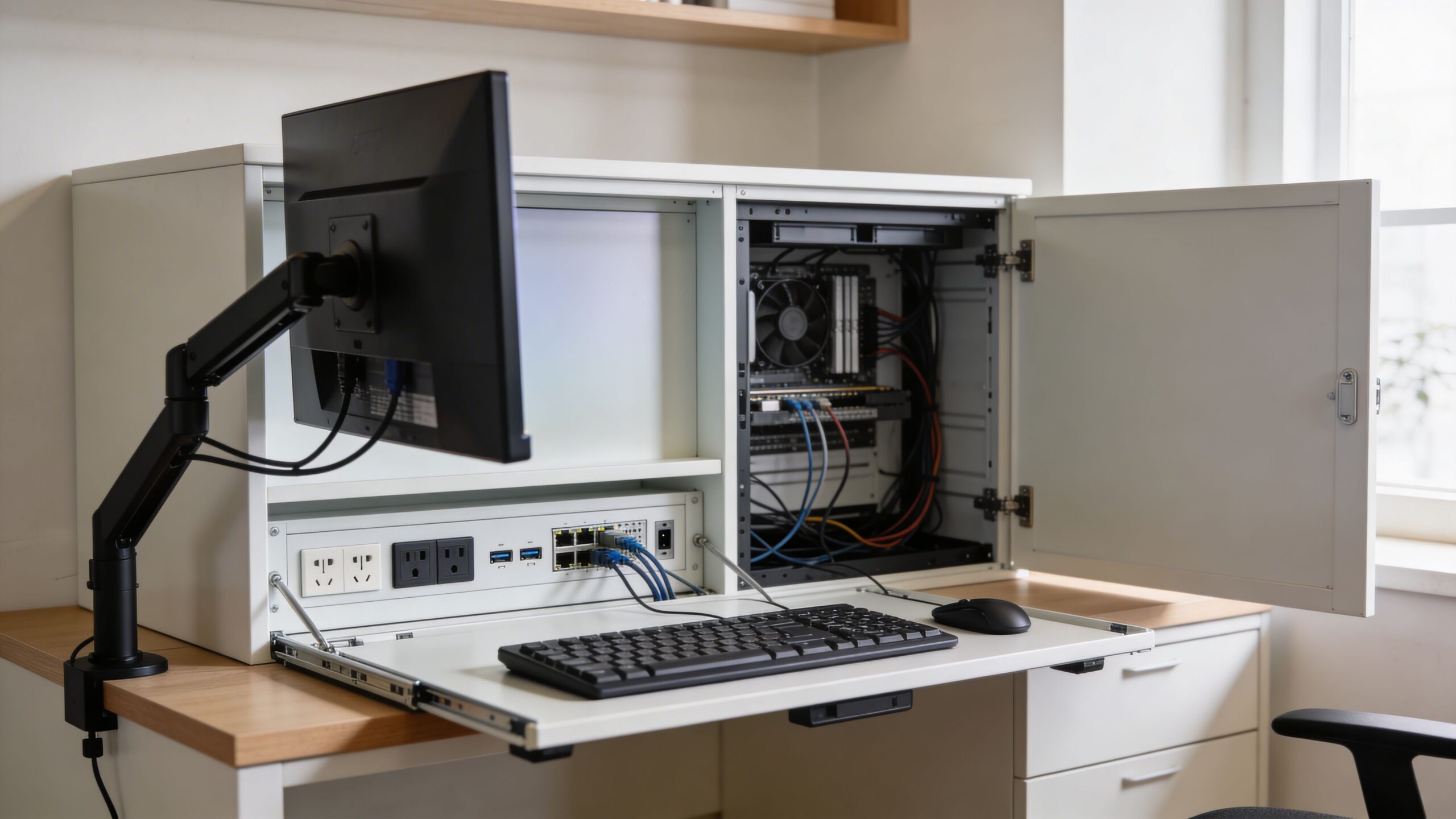
An enclosed workstation needs a defined path for power, charging, and data from the building connection to the user devices. Without that path, cords get pinched in door jambs, floor strips appear where they should not, and IT staff lose access every time a device changes. Those are maintenance problems, safety problems, and appearance problems at the same time.
For larger deployments, it helps to coordinate the furniture with dedicated distribution components such as a cubicle power pole for workstation power routing. That approach is cleaner than feeding each cabinet from improvised extension routing across walls or walking paths.
Focus the specification on four decisions:
Entry point
Decide where power and data enter the unit. Rear entry, side access, and base entry each affect wall placement, service access, and installation time.Cable separation
Keep power and data organized inside the cabinet so routine changes do not turn into tracing exercises.Access for maintenance
Someone will replace a dock, monitor, or charger later. Removable panels and reachable cable zones matter more than perfectly hidden wiring.Charging support
Laptops, phones, and headsets need dedicated charging locations. If that space is not built in, the desktop fills up immediately.
Ventilation and load capacity
Heat is the other common oversight.
If the cabinet includes a CPU bay, dock shelf, or enclosed equipment zone, it needs airflow. Otherwise the unit traps heat from active hardware and power supplies. That can shorten device life, create fan noise complaints, and push users to leave doors open all day, which defeats the point of the cabinet.
Manufacturer guidance is more useful here than generic furniture marketing. Eureka Ergonomic notes load ratings such as 80 pounds on the desktop, 30 pounds per shelf, and 22 pounds per drawer on one cabinet-style workstation, along with rear airflow openings and a removable CPU shelf as practical features to look for (Eureka Ergonomic cabinet workstation specifications).
Those numbers are product-specific, not universal standards. The procurement lesson still stands. Ask for rated load capacity, hardware support details, and a clear ventilation strategy before approving the unit for business use.
A useful visual reference appears below.
What works in active offices
The best cabinet desks I see in flexible workplaces share a few traits:
- Cable openings sized for actual connectors, not just one thin cord
- Shelves or compartments that adjust as equipment changes
- Doors that open fully without blocking circulation or adjacent seating
- A surface and structure rated for monitors, monitor arms, and regular daily use
- Vent paths that stay open even when the cabinet is closed
- Lockable storage for devices and documents in shared or client-facing rooms
The weak versions look fine at handover and create trouble six months later. Shallow interiors, fixed compartments, tiny grommets, and sealed equipment bays all limit adaptability. For a facilities manager rolling these out across hybrid offices, that is the primary trade-off. A cabinet desk should not just hide a workstation. It should standardize it, protect it, and make it easier to scale across rooms with different uses.
Customizing Finishes Materials and Storage Solutions
Once the workstation performs well, customization starts to matter. Here is where a cabinet desk stops looking like borrowed residential furniture and starts fitting the office.
The finish package should match the room, but it also needs to match the abuse level. Some offices need the warmth of veneer or wood tones in executive settings. Others need laminates that hide wear, clean quickly, and stay consistent across multiple departments.
Choose materials by use pattern
A cabinet desk in a private office has different demands than one in a shared touchdown room.
Laminate works well where multiple users rotate through the station. It is easier to maintain and easier to keep visually consistent across a larger rollout.
Veneer or furniture-grade wood makes more sense where the desk supports client-facing use, executive occupancy, or a hospitality-style office aesthetic.
Powder-coated steel supports are worth considering where the desk has to carry heavier equipment and endure constant use. The visual result is cleaner when the structure is built for load instead of hidden and undersized.
Finishes should serve wayfinding and brand consistency
Most offices default to safe neutrals. That is often the right call for longevity.
Still, a cabinet desk gives you a rare opportunity to define the room in two modes. Closed, it behaves like storage or architectural millwork. Open, it becomes a workstation. That means finish choices can support both identities.
A few approaches work especially well:
- Monochrome exterior, functional interior: Calm outside, task-focused inside.
- Brand-color backing panels: Useful in touchdown and team zones without overwhelming the room.
- Mixed material interiors: A durable work surface with softer visual elements on inside doors or side panels.
For offices dealing with tighter footprints, a look at storage cabinets for small spaces helps frame how cabinetry can carry more than one function without making the room feel crowded.
Practical takeaway: The most effective finish is not the most premium option. It is the one that still looks intentional after daily use, cleaning, and reconfiguration.
Interior storage should match the actual workflow
Here, many specifications become too generic.
A cabinet desk should not just include shelves and drawers because that is what cabinet furniture usually has. It should include the right storage for the work being done at that station.
A strong internal layout often includes a mix of the following:
| Interior feature | Best use |
|---|---|
| Adjustable shelving | Shared workstations and changing device mixes |
| File drawer | Roles that still handle paper records or active folders |
| Pull-out printer shelf | Private offices where a desktop printer must stay out of sight |
| Door-mounted tack surface | Project spaces and temporary notes |
| Integrated lighting | Cabinets in rooms with low ambient light or deep interiors |
| Lockable compartments | Equipment security and controlled access |
One role may need a simple laptop docking station with a drawer for peripherals. Another may need room for a monitor, small printer, headset charging, binders, and a secure hardware bay. Those are not styling choices. They are use-case decisions.
Hardware details matter more than people expect
The handles, hinges, lock type, and opening swing affect daily behavior.
If the doors feel heavy, users leave them open. If the lock is awkward, no one secures the station. If the shelves are fixed at the wrong height, equipment migrates onto the desktop.
That is why a cabinet desk deserves the same scrutiny as any other workstation component. When the internal layout reflects the role, people keep the station organized without being told to.
Calculating ROI and Ensuring Security
Cabinet desks are often treated like a style choice. In corporate space planning, they are usually a capacity and risk decision.
Facilities managers do not need another piece of furniture that photographs well and creates daily friction. They need a workstation that lets one room do more than one job, protects equipment after hours, and reduces the small operational problems that waste staff time.
ROI starts with how the room performs
The most significant ROI case is not individual productivity claims. It is space efficiency.
A fixed open desk reserves floor area full time, even when the room needs to host a meeting, client visit, or project review. A cabinet desk gives that same room a second mode. Close the doors, secure the equipment, and the space is ready for another use without looking like a workstation was pushed aside at the last minute.
That matters in executive offices, touchdown rooms, training spaces, and shared support areas. In each case, the value comes from avoiding dedicated single-purpose rooms.
The purchase decision also needs a longer lens. If an enclosed workstation reduces the need for separate storage, cuts reset time between users, and delays a room reconfiguration, the total return can outperform a lower-cost open desk. Teams that need a structured evaluation process can use a furniture buying guide for office workstations to compare those costs before issuing a spec.
The primary savings are operational
Cabinet desks earn their keep through repeatable daily gains:
- faster room reset between users or functions
- less visible clutter in client-facing spaces
- fewer misplaced peripherals, chargers, and small devices
- lower exposure of equipment left in shared rooms
- better control over work areas that should not remain active after hours
None of those items looks dramatic in isolation. Together, they affect how smoothly a workplace runs.
There is a trade-off. If staff have to wrestle with doors, move equipment to open the station, or reconnect cables every time they sit down, adoption drops quickly. The enclosure has to save effort, not add it.
Security value is practical, not theoretical
A cabinet desk does not replace IT controls, records management, or access policy. It adds a physical layer that many hybrid offices still lack.
That layer is useful for laptops, docks, headsets, test devices, paper files, and role-specific hardware that should not stay exposed overnight. In partially open offices, it also helps with a simpler problem. People are less likely to touch, borrow, or unplug equipment that is stored behind a locked enclosure instead of sitting in the open.
Locking strategy matters here. A keyed lock may suit a private office. Shared spaces often work better with managed key systems or digital locks tied to facility procedures. Security that is awkward to use tends to be ignored.
Key takeaway: The strongest business case for a cabinet desk is not appearance. It is better use of space, better control of equipment, and fewer daily disruptions.
What to count before approval
A useful ROI review usually covers these questions:
| ROI area | What to evaluate |
|---|---|
| Space use | Can the room switch between focused work and another function without a full reset? |
| Asset protection | Will the enclosure reduce casual access, tampering, or after-hours exposure of devices and files? |
| Operating time | Will staff spend less time clearing surfaces, reconnecting equipment, or preparing the room for the next use? |
| Fit with policy | Does the locking method align with IT, records, and facilities procedures? |
| User adoption | Can employees open, use, secure, and close the station without extra steps that slow them down? |
The biggest costing mistake is to compare purchase price alone. An inexpensive open desk can create avoidable costs later if it leaves hardware exposed, forces separate storage purchases, or turns a flexible room into a permanent workstation.
A Procurement Checklist for Cabinet Desks
Procurement teams do better with questions than with broad recommendations. A cabinet desk can solve real problems, but only if the specification is disciplined.
Use this checklist before approving a product, a custom build, or a pilot order.
Cabinet Desk Procurement Checklist
| Category | Decision Point / Question | Status (Yes/No/NA) |
|---|---|---|
| Spatial Fit | Does the cabinet fit the room without blocking circulation when doors are fully open? | |
| Spatial Fit | Have we confirmed wall placement, swing clearance, and user entry path? | |
| Spatial Fit | Have we allowed sufficient space behind the desk for chair movement? | |
| Ergonomics | Does the work surface support the intended user posture and equipment layout? | |
| Ergonomics | Is the interior tall and deep enough for the monitor setup without awkward viewing angles? | |
| Ergonomics | Will the chair fit and move comfortably when the station is in use? | |
| Technical Needs | Is there a defined plan for power entry, cable routing, and device charging? | |
| Technical Needs | Does the cabinet include a documented ventilation approach for active hardware? | |
| Technical Needs | Is the desktop or structure rated for the expected monitor and equipment load? | |
| Security | Do we need locks for devices, files, or controlled peripherals? | |
| Security | Can users secure equipment without making daily access difficult? | |
| Storage | Are the drawers, shelves, and compartments matched to the actual role using the desk? | |
| Storage | Can shelves or hardware positions change if equipment changes later? | |
| Aesthetics | Does the exterior finish align with the room when the cabinet is closed? | |
| Aesthetics | Does the interior still look intentional when the station is open and in active use? | |
| Procurement | Have we reviewed maintenance access, replacement parts, and installation requirements? | |
| Procurement | Have we compared this option against broader workplace standards using a formal buying guide? |
A final warning. Do not approve a computer desk in a cabinet based on showroom appearance alone. Ask for a mockup, a real equipment test, or at minimum a layout review that includes chair movement, monitor placement, and cable access. That small step prevents most of the expensive mistakes.
If you are planning enclosed workstations, hybrid seating, or modular office upgrades, Cubicle By Design can help you evaluate layouts, cubicle options, and integrated workstation solutions. Explore cubicles, configure ideas with the cubicle designer, review private office cubicles, or compare workstation cubicles for your next project.