

Modern Office Cubicle Design for Productivity

Modern Office Cubicle Design for Productivity

When you hear the word “cubicle,” what comes to mind? For many, it’s the image of a sterile, isolating box—a “cube farm” from a bygone corporate era. But modern office cubicle design isn’t about creating boxes anymore. It’s about building flexible, human-centric workstations.

This is a deliberate shift away from the past and toward adaptable environments that actually support focus, well-being, and the collaborative spirit of today’s workplace.

From Cube Farm to Creative Hub: The Cubicle’s Journey
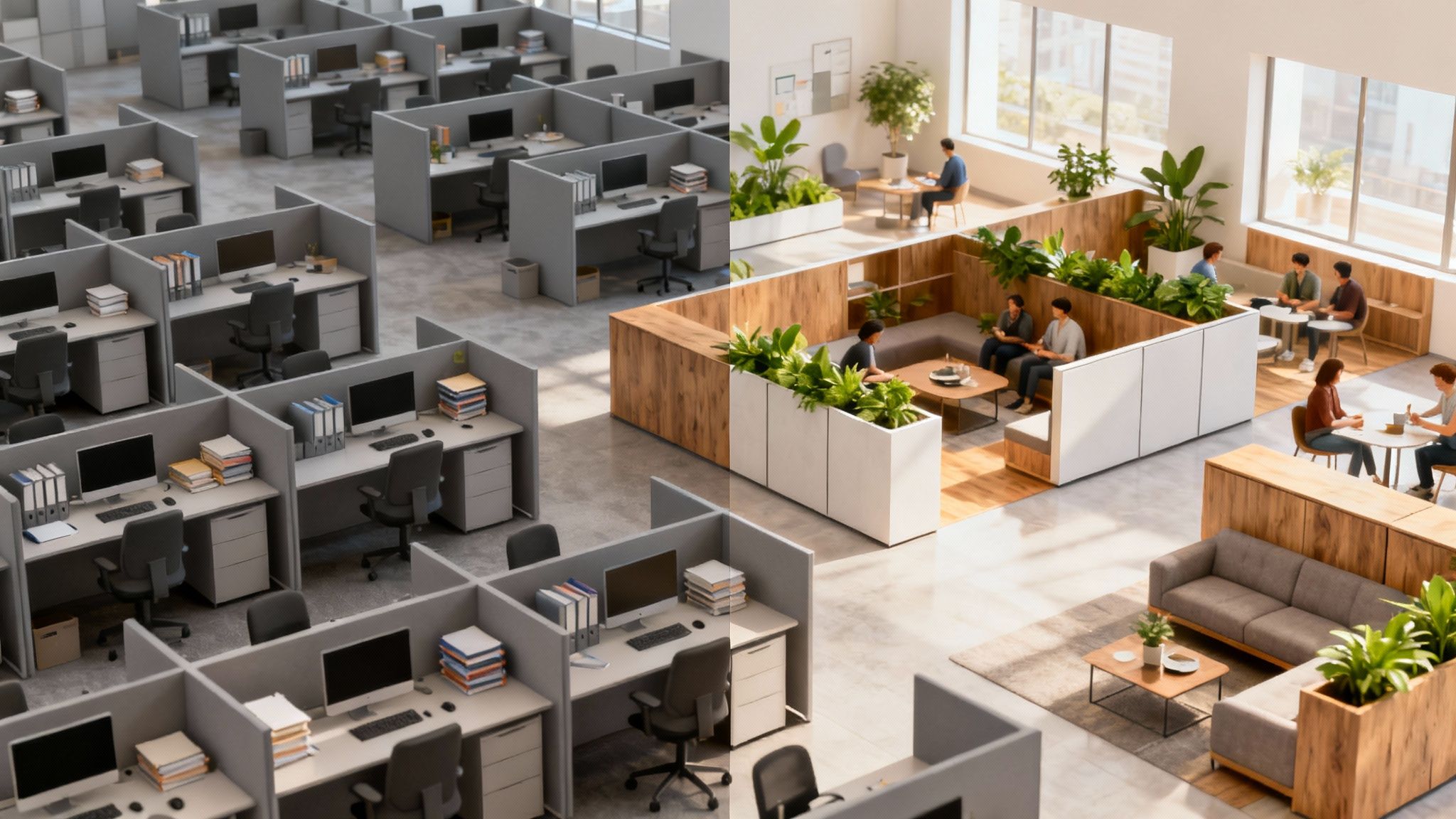
A bright, modern office with low-walled cubicles, promoting an open and collaborative atmosphere, showing an example of modern office cubicle design.

To really get what makes today’s workstations so effective, you have to look back at their surprising origin story. The cubicle wasn’t invented to shove employees into a corner; it was conceived to liberate them. The history shows a wild ride from an idealistic dream to a symbol of corporate monotony—and now, thankfully, a return to its smarter roots.

It all started back in the 1960s. Offices were rigid and hierarchical. Executives got the private offices with windows, while everyone else was packed into open “bullpen” arrangements with virtually no privacy or personal space. It was noisy and impersonal.

The Original Vision for a Flexible Office

Robert Propst, a researcher at the Herman Miller furniture company, saw this problem and came up with a solution: the “Action Office.” His idea was revolutionary at the time. It introduced a three-walled, moveable partition system that completely upended how companies thought about office architecture.

The goal was simple: give employees a good measure of privacy while keeping the overall environment open and flexible. If you’re interested in the nitty-gritty, you can dig deeper into the evolution of the office cubicle in our guide.

But the Action Office was so much more than just walls. It was a complete system designed for the person using it, featuring varied desk heights to encourage movement, tackable surfaces for notes, and materials that absorbed sound. Propst wanted to build a workspace that could adapt to the individual—a personal hub for productivity. It was a concept way ahead of its time, meant to empower workers, not cage them.

The initial intent behind the cubicle was not to create uniformity, but to provide a versatile and customizable workspace that could be adapted to the specific needs of each employee and their tasks.

How the Idea Was Simplified

There was just one problem: Propst’s sophisticated vision was expensive. As competitors jumped into the market, they stripped the Action Office down to its most basic elements—three simple walls and a desktop. This cheap, bare-bones version was easy to churn out, allowing companies to cram more people into less space. Economics won out over experience.

This cost-cutting approach is what led to the dreaded “cube farm.” We’ve all seen it: endless rows of identical, high-walled cubicles that prioritized packing people in over creating a decent place to work. The design became a punchline, a symbol of corporate conformity that left employees feeling isolated and disconnected. The very tool created to give people autonomy became a source of misery.

The history of the cubicle is a great lesson in how easily good design can get lost in translation. Understanding this context makes it clear why today’s modern office cubicle design is more than just a cosmetic refresh. It’s a full-circle return to Propst’s original principles, but updated for the needs of a modern workforce.

Today’s systems solve the old problems of isolation and rigidity by focusing on flexibility, ergonomics, and smart technology integration. By learning from the mistakes of the past, we’re finally building workspaces that truly support employee well-being and drive real productivity.

What Modern Office Cubicle Design Really Means
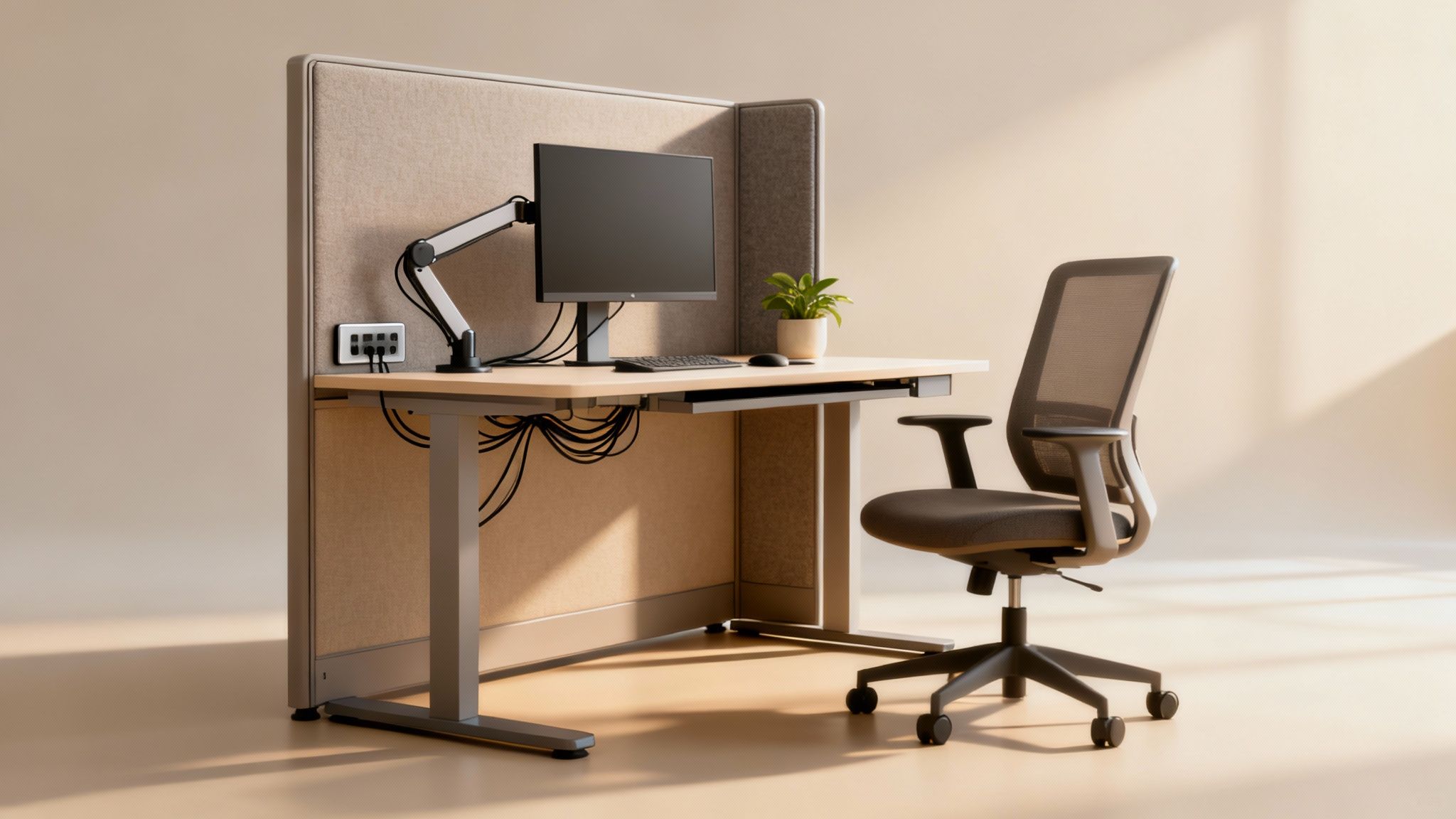
A modern office cubicle with a bright, minimalist design, an ergonomic chair, and ample natural light, illustrating an ideal modern workstation.

If you’re picturing three drab, fabric-covered walls, it’s time for an update. Today, modern office cubicle design isn’t about a piece of furniture—it’s a whole philosophy for creating an adaptable, employee-focused environment. It’s a complete break from the one-size-fits-all box that defined offices for decades.

Think of a modern cubicle less like a box and more like a personal command center. It’s a highly functional, connected home base built to support everything from deep, focused work to a quick, informal check-in with a teammate.

This whole shift is happening for one simple reason: the way we work has changed. The static, repetitive tasks of the past are gone, replaced by dynamic, project-based work that demands both concentration and collaboration. The modern cubicle is a direct answer to that need.

Moving Beyond the Physical Walls

The big ideas behind this new design philosophy are all about flexibility and personal well-being. Unlike their rigid ancestors, modern systems are built to be configurable. This means they aren’t just dropped into an office; they’re truly integrated into its workflow.

Let’s be honest, the original cubicle boom was driven by practical concerns. The energy crisis of the 1970s, for example, was a huge catalyst, as companies scrambled to cram more people into less space to cut real estate costs. It worked for increasing density, but it often forgot about the human element—a problem modern designs are here to solve. You can actually see how historical shifts shaped the evolution of modular workspaces and their impact.

Today, the focus has pivoted from just space efficiency to employee effectiveness. The goal is to create workstations that can be easily changed to suit different teams, projects, or even just an individual’s preference.

The Key Principles of Modern Workstations

Modern office cubicle design stands on a few foundational pillars that set it apart from the old-school models. These aren’t just add-on features; they are the essential building blocks of a supportive work environment.

Here are the concepts at the heart of the design:

  • Intelligent Flexibility: Modern cubicles are often modular, so they can be reconfigured as your teams grow or projects pivot. This kind of adaptability keeps your office layout from becoming obsolete.
  • Seamless Technology Integration: These workstations are designed with tech built right in, featuring integrated power, data ports, and smart cable management to keep things clean and functional. They’re ready for the devices your team uses every single day.
  • True Ergonomic Support: We’re talking more than just an adjustable chair. Modern cubicles incorporate things like sit-stand desks and monitor arms. This focus on physical well-being helps reduce strain and keeps people comfortable all day long.
  • Acoustic and Visual Privacy: Instead of total isolation, today’s designs use materials like frosted glass and sound-dampening panels. The goal is to give employees a sense of privacy without completely cutting them off from the buzz of the office.

A modern cubicle isn’t just a workstation; it’s a tool. It’s designed to empower employees by giving them a space that supports their specific tasks, whether that requires quiet focus or easy access to collaborators.

Ultimately, modern office cubicle design is reclaiming the original promise of a flexible, human-centric workspace. It proves that with thoughtful planning, a cubicle can be a cornerstone of a productive and engaging office, not an obstacle to it.

The Five Pillars of a High-Performing Cubicle

Not all workstations are created equal. A truly modern office cubicle is much more than just a desk and three walls—it’s a carefully balanced ecosystem designed to support the person working inside it.

Think of it like building a high-performance car. You can’t just drop in a powerful engine and call it a day; you need the right suspension, controls, and chassis all working together. A high-performing cubicle is no different. It rests on five essential pillars that combine to create an environment where people can actually do their best work.

Those five pillars are Ergonomics, Acoustics, Lighting, Materials, and Technology Integration. When you get these elements right, a simple workstation becomes a powerful tool for focus and comfort. But if you neglect even one, the whole setup can feel off, leading to distraction and frustration.

Pillar 1: Ergonomics

The absolute foundation of any productive workspace is ergonomics—the science of designing an environment to fit the person, not forcing the person to fit the environment. Get it wrong, and you’re looking at physical strain, fatigue, and a serious drop in productivity.

A modern cubicle tackles this head-on. The single most impactful feature is the sit-stand desk. Giving people the freedom to switch between sitting and standing throughout the day is a game-changer for energy levels and overall health.

Pair that with a fully adjustable chair that offers proper lumbar support and monitor arms that get screens right at eye level, and you’ve eliminated the root causes of most neck and back pain. You can dive deeper into how ergonomics is the secret to a happy workplace in our detailed guide.

Pillar 2: Acoustics

In a busy office, noise is the number one enemy of deep work. The constant chatter, ringing phones, and foot traffic can shatter anyone’s concentration. This is where acoustics come into play. Modern cubicles are engineered to provide auditory privacy without making people feel like they’re in a sensory deprivation tank.

This balance is achieved through a few key elements:

  • Sound-Dampening Panels: The walls of modern cubicles are often made from thick, sound-absorbing fabrics that soak up ambient noise instead of letting it bounce around the office.
  • Strategic Height: Panels don’t have to scrape the ceiling to be effective. Even mid-height partitions do a fantastic job of cutting down on direct-line sound, creating a much quieter personal bubble.
  • Glass with a Purpose: While glass walls keep things feeling open and airy, they can also be specified with acoustic ratings to block sound, giving you the best of both worlds—transparency and tranquility.

A well-designed acoustic environment gives employees the freedom to focus without needing noise-canceling headphones just to get through their task list.

Pillar 3: Lighting

You can’t underestimate the impact of good lighting. It affects everything from mood and energy to eye comfort. The harsh, flickering fluorescent lights of old-school offices are notorious for causing headaches and fatigue. Modern cubicle design throws that whole concept out the window in favor of smarter, more personalized lighting.

This means integrating ambient, task, and natural light. Built-in LED fixtures, often with adjustable brightness and color temperature, let individuals tailor the light for whatever they’re working on. On top of that, layouts using lower partitions and glass are specifically designed to maximize the reach of natural daylight, which is consistently linked to happier, more satisfied employees.

Pillar 4: Materials and Finishes

The materials used in a cubicle define its entire look and feel. The days of monotonous gray fabric are long gone. Today’s options are all about creating a visually appealing atmosphere that reflects a company’s brand and culture.

For example, light wood laminates can create a warm, natural feel, while sleek metallic finishes offer a more industrial, modern edge. Frosted or clear glass panels make the entire space feel larger and more connected. These aren’t just cosmetic choices; they contribute to the overall psychological comfort of the workspace.

Pillar 5: Technology Integration

Finally, a modern cubicle has to play nice with the technology we rely on every single day. A workstation buried in a mess of power strips and tangled cords is a functional and visual nightmare. True integration means designing for technology from the very beginning.

This includes features like:

  • Built-in Power and USB Ports: Placing outlets conveniently at desk level means no more crawling on the floor to plug in a laptop.
  • Integrated Cable Management: Hidden channels and trays built right into the cubicle’s structure keep all those wires for monitors and chargers neatly organized and completely out of sight.
  • Support for Multiple Devices: Work surfaces are now designed with enough depth and strength to easily accommodate multiple monitors, laptops, and all the other tools of the trade.

By focusing on these five pillars, you move beyond just buying furniture and start creating a genuinely high-performing work environment. Each element plays a critical role in building a modern office cubicle that supports your team’s health, focus, and ultimate success.

Unlocking Flexibility with Modular and Glass Systems

Let’s face it: traditional office furniture is static. Once it’s in, it’s a major headache to move, locking you into a layout that can quickly become outdated as your company evolves. But today’s workplace has to be agile. This is where modular and glass systems completely change the game.

The word “modular” might make you think of simple movable walls, but it’s a much bigger concept in modern cubicle design. Think of it as a sophisticated set of building blocks for your entire office. It’s a full ecosystem of components that work together—desks, storage, power, and partitions—all designed to be rearranged with almost no downtime.

With a modular approach, you can shift from a grid of individual workstations to a collaborative project hub in just a few hours, not weeks. Your whole workspace becomes a fluid asset, ready to adapt to whatever your business needs next.

The Power of Modularity: An Agile Workspace

Imagine your office layout less like a permanent building and more like a software program. With modular systems, you can “update” your workspace whenever you need to. Bringing on a new team? You can add workstations seamlessly. Need a dedicated “war room” for a big project? A few cubicles can be quickly reconfigured into a larger, semi-private zone.

This kind of adaptability is a direct response to the speed of modern business. It’s no surprise that flexible workspaces are becoming a top priority for companies that want to stay responsive and efficient. The ability to pivot your physical layout gives you a real competitive edge.

Modularity transforms your office from a static cost center into a strategic asset. It empowers you to reshape your environment on demand, ensuring your workspace actively supports your business goals instead of constraining them.

This flexibility also makes modular systems a smart financial move. Instead of paying for costly renovations every time your needs change, you just reconfigure the pieces you already own. It extends the life of your furniture and gives you a much better long-term return on your investment.

Glass Walls: Balancing Openness and Privacy

While modularity provides the structural agility, glass partitions solve one of the biggest workplace dilemmas: how to balance privacy with an open, connected culture. We all know the problems—high-walled cubicles created total isolation, but fully open offices often lead to constant noise and distractions.

Glass walls are the perfect middle ground. They give you the acoustic separation employees need to focus on tough tasks, but without cutting them off from the energy of the office. That visual connection to the broader team helps maintain a sense of community and prevents the loneliness that plagued older office designs.

This image shows just how well glass walls and modular components work together to create a bright, functional workspace.

The frosted glass provides a bit of visual privacy for focused work while still keeping the whole space feel open and airy.

On top of that, glass maximizes the flow of natural light throughout the office. This doesn’t just cut down on energy bills; it’s been proven to make employees happier and healthier. By combining the transparency of glass with the functionality of modular partitions, you create a workspace that is both productive and inspiring.

For companies looking to go this route, understanding the details of a professional glass architectural wall installation is a key step to getting it right. By embracing modular and glass systems, you unlock a new level of control, creating an environment that’s ready for whatever comes next.

How to Plan a Smart Cubicle Layout

Putting together a great workspace is so much more than just buying some furniture and sticking it in a room. A truly smart layout is the result of careful, deliberate planning that lines up your physical space with how your teams actually get things done. The goal is to build an environment that actively supports productivity, not just one that houses it.

This whole process starts long before you even think about picking out your first cubicle. It begins with a deep dive into your company’s day-to-day rhythm. Who really needs to talk to whom? Which teams need quiet zones to concentrate, and which ones feed off the energy of constant interaction? Nailing down the answers to these questions is your first step toward a modern office cubicle design that works.

Analyzing Your Team’s Workflow

Before you can build a better workspace, you have to truly understand the one you have now. Watch how your teams operate. Do your software developers need to be siloed away to focus on complex code, while your sales team thrives on the high-energy buzz of back-and-forth communication?

Mapping these interactions is everything. A great layout strategically clusters teams that collaborate frequently, which cuts down on wasted steps and sparks those spontaneous problem-solving moments. It’s all about creating the path of least resistance for communication and movement throughout the workday.

The most effective cubicle layouts are not based on seniority or department names, but on the flow of work itself. When the physical environment mirrors the workflow, the entire organization becomes more efficient.

Exploring Tangible Layout Configurations

Once you have a solid handle on your workflow, you can start exploring specific layout ideas that actually support it. Modern cubicle systems offer incredible versatility, letting you create configurations that were simply impossible with the old, static furniture of the past.

Here are a few popular models that really deliver:

  • Pinwheel Configurations: Instead of rigid, straight rows, a pinwheel setup clusters four workstations around a central point. This is fantastic for creative or project-based teams. It gives each person a defined personal space but makes it effortless for them to just turn and chat with their immediate neighbors.
  • Hybrid Models: This is one of the most powerful approaches out there. It’s all about creating distinct zones within the same office. You might have a “focus zone” with higher-walled, acoustically treated cubicles for deep work, right next to an open, collaborative hub with low partitions and shared project tables.
  • Spine-and-Rib Layouts: In this configuration, a central “spine” carrying all the power and data runs through the office, with cubicle “ribs” branching off from it. It’s a remarkably efficient way to manage cabling and creates clear, organized traffic flow.

To get a better sense of what could work for your space, it helps to see the possibilities. You can explore a great overview of popular cubicle configurations to check out visual examples and get some inspiration.

This infographic really nails the core benefit of modular systems—their ability to change with you.
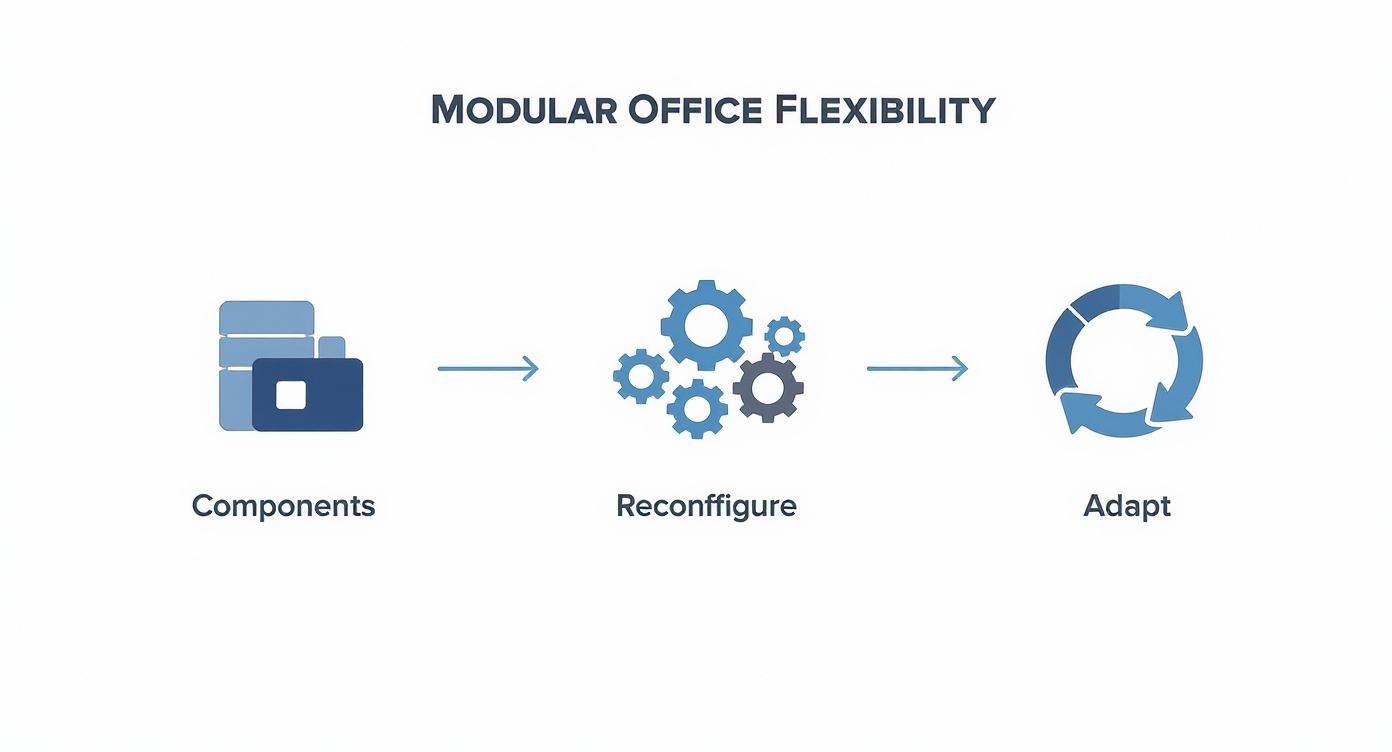
Infographic showing the process flow of modular office flexibility, with steps for Components, Reconfigure, and Adapt, which are key to modern office cubicle design.

The process is simple: start with the right components, reconfigure them as your team evolves, and adapt the entire space to new challenges over time.

Demystifying the Budgeting Process

Budgeting for a new office layout is about more than just the sticker price on a cubicle. To get a realistic number and really maximize your investment, you need to think about all the moving parts that make up the final cost. A well-planned budget prevents nasty surprises and ensures you get the most bang for your buck.

Several key variables will shape your total spend:

  1. Materials and Finishes: Of course, premium materials like glass partitions, sleek wood laminates, and high-grade acoustic fabrics are going to cost more than the standard options.
  2. Size and Complexity: The footprint of each workstation and the intricacy of the layout itself will directly impact both material and installation costs.
  3. Ergonomic Features: Adding things like electric sit-stand desks or fully adjustable monitor arms is an investment in your team’s well-being, but it adds to the upfront cost.
  4. Technology Integration: The number of power and data outlets needed at each station can affect the price, especially if you need complex wiring runs.
  5. Installation and Delivery: Don’t forget to factor in the real-world costs of shipping, professional assembly, and hauling away the old furniture if you need to.

By breaking down your budget into these pieces, you can make smarter decisions about where to invest and where you might be able to save. It’s a strategic approach that empowers you to create a functional, cost-effective layout that genuinely helps your team succeed.

Common Questions About Modern Office Cubicles

As you start looking into modern office cubicle design, it’s completely normal for practical questions to pop up. This is a big decision that goes way beyond just aesthetics—it’s a real investment in your team’s comfort and ability to get work done. Let’s dig into some of the most common questions and give you the straightforward answers you need.

Are Cubicles Still Relevant in the Age of Open Offices?

Absolutely. In fact, you could argue they’re more relevant now than ever before, precisely because so many companies have experienced the downsides of a fully open office. The dream was collaboration, but the reality was often constant noise and zero privacy, which are productivity killers.

Modern cubicles offer a “best of both worlds” solution. They fix the biggest problems with open plans by giving people the acoustic and visual privacy they need to actually concentrate. But by using lower partitions and glass, they still keep that sense of connection that was totally lost in the old-school, high-walled cube farms.

This setup is perfect for activity-based working, where people can choose the right spot for the task at hand. The modern cubicle becomes a personal “home base” for focused work, while open, collaborative areas are just a few steps away for team huddles. It’s that balance that really boosts both individual focus and team morale.

How Much Does a Modern Cubicle Actually Cost?

The price of a modern cubicle can swing pretty wildly depending on what you need, kind of like buying a car. The model and the features you add make all the difference. It helps to think of it in a few tiers.

A basic, no-frills workstation is going to start somewhere in the $800 to $1,500 range per unit. These are your functional workhorses, with standard surfaces and panels.

The sweet spot for most businesses is the mid-range, which typically falls between $1,500 and $3,500. Here, you get much better materials, some acoustic dampening, and essential ergonomic features like electric sit-stand desks. This is where you really start to see the investment pay off in your team’s well-being.

For the top-of-the-line setups, you can expect to go over $4,000 per unit. These are the fully custom systems with premium glass, integrated tech, and all the modular bells and whistles you can imagine, usually reserved for executive suites or design-forward spaces.

Think of your cubicle budget not just as a furniture expense, but as a direct investment in your team’s daily performance and long-term health. Also, remember to factor in the associated costs of space planning, professional delivery, and installation.

How Do You Balance Privacy and Collaboration?

The secret isn’t finding one perfect cubicle for everyone. The key is creating a varied office “ecosystem” with different types of spaces for different kinds of work. A smart layout doesn’t force a one-size-fits-all solution.

Here are a few ways to make that happen:

  • Create Focus Zones: Use cubicles with taller, sound-absorbing panels for roles that require deep concentration—think developers, writers, or accountants.
  • Build Collaborative Hubs: For teams that need to talk all the time, like sales or marketing, cluster workstations with lower partitions to make conversation easy and natural.
  • Strategically Place Shared Spaces: The real magic happens when you place dedicated collaborative areas—like meeting pods, project tables, or comfy lounge areas—right next to these cubicle clusters.

This gives your team the freedom to move between their personal desk and a shared space, letting them pick the right environment for whatever they’re working on at that moment.

Can We Upgrade Our Old Cubicles to Be More Modern?

Yes, and it’s a great, cost-effective way to get the benefits of modern design without ripping everything out and starting from scratch. You can make some high-impact changes that totally transform the look and feel of your existing workstations. For anyone weighing their options, our guide on whether cubicles are right for your office can offer some more perspective.

Start with the upgrades that give you the most bang for your buck. Swapping out tall, fabric panels for lower or frosted glass ones can instantly make the whole office feel brighter and more open. The single best ergonomic upgrade you can make is replacing fixed-height desks with electric sit-stand surfaces, which can often be fitted right into your existing cubicle frames.

Even small additions can make a huge difference. Think about adding individual LED task lights to reduce eye strain or modern ergonomic accessories like monitor arms. A few thoughtful upgrades can turn an outdated setup into a place where people are more comfortable, flexible, and productive.


Ready to design a better workplace with furniture that adapts to your team? At Cubicle By Design, we specialize in creating flexible, modern office solutions that fit your budget and goals. From space planning to professional installation, we’re here to help you build an environment that drives productivity and supports your team.

Start designing your ideal workspace today at Cubicle By Design.

Read More

Office Cubicle Lighting: A Guide by Cubicle By Design

Effective office cubicle lighting isn't just about sticking a lamp on a desk. It's a strategic way to supplement the general overhead light in an office, cutting down on eye strain and boosting focus right where the work happens. This means using specific fixtures, like task lamps or under-cabinet LEDs, to give people direct, adjustable light.

Why Good Cubicle Lighting Matters So Much

Let’s be honest—those harsh overhead fluorescent lights are productivity killers. They cast strange shadows, create awful screen glare, and can leave even the most dedicated employee feeling drained by mid-afternoon. Bad lighting isn't a minor complaint; it's a real barrier to getting quality work done.

This is where smart cubicle lighting comes in. It moves beyond the one-size-fits-all approach of ceiling fixtures and introduces layers of light that employees can actually control. It’s what transforms a generic, draining cubicle into a personalized, energized workstation.

From Annoyance to Advantage

We've all seen it: an employee squinting at their monitor, constantly shifting to dodge the glare from an overhead light. Their desk is dim in some spots and blindingly bright in others—a perfect recipe for headaches and fatigue. This is a day-to-day reality in too many offices, and it directly hits performance and morale.

Now, picture that same cubicle with a simple under-cabinet LED strip. Suddenly, the entire work surface is evenly lit, and shadows on paperwork are gone. Add a slim, adjustable desk lamp off to the side, and you have a clean, focused pool of light for detail-oriented tasks, without it bouncing off the screen. The difference is night and day.

A well-lit workspace isn’t a luxury; it's a fundamental investment in employee health and performance. By providing targeted, adjustable lighting, you empower team members to create an environment where they can do their best work comfortably.

The Tangible Benefits of Better Lighting

Improving your cubicle lighting delivers some very real advantages that go far beyond just seeing better. It's a critical piece of creating a productive, human-focused workspace. Great lighting directly leads to:

  • Reduced Eye Strain and Headaches: The right task lighting eliminates the glare and shadows that make our eyes work overtime. This is one of the most common causes of physical discomfort in the office.
  • Improved Focus and Concentration: When you remove visual distractions and make a space more comfortable, people can stay focused for much longer.
  • Increased Employee Control and Morale: Giving people control over their personal space shows you value their well-being. That small gesture can make a big difference in morale and job satisfaction.
  • Enhanced Workspace Aesthetics: The right lighting choices can truly elevate your office cubicle design ideas, making the whole office feel more professional and put-together.

Ultimately, investing in quality cubicle lighting is an investment in your people. You’re setting the stage for a workday where comfort and productivity aren't at odds, proving that sometimes the smallest changes can have the biggest impact on your bottom line.

Translating Lighting Goals into Practical Specs

So you've decided you need "better light." Great. But moving from that general idea to an actual purchase requires getting a handle on a few technical terms. These specs are the language of lighting, and if you don't speak it, you're just guessing.

Think of it this way: you wouldn't build a desk without knowing its dimensions. The same goes for light. The three big specs you need to know for any cubicle project are lumens (lm), Correlated Color Temperature (CCT), and Color Rendering Index (CRI). Getting these right is the difference between a productive workspace and a den of headaches.

Demystifying Lumens and Lux

First up: brightness. You’ll see lumens listed on every bulb, which tells you the total amount of light it puts out. But what really counts is lux—the amount of that light that actually hits the desk surface where your team is working.

For standard computer-based work, a target of 300 to 500 lux on the desktop is the sweet spot. If someone is dealing with detailed paperwork or fine print, you might want to aim higher, maybe up to 750 lux. This is where a good task lamp really shines, letting people dial in the brightness as their work changes.

A classic mistake is buying a high-lumen lamp and calling it a day. A 1000-lumen light pointed at the ceiling does nothing for the person trying to read a contract. It's the focused lux on the work surface that matters.

Understanding this difference is everything. It ensures you’re providing useful, directed light right where it's needed, instead of just making the whole room brighter and wasting energy.

To make these abstract numbers more concrete, here’s a quick reference table breaking down the key metrics you'll encounter when choosing office lighting.

Key Lighting Metrics for Office Cubicles

Metric (Unit) What It Measures Recommended Range for Cubicles Practical Impact
Illuminance (Lux) The amount of light falling on a surface (e.g., a desk). 300-500 lux (general tasks) Ensures text is readable and reduces eye strain during computer work.
Color Temperature (Kelvin) The perceived "warmth" or "coolness" of the light. 3500K-4100K (neutral) Affects mood and alertness. Neutral white promotes focus without being harsh.
Color Rendering Index (CRI) How accurately a light source reveals the true colors of objects (scale 0-100). 80+ (90+ is ideal) Crucial for design or print work; prevents colors from looking washed out.

Having this chart handy can help you quickly evaluate if a potential fixture meets the practical needs of a modern cubicle environment.

Finding the Right Color Temperature

Color Temperature, measured in Kelvin (K), is all about the vibe. It describes the color of the light itself, from a warm, cozy yellow to a crisp, cool blue. This is probably the single most important factor for setting the psychological tone of a workspace.

  • Warm Light (2700K – 3000K): Think of the cozy, yellowish glow of a classic lamp. This is perfect for break areas or informal meeting spots where you want people to relax.
  • Neutral White (3500K – 4100K): This is the go-to for most office environments. A 4000K light is crisp, clean, and helps people stay focused without feeling like they're in a hospital operating room.
  • Cool White / Daylight (5000K+): This light has a distinct bluish tint that mimics bright daylight. It's fantastic for tasks that demand high visual precision, like graphic design or quality control, because it makes details pop.

The right CCT can make a real difference in beating that 2 p.m. slump. Many newer LED fixtures even offer tunable CCT, which is the best of both worlds—it lets people adjust the light to fit their task or even the time of day.

Ensuring True Colors with CRI

Finally, there's the Color Rendering Index (CRI). On a scale of 0 to 100, CRI tells you how accurately a light source shows you the true colors of an object. For reference, the sun is a perfect 100.

For any office work, especially in departments like marketing or design where color matching is critical, you should never go below a CRI of 80. A low CRI makes colors look dull or just plain wrong, which can cause eye strain and costly mistakes. Luckily, this is an easy one to get right—most quality commercial LEDs today come with a CRI of 90 or more.

Once you have a handle on these specs, you're ready to think about the physical and electrical side of the installation. You can have the best lights in the world, but they're useless without proper power. That's why understanding your cubicle electrical setup is a non-negotiable first step.

The recent shift toward hybrid work has put a huge emphasis on personal task lighting. It’s no surprise that the global desk lamp market hit USD 1.52 billion in 2023 and is still climbing. For a deeper dive into this trend, check out the full desk lamp market analysis.

Selecting the Right Fixtures for Your Workspace

Once you’ve got a handle on the lighting specs, you can turn your attention to the hardware itself. The world of office cubicle lighting has a few different types of fixtures, and each one has its strengths. The trick is to match the fixture’s design to the real-world tasks your team is doing every single day.

The goal isn't just to throw more light onto a desk. It's about adding the right kind of light in the right place. We've seen plenty of offices where a poorly chosen fixture created more problems than it solved, like desk clutter or awkward shadows, even if it had the perfect color temperature.

The Versatile Task Lamp: A Personal Lighting Powerhouse

Task lamps are the classic, go-to solution for a reason—they give each person total control. They generally come in two flavors: freestanding and clamp-on. The best choice usually just comes down to how much desk space you're working with.

  • Freestanding Task Lamps: These are the traditional desk lamps you see everywhere. They’re great for larger desks where a bit of a footprint isn't a big deal. Their main advantage is flexibility; an employee can easily slide the lamp around to kill a shadow or focus on different papers without any fuss.
  • Clamp-On Task Lamps: For smaller cubicles, a clamp-on model is a lifesaver. It attaches right to the edge of the desk or a partition, freeing up that valuable surface area while still delivering highly directable light, often with a long, adjustable arm.

No matter which type you go with, the best task lamps share a few key features. Always look for models with dimmability controls and an adjustable head or arm. This lets each person dial in the exact brightness and angle they need, which makes a huge difference in comfort over a long workday.

Under-Panel and Integrated LED Lighting

For broad, even light across the entire work surface, you can't beat under-panel lighting. These are usually slim LED strips or bars mounted discreetly under overhead storage bins or shelves.

Their biggest benefit is creating a completely shadow-free work zone. Because the light source is wide and sits directly above the main desk area, it washes away the harsh shadows a single-point task lamp can sometimes create. This makes them perfect for anyone who works with physical blueprints, design proofs, or detailed documents spread across their desk.

The most effective setups we've seen almost always use a layered approach. When you combine the broad, ambient glow of an under-panel LED with the focused, adjustable beam of a task lamp, you give employees complete control to adapt their light for any task at hand.

Many modern cubicle systems now offer integrated lighting right from the factory. These fixtures are built directly into the furniture itself, giving you a clean, seamless look with no messy cables to manage. While they're less flexible for retrofitting an older office, they are a fantastic and efficient solution for new build-outs.

To get a better sense of how different tasks call for different light, check out this decision tree. It's a simple way to see how to match color temperature to various work styles.

The key takeaway here is that lighting is never one-size-fits-all. A graphic designer proofing colors needs a totally different quality of light than a sales rep who spends half their day on video calls.

Must-Have Features for Modern Fixtures

When you're comparing fixtures, it's easy to get lost in all the different styles. But from a practical standpoint, a few features should be non-negotiable for any modern office.

  • Dimmability: The need for light changes from morning to afternoon. Being able to turn down the brightness when the sun is pouring in or crank it up on a gloomy day is critical for preventing eye strain.
  • Adjustability: This goes for both the physical position of the light and its color. A lamp with an articulating arm lets people angle the light to kill glare on their screen. Tunable-white LEDs let them shift from cool, focus-boosting light for heads-down work to warmer, more relaxed tones for creative brainstorming.
  • Energy Efficiency: LED is the undisputed champ here. It's no surprise that LED technology now dominates commercial lighting, holding 58.1% of the global market revenue thanks to its incredibly long lifespan and low power draw. Investing in good LEDs will significantly cut your operational costs over time.

Choosing the right features has a direct impact on long-term usability and how happy your employees are in their space. These elements, combined with other ergonomic factors, are what create a truly supportive workstation. In fact, selecting the right office furniture to upgrade office comfort goes hand-in-hand with getting your lighting plan just right.

A Strategic Approach to Lighting Layout and Placement

Choosing the right light fixture is only half the battle. You can have the best lamp in the world, but if you put it in the wrong spot, you’re just trading one problem for another—like swapping dimness for harsh glare. Getting the layout and placement right is where the art and science of office cubicle lighting truly come together.

The whole point is to make light work for the employee, not against them. This means you have to think about how people actually use their space. Here’s a simple rule of thumb that works wonders: consider an employee’s dominant hand.

If you place a task lamp on the opposite side of their writing hand—so, on the left for a right-handed person—you stop their arm from casting a frustrating shadow right over their work. It’s a tiny detail, but it makes a huge difference in day-to-day comfort.

Minimizing Glare and Maximizing Comfort

Glare is the number one enemy of a comfortable workspace. It’s that awful reflection off a computer screen or a shiny desk, and it’s a direct cause of eye strain and headaches. The secret to beating glare is all about angles.

A task light should never be positioned directly behind someone or shining right down on top of their monitor. The sweet spot is to the side of the screen, with the light aimed down at documents or the keyboard—not at the display itself. This lights up the work area without bouncing straight into the user's eyes.

The most common mistake we see is when a facility manager tries to "fix" a dim cubicle by adding an overly bright light right in the employee's line of sight. Effective lighting isn't about brute force; it's about finessing the placement to deliver soft, indirect illumination where it counts.

This is also where you need to use the features of your light fixtures. If a lamp has an adjustable head, that's your best friend for directing the beam precisely. If it comes with a diffuser, that’s your first line of defense against harshness.

Integrating with Existing Ambient Light

No cubicle is an island. Your new task and under-panel lights need to work in harmony with the building's overhead ambient lighting. The goal here is to supplement, not compete.

  • Spot the Gaps: First, take a look at where the overhead lights create shadows or dim spots inside the cubicle. These are the prime locations where your new lights will have the biggest impact.
  • Balance the Brightness: This is why dimmable fixtures are so crucial. On a bright, sunny day, an employee might only need their task light at 30% power. On a gloomy afternoon, they might need to crank it up to 80%. That flexibility is everything.
  • Keep It Consistent: While individual control is key, try to keep the color temperature between the overhead and task lighting in the same ballpark. A mix of warm and cool light in one small space can be visually jarring.

Thinking about how light plays out in different layouts is also key. For a closer look at how various workstation arrangements can affect lighting needs, check out our overview of popular cubicle configurations and an overview of their strategic benefits.

Planning for Power and Cable Management

A beautifully lit cubicle can be instantly ruined by a rat's nest of wires. Thankfully, most modern modular cubicle systems integrate power and cabling right into the panels, giving you a clean, professional solution from the get-go.

When you're planning your layout, map out where the power outlets are. A lot of cubicle systems have powered baseboards or "raceways" that make it incredibly easy to run cords discreetly.

If you're retrofitting older cubicles that don't have built-in power, cable management is just as important. Use simple tools like adhesive clips, zip ties, or cable sleeves to route wires neatly along the underside of the desk or behind the panels. A clean setup doesn't just look better—it’s safer, too, cutting down on trip hazards and making the space easier to clean. Planning your power strategy from the start ensures your lighting is as professional as it is effective.

Taking Your Lighting to the Next Level with Advanced Strategies

Once you have the basics of fixture selection and placement locked down, it's time to get into the really interesting stuff. Modern office cubicle lighting has moved way beyond a simple on/off switch. We're now in an era of smart technologies that can actually adapt to how people work and what's happening outside. This is where you can truly dial in a workspace for peak performance and well-being.

Think of these strategies less like adding cool gadgets and more like creating a lighting system that works intelligently in the background. When you automate adjustments and give people sophisticated control, you make the space more comfortable and can seriously slash operating costs—all without anyone having to think about it. It’s a much more proactive way to think about your office environment.

Smart Controls That Save Money and Headaches

One of the most practical upgrades you can make is integrating smart controls. These systems add a layer of automation that makes your lighting incredibly efficient and much easier for everyone to live with.

  • Occupancy Sensors: These are a total game-changer for energy savings. A simple sensor can automatically fire up the lights when an employee sits down and shut them off when they head out for lunch or go home. It completely eliminates the wasted energy from lights burning in empty cubicles all day.
  • Daylight Harvesting: These are brilliant. The sensors measure how much natural light is streaming in through the windows and automatically dim the artificial lights to keep brightness perfectly consistent. Not only does this save a ton of energy on sunny days, but it also creates a much more pleasant, natural-feeling vibe in the office.

Putting these controls in place can make a real dent in your utility bills. Studies have shown that smart lighting controls can cut a building's lighting-related energy consumption by 30% or more. For any facility manager, that's a number that's hard to ignore.

Tapping into Human-Centric Lighting and Circadian Rhythms

Perhaps the most exciting frontier in office lighting right now is human-centric lighting (HCL). The whole idea is to use tunable white LEDs to copy the natural progression of sunlight throughout the day. This is directly tied to our internal body clocks, or circadian rhythms, which control our sleep-wake cycles.

A great HCL setup might start the day with a cool, crisp, blue-toned light (around 4500K-5000K) to get everyone alert and focused. As the day goes on, the light slowly shifts to a warmer, more neutral tone. By late afternoon, it settles into a relaxing, lower-intensity glow (around 3000K).

This isn't just some passing trend; it's a wellness strategy backed by biology. When you align office lighting with our natural cycles, you can help people focus better during crunch time and then wind down as the day ends. It can even lead to better sleep quality at night.

This approach transforms a simple light fixture into a powerful tool for improving how your employees feel and perform.

High-Tech Solutions for Glare Control

Even if you get the placement perfect, glare from high-contrast monitors can still be a major headache. To solve this, some high-end fixtures now come with advanced tech built specifically to kill glare at the source.

One of the best examples is the use of micro-louvers or highly specialized lenses. These components are precisely engineered to funnel light straight down onto the desk. This stops stray light from scattering sideways, hitting screens, and reflecting into someone's eyes. For people who stare at a monitor all day, it’s like surgical-grade glare control for the most visually demanding jobs.

The demand for smarter, more efficient solutions is really pushing the industry forward. The global commercial lighting market, which of course includes office cubicle lighting, was valued at USD 10.01 billion in 2023 and is on a major growth trajectory. A huge part of that is driven by connected LED systems and energy-saving controls. You can find more data about this expanding commercial lighting market online. By embracing these advanced strategies, you’re putting your workspace at the leading edge of this shift, creating an environment that's not just productive but genuinely good for your team.

Common Questions About Office Cubicle Lighting

Even with the best-laid plans, a few questions always come up when you start rolling out new office cubicle lighting. We hear these all the time from facility managers and even the employees who will be using the new setups. Getting good, direct answers can save you a lot of headaches and help you make smart decisions on the fly.

Think of this as your practical, real-world FAQ for cubicle lighting. From picking the right color to killing that annoying screen glare, these are the day-to-day issues you'll actually run into.

What Is the Best Color Temperature for Office Work?

For most office tasks, you’ll want a color temperature somewhere between 3500K (neutral white) and 5000K (cool white). We've found that 4000K is often the sweet spot. It’s crisp and clean, helping people stay alert and focused, but it doesn't have that sterile, clinical feel you get from higher-temperature lights.

Cooler light, up around 5000K, is a great mimic of natural daylight. It’s fantastic for really detailed or technical work where seeing every little thing matters. On the flip side, anything below 3500K starts feeling much warmer and more relaxing, which is better suited for break rooms or casual meeting spots, not focused desk work.

The best modern fixtures now come with tunable white LEDs, which is a game-changer. It lets employees adjust the light to fit what they're working on or just what feels best to them.

How Do I Stop Glare on My Computer Screen?

Glare is enemy number one for office comfort, causing more headaches and eye strain than just about anything else. Fixing it really comes down to smart placement and using the right kind of light.

The single most effective trick is to position your task light to the side of your monitor. Never place it directly above the screen or behind you, as that’s a surefire way to get reflections bouncing right into your eyes. You want the light to hit your desk, keyboard, or papers—not the screen itself.

A few other tips that work wonders:

  • Use Adjustable Fixtures: A lamp with a movable arm or head is a must-have. It gives you total control over where that beam of light is pointing.
  • Look for Diffusers: Quality lights often have built-in diffusers or lenses. These soften the light source, which dramatically cuts down on harsh, mirror-like reflections.
  • Adjust Monitor Settings: Don't forget you can fight glare from the other side, too. Try lowering your monitor's brightness so it more closely matches the ambient light around you. It makes a huge difference.

Are Rechargeable Lights a Good Choice for Cubicles?

Rechargeable, battery-powered lights are handy for temporary setups or spots where an outlet is just out of reach, but they're not a practical solution for a primary, all-day task light.

The main issue is reliability. They need to be charged constantly, and you’ll often notice the light starts to dim as the battery drains, which is just plain distracting when you're trying to work.

For consistent, steady light that you can count on all day long, a plug-in or professionally hardwired fixture is always the better, more reliable choice. It guarantees you get the same quality of light from the moment you clock in to the moment you leave.

What Is the Most Energy-Efficient Cubicle Lighting?

Hands down, LED lighting is the most energy-efficient technology you can get. Modern LEDs use up to 80% less energy than the old halogen or incandescent bulbs they replaced.

But the benefits go way beyond your power bill. LEDs have an incredibly long lifespan, often rated for 50,000 hours or more. That longevity means you'll be spending a lot less time and money on maintenance and replacement bulbs, making them a really smart long-term investment.

To really max out your efficiency, look for LED fixtures with smart controls built-in. Dimmers let people use only as much light as they need, and occupancy sensors make sure lights aren't left burning in empty cubicles. Good lighting is just one part of the equation; it’s most effective when paired with smart space planning that also considers things like office cubicle privacy and workflow. When you combine efficient hardware with intelligent controls, you get a system that’s both inexpensive to run and great to work with.


At Cubicle By Design, we help you plan and implement workspaces that enhance comfort and productivity from the ground up. Ready to design a better workplace with lighting and furniture solutions that fit your team’s needs? Explore your options and build your ideal setup today.

Design Your Custom Cubicle Now

Read More
Explore Our Comprehensive Office Furniture Designs to Enhance Your Workspace

Explore Our Comprehensive Office Furniture Designs to Enhance Your Workspace

Your workstation is more than simply a place to sit and work; it’s the foundation of efficiency, creativity, and comfort. Well-designed office furniture does more than just fill space; it influences how you think, cooperate, and work. Cubicle by Design believes that genuine office furniture design combines aesthetics, ergonomics, and adaptability to assist organizations and individuals in creating places that inspire, support, and adapt to changing needs.

What Constitutes Exceptional Office Furniture Design?

Before we go into specific products, consider what qualities actually identify exceptional office furniture design:

Ergonomics and Comfort

Furniture should promote excellent posture, reduce strain, and be adaptable to individual requirements. Desks at the appropriate height, chairs with lumbar support, and surfaces that allow for both seated and standing work are all required.

Flexibility and Modularity

Office furniture must adapt to changing work environments, such as hybrid schedules, collaborative workspaces, and remote working. Modular cubicles, reconfigurable desks, and components that can be added later enable growth without complete replacement.

Attractive Appeal

It is important to consider how your workstation looks and feels. Material finishes, color schemes, and design types (modern, minimalist, industrial, etc.) all have an impact on both morale and branding.

Functionality and Storage

A good design strikes a balance between open workspace, storage, wire management, and accessibility. Efficient storage (drawers, shelving, filing cabinets) helps to reduce clutter. Integrated electrical and tech-friendly design matters these days.

Durability and Quality

Office furniture is utilized and even abused. Strong materials, excellent craftsmanship, high-quality hardware, and dependable guarantees assure that the furniture will last and continue to look and perform well.

Cubicle by Design: Furniture Options & Key Features

Cubicle by Design (CBD) specializes in building office spaces that are both functional and appealing. Their assortment and services demonstrate how modern office furniture design can bring everything listed above to reality. Here are the major product lines and what they contribute to your workplace:

Cubicles and Workstations

Workstation Cubicles are great for open offices or collaborative workspaces. They provide seclusion, structure, and a place to personalize each employee’s workspace without impeding communication.

Call Centre Cubicles – These cubicles are designed for high-density layouts, efficient communication, and long work hours while balancing individual focus and team engagement.

Private office cubicles with U-shaped cubicles – These larger setups provide for additional privacy or space in positions that require it (management, design, multiple monitors), while yet preserving functionality.

Sit-stand cubicles – These enable users to quickly switch between sitting and standing during the day, reflecting current health and productivity trends.

Custom Office Desks

  • L-Shaped Desks – Ideal for multitasking, with enough space for two monitors, documents, and peripherals.
  • Standard straight desks, desks with built-in return units or extensions, and custom surface finishes to match your interior design scheme.

Seating, Storage, and Accessories

Chairs and Seating Solutions – Ergonomic chairs, guest seats, stools, etc. Selecting seating that supports the user’s body can assist in alleviating weariness.

Storage units and filing cabinets – Essential for keeping a workspace neat. CBD provides choices that work nicely with cubicles and desks.

Conference tables and collaborative furniture – These items serve as anchors for communal places such as meeting rooms, brainstorming zones, and client encounters.

Electrical Integration and Wire Management – Channels, integrated grommets, and powered outlets incorporated into desks are essential in today’s tech-heavy workplaces

Why Choose Cubicle by Design for Your Office Furniture Design Needs?

Cubicle by Design distinguishes itself not only by its product line, but also by its approach to office furniture design as a holistic service. Some notable features:

Industry Knowledge & Professional Advice: With decades of expertise, CBD knows what truly works in workspaces, not simply catalogs. Their design professionals assist you in selecting furniture style and arrangement that are appropriate for your operation and brand.

Customization and Modularity: From finish options, colours, and shapes to modular cubicle configurations, you may personalize your office to present and future needs.

Affordability + Quality: They strive to offer competitive pricing without sacrificing materials or craftsmanship. This allows smaller organizations or offices with limited resources to obtain high-value components.

Comprehensive Solutions: Not only desks and closets. CBD provides everything from cubicles to conference room tables, seats, storage, and electrical infrastructure. This implies that your furniture selections can be consistent, integrated, and supportive of your design style.

Turnkey Service & Installation Support: Many customers like that CBD handles the entire project—from layout designs to installation—so you don’t have to troubleshoot after purchase.

Tips to Enhance Your Workspace with Great Furniture Design

Even the best furniture requires meticulous planning. Here are some ideas to maximize your purchase and layout:

Measure first: Understand your floor area, window placement, illumination, and outlets. Maintain walkway clearances and breathing space between workstations.

Prioritize Natural Light: Position desks or cubicles to take advantage of daylight. If you want privacy while yet allowing light to circulate, use lower or translucent walls.

Think in zones: divide your environment into work, collaboration, and rest areas. Furniture types can help delineate zones, such as flexible lounge furniture or collaborative tables near windows, and concentrated desktops in quieter areas.

Plan for Technology: Make sure desks have access to power, cable management, and monitor mounting. Furniture with integrated wiring channels or modular structures allows for easy upgrades.

Choose Flexible Pieces: Adjustable height desks, transportable file cabinets, and modular cubicles are excellent investments for a dynamic work environment.

Balance Aesthetic and durability: Materials such as laminate, powder-coated aluminum, and high-quality veneers provide long-lasting performance. Matches your brand’s colours while remaining robust enough to withstand wear and tear.

Test Seating: If possible, sample seats before purchasing, particularly for long-term work. Comfort and ergonomics can significantly improve satisfaction and health.

Real-World Examples: Combining Office Furniture Design with CBD Products

Here are some examples of how CBD’s product lines, along with good design thinking, may improve workspaces:

Startup Office Launch: A new firm requires a modern, cost-effective workplace. Use open-plan workstation cubicles, minimalist conference tables, ergonomic seats, and light-finished workstations. Modular cubicles enable expansion.

Call Center Upgrade: To cut down on tiredness, swap out outdated benches for call center cubicles with built-in privacy panels, overhead storage, and sit-stand desks.

Corporate Suite Refresh: For executives and managers, use U-shaped or private office cubicles with luxurious finishes, guest seating, and matching credenzas or storage. Finish with a consistent color or branding.

Hybrid Work Zones: Create a combination of permanent desks, collaboration tables, and lounge-style meeting places. Using modular and transportable furniture allows you to reconfigure as your team changes or grows.

Choosing the Right Pieces for a Cubicle by Design

When you’re ready to buy CBD furniture, use this brief checklist to ensure that your investment meets both current demands and future growth:

  • Compatibility with room dimensions and shape
  • Material and finish options (color, durability).
  • Ergonomic features include adjustable height and seating comfort.
  • Storage and accessory integration.
  • Style coherence with your brand identity.
  • Budget vs. lifetime worth (invest now in something durable and save continually)
  • Installation assistance and warranty

Conclusion 

​​Investing in premium office furniture design benefits your employees, productivity, and brand image. The appropriate furniture influences how work is completed, how you feel in your workstation, and how your environment changes over time.

Cubicle by Design does more than just sell desks, seats, and cubicles; it also creates environments. CBD provides everything you need to improve your environment, from custom cubicles and flexible workstations to collaborative zones and tech-friendly tables.

Your workstation should be more than just practical. It should be inspiring. Browse Cubicle by Design today and begin transforming your environment to promote creativity, well-being, and success.


Read More
Upgrade Your Office with Managerial Cubicles — Order Online

Upgrade Your Office with Managerial Cubicles — Order Online

Modern workplaces are continually changing. Employers are looking for solutions that balance efficiency, cooperation, and comfort while still projecting a professional image. One of the most effective ways to attain this balance is to equip your office with Managerial Cubicles. These specialist workstations are intended to satisfy the needs of managers, team leaders, and executives who require both privacy and access to their respective teams.

Cubicle by Design allows you to order Managerial Cubicles online, making office upgrades more convenient and affordable.

What Are Managerial Cubicles?

Managerial Cubicles are elevated workstation solutions that blend the construction of traditional cubicles with the style and utility of executive furniture. Managerial cubicles differ from regular employee cubicles in that they are more roomy, configurable, and meant to reflect leadership responsibilities. They frequently include:

  • Extra desk space for meetings and multitasking.
  • Higher walls or barriers for increased privacy
  • Integrated storage options, such as cabinets and drawers
  • improved finishing and trendy design alternatives.

Essentially, they offer the best of both worlds: privacy for focus and an open environment that encourages communication.

Why Choose Managerial Cubicles?

Managerial Cubicles offer benefits to both managers and the general office environment.

  1. Professional Image

Managerial cubicles communicate power without isolating leaders. They provide a professional environment in which managers may hold small meetings, evaluate projects, and have one-on-one talks.

  1. Improved Productivity

Managers can operate more efficiently because to the greater room and organizational features. Productivity improves organically as there is less clutter and more area for technology, documents, and team conversations.

  1. Balanced privacy

Managers must be able to focus without distractions while simultaneously remaining personable. Managerial cubicles offer semi-private workplaces that are an improvement over open workstations but not as private as private offices.

  1. Cost-effective Alternative to Private Offices

Not every corporation can afford to establish private offices for its management. Managerial Cubicles provide the same capabilities at a lower cost, particularly when acquired online through customisable options such as Cubicle by Design.

  1. Scalability & Flexibility

Your cubicle layout can expand to accommodate your growing team. Managerial Cubicles can be integrated with current workplace layouts, expanded with add-ons, or altered to meet changing requirements.

Key Features to Look For in Managerial Cubicles

When choosing Managerial Cubicles, think about aspects that reflect your company’s style and managers’ needs:

  • Sizes are customizable – which includes tiny to huge executive designs.
  • High-Quality Materials – Durable finishes that can withstand frequent use.
  • Ergonomic Design – Workspaces that are comfortable and conducive to long hours.
  • Storage Options – Lockable drawers, cabinets, and shelving for organization.
  • Tech Integration – Built-in ports, cable management, and monitor mounting options.
  • Aesthetic Appeal – Modern designs that complement your office’s branding.

Cubicle by Design specializes in providing totally customisable solutions, so you don’t have to accept “one-size-fits-all.”

Industries That Benefit Most from Managerial Cubicles

While Managerial Cubicles work for practically any office, they are particularly useful in:

  • Corporate offices accommodate department heads, project managers, and executives.
  • Call centers allow leaders to be connected to their teams while keeping focus.
  • Creative agencies provide a platform for brainstorming while maintaining a professional setting.
  • Supporting managers in charge of employee and patient services is the role of healthcare administration.
  • Sensitive documents can be handled securely and systematically thanks to financial services.

Why Order Managerial Cubicles Online?

  • Convenience: You can browse and customize designs at any moment.
  • Transparency – Providing clear pricing and design options upfront.
  • Customization Tools – Change the colors, sizes, and features to meet your exact specifications.
  • Faster Delivery and Setup – Streamlined ordering assures a quick turnaround.
  • Expert Assistance – Seek advice from professionals who understand workplace design.

Transforming Your Office with Managerial Cubicles

Moving to Managerial Cubicles is more than just a design decision; it’s a strategic investment in employee productivity and pleasure. Managers benefit from the combination of privacy and accessibility provided by these workstations, while organizations save money as compared to traditional office design.

Managerial Cubicles are a game-changer when it comes to changing your office layout, moving to a new facility, or simply providing your leadership team with the professional setting they need.

Conclusion 

In today’s fast-paced corporate world, office design is more than just aesthetics; it has a direct impact on productivity, communication, and staff morale. Managerial Cubicles provide the ideal compromise between private offices and open workstations, providing managers with the necessary space and tools for success.

If you’re ready to update your workplace and give your team leaders a professional edge, now is the time to look into your possibilities.

Upgrade your office today by ordering bespoke Managerial Cubicles online from Cubicle by Design and creating a workspace that works as hard as your staff.

Read More
Workstation Cubicles That Fit Any Office Layout

Shop Workstation Cubicles That Fit Any Office Layout

Shop Workstation Cubicles That Fit Any Office Layout

Office furniture design is changing quickly, along with the modern workplace. The days when all employees sat in identical cubicles with minimal consideration for ergonomics, privacy, or teamwork are long gone. These days, businesses are aware that the architecture of their offices has a direct effect on output, worker satisfaction, and overall company success.

Workstation cubicles can help with that. They assist companies of all sizes to develop settings that work for their teams by offering the ideal mix between privacy and collaboration. However, how can you select workstation cubicles that actually complement the design and culture of your office? Everything you need to know before making an investment in workstation cubicles for your office will be covered in this article.

Why Workstation Cubicles Still Matter?

While open workplaces have been popular in recent years, research suggests they are not necessarily the most successful. Many employees seek a sense of personal space where they may concentrate without being constantly distracted. Workstation cubicles strike the appropriate balance:

Privacy for Concentration – Cubicles give workers enough space to work without interruption.

Flexibility – Cubicles can be constructed in a variety of ways to accommodate varied workplace sizes and layouts.

Collaboration-friendly – Modern cubicles are not isolated; they often have low walls or open sides to promote collaboration.

Professional appearance – A well-planned cubicle layout gives your office a polished and ordered impression.

Types of Workstation Cubicles

When searching for workstation cubicles, it is crucial to understand the many styles available:

  1. Standard Cubicles

Traditional panel cubicles with dividers for privacy and storage. Ideal for enterprises that require specific workplaces.

  1. Low-Wall Cubicles

These have shorter dividers, offering staff some privacy but preserving an open vibe. Ideal for encouraging collaboration.

  1. Team Workstations

Clustered cubicles are meant to accommodate groups of people working on the same project or department. They conserve space and improve communication.

  1. Private Cubicles

Taller walls give optimum seclusion for employees handling sensitive information or requiring intense concentration.

  1. Sit-stand Cubicles

Adjustable height desks are included in cubicle systems to promote worker wellness and flexibility.

Key Factors to Consider When Choosing Workstation Cubicles

  1. Office Layout and Space Planning

The first step in selecting cubicles is to evaluate your business floor design. Consider:

  • How many staff require workstations?
  • How much room would you like between cubicles?
  • Do you prefer a mix of open and private cubicles?
  1. Company Culture

Does your firm thrive on teamwork or individual effort? For creative teams, low-wall or cluster workstations may be preferable. For accounting or legal departments, private cubicles may be more appropriate.

  1. Ergonomics & Comfort

Employees spend most of their day at their desks. Ergonomic cubicles with adjustable chairs, monitor arms, and sit-stand desks can help minimize fatigue and increase productivity.

  1. Aesthetic and Branding

Your office’s design should reflect your brand. Modern cubicles are available in a number of finishes, colors, and materials that may be tailored to complement your business brand.

  1. Storage needs

Consider cubicles with built-in filing cabinets, ceiling storage, or shelves for staff who require quick access to documents and supplies.

  1. Technological Integration

Today’s cubicles are built with technology in mind. Look for features like as integrated cable management, power outlets, and USB ports.

Benefits of Workstation Cubicles

Improved Focus and Productivity – Employees have their own room to concentrate without being distracted.

Better Organization – Having a specific workspace makes it easier to keep documents and tools organized.

Flexibility for Growth – Modular cubicles can be adjusted as your organization grows or evolves.

Enhanced Professionalism – A clean, well-designed office enhances employee morale and creates a positive impression on visitors.

Cost-Effective Solution – Cubicles are scalable and less expensive than constructing separate offices.

How to Ensure Your Cubicles Fit Any Layout?

  1. Collaborate with Experts in Space Design

Professional space planners can assist you in making the best use of your available space while ensuring comfort and movement.

  1. Select Modular Designs

Modular cubicles enable you to simply modify layouts as your staff expands or your workplace requirements change.

  1. Prioritize Flexibility

Choose cubicles with numerous functions, such as individual workstations that may be readily connected to form collaborative pods.

  1. Plan for the Future

Think ahead.  If you want to hire more people in the next year or two, consider cubicles that can expand with your demands.

Trends in Modern Workstation Cubicles

  • Hybrid Work Solutions – Cubicles that allow for hot-desking and flexible seating.
  • Collaborative Spaces – Lower walls, shared tables, and open-concept cubicles promote teamwork.
  • Sustainable Materials – Eco-friendly coatings and recyclable materials.
  • Smart Cubicles – Lights, charging stations, and noise-cancelling capabilities.

Conclusion

Workstation cubicles are more than simply office furniture; they’re an important aspect of creating an environment in which your staff may thrive. The proper cubicle system strikes a mix between privacy, collaboration, comfort, and design, all while smoothly integrating into your office plan.

Whether you’re furnishing a new office or upgrading an existing one, investing in the correct workstation cubicles can significantly improve productivity, morale, and the overall appearance of your workplace.

Cubicle By Design specializes in workstation cubicles that fit any office plan. With customizable designs, ergonomic alternatives, and expert space planning, we’ll assist you in creating a workspace that is ideal for your team. Contact us now to get started!

Read More
Reception Cubicles for Sale — Create a Welcoming Front Desk Today

Reception Desk Cubicles — Create a Welcoming Front Desk Today

The reception area is the first thing visitors, clients, and workers see when they enter your office. A well-designed front desk can convey professionalism, efficiency, and warmth. Reception desk cubicles are an excellent way to create an efficient and welcoming reception room.

Reception desk cubicles are more than simply furniture, they reflect your brand’s personality and values. Whether you want to create a friendly environment, expedite visitor management, or assure privacy and efficiency for your employees, welcome desk cubicles can change how people see your company.

Why Reception Desk Cubicles Matter?

First Impressions Count

The front desk is frequently the first point of contact for guests. A sleek, elegant, and effective reception desk cubicle enhances your office’s professionalism and organization.

Balancing Privacy with Openness

Receptionists frequently need to strike a balance between openness to greet visitors and privacy to handle calls or sensitive information. Cubicles can be configured with dividers that give the appropriate mix.

Optimized Workflow

A well-designed reception cubicle increases efficiency by allowing employees convenient access to phones, computers, files, and visitor management tools.

Reflecting Brand Identity

Your reception desk cubicle can express your company’s personality and brand identity through materials and colors, as well as design components.

Key Features of Reception Desk Cubicles

  • Ergonomic Design: Ensures the comfort and productivity of receptionists, who are frequently sitting for extended periods.
  • Durable Materials: High-quality wood, laminate, or metal that can resist frequent use.
  • Storage Options: Built-in drawers and shelves to organize documents and office supplies.
  • Technology Integration: There is room for laptops, phones, and visitor management systems.
  • Customizable Layouts: Options for small, medium, and large office spaces.

Benefits of Reception Desk Cubicles

  • Professional Appearance: Presents a professional image to clients and guests.
  • Space Efficiency: Increases front-office space, particularly in smaller workplaces.
  • Enhanced Visitor Experience: From the moment they enter, visitors feel welcomed and guided.
  • Improved Staff Productivity: Organized layouts allow receptionists to execute jobs more efficiently.

Tips for Designing a Welcoming Front Desk

  • Choose warm, inviting colors that are consistent with your business identity.
  • Maintain adequate lighting to make the space bright and welcoming.
  • Include comfortable chairs for waiting visitors.
  • Add plants or artwork to create a relaxing environment.
  • Keep the reception area clutter-free for a professional appearance.

FAQs About Reception Desk Cubicles

  1. What size reception desk cubicle is best for my office?

The ideal size is determined by your available area and the functions that your receptionist must perform. Compact cubicles are ideal for tiny offices, whereas larger desks with extended countertops are excellent for high-traffic areas.

  1. Can reception desk cubicles be customized?

Yes, reception desk cubicles can be customized in terms of size, materials, finishes, and storage options. Custom designs allow you to reflect your brand identity while meeting practical needs.

  1. How do I make my reception area more welcoming?

Use warm colors, comfortable seating, good lighting, and decor elements like plants or artwork. A well-designed reception desk cubicle also plays a key role in creating a friendly atmosphere.

Conclusion

Investing in reception desk cubicles is more than simply a practical decision; it’s about providing a pleasant, professional, and organized environment that makes a lasting impression. By integrating ergonomic design, storage solutions, and visual appeal, your front desk may reflect the best of your business while improving the experience for both visitors and employees.

Ready to upgrade your reception area? Explore modern and customizable solutions at Cubicle By Design.

Read More
Personalized Workspaces

Creating Personalized Workspaces with Custom Cubicles

Dynamic workplace, office space design has a significant impact on productivity and employee satisfaction. The modern workforce can no longer thrive in restrictive, one-size-fits-all workplaces. Instead, employees seek balance—a mix of privacy, cooperation, and personalization. That’s where customized office cubicles come in.

Custom cubicles are more than just workstations; they’re personalised hubs that reflect the company culture while meeting individual requirements. They assist firms in optimizing space, increasing productivity, and creating a positive work atmosphere. 

Why Personalization Matters in the Workplace?

Personalization is no longer a luxury, but rather an expectation. Employees spend about a third of their time at their desks; therefore, the work environment has a significant impact on their overall performance and well-being.

  • Enhanced Productivity: A workstation designed to an individual’s preferences lowers distractions and boosts productivity.
  • Employee Satisfaction: A customized setting gives employees a sense of ownership and comfort, making them feel appreciated.
  • Talent Retention: The modern workforce, particularly Millennials and Generation Z, rewards businesses that create flexible, employee-focused settings.

When employees believe their workspace is created with them in mind, they are more likely to remain engaged and loyal to the organization.

The Evolution of Cubicles: From Standard to Customized

Cubicles first appeared in the 1960s as part of the “Action Office” concept.  They were designed to provide workers with seclusion while allowing for communication.  Cubicles, on the other hand, earned a negative reputation over time as gray, homogeneous boxes devoid of personality.

Today, this perception has shifted considerably.  Modern bespoke cubicles are created with aesthetics, ergonomics, and utility in mind.  They are flexible to meet the demands of the firm and can be tailored to individual personnel.  Cubicles are no longer dull, with so many materials, colors, layouts, and accessories to choose from; they’re strategic tools for professional success.

Benefits of Custom Cubicles

  1. Maximizing Office Space.

Custom cubicles enable firms to maximize their available square space.  They can be customized to meet unique space layouts, enhance natural light, and generate flow across the office.

  1. Balancing Privacy and Collaboration.

Employees require both focused time and opportunity for teamwork.  Companies can achieve a combination of open-plan communication and individual concentration by using configurable dividers and layouts.

  1. Improved Aesthetics

Gone are the days of drab grey panels.  Custom cubicles can be made with bright colors, sophisticated finishes, or even branded with the company’s logo.  A visually pleasing workstation improves morale and fosters a greater sense of belonging.

  1. Improved Ergonomics.

Modern cubicles often feature ergonomic elements, including adjustable desk heights and cable management systems.

  1. Scalability & Flexibility

Businesses grow and develop, as should their workspaces. Modular cubicle systems are easily reconfigurable when teams grow, migrate, or restructure.

Key Features of Personalized Workspaces

When designing custom cubicles, companies should focus on these personalization features:

  • Adjustable Desks: Height-adjustable desks support both sitting and standing work styles.
  • Storage Solutions: Personal drawers, lockers, and shelving keep the workspace organized and clutter-free.
  • Technology Integration: Built-in charging stations, monitor mounts, and cable management streamline workflows.
  • Acoustic Panels: Soundproofing elements reduce distractions and maintain focus.
  • Lighting Options: Task lighting or natural light integration ensures comfort during long hours.
  • Aesthetic Customization: Employees can choose from various color schemes, wall art, or plants to personalize their cubicle.

How Personalized Cubicles Improve Company Culture?

Company culture is shaped by employees’ daily experiences in the workplace, not just regulations and events. Custom cubicles can play an important role in this.

  • Promoting Equality: Providing customized options to all employees shows fairness and inclusivity.
  • Encouraging Creativity: Personalized settings encourage individuals to bring their true selves to work, which fosters creativity.
  • Reinforcing Branding: Cubicles that include company colors and ideals enhance the sense of community.
  • Supporting Wellbeing: Ergonomic and tailored designs minimize stress and boost mental health.

Designing Custom Cubicles: Best Practices

Creating a completely personalized office needs a smart approach. Here are a few excellent guidelines to follow:

  1. Evaluate Employee Needs.

Conduct surveys or focus groups to learn what employees appreciate most in their workstation, such as extra storage, adjustable chairs, or silent zones.

  1. Incorporate Flexibility

Not all employees work in the same way. Create adaptable cubicles that allow employees to change layouts, modify desk heights, and personalize accessories.

  1. Use Sustainable Materials.

Eco-friendly materials not only promote sustainability, but they also produce healthier interior environments.

  1. Focus on Lighting and Acoustics

Good illumination decreases eye strain, and acoustic solutions boost focus. Integrating these into cubicle design improves comfort.

  1. Prioritize Technology Integration.

With remote and hybrid work becoming more common, cubicles should include built-in charging, screens, and soundproofing elements to allow virtual meetings.

Real-World Applications of Custom Cubicles

Many businesses are adopting customizable cubicles to address specific needs:

  • Tech Companies are creating flexible areas for collaborative coding sessions and individual problem solutions.
  • Law Firms: Creating discrete, soundproof booths for confidentiality while retaining a professional appearance.
  • Healthcare Offices: Create ergonomic, sanitary, and well-organized cubicles for administrative workers.
  • Creative Agencies: Designing vivid, open cubicles to promote brainstorming and inspiration.

ROI of Investing in Personalized Workspaces

Custom cubicles have a direct impact on corporate success in addition to their aesthetic value.

  • Reduced Turnover: Employees are more inclined to stick with a company that values their comfort and individuality.
  • Higher Productivity: Workspaces that are comfortable and distraction-free promote focus and efficiency.
  • Improved Recruitment: Modern, customizable workspaces entice top talent in competitive industries.
  • Space Efficiency: Well-designed cubicles decrease wasted space and lower long-term office costs.

Future of Personalized Workspaces

The future of work is hybrid and employee-centric. Custom cubicles will evolve as firms adapt to new work styles. Expect to see

  • Smart Cubicles: IoT-enabled gadgets that automatically alter lighting, temperature, and ergonomics.
  • Wellness Features: Air purifiers, plants, and circadian lighting to promote health and well-being.
  • Hyper-customization: Employees use digital planning tools to create their own cubicle arrangements.

These trends will ensure that individualized cubicles remain an important component of workplace architecture.

Conclusion 

Creating personalized workspaces with custom cubicles is more than a design trend—it’s a strategic investment in people and productivity. By offering flexibility, comfort, and individuality, companies foster environments where employees thrive.

In the modern workplace, success isn’t just about what gets done, but how it gets done. With custom cubicles, businesses can ensure that every employee feels empowered, valued, and equipped to do their best work.


Read More
Design Tips for Reception Cubicles That Enhance Your Brand

Design Tips for Reception Cubicles That Enhance Your Brand

Initial interactions can be critical for any business system. The reception area is often the first area where visitors, customers, or potential partners come when they enter your business. It shapes the perception they carry about your business for the rest of the day. Therefore, designing reception cubicles is more than just a smart idea; it serves a business purpose as well. It gives you an opportunity to sophisticatedly display your values, professional insight, image, and brand.

There is so much more to a reception cubicle than just a simple desk and chair. This is the first visual introduction your brand makes, before you even say a word. It’s an important part to get right while making sure it can adequately support its functional needs.

Start with Your Brand’s Visual Identity

Visual identity lies at the heart of every branded reception design. Color schemes, logos, typography, and overall style are parts of it. By integrating these elements into the cubicle design, one can ensure immediate recognition as well as reliability. For example, use material such as the finish on wood and natural fabrics that relate to your brand’s use of earthy tones to express sustainability. On the other hand, if you belong to a tech industry, then a contemporary welcome area with glass divides smooth surfaces, and LED accents might be creativity reflecting forward-thinking.

Balance is to be applied very subtly. It can get too much if there are too many logos or branding is just very strong anywhere in the office. As an alternative to a balanced, coherent look, use textures and color accents with minimally placed logos.

Prioritize Comfort and Functionality

Although appearances are vital, your receptionist’s efficiency and comfort are just as crucial. The design of the cubicle should facilitate efficient operations. This entails picking a workstation that is the right size, an ergonomic chair, and enough space for files and supplies without causing clutter.

A functional cubicle layout reduces distractions and keeps the reception area looking professional. Think about cable management for computers and phones, easy access to stationery, and discreet storage for personal items. A tidy reception sends a message of organization and attention to detail—values your brand likely wants to project.

Use Lighting to Create the Right Atmosphere

Lighting is one of the most underestimated design tools for reception cubicles. It affects mood, focus, and even how colors appear. Harsh fluorescent lights can feel cold and unwelcoming, while warm lighting creates a softer, more inviting environment.

Consider blending natural light with strategically placed artificial lighting. If your reception gets plenty of daylight, position the cubicle to take advantage of it without causing glare on computer screens. For artificial lighting, adjustable desk lamps or LED strips can provide task lighting while keeping the overall area well-lit. Using lighting that complements your brand—like cooler tones for a corporate tech feel or warm tones for a hospitality-oriented brand—enhances consistency.

Incorporate Brand Storytelling Through Décor

The reception cubicle is a perfect place to tell your brand’s story visually. Décor elements like framed photographs, art pieces, or even a small product display can communicate what you stand for. A design firm might showcase sketches or 3D models, while a wellness brand could incorporate calming imagery and plants.

Even small details like the pen holder, visitor sign-in sheet, or digital display can be branded in subtle ways. If your brand is about innovation, a sleek tablet for check-ins can make an impression. If it’s about tradition, handcrafted décor can reflect authenticity.

Focus on Materials and Textures

The materials you choose for the cubicle say a lot about your brand. Metal and glass suggest modernity, minimalism, and efficiency. Wood and fabric convey warmth, tradition, and approachability. Mixing textures—such as pairing matte finishes with glossy ones—can create visual interest without making the space look busy.

Durability is also key. Reception cubicles are high-traffic areas, so choose materials that can withstand daily wear while still looking polished. This not only saves on maintenance costs but also ensures your reception always presents a fresh face to visitors.

Maintain a Clean and Clutter-Free Appearance

A messy reception cubicle can undermine even the most beautifully designed space. Make cleanliness part of the design by integrating closed storage, cable organizers, and minimalist accessories. The design should naturally discourage clutter by having a place for everything—files stored out of sight, electronics neatly arranged, and surfaces clear except for intentional décor.

When visitors see an organized workspace, it signals that your company values order, professionalism, and efficiency.

Make Space for Personal Touches—But Keep Them On-Brand

Your receptionist is the face of your company for visitors, so allowing them to personalize their workspace is important. However, these personal touches should harmonize with the brand’s look and feel. A small framed photo, a tasteful desk plant, or a mug in brand colors can add warmth without clashing with the design.

Balancing professionalism and personality makes the space feel welcoming and human while still aligning with the brand.

Consider the Visitor’s Perspective

While designing, think beyond how the cubicle looks from the receptionist’s side. What will a visitor see while waiting? Will they have a clear line of sight to branded elements? Is there enough visual interest to make the wait pleasant?

Placing the cubicle so that it faces the entrance helps with immediate acknowledgment of visitors. Adding a comfortable waiting area in view—equipped with branded reading materials or a display screen—creates a cohesive environment that reinforces your identity.

Keep Accessibility in Mind

Everyone must be ready to access a well-designed welcome cubicle. This entails maintaining open walkways, setting counters at the proper height, and making sure there is enough space for guests in wheelchairs to approach the desk comfortably. 

Accessibility-friendly reception cubicles design not only meets legal standards but also reflects your brand’s commitment to inclusivity and care.

Refresh and Evolve Over Time

As your brand expands, so should your greeting area. As trends shift, so do business objectives. You can add new branding elements, update technology, or change colors by revisiting the design every few years. Simple adjustments like changing out the décor or improving the lighting may keep the room seeming interesting and up to date.

Conclusion

The design of reception cubicles purposefully combines aesthetics, functionality, and brand messaging. Every choice you make affects how clients see your company, from the materials to the lighting. By creating a welcoming space that reflects your visual identity, prioritizes comfort, and tells your brand’s story, you can make an impact long before any conversation begins.

A well-designed greeting area not only greets visitors but also communicates your identity, values, and the reasons they should do business with you.


Read More
Transform Your Office with Our Interactive Cubicle Designer

Transform Your Office with Our Interactive Cubicle Designer

The way your office space is designed has a significant impact on the comfort, productivity, and general work culture of your team in the fast-paced business world of today. Regardless of how big or small your company is, a well-designed workplace may change the way your staff works together and collaborates. A Cubicle Designer is one of the most effective tools for accomplishing this; it’s an interactive platform that lets you easily alter and optimize the arrangement of your workspace.

At CubicleByDesign, we recognize that every business requires a different the environment, and no two workplaces are identical. For this reason, we provide an easy-to-use Cubicle Designer tool that enables you to design, plan, and construct office cubicles that meet your precise requirements. This article will discuss the advantages of utilizing an interactive cubicle designer, why it’s revolutionary, and how you can use it to turn your workplace into a center of employee happiness and productivity.

What is a Cubicle Designer?

Businesses can use an interactive online application called a Cubicle Designer to digitally design unique workplace cubicle arrangements. By choosing cubicle sizes, layouts, furniture kinds, and accessories with drag-and-drop ease, the cubicle designer allows you to virtually construct your office space without the need for expensive consultations or static floor plans.

The main goal is to provide you complete control over the layout of your workplace so you can:

  • Create effective floor plans that make the most of available space.
  • Select furniture that is both useful and ergonomic.
  • Customize cubicles to meet the privacy and workflow requirements of your company.
  • Before committing, see how several alternatives will appear.

Our user-friendly Cubicle Designer makes the design process enjoyable, economical, and collaborative.

Why Is Office Design So Important?

It’s important to comprehend why office layout is so important before delving further into the advantages of hiring a cubicle designer. Several investigations have demonstrated that the physical workstation affects:

  • Productivity of employees: Uncomfortable, cluttered, or badly planned workspaces can impair concentration and productivity.
  • Collaboration: Good cubicle arrangements encourage improved team communication.
  • Employee well-being: Carefully planned spaces and ergonomic furnishings both lessen stress.
  • Brand image: Top talent is drawn to and impressed by a well-designed workplace.

Office design is a strategic advantage, to put it briefly. Putting effort and money into creating a well-designed cubicle system may result in more contented workers, more productivity, and a better work environment.

Key Features of Our Interactive Cubicle Designer?

Our Cubicle Designer tool is packed with features that make office planning seamless and efficient. Here’s a closer look at what you can expect:

1. Intuitive Drag-and-Drop Interface

No technical or design expertise is needed. Simply drag cubicle walls, desks, storage units, and accessories onto your digital floor plan. Move and resize components until the layout feels just right.

2. Customizable Dimensions

Every office space is different. Our tool allows you to input the exact dimensions of your floor plan and then customize each cubicle’s size and shape to fit perfectly.

3. Wide Selection of Cubicle Styles

Choose from a variety of cubicle panel heights, finishes, colors, and materials to align with your brand’s aesthetics and functional requirements.

4. Integrated Storage & Accessories

Add filing cabinets, shelves, whiteboards, and privacy screens to create workstations that boost productivity and organization.

5. Real-Time 3D Visualization

Switch between 2D layout views and 3D renderings to see how your cubicles will look from different perspectives.

6. Save and Share Designs

Collaborate with team members or consultants by sharing your design files, ensuring everyone is aligned before moving forward.

7. Get Instant Quotes

Once your design is complete, request a quote directly through the platform, simplifying your purchasing process.

How to Use the Cubicle Designer to Transform Your Office?

If you’re wondering how to get started with our interactive cubicle designer, here’s a step-by-step guide:

Step 1: Measure Your Office Space

Start by measuring the length and width of your office area. Enter these dimensions into the tool to create a scalable floor plan.

Step 2: Choose Your Cubicle Layout

Decide how many workstations you need and the type of privacy your team prefers — open benching, semi-private cubicles, or fully enclosed offices.

Step 3: Customize Cubicle Components

Select panel heights, desk shapes, finishes, and colors. Add storage and organizational tools that suit your team’s workflow.

Step 4: Experiment with Configurations

Use the drag-and-drop feature to move workstations around. Try different shapes like L-shaped or U-shaped cubicles depending on your needs.

Step 5: Visualize Your Design

Switch to 3D mode to walk through your design virtually. This helps spot potential issues like tight walkways or lack of natural light.

Step 6: Finalize and Request a Quote

Once satisfied, save your design and submit it for a detailed quote. Our team will guide you through the next steps for delivery and installation.

Benefits of Using a Cubicle Designer for Your Business

1. Maximized Space Utilization

Poorly planned offices waste precious square footage. A cubicle designer ensures every inch is used efficiently, accommodating more employees comfortably without overcrowding.

2. Cost Savings

Designing in a virtual environment helps avoid costly mistakes in purchasing and installation. You can experiment with multiple layouts without extra expenses.

3. Customization to Your Brand and Needs

Your office is an extension of your company’s culture and brand. With the cubicle designer, you can create a workspace that reflects your identity and meets your team’s specific needs.

4. Improved Employee Experience

When employees have ergonomic, well-organized, and aesthetically pleasing workstations, job satisfaction and productivity increase. Personalized cubicles can boost morale and reduce turnover.

5. Faster Decision-Making

The visual, interactive nature of the cubicle designer simplifies communication between managers, designers, and employees. This speeds up approvals and reduces project timelines.

6. Scalable and Flexible Designs

As your company grows or your workspace needs evolve, you can easily adjust your cubicle layout using the tool without starting from scratch.

Why Choose CubicleByDesign’s Cubicle Designer?

Since our Cubicle Designer is made especially for office cubicles and modular furniture, it stands out among the various office planning tools available on the market. We provide a solution that meets your demands by fusing our in-depth product expertise with user-friendly technology.

  • Years of expertise in office furniture manufacture and design have helped to build our platform.
  • We provide professional assistance to help you make the most of your plan.
  • Our designs go in perfectly with the premium cubicle products that we sell straight to you.
  • To keep your workspace up to date, we stay abreast of the most recent developments in office ergonomics and design.

Real-Life Success Stories

Businesses across various industries have transformed their offices using our Cubicle Designer:

  • Tech Startups have created open-plan layouts that encourage teamwork and creativity.

  • Financial Firms have designed private cubicles with noise reduction features for confidential work.

  • Healthcare Providers have optimized their administrative areas for efficient patient data management.

These companies report enhanced workflow, happier employees, and impressive client impressions thanks to their customized office designs.

Design Your Ideal Workspace Today

The workplace of the future is flexible, functional, and thoughtfully designed — and it starts with a smart plan. Our interactive Cubicle Designer makes it easy to create an office environment where your team can thrive.

Don’t settle for cookie-cutter layouts or guesswork. Take control of your workspace planning, maximize your office potential, and give your employees the best environment possible.

Visit our Cubicle Designer tool now and start transforming your office today!

Read More
Your Workspace with Call Center One Surface Cubicles

Upgrade Your Workspace with Call Center One Surface Cubicles

In today’s fast-paced customer service sector, providing your call center operators with the appropriate workspace layout is critical. Your staff can provide the finest service possible with Cubicle By Design’s Call Center One Surface Cubicles, which offer a deliberate balance of ergonomics, privacy, and technology-ready design.

  1. Purpose‑Built for Call Center Performance

Call Center One Surface cubicles are designed for multitasking, high-volume jobs. Every workstation has a sizable single work area that is suitable for dual-screen configurations, phones, headsets, and PCs. Agents may navigate between voice, chat, and email channels with ease thanks to this design, which avoids cluttering areas and a tight structure.

This workstation is more than simply a desk; it’s a solution-focused center that facilitates quicker, simpler, and more polished client experiences.

  1. Enhancing Productivity & Agent Comfort

Reduced Distractions and Devoted Attention

The One Surface configuration helps agents focus on duties and minimize distractions by establishing a customized workstation. Modular acoustical panels reduce surrounding visual movement and background noise, resulting in a more peaceful and effective space.

Ergonomic Design is important.

Agents can reduce stress and improve posture by keeping necessary tech equipment and accessories within easy reach thanks to the carefully proportioned surface area. Keyboard trays, monitor arms, and drawer pedestals are examples of accessories that can create a customized comfortable workspace.

  1. Control of Acoustics and Privacy

Issues like volume and traffic jams are common in call center settings. One Surface cubicles achieve a careful balance between preventing a feeling of alone in the workplace and offering suitable visual and acoustic separation:

Variations in Panel Height: Select from a range of panel heights to suit your requirements for open visibility vs seclusion. While lower panels provide team monitoring, higher panels provide greater solitude.

Noise Reduction Features: By reducing background noise, the cubicles let agents and clients have more comfortable talks.

  1. Adaptability and Expandable Setups

Compact Footprint: One Surface cubicles are perfect for high-density layouts without sacrificing functionality. They usually fall into the affordable range of around 4 ft × 2 ft (or comparable configurations).

Clustered Arrangements: To create cohesive team zones, these units can be arranged in clusters of six, eight, or more. To provide safety and accessibility, aisles are designed with minimum widths (often 3′ to comply with ADA/fire codes).

Customization and Growth-Ready: These cubicles may be modified to accommodate more units or rearranged panels as needed, regardless of how your center grows or how its workflow evolves.

  1. Reasons to Select Cubicle By Design: Turnkey Service & Industry Expertise

More than 30 Years of Experience

Cubicle By Design has decades of expertise in call center operations, from layout requirements to attitude. Every system they create incorporates their understanding of the business.

The Benefits of Turnkey Services

Cubicle By Design provides project delivery from start to end, from early design advice to installation and support. They guarantee smooth planning, assembly, and on-site deployment with their turnkey service.

Durability of Materials and Aesthetic Selections

These cubicles promote branding, spatial cohesiveness, and long-term use since they are constructed from high-quality, long-lasting materials that were chosen for their functionality and aesthetic appeal.

  1. Designing Your Ideal Layout: Tips from the Expert

Measure Your Needs for Privacy vs. Space

  • Choose lower-height panels if your team needs greater visibility (for supervisors, for example).
  • Select larger panels or combine with private office suites if secrecy is crucial.

Streamline Traffic and Ensure Compliance

  • Make sure aisles are at least 36 inches (3 feet) wide for fire safety, and at least 36 to 42 inches for ADA compliance. This keeps emergency clearance and traffic movement efficient.

Include Ergonomic Features

Consider accessories like:

  • Adjustable monitor arms 
  • Keyboard trays 
  • Pedestal filing drawers 
  • Task lighting and power/data routing

These make the workspace more personalized and healthy for long shifts.

Allow for Some Flexibility & Personalization

Allowing agents to personalize modest spaces—plants, pictures, or personal belongings—will increase their sense of pride and professional happiness.

  1. Real‑World Use Cases

High‑Volume Contact Centers

Ideal for groups managing incoming and outgoing calls via a variety of channels, including chat, email, and the phone. Agents can switch between tools more quickly because to the clear setup.

Training & Supervision Zones

In order for team leads and trainers to interact with agents promptly, lower panels provide visibility. For training pods, use groups of One Surface cubicles that can be readily and quietly observed.

Privacy‑Sensitive Operations

Higher panels and dedicated surfaces for private discussions are advantageous for contact centers that deal with insurance or healthcare, where disclosures may be delicate.

  1. Bringing It All Together

Call Center One Surface cubicles are a strategic instrument for increasing call center effectiveness, not merely furniture.  They promote both agent well-being and client happiness with their ergonomic design, noise-conscious construction, modular possibilities, and expert-backed installation.

Investing in specially designed cubicles like these might have a big influence on morale and productivity whether you’re redesigning an existing layout or building a new contact center.  To customize solutions for your office, get in touch with Cubicle By Design for a consultation or a bespoke layout plan.

Conclusion

Call Center One Surface Cubicles combine functionality, comfort, and technological integration to provide great value for fast-paced customer service operations. The correct cubicle design may have a profound impact on operations scalability, agent retention, and quality standards.

Improve your environment and give your team more authority. Find out how your call center can function at its peak with the One Surface design.


Read More